
Vue.js(4)- 生命周期
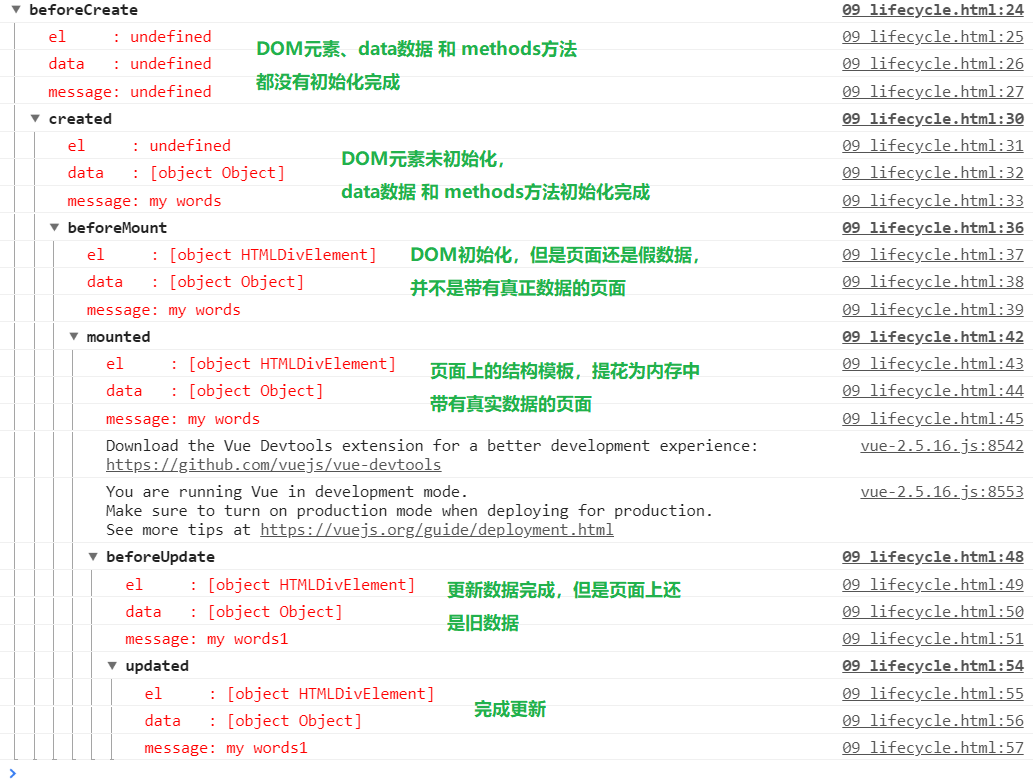
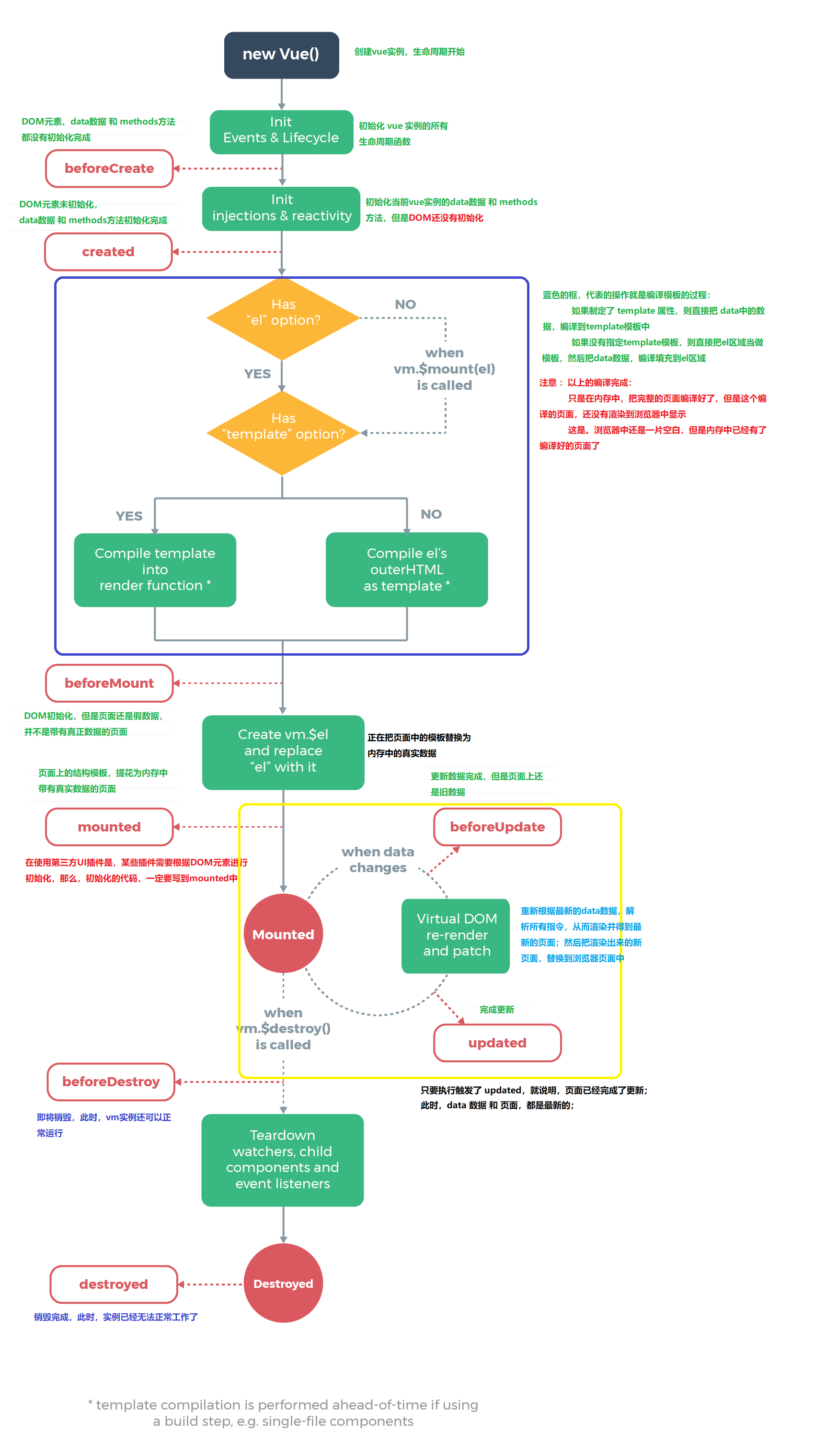
当new的时候,就创建了一个vue实例,这个实例就是vue框架的入口,也是VM层
<!DOCTYPE html>

<html lang="en">

<head>

  <meta charset="UTF-8">

  <meta name="viewport" content="width=device-width, initial-scale=1.0">

  <meta http-equiv="X-UA-Compatible" content="ie=edge">

  <title>Document</title>

  <script src="./vue-2.5.16.js"></script>

</head>

<body>

  <div id="app">

    <input type="text" v-model="message">

    <h2>{{message}}</h2>

  </div>

  <script>

    var vm = new Vue({

      el: "#app",

      data: {

        message: 'my words'

      },

      beforeCreate() {

        console.group("beforeCreate");

        console.log("%c%s", "color:red", "el     : " + this.$el);

        console.log("%c%s", "color:red", "data   : " + this.$data);

        console.log("%c%s", "color:red", "message: " + this.message)

      },

      created() {

        console.group("created");

        console.log("%c%s", "color:red", "el     : " + this.$el);

        console.log("%c%s", "color:red", "data   : " + this.$data);

        console.log("%c%s", "color:red", "message: " + this.message)

      },

      beforeMount() {

        console.group("beforeMount");

        console.log("%c%s", "color:red", "el     : " + this.$el);

        console.log("%c%s", "color:red", "data   : " + this.$data);

        console.log("%c%s", "color:red", "message: " + this.message)

      },

      mounted() {

        console.group("mounted");

        console.log("%c%s", "color:red", "el     : " + this.$el);

        console.log("%c%s", "color:red", "data   : " + this.$data);

        console.log("%c%s", "color:red", "message: " + this.message)

      },

      beforeUpdate() {

        console.group("beforeUpdate");

        console.log("%c%s", "color:red", "el     : " + this.$el);

        console.log("%c%s", "color:red", "data   : " + this.$data);

        console.log("%c%s", "color:red", "message: " + this.message)

      },

      updated() {

        console.group("updated");

        console.log("%c%s", "color:red", "el     : " + this.$el);

        console.log("%c%s", "color:red", "data   : " + this.$data);

        console.log("%c%s", "color:red", "message: " + this.message)

      },

      beforeDestroy() {

        console.group("beforeDestroy");

        console.log("%c%s", "color:red", "el     : " + this.$el);

        console.log("%c%s", "color:red", "data   : " + this.$data);

        console.log("%c%s", "color:red", "message: " + this.message)

      },

      destroyed() {

        console.group("destroyed");

        console.log("%c%s", "color:red", "el     : " + this.$el);

        console.log("%c%s", "color:red", "data   : " + this.$data);

        console.log("%c%s", "color:red", "message: " + this.message)

      },

    })

  </script>

</body>

</html>
Vue.js(4)- 生命周期的更多相关文章
- Vue js 的生命周期详解
Vue 实例的生命周期 Vue 实例有一个完整的生命周期,也就是从开始创建.初始化数据.编译模板.挂载Dom→渲染.更新→渲染.卸载等一系列 过程,我们称这是 Vue 的生命周期.通俗说就是 Vue ...
- vue.js之生命周期,防止闪烁,计算属性的使用,vue实例简单方法和循环重复数据
摘要:今天是比较糟糕的一天没怎么学习,原因是学校的wifi连不上了~~.今天学习一下vue的生命周期,如何防止闪烁(也就是用户看得到花括号),计算属性的使用,vue实例简单方法,以及当有重复数据时如何 ...
- Vue js 的生命周期(看了就懂)
转自: https://blog.csdn.net/qq_24073885/article/details/60143856 用Vue框架,熟悉它的生命周期可以让开发更好的进行. 首先先看看官网的图, ...
- Vue.js之生命周期
有时候,我们需要在实例创建过程中进行一些初始化的工作,以帮助我们完成项目中更复杂更丰富的需求开发,针对这样的需求,Vue提供给我们一系列的钩子函数. vue生命周期 beforeCreate 在实例初 ...
- vue.js的生命周期 及其created和mounted的部分
网上很多人有所总结,转载自: https://segmentfault.com/a/1190000008570622 关于created和mounted的部分,也可以参考: https://blo ...
- Vue.js——5.生命周期
Vue的生命周期 创建阶段new Vue1,beforeCreate() 表示在实例没有被创建出来之前会执行它加载data和methods2,caeated() data 和methods被初始化了 ...
- 从零开始学 Web 之 Vue.js(三)Vue实例的生命周期
大家好,这里是「 从零开始学 Web 系列教程 」,并在下列地址同步更新...... github:https://github.com/Daotin/Web 微信公众号:Web前端之巅 博客园:ht ...
- Vue01 Vue介绍、Vue使用、Vue实例的创建、数据绑定、Vue实例的生命周期、差值与表达式、指令与事件、语法糖
1 Vue介绍 1.1 官方介绍 vue是一个简单小巧的渐进式的技术栈,它提供了Web开发中常用的高级功能:视图和数据的解耦.组件的服用.路由.状态管理.虚拟DOM 说明:简单小巧 -> 压缩后 ...
- Vue.js-07:第七章 - Vue 实例的生命周期
一.前言 在之前的 Vue 学习中,我们在使用 Vue 时,都会创建一个 Vue 的实例,而每个 Vue 实例在被创建时都要经过一系列的初始化过程.例如,需要设置数据监听.编译模板.将实例挂载到 D ...
- vue 项目实战 (生命周期钩子)
开篇先来一张图 下图是官方展示的生命周期图 Vue实例的生命周期钩子函数(8个) 1. beforeCreate 刚 new了一个组件,无法访问到数据和真实的do ...
随机推荐
- SpringBoot学习(学习过程记录)
关于微服务和SOA 这,仅是我学习过程中记录的笔记.确定了一个待研究的主题,对这个主题进行全方面的剖析.笔记是用来方便我回顾与学习的,欢迎大家与我进行交流沟通,共同成长.不止是技术. 官网教程学习ht ...
- VS2019 添加控制器 主机运行转换时出现问题
问题: 解决方案: 更换低版本VS,亲测VS2017可行(其它未实测) VS2019目前没找到解决方案,VS版本问题 原文链接
- 腾讯X5内核使用详解(X5内核播放器使用如何去除控制栏全屏播放)以及一些注意事项
例子下载地址 https://www.lanzous.com/i2zsv5g GIT就不用了麻烦的不行 本人安卓刚学 就上X5内核弄了老长时间由于对maven 和idea不熟悉刚开始导包都是 ...
- G. Repeat it
G. Repeat it time limit per test 2.0 s memory limit per test 64 MB input standard input output stand ...
- 安装phpmyadmin数据可视化
1.下载压缩包,并且解压 cd /usr/local/src wget https://files.phpmyadmin.net/phpMyAdmin/4.9.4/phpMyAdmin-4.9.4-a ...
- RadioGroup的使用
前言: 使用RadioGroup就可以在选择情况多的时候,简化代码 RadioGroup 使用互斥选择时,会使用RadioGroup标签下面RadioButton,如下面的代码:(这样写下来,男和女的 ...
- mfc WebBrowser打开本地网页
本地路径要用file协议,例子:file:///c:/abc/def.html注意点:file:后面是3个正斜杠,路径中用正斜杠(不是标准的反斜杠).如果你觉得IE地址栏支持标准的路径写法,那么你就错 ...
- Hash!
Panda一个字符串是否是另一个字符串的子串 #include<bits/stdc++.h> using namespace std; const int mod=998244353,tt ...
- .nerCore-RabbitMQDemo消息队列
1.定义:MQ全称为Message Queue, 消息队列(MQ)是一种应用程序对应用程序的通信方法.应用程序通过读写出入队列的消息(针对应用程序的数据)来通信,而无需专用连接来链接它们.MQ是消费- ...
- TensorFlow2 Part1:基础
TensorFlow™是一个基于数据流编程(dataflow programming)的符号数学系统,被广泛应用于各类机器学习(machine learning)算法的编程实现,其前身是谷歌的神经网络 ...