
第一次作业:使用java实现word count
github项目地址:
https://github.com/changrui520/homework
作业要求:
可执行程序命名为:wc.exe。
该程序处理用户需求的模式为:wc.exe [parameter] [input_file_name]
存储统计结果的文件默认为result.txt,放在与wc.exe相同的目录下。
需求分析:
输入:wc.exe -c file.c
读取file.c,统计字符数,输出字符数并写入到result.txt中。
输入:wc.exe -w file.c
读取file.c,统计单词数,输出单词数并写入到result.txt中。
输入:wc.exe -l file.c
读取file.c,统计行数,输出行数并写入到result.txt中。
输入:wc.exe -a file.c
读取file.c,统计空行、注释行,输出行数并写入到result.txt中
PSP表格:
| PSP2.1 | PSP阶段 | 预估耗时(分钟) | 实际耗时(分钟) |
| · Planning | · 计划 | 15 | 10 |
| · Estimate | · 估计这个任务需要多少时间 | 30 | 20 |
| · Development | · 开发 | 60 | 40 |
| · Analysis | · 需求分析 (包括学习新技术) | 5 | 5 |
| · Design Spec | · 生成设计文档 | 5 | 5 |
| · Design Review | · 设计复审 (和同事审核设计文档) | 10 | 5 |
| · Coding | · 代码规范 (为目前的开发制定合适的规范) | 10 | 5 |
| · Code Review | · 具体设计 | 15 | 20 |
| · Test | · 具体编码 | 60 | 40 |
| · Reporting | · 代码复审 | 10 | 5 |
| · Test Report | · 报告 | 10 | 5 |
| · Size Measurement | · 测试报告 | 30 | 20 |
| · Postmortem & Process | · 计算工作量 | 15 | 10 |
| · Improvement Plan | · 事后总结, 并提出过程改进计划 | 10 | 5 |
| · 合计 | 270 | 250 |
思路:
使用IO流中的字符流实现。
Main类:读取用户录入的内容,根据内容调用utils类中的相应方法。
Utils类:负责具体处理。charNum方法:统计字符数,wordNum方法:统计单词数,lineNum方法:统计行数,markLineNum方法:统计空行、注释行。
开发环境及工具:
win10+idea+jdk9.0.1+git+mavem
关键代码:
Main:
public class Main {

    public static void main(String[] args) {

        BufferedReader br = new BufferedReader(new InputStreamReader(System.in));

        String currentCommand = null;

        String[] commands = null;

        while (true) {

            try {

                //判断命令是否为空

                if ((currentCommand = br.readLine()) != null) {

                    commands = currentCommand.split(" ");

                    //判断是否为3个词

                    if (commands.length == 3) {

                        //判断第一个词是否为wc.exe

                        if ("wc.exe".equals(commands[0])) {

                            //判断第三个词是否以.c结尾

                            if (!commands[2].endsWith(".c")) {

                                System.out.println("必须以.c结尾");

                                continue;

                            }

                            //判断第二个词

                            switch (commands[1]) {

                                case "-c":

                                    System.out.println(charNum(commands[2]));

                                    break;

                                case "-w":

                                    System.out.println(wordNum(commands[2]));

                                    break;

                                case "-l":

                                    System.out.println(lineNum(commands[2]));

                                    break;

                                case "-a":

                                    System.out.println(markLineNum(commands[2]));

                                    break;

                                default:

                                    System.out.println("错误,请重新输入");

                                    break;

                            }

                        } else {

                            System.out.println("错误,请重新输入");

                            continue;

                        }

                    } else {

                        System.out.println("错误,请重新输入");

                        continue;

                    }

                }

            } catch (FileNotFoundException e) {

                System.out.println("文件不存在");

            } catch (IOException e) {

                System.out.println("读取文件失败");

            }

        }

    }

}
Utils:
public class Utils {

    public static int charNum(String fileName) throws IOException {

        Integer num = 0;

        BufferedReader br = new BufferedReader(new FileReader(fileName));

        BufferedWriter bw=new BufferedWriter(new FileWriter("result.txt"));

        int c;

        //统计字符数

        while((c=br.read())!=-1){

            if((char)c!='\r'&&(char)c!='\n'){

                num++;

            }

        }

        //写出结果

        bw.write(fileName+","+"字符数"+":");

        bw.write(num.toString());

        //关流

        br.close();

        bw.close();

        return num;

    }

    public static int wordNum(String fileName)throws IOException{

        Integer num=0;

        BufferedReader br = new BufferedReader(new FileReader(fileName));

        BufferedWriter bw=new BufferedWriter(new FileWriter("result.txt"));

        String currentLine=null;

        //储存分割后的数组

        String[] words=null;

        while((currentLine=br.readLine())!=null){

            currentLine=currentLine.replaceAll("[^_a-zA-Z]"," ");

            words=currentLine.split(" ");

            for(String word:words){

                //去掉空格,和空字符

                if(!word.equals(" ")&&!word.equals("")){

                    num++;

                }

            }

        }

        bw.write(fileName+","+"单词数"+":");

        bw.write(num.toString());

        br.close();

        bw.close();

        return num;

    }

    public static int lineNum(String fileName)throws IOException{

        Integer num=0;

        BufferedReader br = new BufferedReader(new FileReader(fileName));

        BufferedWriter bw=new BufferedWriter(new FileWriter("result.txt"));

        while((br.readLine())!=null){

            num++;

        }

        bw.write(fileName+","+"行数"+":");

        bw.write(num.toString());

        br.close();

        bw.close();

        return num;

    }

    @Test

    public static int markLineNum(String fileName) throws IOException {

        Integer num = 0;

        BufferedReader br = new BufferedReader(new FileReader(fileName));

        BufferedWriter bw = new BufferedWriter(new FileWriter("result.txt"));

        String line = null;

        while ((line = br.readLine()) != null) {

            line = line.replaceAll("\r\n", "");

            if (isMark(line)) {

                num++;

            }

        }

        bw.write(fileName + "," + "空行、代码行、注释行数量" + ":");

        bw.write(num.toString());

        br.close();

        bw.close();

        return num;

    }

        private static boolean isMark(String line) {

        //判断是否为空行

        if (line == null || line .equals("")) {

            return true;

        }

        //判断是否以”*/“开头

        if (line.endsWith("*/")) {

            return true;

        }

        //判断是否以”//“开头

        if (line.startsWith("//")) {

            return true;

        }

        //判断是否以”/*“结尾

        if (line.startsWith("/*")) {

            return true;

        }

        return false;

    }

}
测试设计过程:
共计11个测试用例:
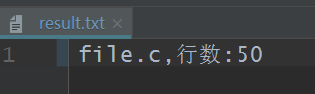
1.wc.exe -c file.c
结果:
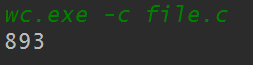
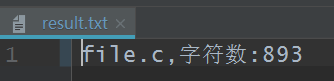
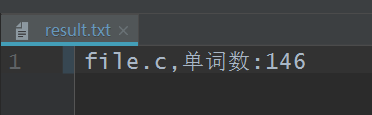
2.wc.exe -w file.c
结果:

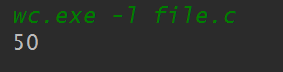
3.wc.exe -l file.c
结果:
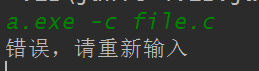
4.a.exe -c file.c
结果:
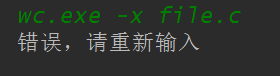
5.wc.exe -x file.c
结果:
6.wc.exe
结果:

7.wc.exe -c file.c file.c
结果:

8.wc.exe -c a.c
结果:

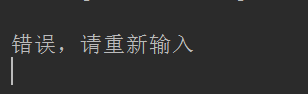
9.空命令
结果:
10..wc.exe -c file.java
结果:
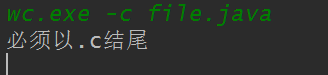
11.wc.exe -a file.c
结果:
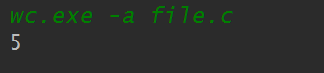
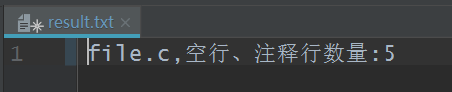
全部达到预期要求
作业心得:
通过这次wc作业的开发,我对软件工程这门专业有了更深入的了解和感悟,软件的开发不仅仅是简单地编写代码,还要注意设计的规范化,合理化,代码的安全性,程序的健壮性。软件上线之前必须经过单元测试。想要让用户觉得自己的程序好用,必须要考虑周到。
第一次作业:使用java实现word count的更多相关文章
- Java --本地提交MapReduce作业至集群☞实现 Word Count
还是那句话,看别人写的的总是觉得心累,代码一贴,一打包,扔到Hadoop上跑一遍就完事了????写个测试样例程序(MapReduce中的Hello World)还要这么麻烦!!!?,还本地打Jar包, ...
- Word Count作业
Word Count作业 一.个人Gitee地址:https://gitee.com/Changyu-Guo 二.项目简介 该项目主要是模拟Linux上面的wc命令,基本要求如下: 命令格式: wc. ...
- java第一次作业0
lsl321 java第一次作业 #1. 本章学习总结 你对于本章知识的学习总结 本章我们学习了各种java相关文件的使用,以及码云,博客,pat等程序辅助软件,这些对于我们专业的学习有非常大的帮助, ...
- Java第一次作业——Java语言基础
<Java技术>第一次作业 学习总结 1.Scanner类实现基本数据输入方法 Scanner input=new Scanner(System.in); int num = input. ...
- 个人项目作业-Word Count
个人项目作业 1.Github地址 https://github.com/CLSgGhost/SE_work 2.项目相关需求 wc.exe 是一个常见的工具,它能统计文本文件的字符数.单词数和行数. ...
- Spark: 单词计数(Word Count)的MapReduce实现(Java/Python)
1 导引 我们在博客<Hadoop: 单词计数(Word Count)的MapReduce实现 >中学习了如何用Hadoop-MapReduce实现单词计数,现在我们来看如何用Spark来 ...
- 【2016.3.22】作业 Word count 小程序
今天更下word count程序的设计思路及实现方法. 我的程序贴在coding里,这里就先不贴出来了, 我的coding地址:https://coding.net/u/holy_angel/p/wo ...
- Mac下hadoop运行word count的坑
Mac下hadoop运行word count的坑 Word count体现了Map Reduce的经典思想,是分布式计算中中的hello world.然而博主很幸运地遇到了Mac下特有的问题Mkdir ...
- 第一次作业——WorkCount
项目地址:https://gitee.com/yangfj/wordcount_project 1.软件需求分析: 撰写PSP表格: PSP2.1 PSP阶段 预估耗时 (分钟) 实际耗时 (分钟) ...
随机推荐
- c语言中%s和%d的区别
/************************************************************************* > File Name: ptr_both. ...
- Linux下idea由于缺少相关权限导致的tomcat ERROR
昨天一天都在倒腾两个系统,也是醉了. 不过还好,系统修好了,在ubuntu下重新安装idea后,出现了这个错误: Intellij Idea Tmocat Error running Tomcat: ...
- setAttribute 添加属性js_jq
属性js setAttribute document.getElementsByName("test")[0].setAttribute("src", &quo ...
- Express+MySQL实现图片上传到服务器并把路径保存到数据库中
demo准备:mysql5.7.20 express4.0 处理图片文件的中间件Multer 先搭建服务器并展示html页面 const express = require("express ...
- CentOS6.x/6.5/6.4/6.3/6.2/7.x 64位安装php5.2(使用YUM自动安装)
默认情况下,CentOS6 64 bit 已经早已不支持php5.2.x ,但是某些php程序还需要zend optimizer支持,怎么办呢?目前大部分的yum repos 都已经不支持直接安装ph ...
- (转)防火墙上的object-group命令实际应用。 (2010-11-11 10:03:53)
RLooo的博客:http://blog.sina.com.cn/s/blog_59879e3a0100o5w1.html 使用object-group 能大大简化配置工作量,很实用. 防火墙上的配置 ...
- Maven高级:01.maven分模块构建&&02.私服的应用
IntelliJ IDEA 2018.3.6 x64 07 Maven高级:01.maven分模块构建(上) 07 Maven高级:01.maven分模块构建(中) 07 Maven高级:01.mav ...
- EL表达式获取属性值的原理
EL表达式获取对象属性的原理是这样的:以表达式${user.name}为例EL表达式会根据name去User类里寻找这个name的get方法,此时会自动把name首字母大写并加上get前缀,一旦找到与 ...
- dlib安装踩过的坑
使用到dlib时遇到了下载错误,不能正常安装 以下是成功安装的记录: 首先打开Anaconda prompt选定一个python环境,安装cmake和boost pip install cmake - ...
- mongo客户端升级导致pymongo中使用聚合函数时出现异常
一.异常信息 The 'cursor' option is required, except for aggregate with the explain argument 二.解决办法 #部分源代码 ...