
IIS日志如何记录X-Forwarded-For
起因
最近因为某个站点的流量异常,需要统计一下服务器的来源IP,本来开一下IIS日志就能搞定的事儿,但不幸的是生产服务器使用F5做了负载均衡,IIS日志无法记录到真实IP,真实的IP在“x-forwarded-for”中,baidu了一堆,没几个靠谱的,还好有个bing能用,很快找到了下这篇文章,文章写的条理清晰,浅显易懂,立马转了过来,省的什么时候又给墙了,大家看原文吧,我懒得翻译了。
原文:http://www.loadbalancer.org/blog/iis-and-x-forwarded-for-header/
What's the issue?
When you load balance your website at layer 7, it will become non-transparent. This means that the actual client source IP address is replaced by the load balancer's own IP address - and only this address will be recorded in the IIS logs.
One way around this is to insert XFF headers on the load balancer to track the actual client source IP address. IIS can then be reconfigured to make this data available in the logs.
NB. The other options to gain source IP transparency are to configure the load balancer in layer 4 NAT mode, layer 4 DSR mode or Layer 7 with TPROXY enabled.
The solution - how to modify logging behaviour
The steps required depend on your version of IIS.
IIS 8.5 & later
A custom logging field can be added to record XFF headers.
To enable this feature:
- Start IIS Manager, then on the Connections pane on the left, click the appropriate website where you want to enable XFF logging. The Home page is then displayed in the main panel.
- From the Home page, double-click Logging.

- From the Log File section, click Select Fields.

- From the bottom left corner, click Add Field.
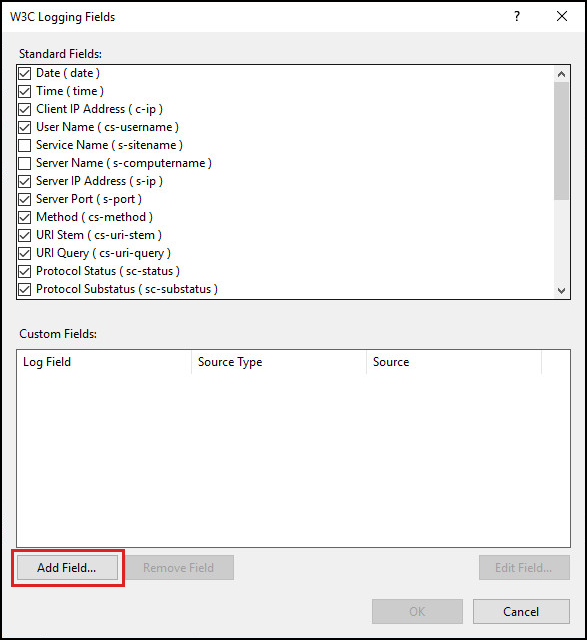
- In the Add Custom Field window, complete the following:

- in Field Name, type X-Forwarded-For
- in Source, type X-Forwarded-For
- leave Source Type set to ‘Request Header’
- click OK on the Add Custom Field window
- click OK on the W3C Logging Fields window
- From the Actions pane on the right, click Apply to implement the change.
- The log files are located by default in the directory %SystemDrive%\inetpub\logs\LogFiles. IIS creates new log files and appends “_x” to the log file names to indicate that they contain custom fields.
UIIS 7 & IIS 7.5
For IIS 7 & 7.5 the Advanced Logging add-on must be installed. This can be downloaded here. Once installed on the IIS server, you'll see an extra option called 'Advanced Logging' in IIS.
To configure and enable Advanced Logging:
- Start IIS Manager, then on the Connections pane on the left, click the server, website or directory where you want to configure Advanced Logging. The related Home page is displayed in the main panel.
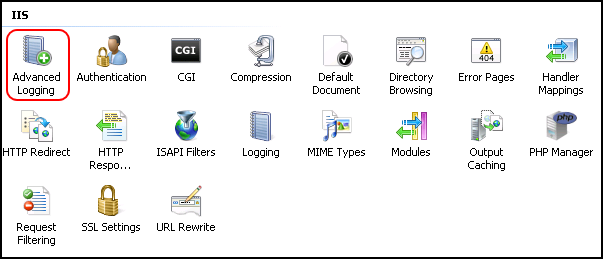
- From the Home page, under IIS, double-click Advanced Logging.
- From the Actions pane on the right, click Enable Advanced Logging.

- From the Actions pane on the right, click Edit Logging Fields.
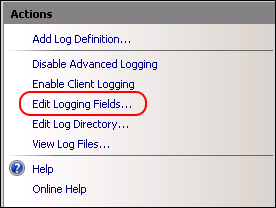
- On the Edit Logging Fields window click Add Field, and then complete the following:
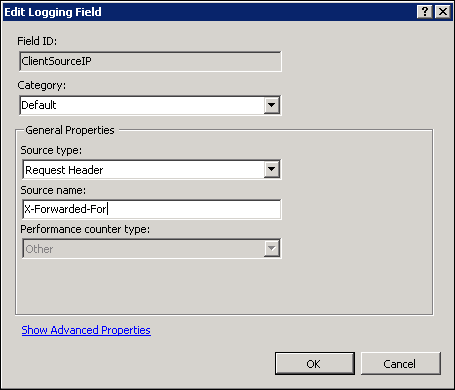
- in Field ID, type ClientSourceIP
- in Category, type Default
- in Source type, select Request Header
- in Source name, type X-Forwarded-For
- click OK on the Add Logging Field form
- click OK on the Edit Logging Fields form
- From the Actions pane on the right, click Add Log Definition.
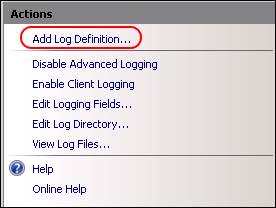
- Enter Client Source IP in the Base file name field.

- Click Select Fields.
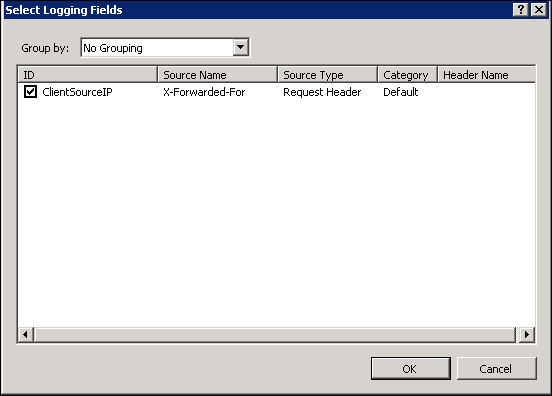
- Check (enable) the ClientSourceIP field created earlier
- Click OK on the Select Logging Fields form, then click Apply in the actions pane.
- Click Return To Advanced Logging in the actions pane.
- Run iisreset /restart to apply the new settings.
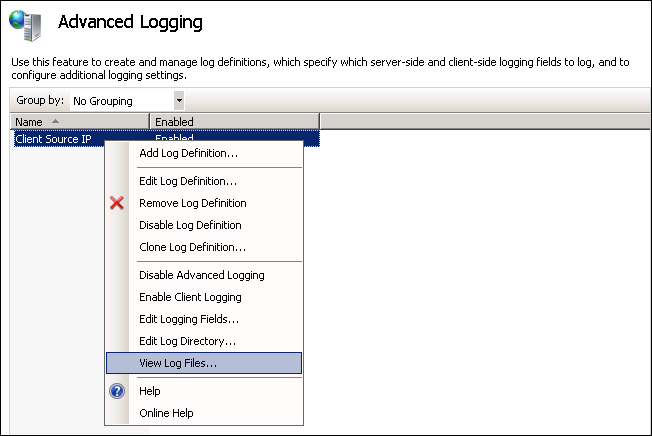
- The advanced log must be viewed rather than the default log. The advanced log is located in %SystemDrive%inetpublogsAdvancedLogs. To view the logs, right-click the Client Source IP log definition and click View Log Files.
IIS 6
Unfortunately, the Microsoft solution mentioned above is not available for IIS 6. Luckily there are a number of other solutions - some costing money and others that have been released as open source. One excellent example that we've tested with our products is F5's X-Forwarded-For ISAPI filter. It's available in both in 32- and 64-bit versions.
- Download the zipped archive from here and extract to an appropriate folder.
- Navigate to the relevant version (32- or 64-bit).
- Copy F5XForwardedFor.dll to a suitable location on your server, e.g. C:ISAPIfilters.
- Make sure you have ISAPI Filters enabled on your IIS server.
- Open IIS Manager, right-click the site and select Properties.
- Select the ISAPI Filters tab.
- Click add, then in the popup enter a suitable name and select the DLL file stored in step 3.
- Restart your website.
后记
关于IIS日志分析,这里再推荐个工具HttpLogBrowser(传送门),基本上大部分的统计需求都可以满足,实在是居家旅行之必备。
补充
其实还有个方法,可以直接在IIS日志里输出,就是使用F5XForwardedFor,注册完成后重启IIS,就会在日志里直接输出(传送门),我试了也是可行的,但不知道是不是官方方案,生产没敢搞。
IIS日志如何记录X-Forwarded-For的更多相关文章
- IIS日志-网站运维的好帮手
对于一个需要长期维护的网站来说,如何让网站长久稳定运行是件很有意义的事情. 有些在开发阶段没有暴露的问题很有可能就在运维阶段出现了,这也是很正常的. 还有些时候,我们希望不断地优化网站,让网站更快速的 ...
- 网站运维工具使用iis日志分析工具分析iis日志(iis日志的配置)
我们只能通过各种系统日志来分析网站的运行状况,对于部署在IIS上的网站来说,IIS日志提供了最有价值的信息,我们可以通过它来分析网站的响应情况,来判断网站是否有性能问题,或者存在哪些需要改进的地方 对 ...
- 【转】IIS日志-网站运维的好帮手
对于一个需要长期维护的网站来说,如何让网站长久稳定运行是件很有意义的事情. 有些在开发阶段没有暴露的问题很有可能就在运维阶段出现了,这也是很正常的. 还有些时候,我们希望不断地优化网站,让网站更快速的 ...
- X-Forwarded-For (IIS日志记录用户真实IP)
参考:http://www.jbxue.com/article/7521.html 当IIS放在反向代理后面时,日志中的客户端ip是反向代理服务器的ip,不是用户的真实IP地址. 本文为大家介绍使用X ...
- [转]IIS 日志记录时间和实际时间 不一样
今天偶然发现 2003 系统IIS 日志记录时间和实际时间总是差了8个小时,也就是慢了8个小时.苦苦找了半天才发现如下办法能解决 ,特发来分享下 解决1:如果 IIS日志记录默认使用的是W3C扩展日志 ...
- Apache/Nginx/IIS日志记录的各个字段内容与含义
一.Apache 1.1 Apache日志文件名称及路径介绍 当我们安装并启动Apache后,Apache会自动生成两个日志文件,这两个日志文件分别是访问日志access_log(在Windows上是 ...
- iis日志查看
IIS日志是每个服务器管理者都必须学会查看的,服务器的一些状况和访问IP的来源都会记录在IIS日志中,所以IIS日志对每个服务器管理者非常的重要,seoer也不例外,这点同时也可方便网站管理人员查看网 ...
- 云计算之路-阿里云上:结合IIS日志分析“黑色30秒”问题
在昨天针对“黑色30秒”问题的分析中,我们猜测Requests Queued上升是由于正在处理的请求出不去(到达不了客户端).今天我们结合IIS日志验证这个猜测. IIS日志中有一个重要的指标——ti ...
- 【一步一图】:详解IIS日志配置
打开网站配置:右键点击属性 弹出设置界面 如上图,日志可选4种格式: [Microsoft IIS 日志文件格式] 存放地址如上图 以in开头 年份后两位+月份+日 命名: 示例: //, ...
随机推荐
- php面试专题---6、正则表达式考点
php面试专题---6.正则表达式考点 一.总结 一句话总结: 正则匹配步骤:1.先写出一个要匹配的字符串:2.自左向右的顺序使用正则表达式的原子和元字符进行拼接:3.最终加入模式修正符: 1.写出一 ...
- vux使用方法
# 使用vux及vuex-i18n需要做的工作 ### 1.首先需要安装vux ### 2.需要安装vux-loader ### 3.需要安装vuex ### 4.需要安装vuex-i18n ### ...
- delphi xe2 opencv 学习
安装环境 delphi xe2 + opencv opencv 从下面的地方下载 https://github.com/Laex/Delphi-OpenCV然后按照 此网站的 说明 一项以项的 安装 ...
- webapi返回json格式优化 转载https://www.cnblogs.com/GarsonZhang/p/5322747.html
一.设置webapi返回json格式 在App_Start下的WebApiConfig的注册函数Register中添加下面这代码 1 config.Formatters.Remove(config.F ...
- 【C#学习笔记】 IDisposable 接口
在.net 编程环境中,系统的资源分为托管资源和非托管资源. 对于托管的资源的回收工作,是不需要人工干预回收的,而且你也无法干预他们的回收,所能够做的只是了解.net CLR如何做这些操作.也就是说对 ...
- 嵌入式C语言3.2 关键字---自定义数据类型
1. struct 结构体 基本语法 struct myabc{ unsigned int a; unsigned int b; unsigned int c; unsigned int d; } 调 ...
- ATT&CK实战系列 红队实战(一)————环境搭建
首先感谢红日安全团队分享的靶机实战环境.红队实战系列,主要以真实企业环境为实例搭建一系列靶场,通过练习.视频教程.博客三位一体学习. 靶机下载地址:http://vulnstack.qiyuanxue ...
- Cocos2d-x之Map<K, V>
| 版权声明:本文为博主原创文章,未经博主允许不得转载. Map<K, V>是Cocos2d-x 3.0x中推出的字典容器,它也能容纳Ref类型.Map<K,V>是模仿C+ ...
- Linux Kernel中所應用的數據結構及演算法
Linux Kernel中所應用的數據結構及演算法 Basic Data Structures and Algorithms in the Linux kernel Links are to the ...
- 定时任务crond介绍
定时任务cornd crond介绍: crond是linux系统中用来定期(或周期性)执行命令或指定程序任务脚本的一种程序. 查看crontab帮助: [root@db01 ~]# crontab - ...