
06.LoT.UI 前后台通用框架分解系列之——浮夸的图片上传
LOT.UI分解系列汇总:http://www.cnblogs.com/dunitian/p/4822808.html#lotui
LoT.UI开源地址如下:https://github.com/dunitian/LoTCodeBase/tree/master/LoTUI
先看在LoT.UI里面的应用效果图:
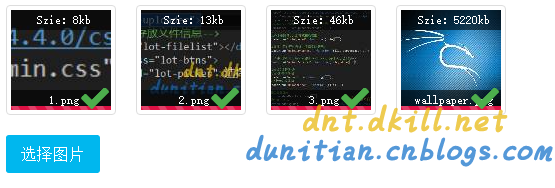
懒人福利:http://www.cnblogs.com/dunitian/p/5535455.html(一句代码直接实现)
关键代码解析:(https://github.com/dunitian/LoTCodeBase/tree/master/NetCode/3.常用技能/02.uploader系列/01.Webuploader)

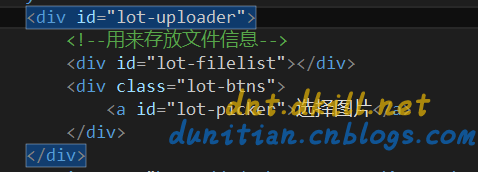
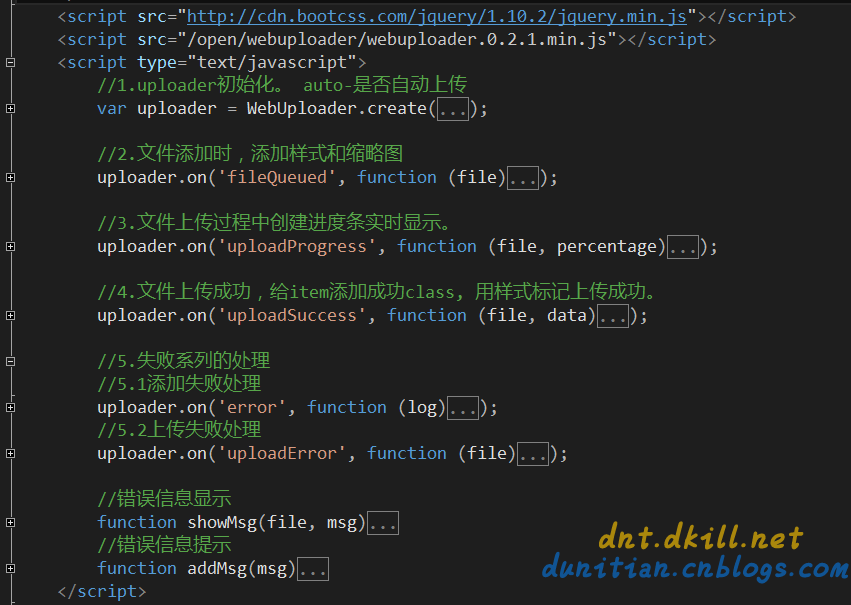
JS部分:
<script type="text/javascript">

        //1.uploader初始化。 auto-是否自动上传

        var uploader = WebUploader.create({

            server: '/Home/Upload',

            swf: '/open/webuploader/Uploader.swf',

            pick: '#lot-picker',

            auto: true,                     //自动上传

            //chunked: true,                //断点续传-单个默认5M

            duplicate: false,               //文件去重

            prepareNextFile: true,          //提前准备下一个文件(可选,单文件不建议开)

            //formData: { },                //自定义参数表,每次请求都会发送这些参数

            paste: document.body,           //启动剪贴板(可选)

            dnd: $('#lot-uploader'),        //启动拖拽(可选)

            fileNumLimit: 5,                //文件总数量

            fileSingleSizeLimit: 10485760,  //单个文件最大值(IIS默认<=4M,可自行设置:httpRuntime的maxRequestLength)

            accept: {

                title: 'Images',

                extensions: 'gif,jpg,jpeg,bmp,png',

                mimeTypes: 'image/*'

            }

        });

        //2.文件添加时,添加样式和缩略图

        uploader.on('fileQueued', function (file) {

            var $li = $(

                    '<div id="' + file.id + '" class="file-item thumbnail">' +

                        '<img>' +

                        '<div class="info info-top">Szie:' + Math.floor(file.size / 1024) + 'kb' + '</div>' +

                        '<div class="info info-bot">' + file.name + '</div>' +

                    '</div>'

                    ),

                $img = $li.find('img');

            $('#lot-filelist').append($li);

            // 创建缩略图

            uploader.makeThumb(file, function (error, src) {

                if (error) {

                    $img.replaceWith('<span>不能预览</span>');

                    return;

                }

                $img.attr('src', src);

            }, 100, 100);

            ////计算文件MD5(可加)

            //uploader.md5File(file).then(function (val) {

            //    console.log('md5:',val,'-',file.name);

            //});

        });

        //3.文件上传过程中创建进度条实时显示。

        uploader.on('uploadProgress', function (file, percentage) {

            var $li = $('#' + file.id),

                $percent = $li.find('.progress span');

            //避免重复创建

            if (!$percent.length) {

                $percent = $('<p class="progress"><span></span></p>').appendTo($li).find('span');

            }

            $percent.css('width', percentage * 100 + '%');

        });

        //4.文件上传成功,给item添加成功class, 用样式标记上传成功。

        uploader.on('uploadSuccess', function (file, data) {

            if (data.status) {

                $('#' + file.id).addClass('upload-state-done');

            } else {

                showMsg(file, data.msg);

            }

        });

        //5.失败系列的处理

        //5.1添加失败处理

        uploader.on('error', function (log) {

            switch (log) {

                case 'F_EXCEED_SIZE':

                    addMsg('文件10M以内'); break;

                case 'Q_EXCEED_NUM_LIMIT':

                    addMsg('已超最大上传数'); break;

                case 'Q_TYPE_DENIED':

                    addMsg('文件类型不正确'); break;

                case 'F_DUPLICATE':

                    addMsg('文件已经被添加'); break;

                default:

                    addMsg('文件添加失败~'); break;

            }

        });

        //5.2上传失败处理

        uploader.on('uploadError', function (file) {

            showMsg(file, '上传失败');

        });

        //错误信息显示

        function showMsg(file, msg) {

            var $li = $('#' + file.id), $error = $li.find('div.error');

            //避免重复创建

            if (!$error.length) {

                $error = $('<div class="error"></div>').appendTo($li);

            }

            $error.text(msg);

        }

        //错误信息提示

        function addMsg(msg) {

            $('#lot-uploader').prepend('<h3 class="temp-log" style="color:red;">' + msg + '</h3>')

            setTimeout(function () {

                $('.temp-log').remove();

            }, 2000);

        }

    </script>
后端代码:
/// <summary>

        /// 图片上传

        /// </summary>

        /// <returns></returns>

        public JsonResult Upload(HttpPostedFileBase file)

        {

            if (file == null) { return Json(new { status = false, msg = "图片提交失败" }); }

            if (file.ContentLength > 10485760) { return Json(new { status = false, msg = "文件10M以内" }); }

            string filterStr = ".gif,.jpg,.jpeg,.bmp,.png";

            string fileExt = Path.GetExtension(file.FileName).ToLower();

            if (!filterStr.Contains(fileExt)) { return Json(new { status = false, msg = "图片格式不对" }); }

            //防止黑客恶意绕过,从根本上判断下文件后缀

            if (!file.InputStream.CheckingExt())

            {

                //todo:一次危险记录

                return Json(new { status = false, msg = "图片格式不对" });

            }

            //todo: md5判断一下文件是否已经上传过,如果已经上传直接返回 return Json(new { status = true, msg = sqlPath });

            string path = string.Format("{0}/{1}", "/lotFiles", DateTime.Now.ToString("yyyy-MM-dd"));

            string fileName = string.Format("{0}{1}", Guid.NewGuid().ToString("N"), fileExt);

            string sqlPath = string.Format("{0}/{1}", path, fileName);

            string dirPath = Request.MapPath(path);

            if (!Directory.Exists(dirPath)) { Directory.CreateDirectory(dirPath); }

            try

            {

                //todo:缩略图

                file.SaveAs(Path.Combine(dirPath, fileName));

                //todo: 未来写存数据库的Code

            }

            catch { return Json(new { status = false, msg = "图片保存失败" }); }

            return Json(new { status = true, msg = sqlPath });

        }
开源组件:https://github.com/fex-team/webuploader
扩展组件:https://github.com/dunitian/LoTUploader
06.LoT.UI 前后台通用框架分解系列之——浮夸的图片上传的更多相关文章
- 07.LoT.UI 前后台通用框架分解系列之——强大的文本编辑器
LOT.UI分解系列汇总:http://www.cnblogs.com/dunitian/p/4822808.html#lotui LoT.UI开源地址如下:https://github.com/du ...
- 07.LoT.UI 前后台通用框架分解系列之——轻巧的文本编辑器
LoT.UI汇总:http://www.cnblogs.com/dunitian/p/4822808.html#lotui 上次说的是强大的百度编辑器 http://www.cnblogs.com/d ...
- 08.LoT.UI 前后台通用框架分解系列之——多样的Tag选择器
LOT.UI分解系列汇总:http://www.cnblogs.com/dunitian/p/4822808.html#lotui LoT.UI开源地址如下:https://github.com/du ...
- 01.LoT.UI 前后台通用框架分解系列之——小图片背景全屏显示(可自动切换背景)
LOT.UI分解系列汇总:http://www.cnblogs.com/dunitian/p/4822808.html#lotui LoT.UI开源地址如下:https://github.com/du ...
- 02.LoT.UI 前后台通用框架分解系列之——灵活的菜单栏
LOT.UI分解系列汇总:http://www.cnblogs.com/dunitian/p/4822808.html#lotui LoT.UI开源地址如下:https://github.com/du ...
- 03.LoT.UI 前后台通用框架分解系列之——多样的表格
LOT.UI分解系列汇总:http://www.cnblogs.com/dunitian/p/4822808.html#lotui LoT.UI开源地址如下:https://github.com/du ...
- 04.LoT.UI 前后台通用框架分解系列之——轻巧的弹出框
LOT.UI分解系列汇总:http://www.cnblogs.com/dunitian/p/4822808.html#lotui LoT.UI开源地址如下:https://github.com/du ...
- 05.LoT.UI 前后台通用框架分解系列之——漂亮的时间选择器
LOT.UI分解系列汇总:http://www.cnblogs.com/dunitian/p/4822808.html#lotui LoT.UI开源地址如下:https://github.com/du ...
- 网络请求框架----HttpClient的get,post和图片上传服务器
HttpClient是Apache Jakarta Common下的子项目,用来提供高效的.最新的.功能丰富的支持HTTP协议的客户端编程工具包,并且它支持HTTP协议最新的版本和建议.HttpCli ...
随机推荐
- HTML文档头部
前面的话 在声明文档类型之后,HTML文档的下一部分为<html>标签,告知浏览器应将括在<html>...</html>内的所有内容解析为HTML.然后是HT ...
- ASP.NET MVC开发:Web项目开发必备知识点
最近加班加点完成一个Web项目,使用Asp.net MVC开发.很久以前接触的Asp.net开发还是Aspx形式,什么Razor引擎,什么MVC还是这次开发才明白,可以算是新手. 对新手而言,那进行A ...
- Java多态性——分派
一.基本概念 Java是一门面向对象的程序设计语言,因为Java具备面向对象的三个基本特征:封装.继承和多态.这三个特征并不是各自独立的,从一定角度上看,封装和继承几乎都是为多态而准备的.多态性主要体 ...
- JS魔法堂:不完全国际化&本地化手册 之 理論篇
前言 最近加入到新项目组负责前端技术预研和选型,其中涉及到一个熟悉又陌生的需求--国际化&本地化.熟悉的是之前的项目也玩过,陌生的是之前的实现仅仅停留在"有"的阶段而已. ...
- Maven多模块,Dubbo分布式服务框架,SpringMVC,前后端分离项目,基础搭建,搭建过程出现的问题
现互联网公司后端架构常用到Spring+SpringMVC+MyBatis,通过Maven来构建.通过学习,我已经掌握了基本的搭建过程,写下基础文章为而后的深入学习奠定基础. 首先说一下这篇文章的主要 ...
- MySQL加密
MySQL字段加密和解密 1.加密:aes_encrypt('admin','key') 解密:aes_decrypt(password,'key') 2.双向加密 通过密钥去加密,解密的时候的只有知 ...
- TCP三次握手图解
- UGUI Text(Label)
环境 Unity 5.3.6f1 关于Best Fit 如果勾选了 Best Fit ,当有大量的文本填充在Text上时,那么文字是不会自动换行的. 打字机效果 在github上已有现成的:https ...
- springMVC初始化绑定器
单日期 在处理器类中配置绑定方法 使用@InitBinder注解 在这里首先注册一个用户编辑器 参数一为目标类型 propertyEditor为属性编辑器,此处我们选用 CustomDateEd ...
- 我将系统从Windows迁移至Linux下的点点滴滴
一.写在最前 由于本人的技术水平有限,难免会出现错误.本文对任何一个人有帮助都是我莫大的荣幸,任何一个大神对我的点拨,我都会感激不尽. 二.技术选型 在2013年8月低的时候,公司中了XXX市场监督局 ...