
Spring-注入外部值
Spring注入需要初始化,但前面均使用硬编码注入,如:
JavaConfig配置:
 package soundSystem;

 import org.springframework.stereotype.Component;

 /**

  * CompactDisc接口的实现类,此类中定义了CD的名字和作者以及打印相关信息的方法

  * @author yan

  */

 @Component("compactd")//用于扫描来动态生成bean

 public class SgtPeppers implements CompactDisc{

     private String title="K歌之王";

     private String artist="陈奕迅";

     @Override

     public void cdInfo() {

         System.out.print("This CD's title:"+title+";artist:"+artist);

     }

 }
xml配置(需要实现setter方法):
     <bean id="cd" class="soundSystem.SgtPeppers">

         <property name="title" value="L.O.V.E"></property>

         <property name="artist" value="May Day"></property>

     </bean>
Spring允许注入外部值,这样不用受到硬编码的限制:
--JavaConfig(显式bean)
主要是在配置类中实现:
1.在配置类类名上方添加注解@PropertySource("classpath:/sp.properties"),参数为文件全路径名,properties文件是专门用来存放k-v值对的;
2.在配置类中定义Environment env,并添加@AutoWired注解;
3.在定义bean的方法中使用env.getProperty()方法配置文件(*.properties)中的值来赋给bean作为参数。
 package com.spring.config;

 import org.springframework.beans.factory.annotation.Autowired;

 import org.springframework.context.annotation.Bean;

 import org.springframework.context.annotation.ComponentScan;

 import org.springframework.context.annotation.Configuration;

 import org.springframework.context.annotation.PropertySource;

 import org.springframework.core.env.Environment;

 import com.spring.custom.Person;

 @Configuration("com.spring.custom")

 @ComponentScan(basePackages={"com.spring"})

 @PropertySource("classpath:/sp.properties")

 public class CreatureSpingConfig {

     @Autowired

     Environment env;

     @Bean

     public Person person(){

         return new Person(env.getProperty("name"), env.getProperty("age",Integer.class), env.getProperty("sex"));

     }

 }
这样就实现了从外部文件注入的目标了。
注:getProperty("key值")返回的是String类型,但并不是所有参数都是String类型,所以这个方法有几个重载形式
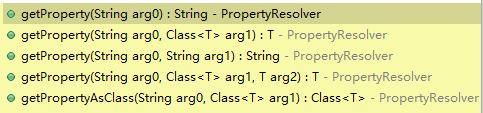
解释如下:
 public interface PropertyResolver {

     //是否包含某个属性

     boolean containsProperty(String key);

         //获取属性值 如果找不到返回null

     String getProperty(String key);

         //获取属性值,如果找不到返回默认值

     String getProperty(String key, String defaultValue);

         //获取指定类型的属性值,找不到返回null

     <T> T getProperty(String key, Class<T> targetType);

         //获取指定类型的属性值,找不到返回默认值

     <T> T getProperty(String key, Class<T> targetType, T defaultValue);

          //获取属性值为某个Class类型,找不到返回null,如果类型不兼容将抛出ConversionException

     <T> Class<T> getPropertyAsClass(String key, Class<T> targetType);

         //获取属性值,找不到抛出异常IllegalStateException

     String getRequiredProperty(String key) throws IllegalStateException;

         //获取指定类型的属性值,找不到抛出异常IllegalStateException

     <T> T getRequiredProperty(String key, Class<T> targetType) throws IllegalStateException;

         //替换文本中的占位符(${key})到属性值,找不到不解析

     String resolvePlaceholders(String text);

         //替换文本中的占位符(${key})到属性值,找不到抛出异常IllegalArgumentException

     String resolveRequiredPlaceholders(String text) throws IllegalArgumentException;

 }
这里列举的是PropertyResolver接口中定义的方法,是因为Environment继承了这个接口,上例中我们使用了第7行和第13行的getProperty的两种重载的形式,当然也可是设置默认值。
--JavaConfig(注解生成bean)演示@Value注解使用方式
实现类:
 package com.spring.beans;

 import org.springframework.beans.factory.annotation.Autowired;

 import org.springframework.beans.factory.annotation.Value;

 import org.springframework.stereotype.Component;

 @Component//自动生成bean

 public class VCD implements CompactDisc{

 private String title;

 private String artist;

 private int year;

 //定义有参构造

     @Autowired//必须写,不写会报错(目前不知原因)

     public VCD(@Value("${title}")String title, @Value("${artist}")String artist,@Value("${year}")int year) {

     super();

     this.title = title;

     this.artist = artist;

     this.year=year;}

     @Override

     public void play() {

         System.out.println("Playing CD's title is"+title+",the artist is"+artist+",the year is"+year);

         }

     }
配置类:
 package com.spring.config;

 import org.springframework.beans.factory.annotation.Autowired;

 import org.springframework.beans.factory.annotation.Configurable;

 import org.springframework.context.annotation.Bean;

 import org.springframework.context.annotation.ComponentScan;

 import org.springframework.context.annotation.Configuration;

 //import org.springframework.context.annotation.ImportResource;

 import org.springframework.context.annotation.PropertySource;

 import org.springframework.context.support.PropertySourcesPlaceholderConfigurer;

 import org.springframework.core.env.Environment;

 @Configuration//表明这是一个Spring的配置类

 @ComponentScan(value="com.spring")//表示需要扫描的包,因为演示所用为显式bean,所以其实这里没必要添加此注解

 @PropertySource(value="classpath:propertiesSource.properties")

 //@ImportResource("classpath:spring.xml")//引入XML配置文件

 public class SpringConfig {

     /**

      * 因为采用混合配置,故注释掉重复bean及无用变量

      */

     @Autowired

     private Environment e;

     @Bean//要使用@Value注解需要添加此bean

     public static PropertySourcesPlaceholderConfigurer pc(){

         return new PropertySourcesPlaceholderConfigurer();

     }

 }
配置文件:
title=L.O.V.E

artist=May Day

year=2006
注:
- 要使用@Value需要添加PropertySourcesPlaceholderConfigurer类的bean;
- 需要在使用@Value处添加@AutoWired注解,否则会出错。
--XML(显式bean)
此处使用混合配置,以CD为例。
配置类:
 package com.spring.config;

 //import org.springframework.beans.factory.annotation.Autowired;

 //import org.springframework.beans.factory.annotation.Configurable;

 //import org.springframework.context.annotation.Bean;

 import org.springframework.context.annotation.ComponentScan;

 import org.springframework.context.annotation.Configuration;

 import org.springframework.context.annotation.ImportResource;

 //import org.springframework.context.annotation.PropertySource;

 //import org.springframework.core.env.Environment;

 @Configuration//表明这是一个Spring的配置类

 @ComponentScan(value="com.spring")//表示需要扫描的包,因为演示所用为显式bean,所以其实这里没必要添加此注解

 //@PropertySource(value="classpath:propertiesSource.properties")

 @ImportResource("classpath:spring.xml")//引入XML配置文件

 public class SpringConfig {

     /**

      * 因为采用混合配置,故注释掉重复bean及无用变量

      */

 //    @Autowired

 //    private Environment e;

 //    @Bean

 //    public CompactDisc cd(){

 //        return new VCD(e.getProperty("title"),e.getProperty("artist"));

 //    }

 }
实现类:
 package com.spring.beans;

 public class VCD implements CompactDisc{

 private String title;

 private String artist;

 private int year;

 //定义有参构造

     public VCD(String title, String artist,int year) {

     super();

     this.title = title;

     this.artist = artist;

     this.year=year;

     System.out.println("Playing CD's title is"+this.title+",the artist is"+this.artist+",the year is"+this.year);}

     @Override

     public void play() {}

 }
在XML中:
<?xml version="1.0" encoding="UTF-8"?>

 <beans

      xmlns="http://www.springframework.org/schema/beans"

      xmlns:c="http://www.springframework.org/schema/c"

      xmlns:xsi="http://www.w3.org/2001/XMLSchema-instance"

      xmlns:p="http://www.springframework.org/schema/p"

      xmlns:context="http://www.springframework.org/schema/context"

      xsi:schemaLocation="http://www.springframework.org/schema/beans

      http://www.springframework.org/schema/beans/spring-beans.xsd

     http://www.springframework.org/schema/context

     http://www.springframework.org/schema/context/spring-context.xsd

     ">

     <context:property-placeholder location="classpath:propertiesSource.properties"/>

     <bean id="cd" class="com.spring.beans.VCD" c:_0="${title}" c:_1="${artist}" c:_2="${year}">

     </bean>

 </beans>
配置文件中:
title=L.O.V.E

artist=May Day

year=2006
这样便可以实现从外部注入属性值了。
注意:
- 在XML配置中,要添加<context:property-placeholder/>标签,其属性location的值便为配置文件的路径,这与JavaConfig中的@PropertySource起同样的作用;
- 从例子中可以看出,构造器注入,可以使用c-命名空间来设置初始值,格式如:c:_index,index为构造器中参数的索引值,从0开始。而<context:property-placeholder/>标签是专门用来匹配属性占位符的,缺少此标签则不起作用。
2016-10-25 21:20:52
资料参考:
- Environment用法:http://blog.csdn.net/hdngbj/article/details/18003001#
- 混合配置用法:http://www.cnblogs.com/yw0219/p/5989865.html
Spring-注入外部值的更多相关文章
- SSH框架系列:Spring读取配置文件以及获取Spring注入的Bean
分类: [java]2013-12-09 16:29 1020人阅读 评论(0) 收藏 举报 1.简介 在SSH框架下,假设我们将配置文件放在项目的src/datasource.properties路 ...
- spring in action 学习笔记十:用@PropertySource避免注入外部属性的值硬代码化
@PropertySource的写法为:@PropertySource("classpath:某个.properties文件的类路径") 首先来看一下这个案例的目录结构,重点看带红 ...
- Spring(八):Spring配置Bean(一)BeanFactory&ApplicationContext概述、依赖注入的方式、注入属性值细节
在Spring的IOC容器里配置Bean 配置Bean形式:基于xml文件方式.基于注解的方式 在xml文件中通过bean节点配置bean: <?xml version="1.0&qu ...
- spring boot 使用拦截器 无法注入 配置值 、bean问题
参考:https://www.cnblogs.com/SimonHu1993/p/8360701.html 一定要将 拦截器组件 交给spring容器进行管理,这样才能注入配置值,或者注入bean: ...
- spring读取classpath目录下的配置文件通过表达式去注入属性值.txt
spring读取配置文件: 1. spring加载配置文件: <context:property-placeholder location="classpath:config/syst ...
- spring in action 学习十一:property placeholder Xml方式实现避免注入外部属性硬代码化
这里用到了placeholder特有的一个语言或者将表达形式:${},spring in action 描述如下: In spring wiring ,placeholder values are p ...
- spring:为javabean的集合对象注入属性值
spring:为JavaBean的集合对象注入属性值 在 spring 中可以对List.Set.Map 等集合进行配置,不过根据集合类型的不同,需要使用不同的标签配置对应相应的集合. 1.创建 Ts ...
- spring练习,使用Eclipse搭建的Spring开发环境,使用set注入方式为Bean对象注入属性值并打印输出。
相关 知识 >>> 相关 练习 >>> 实现要求: 使用Eclipse搭建的Spring开发环境,使用set注入方式为Bean对象注入属性值并打印输出.要求如下: ...
- spring in action 学习十二:property placeholder 注解的方式实现避免注入外部属性硬代码化
这里的注解是指@PropertySource这个注解.用@PropertySource这个注解加载.properties文件. 案例的目录结构如下: student.properties的代码如下: ...
随机推荐
- haproxy-1.6.11 make 报错
# make TARGET=linux26 USE_OPENSSL= ADDLIB=-lz gcc -Iinclude -Iebtree -Wall -O2 -g -fno-strict-aliasi ...
- 在线升级java的版本
真接rpm包安装javaxxxx.rpm 然后调整/etc/profile 如下: # tail -n /etc/profile JAVA_HOME=/usr/java/jdk1..0_45 PATH ...
- compiled inline cache
http://cr.openjdk.java.net/~jrose/pres/200910-VMIL.pdf https://wiki.openjdk.java.net/display/HotSpot ...
- 【转】32位和64位系统区别及int字节数
http://blog.csdn.net/zhongzhiwei/article/details/8678885 一)64位系统和32位有什么区别? 1.64bit CPU拥有更大的寻址能力,最大支持 ...
- ubantu下安装软件
Linux系统中,软件通常以源代码或者预编译包的形式提供.(1)软件源代码需要编译为二进制的机器代码才能够使用,安装比较耗时,不过您可以自行调节编译选项,决定需要的功能或组件,或者针对硬件平台作一些优 ...
- laravel 拾遗 中间件
Problem You want to add middleware to your application but don't know where to begin. Solution C ...
- 第九章 搭建Hadoop 2.2.0版本HDFS的HA配置
Hadoop中的NameNode好比是人的心脏,非常重要,绝对不可以停止工作.在hadoop1时代,只有一个NameNode.如果该NameNode数据丢失或者不能工作,那么整个集群就不能恢复了.这是 ...
- Qt入门-layout布局
开发一个图形界面应用程序,界面的布局影响到界面的美观.在设计一个界面之前,应该考虑到开发的界面可能给不用的用户使用,而用户的屏幕大小.纵横比例.分辨率可能不同,界面还可能是可缩放的,程序应该可以适应这 ...
- LeetCode: Populating Next Right Pointers in Each Node II 解题报告
Populating Next Right Pointers in Each Node IIFollow up for problem "Populating Next Right Poin ...
- shell替换掉两个以上的空格
方法一:sed 's/ \+/ /g' test.txt > test1.txt