
Hive UDF IP解析(二):使用geoip2数据库自定义UDF
开发中经常会碰到将IP转为地域的问题,所以以下记录Hive中自定义UDF来解析IP。
使用到的地域库位maxmind公司的geoIP2数据库,分为免费版GeoLite2-City.mmdb和收费版GeoIP2-City.mmdb,不管哪个版本,开发的接口都是相同。
开发环境:
hive-2.3.0
hadoop 2.7.3
jdk 1.8
1. 新建maven项目regionParse,加入以下依赖包
<dependency>

    <groupId>org.apache.hive</groupId>

    <artifactId>hive-exec</artifactId>

    <version>2.3.0</version>

</dependency>

<dependency>

    <groupId>com.maxmind.db</groupId>

    <artifactId>maxmind-db</artifactId>

    <version>1.2.2</version>

</dependency>

<dependency>

    <groupId>com.maxmind.geoip2</groupId>

    <artifactId>geoip2</artifactId>

    <version>2.11.0</version>

</dependency>
2.1 新建IP2Region.java,继承UDF(中文版)
package com.gw.udf;

import java.io.File;

import java.io.IOException;

import java.net.InetAddress;

import java.net.UnknownHostException;

import org.apache.hadoop.hive.ql.exec.UDF;

//import org.apache.log4j.Logger;

import com.gw.util.Constants;

import com.gw.util.geoip2.GWDatabaseReader;  //重写了com.maxmind.geoip2.DatabaseReader类

import com.maxmind.geoip2.exception.GeoIp2Exception;

import com.maxmind.geoip2.model.CityResponse;

import com.maxmind.geoip2.record.City;

import com.maxmind.geoip2.record.Country;

import com.maxmind.geoip2.record.Subdivision;

public class IP2Region extends UDF {

//    private static Logger log = Logger.getLogger(IP2Region.class);

    private static GWDatabaseReader reader = null;

    static {

        String path = IP2Region.class.getResource("/").getFile().toString();

        try {

            System.out.println(path + Constants.geoIPFile);

            File database = new File(path + Constants.geoIPFile);

            reader = new GWDatabaseReader.Builder(database).build();

        } catch (IOException e) {

//            log.error(e.getMessage());

        }

    }

    @SuppressWarnings("finally")

    public static String evaluate(String ip,int i) {

        InetAddress ipAddress;

        String region = null;

        try {

            ipAddress = InetAddress.getByName(ip);

            CityResponse response = null;

            response = reader.city(ipAddress);

            Country country = response.getCountry();

            Subdivision subdivision = response.getMostSpecificSubdivision();

            City city = response.getCity();

            if(country!=null && i==0){

                region = country.getNames().get("zh-CN") != null ? country.getNames().get("zh-CN") : country.getNames().get("en") ;

            }

            else if(subdivision!=null && i == 1 ){

                region = Constants.provinceCN.get(subdivision.getIsoCode()) != null ?

                        Constants.provinceCN.get(subdivision.getIsoCode()) :

                            subdivision.getNames().get("en")    ;

            }

            else if(city!=null && i == 2){

                String province = city.getNames().get("zh-CN");

                if(province != null && province.lastIndexOf("市") > 0){

                    province = province.substring(0,province.length()-1);

                }

                region =  province != null ? province : city.getNames().get("en");

            }

//            Postal postal = response.getPostal();

            //获取经纬度,暂时不需要

//            Location location = response.getLocation();

//            System.out.println(location.getLatitude());  // 44.9733

//            System.out.println(location.getLongitude()); // -93.2323

        } catch (Exception e) {

//            log.error(e.getMessage());

        } finally{

            return region;

        }

    }

    public static void main(String[] args) throws UnknownHostException,

            IOException, GeoIp2Exception {

        String ip = "223.104.6.25";

        System.out.println(evaluate(ip,0) + ":" + evaluate(ip,1) + ":" + evaluate(ip,2));

    }

}
2.2 新建IP2RegionEN.java, 继承UDF(英文版)
package com.gw.udf;

import java.io.File;

import java.io.IOException;

import java.net.InetAddress;

import java.net.UnknownHostException;

import org.apache.hadoop.hive.ql.exec.UDF;

//import org.apache.log4j.Logger;

import com.gw.util.Constants;

import com.gw.util.geoip2.GWDatabaseReader;

import com.maxmind.geoip2.exception.GeoIp2Exception;

import com.maxmind.geoip2.model.CityResponse;

import com.maxmind.geoip2.record.City;

import com.maxmind.geoip2.record.Country;

import com.maxmind.geoip2.record.Subdivision;

public class IP2RegionEN extends UDF {

//    private static Logger log = Logger.getLogger(IP2Region.class);

    private static GWDatabaseReader reader = null;

    static {

        String path = IP2RegionEN.class.getResource("/").getFile().toString();

        try {

            System.out.println(path + Constants.geoIPFile);

            File database = new File(path + Constants.geoIPFile);

            reader = new GWDatabaseReader.Builder(database).build();

        } catch (IOException e) {

//            log.error(e.getMessage());

        }

    }

    @SuppressWarnings("finally")

    public static String evaluate(String ip,int i) {

        InetAddress ipAddress;

        String region = null;

        try {

            ipAddress = InetAddress.getByName(ip);

            CityResponse response = null;

            response = reader.city(ipAddress);

            Country country = response.getCountry();

            Subdivision subdivision = response.getMostSpecificSubdivision();

            City city = response.getCity();

            if(country!=null && i==0){

                region = country.getNames().get("en") ;

            }

            else if(subdivision!=null && i == 1 ){

                region = subdivision.getNames().get("en")    ;

            }

            else if(city!=null && i == 2){

                region =  city.getNames().get("en");

            }

//            Postal postal = response.getPostal();

            //获取经纬度,暂时不需要

//            Location location = response.getLocation();

//            System.out.println(location.getLatitude());  // 44.9733

//            System.out.println(location.getLongitude()); // -93.2323

        } catch (Exception e) {

//            log.error(e.getMessage());

        } finally{

            return region;

        }

    }

    public static void main(String[] args) throws UnknownHostException,

            IOException, GeoIp2Exception {

        String ip = "223.104.6.25";

        System.out.println(evaluate(ip,0) + ":" + evaluate(ip,1) + ":" + evaluate(ip,2));

    }

}
3. 由于免费的数据库解析出来的中文省份含有简称比如福建直接显示为闽,比较坑。
为便于统一,所以自己定义了一个isocode的转换类Constants.java 用于省份的统一显示。
package com.gw.util;

import java.util.HashMap;

import java.util.Map;

public class Constants {

    public static final String geoIPFile= "GeoLite2-City.mmdb";

    public static final String geollFile = "geo.csv";

    public static final Map<String,String> provinceCN = new HashMap<String,String>();

     static {

         provinceCN.put("AH","安徽");

         provinceCN.put("BJ","北京");

         provinceCN.put("CQ","重庆");

         provinceCN.put("FJ","福建");

         provinceCN.put("GD","广东");

         provinceCN.put("GS","甘肃");

         provinceCN.put("GX","广西");

         provinceCN.put("GZ","贵州");

         provinceCN.put("HA","河南");

         provinceCN.put("HB","湖北");

         provinceCN.put("HE","河北");

         provinceCN.put("HI","海南");

         provinceCN.put("HK","香港");

         provinceCN.put("HL","黑龙江");

         provinceCN.put("HN","湖南");

         provinceCN.put("JL","吉林");

         provinceCN.put("JS","江苏");

         provinceCN.put("JX","江西");

         provinceCN.put("LN","辽宁");

         provinceCN.put("MO","澳门");

         provinceCN.put("NM","内蒙古");

         provinceCN.put("NX","宁夏");

         provinceCN.put("QH","青海");

         provinceCN.put("SC","四川");

         provinceCN.put("SD","山东");

         provinceCN.put("SH","上海");

         provinceCN.put("SN","陕西");

         provinceCN.put("SX","山西");

         provinceCN.put("TJ","天津");

         provinceCN.put("TW","台湾");

         provinceCN.put("XJ","新疆");

         provinceCN.put("XZ","西藏");

         provinceCN.put("YN","云南");

         provinceCN.put("ZJ","浙江");

    }

}
4. 在测试过程中发现已有的geoip2的jar和hive系统中其他jar有冲突,所以又修改了geoip2的部分源码。
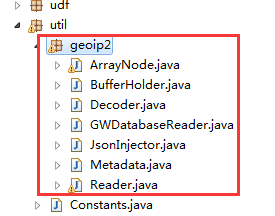
最后,打包编译提交到hive的external_lib(自定义包统一存放的文件夹)中。
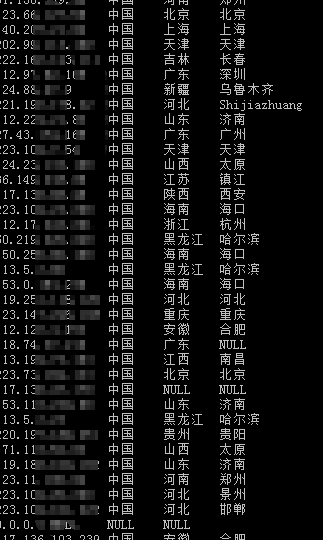
5. 测试结果:
ip2region(ip,0)表示国家
ip2region(ip,1)表示省份
ip2region(ip,2)表示城市
select ip,ip2region(ip,0),ip2region(ip,1),ip2region(ip,2) from xxx_table where ip is not null limit 300;
测试结果看到部分城市给出的是拼音(Shijiazhuang),这个免费库还是有点坑爹,暂时可以将就使用了。
中文版本如下:
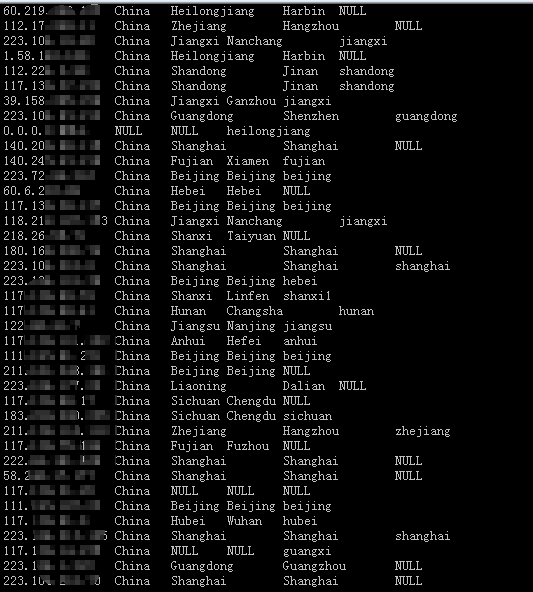
英文版本如下:
最后附上整个部署的说明:
1. 将数据库文件添加到hive的路径 $HIVE_HOME/conf目录下

以后如果有IP数据库城市的更新,直接更新这个目录下的文件。

省份文件固定,不需要修改。
数据库文件有三个:geoCN.csv、geoEN.csv、GeoLite2-City.mmdb

2. 删除$HIVE_HOME/lib/目录下 geoip2-0.4.0.jar、maxminddb-0.2.0.jar 文件

使用maxmind-db-1.2.2.jar、geoip2-2.11.0.jar替换放入。

3. 将编译的regionalParse-0.0.1-SNAPSHOT.jar放到external_lib目录。

4. 修改.hiverc文件,添加以下内容

add jar /usr/local/hive/external_lib/regionalParse-0.0.1-SNAPSHOT.jar;

create temporary function ll2province as 'com.gw.udf.LL2Province';

create temporary function ll2provinceen as 'com.gw.udf.LL2ProvinceEN';

create temporary function indexof as 'com.gw.udf.IndexOf';

create temporary function ip2region as 'com.gw.udf.IP2Region';

create temporary function ip2regionen as 'com.gw.udf.IP2RegionEN';

5. 重启hiveServer2

#!/bin/sh

nohup $HIVE_HOME/bin/hive --service hiveserver2 &

6. 测试方法:

测试中文:

select ip,ip2region(ip,0),ip2region(ip,1),ip2region(ip,2),

ll2province(substring(coordinator, 0, indexof(coordinator, ":")), substring(coordinator, indexof(coordinator, ":") + 2))

from xxx where ip is not null limit 10;

测试英文:

select ip,ip2regionen(ip,0),ip2regionen(ip,1),ip2regionen(ip,2),

ll2provinceen(substring(coordinator, 0, indexof(coordinator, ":")), substring(coordinator, indexof(coordinator, ":") + 2))

from xxx where ip is not null limit 10;
Hive UDF IP解析(二):使用geoip2数据库自定义UDF的更多相关文章
- Hive UDF IP解析(一):依赖包兼容性问题
Java依赖环境: <dependency> <groupId>org.apache.hive</groupId> <artifactId>hive-e ...
- 自定义UDF函数应用异常
自定义UDF函数应用异常 版权声明:本文为yunshuxueyuan原创文章.如需转载请标明出处: http://www.cnblogs.com/sxt-zkys/QQ技术交流群:299142667 ...
- Hive框架基础(二)
* Hive框架基础(二) 我们继续讨论hive框架 * Hive的外部表与内部表 内部表:hive默认创建的是内部表 例如: create table table001 (name string , ...
- IP工具类-自己动手做个ip解析器
IP工具类-自己动手做个ip解析器 一.资料准备 导入依赖包:
- hive 存储,解析,处理json数据
hive 处理json数据总体来说有两个方向的路走 1.将json以字符串的方式整个入Hive表,然后通过使用UDF函数解析已经导入到hive中的数据,比如使用LATERAL VIEW json_tu ...
- Spring Security 解析(二) —— 认证过程
Spring Security 解析(二) -- 认证过程 在学习Spring Cloud 时,遇到了授权服务oauth 相关内容时,总是一知半解,因此决定先把Spring Security .S ...
- 企业运维实践-Nginx使用geoip2模块并利用MaxMind的GeoIP2数据库实现处理不同国家或城市的访问最佳实践指南
关注「WeiyiGeek」公众号 设为「特别关注」每天带你玩转网络安全运维.应用开发.物联网IOT学习! 希望各位看友[关注.点赞.评论.收藏.投币],助力每一个梦想. 本章目录 目录 0x00 前言 ...
- MySQL 系列(二) 你不知道的数据库操作
第一篇:MySQL 系列(一) 生产标准线上环境安装配置案例及棘手问题解决 第二篇:MySQL 系列(二) 你不知道的数据库操作 本章内容: 查看\创建\使用\删除 数据库 用户管理及授权实战 局域网 ...
- .net Core 调用微信Jsapi接口,H5解析二维码
项目里需要用到扫描二维码,自己实现,不会. 找到了两种解决方案: 通过reqrcode.js,这是一个前端解析二维码内容的js库.如果二维码比较清晰,用这种效果也不错 调用微信扫一扫功能,这种效果很好 ...
随机推荐
- HDUOJ----(1084)What Is Your Grade?
关键是自己没有读懂题目而已,不过还好,终于给做出来了...... What Is Your Grade? Time Limit: 2000/1000 MS (Java/Others) Memor ...
- MM 算法与 EM算法概述
1.MM 算法: MM算法是一种迭代优化方法,利用函数的凸性来寻找它们的最大值或最小值. MM表示 “majorize-minimize MM 算法” 或“minorize maximize MM 算 ...
- 系统加速解决方案之Windows XP
系统加速解决方案之Windows XP 在使用Windows XP的过程中,系统速度会随着时间的推移越来越慢,你可重装系统,但重装后,那么多的应用软件也要重新安装,如何在不安装系统的前提下提升Wind ...
- DBA_实践指南系列1_Oracle Erp R12系统安装Install(案例)
2013-12-01 Created By BaoXinjian
- if else和switch的效率
switch和if-else相比,由于使用了Binary Tree算法,绝大部分情况下switch会快一点,除非是if-else的第一个条件就为true. 说实话 我也没有深入研究过这个问题的根源 ...
- errno之我见
Errno能帮我们找到系统函数的错误信息. 比方open函数,假设正常返回时,其返回值是一个非负的整数. 异常时会返回-1.同一时候该系统函数会设置errno的值.让我们能够了解错误的原因. Errn ...
- kubernetes 二
部署harbor Habor是由VMWare中国团队开源的容器镜像仓库.事实上,Habor是在Docker Registry上进行了相应的企业级扩展,从而获 得了更加广泛的应用,这些新的企业级特性包括 ...
- Java的Statement、PreparedStatement、PreparedStatement + 批处理 的区别
首先来说一下连接了数据库之后执行的sql语句:通常连接了数据库之后,我们就会获得statement 类的对象或者是他的子类的对象(PreparedStatement类),通过这个对象我们就可以利用它提 ...
- mysql常用函数汇总(分享)
以下是对mysql中的常用函数进行了汇总介绍.需要的朋友可以过来参考下. 一.数学函数ABS(x) 返回x的绝对值BIN(x) 返回x的二进制(OCT返回八进制,HEX返回十六进制)CEILING(x ...
- modelsim常见错误
1. Error: (vlog-7) Failed to open design unit file "D:/Xilinx/verilog/src/glbl.v" in read ...