
table的td、th的一些样式问题(宽度,边框,滚动条)
1. 给table加边框
table{

 border-collapse: collapse;

/*表格的边框合并为一个单一的边框*/

}

table, table tr th,  table tr td {

border:1px solid #ccc;

}
还有种傻傻的方法:
table{

  border-top:1px solid #ccc;

  border-left:1px solid #ccc;

}

table tr td, table tr th{

  border-right:1px solid #ccc;

  border-bottom: 1px solid #ccc;

}
2.给table的th固定宽度
① 设置table的宽度
② table设置table-layout : fixed ;
③ 设置th宽度
3.给table加滚动条
在table外包一层div,div设置overflow属性
div{

   overflow-x: scroll;

}
4.给td加滚动条
在td里加一层div,div宽度100%,且设置overflow属性
5.td里嵌套table,且table有滚动条
① 最外层的table加上宽度、table-layout:fixed;word-break:break-all;(防止内层的table内容过长,将外层td撑开)
②在td和第二层table之间,加一层div;div设置overflow属性,再给内层table的th设置宽度就行了,
6.隐藏滚动条
.classname :: -webkit-scrollbar{

display:none;

}
7.如下图,th在左侧,右侧td,第一行的td设置了colspan=“8”,使用了colspan后,设置列宽(th/td的宽度)不生效:

解决办法:添加colgroup属性,col设置列的宽度。(若td设置了colspan,且colgroup设置了col的宽度,但ie下宽度仍不生效,记得:table加上样式table-layout : fixed ;)
<colgroup>

    <col width = '20%'>

    <col width = '10%'>

    <col width = '10%'>

    <col width = '10%'>

    <col width = '10%'>

    <col width = '10%'>

    <col width = '10%'>

    <col width = '10%'>

    <col width = '10%'>

</colgroup>
8. 设置td的内容超出部分以省略号显示(title属性展示完整数据)
table tr td {

    overflow: hidden;

    text-overflow:ellipsis;

    white-space: nowrap;

}
(若不生效,给 table 设置宽度和table-layout : fixed ;)
table table td{

      overflow:hidden;

      text-overflow: ellipsis;

      display:-webkit-box;

      -webkit-line-clamp:;

      -webkit-box-orient:vertical;

      word-wrap:break-word;

      word-break:break-all;

}
9. 兼容问题:ie9下,表格出现空格以及错位。
如图:第一行的操作人右移了,出现了空格。
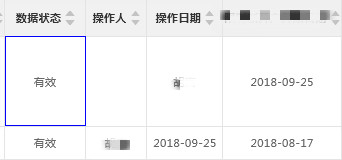
解决办法: 网上查,这是ie9的一个bug, </td>与<td>间有空行时会发生错位。所以,去除掉td标签内的空格。
10. tr之间出现空白行
如图:我在用字符串拼接,生成表结构的时候,发现渲染出的表结构tr之间有空行
  var html ='<tr><th>名称</th><td>内容</td><th>名称</th><td>内容</td></tr>';

  $('tbody').append(html);
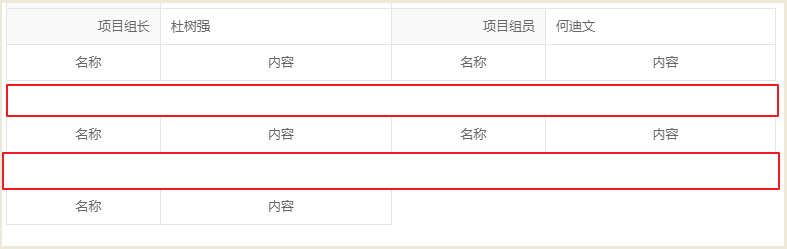
检查发现:坑啊,结束标志写错了,</tr>写错成了<tr/>,记录下来,不知道有没有人和我一起犯蠢。
11. td 在ie浏览器里 没有边框,谷歌浏览器正常
检查发现,td设置了相对定位position:relative,在ie下有兼容问题,
解决:设置background-clip属性(规定背景的绘制区域) -----> 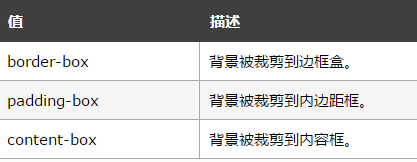
table tr td {

  padding: 0px;

  height: 40px;

  position: relative;

  background-clip: padding-box;

}
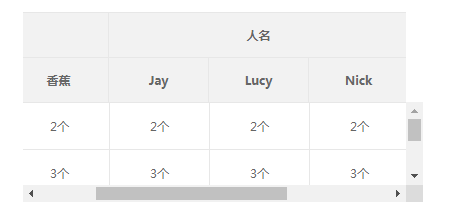
12. 多行多列的表头thead固定
效果图:
<!DOCTYPE html>

<html lang="en">

<head>

  <meta charset="UTF-8">

  <meta name="viewport" content="width=device-width, initial-scale=1.0">

  <meta http-equiv="X-UA-Compatible" content="ie=edge">

  <title>多行多列的表头固定</title>

  <style>

    #app{

      max-width: 400px;

      margin: 20px auto;

      overflow: hidden;

    }

    .head-list{

      overflow: hidden; /*隐藏thead多余内容和滚动条*/

    }

    .body-list{

      overflow: auto;

      max-height: 100px;

      min-height: 0%; /* 设置了overflow:auto,在ie9可能会有兼容问题:在td里的input输入内容时,div的高度会增大 */

    }

    .head-list table{

      border-bottom: 0 none;

    }

    table{

      border: 1px solid #e7e7e7;

      border-collapse: collapse;

      table-layout: fixed;

      font-size: 12px;

      color: #666;

      width: 700px;

    }

    thead tr {

      background-color: #f2f2f2;

      height: 45px;

    }

    thead .secondTr th{

      width: 100px; /* 7*100 大于总宽度400 */

      border-bottom: 0 none;

    }

    th,td{

      border: 1px solid #e7e7e7;

      text-align: center;

      box-sizing: border-box;

    }

    table tbody tr td {

      width: 100px;

      padding: 15px 0px;

    }

  </style>

</head>

<body>

  <div id="app">

    <div class="head-list">

      <table>

        <thead>

          <tr>

            <th colspan="2">水果</th>

            <th colspan="3">人名</th>

            <th colspan="2">玩具</th>

          </tr>

          <tr class="secondTr">

            <th>苹果</th>

            <th>香蕉</th>

            <th>Jay</th>

            <th>Lucy</th>

            <th>Nick</th>

            <th>小汽车</th>

            <th>娃娃</th>

          </tr>

        </thead>

      </table>

    </div>

    <div class="body-list">

      <table>

        <tr>

          <td>2个</td>

          <td>2个</td>

          <td>2个</td>

          <td>2个</td>

          <td>2个</td>

          <td>2个</td>

          <td>2个</td>

        </tr>

        <tr>

          <td>3个</td>

          <td>3个</td>

          <td>3个</td>

          <td>3个</td>

          <td>3个</td>

          <td>3个</td>

          <td>3个</td>

        </tr>

        <tr>

          <td>4个</td>

          <td>4个</td>

          <td>4个</td>

          <td>4个</td>

          <td>4个</td>

          <td>4个</td>

          <td>4个</td>

        </tr>

        <tr>

          <td>5个</td>

          <td>5个</td>

          <td>5个</td>

          <td>5个</td>

          <td>5个</td>

          <td>5个</td>

          <td>5个</td>

        </tr>

      </table>

    </div>

  </div>

  <script src="https://cdn.bootcss.com/jquery/3.4.1/jquery.js"></script>

  <script>

    // 不加js的情况下,此时页面tbody已经出现横纵滚动条,但在滚动横向滚动条时,表头不动(见图1)。所以要设置一个scroll事件,让表头随着表体滚动

    $('.body-list').on('scroll', function () {

      $(".head-list").scrollLeft($('.body-list').scrollLeft());

    });

    var divHeight = $(".body-list").height();

    var tableHeight = $(".body-list table").height();

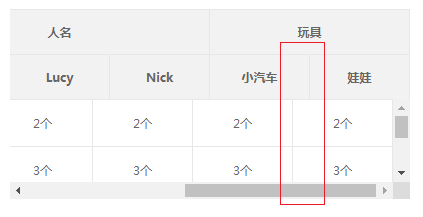
    // 出现纵向滚动条时,给表头div添加margin样式(略丑,但是不加margin,会导致横向条滚到最右,上下表格发生错位,见图2)

    if(tableHeight > divHeight){

      $(".head-list").css('margin-right','17px');

    }

  </script>

</body>

</html>
图1:
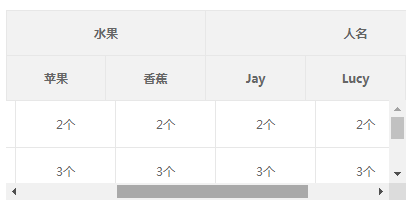
图2:
table的td、th的一些样式问题(宽度,边框,滚动条)的更多相关文章
- ie7、ie8 下Table 中 td 列固定宽度 未按样式设定显示 曲线解决方案
<!doctype html> <html> <head> <meta charset='utf-8'> <style> .title {b ...
- 当Table中td内容为空时,显示边框的办法
1. 在 table的css里面加: border-collapse:collapse;在 td 的css里面加: empty-cells:show; 2 .最简单的就是 在TD里写个 说明: ...
- 如何让table中td宽度固定
table中td会随着里面的内容伸缩,设置其width样式并没有效果.这个时候需要下面的CSS可以实现. 首先是设置table .table {table-layout:fixed;} 其次是td . ...
- table中td内容过长 省略号显示
首先设置 css样式: table { table-layout: fixed;} HTML中的table代码: <tr> <th class="col-md-1" ...
- table中td的宽度不随文字变宽
1.设置了table的宽度后,宽度仍然不固定,td的内容一多,很容易吧table撑变形.有些时候我们需要设置固定的宽度. 解决办法 table的css 加入样式 table-layout:fixed ...
- 关于table的td和ul元素li隔行变色的功能实现
table元素的td和ul元素li隔行变色的功能实现 利用css控制二者的样式轻松实现隔行换色: 例如:table的css样式控制: table tr td{ background-color:颜 ...
- table的td的1%
使用media-obj和media-bd类似的样式,大多数采用的是display: table-cell(即是table中td)来实现.当然设置display是不够,还要根据情况设置width.如下面 ...
- html中table,tr,td
table表格,tr表格中的行,tr表格中的列,等级关系是table>tr>td, 当然表格中还包括thead,tbody,tfoot,th,但由于浏览器支持缘故很少使用.另外table在 ...
- <td></td>标签的border 样式在浏览器中显示不出来
问题: 在一些浏览器中比如360浏览器的兼容模式下, <td style="border:1px solid red;"></td> 标签 中 的内容为空时 ...
随机推荐
- python django 环境搭建
一. 版本选择 Django 1.5.x 支持 Python 2.6.5 Python 2.7, Python 3.2 和 3.3. Django 1.6.x 支持 Python 2.6.X, 2.7 ...
- 使用 docker-machine 管理 Azure 容器虚拟机
安装 docker-machine 请参见该链接(https://docs.docker.com/machine/install-machine "https://docs.docker.c ...
- SQL点点滴滴_公用表表达式(CTE)递归的生成帮助数据
本文的作者辛苦了,版权问题特声明本文出处:http://www.cnblogs.com/wy123/p/5960825.html 工作有时候会需要一些帮助数据,必须需要连续的数字,连续间隔的时间点,连 ...
- 《SQL必知必会》知识点汇总
select CustomerNo from dbo.Customers; 通配符的使用 select *from dbo.Customers; select CustomerNo from dbo. ...
- Django路由系统---django重点之url传递一个默认参数
django重点之url传递一个默认参数 可以利用这个特性,让2个URL映射一个函数,但是返回2个不同的HTML url(r'default_param1', views.def_param,), u ...
- 【2017-11-08】Linux与openCV:opencv版本查看及库文件位置等
1. 查看当前系统中opencv的版本: pkg-config --modversion opencv 可以看到系统中目前存在opencv2.4.9.1及opencv3.2.0两个版本. 不太清楚op ...
- python28 excel读取模块xlrd
安装: pip install xlrd 简单使用: import xlrd book = xlrd.open_workbook(r'C:\Users\dinghanhua\Desktop\yqqap ...
- update from select
CREATE TABLE dualx( x_id ) NOT NULL , x_con ) ) CREATE TABLE dualy( y_id ) NOT NULL , y_con ) ) ','x ...
- Angular2 *ngFor把数据显示在多个input中出错解决方法
点击添加按钮会自动添加一个空的input组 html <div class="form-inline"> <label class="form-cont ...
- 【[SCOI2009]迷路】
大水题一遍 过掉比较繁琐的拆点还是非常开心的 发现每一条边的边权可能不是\(1\),但是边权的范围非常小,同时点数也非常小,只有\(n<=10\),所以我们可以将一个点拆成九个点,之后随便一连边 ...