
eclipse启动报错:An error has occurred.See the log file D:\eclipse\configuration\1552616709202.log
如题,Eclipse崩了,只能按它留下的线索去看了1552616709202.log:
!SESSION -- ::08.739 -----------------------------------------------

eclipse.buildId=4.6..M20161124-

java.version=1.8.0_181

java.vendor=Oracle Corporation

BootLoader constants: OS=win32, ARCH=x86_64, WS=win32, NL=zh_CN

Framework arguments:  -product org.eclipse.epp.package.jee.product

Command-line arguments:  -os win32 -ws win32 -arch x86_64 -product org.eclipse.epp.package.jee.product

!ENTRY org.eclipse.equinox.ds   -- ::40.333

!MESSAGE [SCR - WorkThread] Timeout occurred! Thread was blocked on processing [QueuedJob] WorkPerformer: org.eclipse.equinox.internal.ds.SCRManager@701a36b3; actionType

!ENTRY org.eclipse.equinox.ds   -- ::40.340

!MESSAGE [SCR] Enabling components of bundle org.eclipse.ui.trace did not complete in  ms

!ENTRY org.eclipse.core.runtime   -- ::45.367

!MESSAGE FrameworkEvent ERROR

!STACK

org.osgi.framework.BundleException: Unable to acquire the state change lock for the module: osgi.identity; type="osgi.bundle"; version:Version="3.12.0.v20160606-1342"; osgi.identity="org.eclipse.core.runtime"; singleton:="true" [id=] STARTED [STARTED]

    at org.eclipse.osgi.container.Module.lockStateChange(Module.java:)

    at org.eclipse.osgi.container.Module.start(Module.java:)

    at org.eclipse.osgi.container.ModuleContainer$ContainerStartLevel.incStartLevel(ModuleContainer.java:)

    at org.eclipse.osgi.container.ModuleContainer$ContainerStartLevel.incStartLevel(ModuleContainer.java:)

    at org.eclipse.osgi.container.ModuleContainer$ContainerStartLevel.doContainerStartLevel(ModuleContainer.java:)

    at org.eclipse.osgi.container.ModuleContainer$ContainerStartLevel.dispatchEvent(ModuleContainer.java:)

    at org.eclipse.osgi.container.ModuleContainer$ContainerStartLevel.dispatchEvent(ModuleContainer.java:)

    at org.eclipse.osgi.framework.eventmgr.EventManager.dispatchEvent(EventManager.java:)

    at org.eclipse.osgi.framework.eventmgr.EventManager$EventThread.run(EventManager.java:)

Caused by: java.util.concurrent.TimeoutException: Timeout after waiting  seconds to acquire the lock.

    at org.eclipse.osgi.container.Module.lockStateChange(Module.java:)

    ...  more

Root exception:

java.util.concurrent.TimeoutException: Timeout after waiting  seconds to acquire the lock.

    at org.eclipse.osgi.container.Module.lockStateChange(Module.java:)

    at org.eclipse.osgi.container.Module.start(Module.java:)

    at org.eclipse.osgi.container.ModuleContainer$ContainerStartLevel.incStartLevel(ModuleContainer.java:)

    at org.eclipse.osgi.container.ModuleContainer$ContainerStartLevel.incStartLevel(ModuleContainer.java:)

    at org.eclipse.osgi.container.ModuleContainer$ContainerStartLevel.doContainerStartLevel(ModuleContainer.java:)

    at org.eclipse.osgi.container.ModuleContainer$ContainerStartLevel.dispatchEvent(ModuleContainer.java:)

    at org.eclipse.osgi.container.ModuleContainer$ContainerStartLevel.dispatchEvent(ModuleContainer.java:)

    at org.eclipse.osgi.framework.eventmgr.EventManager.dispatchEvent(EventManager.java:)

    at org.eclipse.osgi.framework.eventmgr.EventManager$EventThread.run(EventManager.java:)
从日志看是拿锁超时了,关键是锁在哪?锁在工作空间的.metadata目录里:
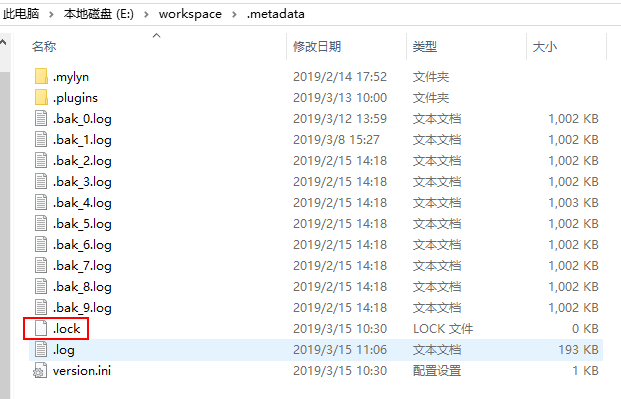
把这个日志(eclipse\configuration\1552616709202.log)和锁(workspace\.metadata\.lock)删了再试试就ok了,Eclipse正常启动。
碰到这种启动失败的场景,基本就是清理这两个目录(configuration和.metadata)这条路子。
eclipse启动报错:An error has occurred.See the log file D:\eclipse\configuration\1552616709202.log的更多相关文章
- deepin linux 15.3安装完eclipse启动报错An error has occurred.
原因是系统中安装了jdk9 导致的. 卸载jdk9就可以了 $ java -version Picked up _JAVA_OPTIONS: -Dawt.useSystemAAFontSettings ...
- Eclipse启动报错An internal error occurred during: "Initializing Java Tooling"
Eclipse启动报错An internal error occurred during: "Initializing Java Tooling" 解决方案: 删除工作空间work ...
- IDEA启动报错Internal error. Please report to http://jb.gg/ide/critical-startup-errors java.lang.NoClassDefFoundError: org/eclipse/xtext/xbase/lib/Exceptions
报错内容: IDEA 启动报错 Internal error. Please report to http://jb.gg/ide/critical-startup-errors 报错图为: 我尝试找 ...
- eclipse 启动报错\workspace\.metadata\.log
eclipse启动报错,让查看.metadata\.log日志 eclipse启动不了,让查看.metadata\.log日志,上面为日志中的错误提示. 解决办法:删除 .metadata\.plug ...
- Android 开发环境 —— Eclipse 启动时报错:Error when loading the SDK
简述: Eclipse 启动时报错:Error when loading the SDK 错误信息: Error when loading the SDK: Error: Error parsing ...
- 遇到的eclipse启动报错问题解决
遇到的eclipse启动报错问题解决 一.启动时出现Java was started but returned exit code=13 可能原因: 1.eclipse与JDK的不是都64位或者32位 ...
- centos6的kibana7.1无法启动报错 FATAL Error: /lib64/libc.so.6: version `GLIBC_2.14' not found 升级glibc的问题处理
centos6的kibana7.1无法启动报错 FATAL Error: /lib64/libc.so.6: version `GLIBC_2.14' not found 升级glibc的问题处理 ...
- ubuntu 下安装 mysql 启动报错:ERROR 2002 (HY000): Can't connect to local MySQL server through socket '/var/run/mysqld/mysqld.sock' (2)
环境: ubuntu LTS 18.04.1 mysql Ver 14.14 Distrib 5.7.29, for Linux (x86_64) 初探 linux,按照如下安装完mysql sudo ...
- nginx 启动报错“var/run/nginx/nginx.pid" no such file or directory
nginx 启动报错“var/run/nginx/nginx.pid" no such file or directory 今天刚搭建的nginx服务器启动时,报错“var/run/ngin ...
随机推荐
- STM32端口输入输出模式配置
STM32的IO口模式配置 根据数据手册提供的信息,stm32的io口一共有八种模式,他们分别是: 四种输入模式 上拉输入:通过内部的上拉电阻将一个不确定的信号通过一个电阻拉到高电平. 下拉输入:把电 ...
- bzoj1617 / P2904 [USACO08MAR]跨河River Crossing
P2904 [USACO08MAR]跨河River Crossing 显然的dp 设$f[i]$表示运走$i$头奶牛,木筏停在未过河奶牛一侧所用的最小代价 $s[i]$表示一次运$i$头奶牛到对面的代 ...
- Asynchronous Programming Model (APM)异步编程模型
https://msdn.microsoft.com/zh-cn/library/ms228963(v=vs.110).aspx 一.概念 An asynchronous operation that ...
- nodejs真的是单线程吗?
[原文] 一.多线程与单线程 像java.python这个可以具有多线程的语言.多线程同步模式是这样的,将cpu分成几个线程,每个线程同步运行. 而node.js采用单线程异步非阻塞模式,也就是说每一 ...
- 使用IDEA2017创建java web +maven项目
1.首先,提前准备的东西:我使用的是IDEA2017,tomcat7,jdk1.:请将这些软件安装完成,环境变量配置完成,如何配置以及安装我就不复述了,百度上一堆一堆的,比我知道的详细多了. 2.下面 ...
- 接口测试实例(Road)
以getObjectByCode接口为例,用jmeter2.13来进行接口测试. 测试前准备: 测试工具及版本:jmeter 2.13 r1665067(须包含__MD5函数) 示例接口:8.1根据单 ...
- JavaScript学习总结(二十三)——JavaScript 内存泄漏教程
参考教程:http://www.ruanyifeng.com/blog/2017/04/memory-leak.html 一.什么是内存泄漏? 程序的运行需要内存.只要程序提出要求,操作系统或者运行时 ...
- HDU 4122 单调队列
转载自:http://blog.csdn.net/lvshubao1314/article/details/46910271 DES :给出n个订单和m是商店的开放时间.然后n行给出n个订单的信息.然 ...
- 从客户端中检测到有潜在危险的 Request.Form 值 方法
由于在.net中,Request时出现有HTML或Javascript等字符串时,系统会认为是危险性值.立马报出“从客户端 中检测到有潜在危险的Request.Form值”这样的错. 解决方案一: ...
- HDU 1495 非常可乐 bfs 难度:1
http://acm.hdu.edu.cn/showproblem.php?pid=1495 第三个杯子的盛水量可由前两个杯子得到,而前两个杯子状态总数在100*100以内,穷举可实现 #includ ...