
Android-openFileInput openFileOutput
Android设计了一套可以操作自身APP目录文件对API openFileInput openFileOutput,读取只需传入文件名,写入需要传入文件名 与 权限模式
界面:
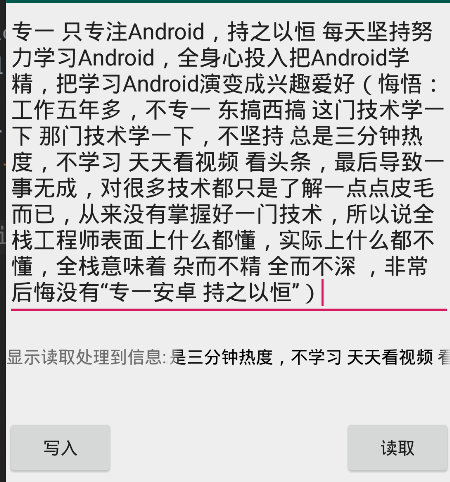
布局代码:
<?xml version="1.0" encoding="utf-8"?>

<LinearLayout xmlns:android="http://schemas.android.com/apk/res/android"

    android:orientation="vertical"

    android:layout_width="match_parent"

    android:layout_height="match_parent">

    <EditText

        android:id="@+id/et_output"

        android:layout_width="match_parent"

        android:layout_height="wrap_content"

        android:hint="请写入数据到文件"

        />

    <LinearLayout

        android:layout_width="match_parent"

        android:layout_height="wrap_content"

        android:layout_marginTop="20dp">

        <TextView

            android:layout_width="wrap_content"

            android:layout_height="wrap_content"

            android:text="显示读取处理到信息:"

            />

        <TextView

            android:id="@+id/tv_input"

            android:layout_width="0dip"

            android:layout_height="wrap_content"

            android:layout_weight="1"

            android:textColor="@android:color/black"

            android:singleLine="true"

            android:ellipsize="marquee"

            android:marqueeRepeatLimit="marquee_forever"

            />

    </LinearLayout>

    <RelativeLayout

        android:layout_width="match_parent"

        android:layout_height="wrap_content"

        android:layout_marginTop="40dp">

        <Button

            android:id="@+id/bt_output"

            android:layout_width="wrap_content"

            android:layout_height="wrap_content"

            android:text="写入"

            />

        <Button

            android:id="@+id/bt_input"

            android:layout_width="wrap_content"

            android:layout_height="wrap_content"

            android:text="读取"

            android:layout_alignParentRight="true"

            />

    </RelativeLayout>

</LinearLayout>
openFileInput openFileOutpu 读写操作代码:
package liudeli.datastorage;

import android.app.Activity;

import android.os.Bundle;

import android.text.TextUtils;

import android.view.View;

import android.widget.Button;

import android.widget.EditText;

import android.widget.TextView;

import android.widget.Toast;

import java.io.File;

import java.io.FileInputStream;

import java.io.FileOutputStream;

public class MainActivity3 extends Activity implements View.OnClickListener {

    @Override

    protected void onCreate(Bundle savedInstanceState) {

        super.onCreate(savedInstanceState);

        setContentView(R.layout.activity_main3);

        initViewListener();

        getFilesDir(); // 得到当前APP应用files目录

        getCacheDir();// 得到当前APP应用cache缓存目录

    }

    private EditText etOutpu;

    private TextView tvInput;

    public Button btOutput, btInput;

    private void initViewListener() {

        etOutpu = findViewById(R.id.et_output);

        tvInput = findViewById(R.id.tv_input);

        btOutput = findViewById(R.id.bt_output);

        btInput = findViewById(R.id.bt_input);

        btOutput.setOnClickListener(this);

        btInput.setOnClickListener(this);

        // 让TextView获得焦点,TextView就可以滚动了

        tvInput.setSelected(true);

    }

    @Override

    protected void onDestroy() {

        super.onDestroy();

    }

    @Override

    public void onClick(View v) {

        switch (v.getId()) {

            case R.id.bt_input: {

                // Android提供了操作自身APP文件目录的API openFileInput

                try {

                    File file = new File(getFilesDir().getAbsolutePath() ,"my_open_file_file.txt");

                    if (!file.exists()) {

                        Toast.makeText(MainActivity3.this, "文件不存在", Toast.LENGTH_LONG).show();

                        return;

                    }

                    FileInputStream fileInputStream = openFileInput("my_open_file_file.txt");

                    byte[] bytes = new byte[1024];

                    int len;

                    while (-1 != (len = fileInputStream.read(bytes))) {

                        StringBuffer sb = new StringBuffer();

                        sb.append(new String(bytes, 0 ,len));

                        tvInput.setText("" + sb.toString());

                    }

                    fileInputStream.close();

                } catch (Exception e) {

                    e.printStackTrace();

                }

                break;

            }

            case R.id.bt_output: {

                String outputStr = etOutpu.getText().toString();

                if (TextUtils.isEmpty(outputStr)) {

                    Toast.makeText(MainActivity3.this, "请输入内容!", Toast.LENGTH_SHORT).show();

                    return;

                }

                // Android提供了操作自身APP文件目录的API openFileOutput

                try {

                    // MODE_APPEND 私有模式,每次会进行覆盖,是比较安全的模式

                    // MODE_WORLD_READABLE 全局可读模式

                    // MODE_WORLD_WRITEABLE 全局可写模式

                    // MODE_WORLD_READABLE|MODE_WORLD_WRITEABLE 全局可读可写模式

                    FileOutputStream fos = openFileOutput("my_open_file_file.txt", MODE_PRIVATE);

                    fos.write(outputStr.getBytes());

                    fos.close();

                } catch (Exception e) {

                    e.printStackTrace();

                }

                break;

            }

            default:

                break;

        }

    }

}
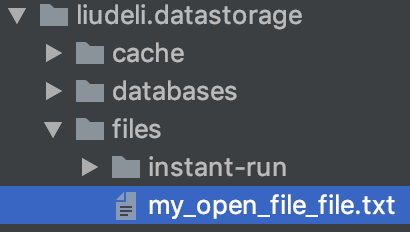
操作的文件目录:使用 openFileInput openFileOutput 对文件进行操作,系统会自动在当前APP目录创建files文件夹/文件
Android-openFileInput openFileOutput的更多相关文章
- 疯狂安卓Android自学笔记
开发者必备自学工具: 谷歌搜索:www.yundou.info Android原版开发文档 (英文) Doc http://www.phoned.cn/docs/reference/android/v ...
- Android 读写文件
Android 读写文件 Android使用一个非常类似与其他平台上的基于磁盘的文件系统. 这节课讲述如何利用File APIs在Android文件系统中读写文件. File 对象非常适合于流式顺序数 ...
- Android 之数据存储(sdCard,sharedPreference,sqlite数据库)
sdCard:默认路径在 /storage/sdcard/... Android支持OpenFileOutput和openFileInput方式访问手机存储器上的文件. Context提供了如下两个方 ...
- To Learn
1. Hybrid:Ionic.Cordova.AngularJS等框架 webView,处理H5 2. View.ViewGroup android.view.View public class ...
- android文件的写入与读取---简单的文本读写context.openFileInput() context.openFileOutput()
最终效果图,点击save会保存到文件中,点击show会从文件中读取出内容并显示. main.xml <?xml version="1.0" encoding=" ...
- 【Android】android文件的写入与读取---简单的文本读写context.openFileInput() context.openFileOutput()
最终效果图,点击save会保存到文件中,点击show会从文件中读取出内容并显示. main.xml <?xml version="1.0" encoding="ut ...
- android应用私有存储文件的写入与读取-openFileInput 和 openFileOutput
一:第一种方式就是像Java平台下的实现方式一样通过构造器直接创建,如果需要向打开的文件末尾写入数据,可以通过使用构造器FileOutputStream(File file, boolean appe ...
- Android开发 文件读写openFileOutput与openFileInput
package com.example.androidtest; import java.io.ByteArrayOutputStream; import java.io.FileInputStrea ...
- Android 文件操作之openFileOutput
openFileOutput()方法的第一参数用于指定文件名称,不能包含路径分隔符“/” ,如果文件不存在,Android 会自动创建它.创建的文件保存在/data/data/<package ...
随机推荐
- JAVA面向对象编程课程设计——项目部署
目录 一.Java环境的安装 1.下载 2.安装 3.配置环境变量 二.Tomcat的安装 1.下载 2.安装 3.启动Tomcat(默认已经安装好java环境,如果未安装java会报错.) 三.My ...
- 6.9-JDBC
一.JDBC 步骤: 1.加载驱动 2.创建连接 3.创建Statement或PreparedStatement 4.遍历结果集 5.释放资源 二.PrepareStatement sql注入: Pr ...
- 《Linux内核精髓:精通Linux内核必会的75个绝技》一HACK #12 使用Memory Cgroup限制内存使用量
HACK #12 使用Memory Cgroup限制内存使用量 Memory Cgroup是Cgroup的资源限制功能之一,可以控制特定进程可以使用的内存量.Memory CgroupMemory C ...
- oracle账户密码更新
oracle忘记用户名密码怎样恢复 首先cmd - sqlplusw 普通用户登陆:用户名:scott(普通用户名) 密码:tiger(普通用户密码) 管理员登陆:用户名:system 密码 ...
- django关于静态的信息的配置
今天搭建完,django后,访问 admin 发现 样式没有加载 需要搭建静态的配置 1 设置项目目录的静态目录 用来存放静态的文件 在setttings.py中 添加以下参数 在 STATIC_ ...
- Linux及安卓的事件处理资料
事件处理机制介绍: https://source.android.com/devices/input/overview.html http://newandroidbook.com/Book/Inpu ...
- SpringFox swagger2 and SpringFox swagger2 UI 接口文档生成与查看
依赖: <!-- https://mvnrepository.com/artifact/io.springfox/springfox-swagger2 --> <dependency ...
- Delphi7 [Fatal Error] ClassPas.pas(8): File not found: 'DesignIntf.dcu'
Delphi7 [Fatal Error] ClassPas.pas(8): File not found: 'DesignIntf.dcu' Add path to Project>Optio ...
- libcurl 调用curl_easy_getinfo( ) 返回错误码对照
//执行设置好的操作 res = curl_easy_perform(easy_handle); //获取HTTP错误码 ; curl_easy_getinfo(easy_handle, CURLIN ...
- 录制手机的视频,转换成gif
Android: 通过adb命令去进行录屏,然后将录制的视频转换成gif图片: 前提:确保电脑上安装了adb,且Android的level高于19. 1.adb shell screenrecord ...