
Android-openFileInput openFileOutput
Android设计了一套可以操作自身APP目录文件对API openFileInput openFileOutput,读取只需传入文件名,写入需要传入文件名 与 权限模式
界面:
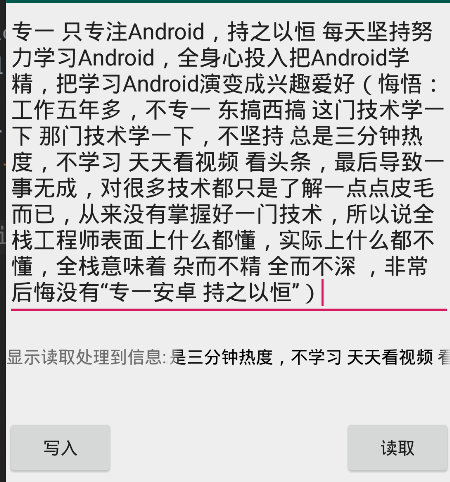
布局代码:
<?xml version="1.0" encoding="utf-8"?>

<LinearLayout xmlns:android="http://schemas.android.com/apk/res/android"

    android:orientation="vertical"

    android:layout_width="match_parent"

    android:layout_height="match_parent">

    <EditText

        android:id="@+id/et_output"

        android:layout_width="match_parent"

        android:layout_height="wrap_content"

        android:hint="请写入数据到文件"

        />

    <LinearLayout

        android:layout_width="match_parent"

        android:layout_height="wrap_content"

        android:layout_marginTop="20dp">

        <TextView

            android:layout_width="wrap_content"

            android:layout_height="wrap_content"

            android:text="显示读取处理到信息:"

            />

        <TextView

            android:id="@+id/tv_input"

            android:layout_width="0dip"

            android:layout_height="wrap_content"

            android:layout_weight="1"

            android:textColor="@android:color/black"

            android:singleLine="true"

            android:ellipsize="marquee"

            android:marqueeRepeatLimit="marquee_forever"

            />

    </LinearLayout>

    <RelativeLayout

        android:layout_width="match_parent"

        android:layout_height="wrap_content"

        android:layout_marginTop="40dp">

        <Button

            android:id="@+id/bt_output"

            android:layout_width="wrap_content"

            android:layout_height="wrap_content"

            android:text="写入"

            />

        <Button

            android:id="@+id/bt_input"

            android:layout_width="wrap_content"

            android:layout_height="wrap_content"

            android:text="读取"

            android:layout_alignParentRight="true"

            />

    </RelativeLayout>

</LinearLayout>
openFileInput openFileOutpu 读写操作代码:
package liudeli.datastorage;

import android.app.Activity;

import android.os.Bundle;

import android.text.TextUtils;

import android.view.View;

import android.widget.Button;

import android.widget.EditText;

import android.widget.TextView;

import android.widget.Toast;

import java.io.File;

import java.io.FileInputStream;

import java.io.FileOutputStream;

public class MainActivity3 extends Activity implements View.OnClickListener {

    @Override

    protected void onCreate(Bundle savedInstanceState) {

        super.onCreate(savedInstanceState);

        setContentView(R.layout.activity_main3);

        initViewListener();

        getFilesDir(); // 得到当前APP应用files目录

        getCacheDir();// 得到当前APP应用cache缓存目录

    }

    private EditText etOutpu;

    private TextView tvInput;

    public Button btOutput, btInput;

    private void initViewListener() {

        etOutpu = findViewById(R.id.et_output);

        tvInput = findViewById(R.id.tv_input);

        btOutput = findViewById(R.id.bt_output);

        btInput = findViewById(R.id.bt_input);

        btOutput.setOnClickListener(this);

        btInput.setOnClickListener(this);

        // 让TextView获得焦点,TextView就可以滚动了

        tvInput.setSelected(true);

    }

    @Override

    protected void onDestroy() {

        super.onDestroy();

    }

    @Override

    public void onClick(View v) {

        switch (v.getId()) {

            case R.id.bt_input: {

                // Android提供了操作自身APP文件目录的API openFileInput

                try {

                    File file = new File(getFilesDir().getAbsolutePath() ,"my_open_file_file.txt");

                    if (!file.exists()) {

                        Toast.makeText(MainActivity3.this, "文件不存在", Toast.LENGTH_LONG).show();

                        return;

                    }

                    FileInputStream fileInputStream = openFileInput("my_open_file_file.txt");

                    byte[] bytes = new byte[1024];

                    int len;

                    while (-1 != (len = fileInputStream.read(bytes))) {

                        StringBuffer sb = new StringBuffer();

                        sb.append(new String(bytes, 0 ,len));

                        tvInput.setText("" + sb.toString());

                    }

                    fileInputStream.close();

                } catch (Exception e) {

                    e.printStackTrace();

                }

                break;

            }

            case R.id.bt_output: {

                String outputStr = etOutpu.getText().toString();

                if (TextUtils.isEmpty(outputStr)) {

                    Toast.makeText(MainActivity3.this, "请输入内容!", Toast.LENGTH_SHORT).show();

                    return;

                }

                // Android提供了操作自身APP文件目录的API openFileOutput

                try {

                    // MODE_APPEND 私有模式,每次会进行覆盖,是比较安全的模式

                    // MODE_WORLD_READABLE 全局可读模式

                    // MODE_WORLD_WRITEABLE 全局可写模式

                    // MODE_WORLD_READABLE|MODE_WORLD_WRITEABLE 全局可读可写模式

                    FileOutputStream fos = openFileOutput("my_open_file_file.txt", MODE_PRIVATE);

                    fos.write(outputStr.getBytes());

                    fos.close();

                } catch (Exception e) {

                    e.printStackTrace();

                }

                break;

            }

            default:

                break;

        }

    }

}
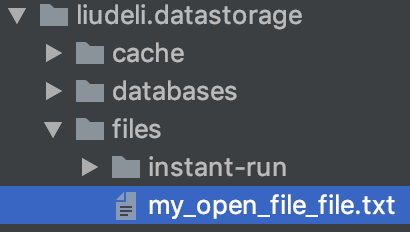
操作的文件目录:使用 openFileInput openFileOutput 对文件进行操作,系统会自动在当前APP目录创建files文件夹/文件
Android-openFileInput openFileOutput的更多相关文章
- 疯狂安卓Android自学笔记
开发者必备自学工具: 谷歌搜索:www.yundou.info Android原版开发文档 (英文) Doc http://www.phoned.cn/docs/reference/android/v ...
- Android 读写文件
Android 读写文件 Android使用一个非常类似与其他平台上的基于磁盘的文件系统. 这节课讲述如何利用File APIs在Android文件系统中读写文件. File 对象非常适合于流式顺序数 ...
- Android 之数据存储(sdCard,sharedPreference,sqlite数据库)
sdCard:默认路径在 /storage/sdcard/... Android支持OpenFileOutput和openFileInput方式访问手机存储器上的文件. Context提供了如下两个方 ...
- To Learn
1. Hybrid:Ionic.Cordova.AngularJS等框架 webView,处理H5 2. View.ViewGroup android.view.View public class ...
- android文件的写入与读取---简单的文本读写context.openFileInput() context.openFileOutput()
最终效果图,点击save会保存到文件中,点击show会从文件中读取出内容并显示. main.xml <?xml version="1.0" encoding=" ...
- 【Android】android文件的写入与读取---简单的文本读写context.openFileInput() context.openFileOutput()
最终效果图,点击save会保存到文件中,点击show会从文件中读取出内容并显示. main.xml <?xml version="1.0" encoding="ut ...
- android应用私有存储文件的写入与读取-openFileInput 和 openFileOutput
一:第一种方式就是像Java平台下的实现方式一样通过构造器直接创建,如果需要向打开的文件末尾写入数据,可以通过使用构造器FileOutputStream(File file, boolean appe ...
- Android开发 文件读写openFileOutput与openFileInput
package com.example.androidtest; import java.io.ByteArrayOutputStream; import java.io.FileInputStrea ...
- Android 文件操作之openFileOutput
openFileOutput()方法的第一参数用于指定文件名称,不能包含路径分隔符“/” ,如果文件不存在,Android 会自动创建它.创建的文件保存在/data/data/<package ...
随机推荐
- Some index files failed to download. They have …… or old ones used instead
问题: 平台:Ubuntu12.04 W: Failed to fetch http://us.archive.ubuntu.com/ubuntu/dists/precise/universe/bin ...
- 2017CCSP总结——失败(铜)
这次比赛,算是铩羽而归.尽管是第一次出去打比赛,在经验方面略显不足,但是,归根到底,我这次比赛打的很失败.包括我们学校去的,打的也不好,可以说是全体翻车.真的很对不起带我们去的老师.>_< ...
- struts1的一个简单登陆功能
Login.jsp: <form action="<%= request.getContextPath() %>/login.do" method="p ...
- 获取中文的首字母demo
import net.sourceforge.pinyin4j.PinyinHelper; /** * * @Title: getPinYinHeadChar * @Description: TODO ...
- 关于Ceph现状与未来的一些思考
http://blog.csdn.net/mightysheldor/article/details/51093476 Ceph从2004年提交了第一行代码,至今为止已经10年了.这个起源于Sage博 ...
- 第七章 : Git 介绍 (下)[Learn Android Studio 汉化教程]
Learn Android Studio 汉化教程 Let’s reset even further to remove all traces of your work on the deprecat ...
- jQuery操作table tr td
1.鼠标移动行变色 $("#tab tr").hover(function(){ $(this).children("td").addClass("h ...
- Apache Hadoop 集群安装文档
简介: Apache Hadoop 集群安装文档 软件:jdk-8u111-linux-x64.rpm.hadoop-2.8.0.tar.gz http://www.apache.org/dyn/cl ...
- C++ 20170807
mesos/3rdparty/stout/include/stout/err.hpp=======================================================str ...
- vector中resize()和reserve()的区别
先看看<C++ Primer>中对resize()函数两种用法的介绍: 1.resize(n) 调整容器的长度大小,使其能容纳n个元素. 如果n小于容器的当前的size,则删除多出来的元素 ...