
WPF 内部Template 动画板 无法冻结此 Storyboard 时间线树供跨线程使用
解决此问题,需要一定的想象力。
换个思路即可
大体是
使用Tag或者别无用的可以输入数值的属性,或者附加属性也可以的。来绑定到你要动画的属性
当然这个过程中要使用转换器了
我给出一个关于Button 的Width的内部模板小栗子,各位朋友可以针对自己的项目/控件进行修改
XAML代码
    <Window.Resources>

        <local:ToCon x:Key="To"/>

        <Style x:Key="FocusVisual">

            <Setter Property="Control.Template">

                <Setter.Value>

                    <ControlTemplate>

                        <Rectangle Margin="" SnapsToDevicePixels="true" Stroke="{DynamicResource {x:Static SystemColors.ControlTextBrushKey}}" StrokeThickness="" StrokeDashArray="1 2"/>

                    </ControlTemplate>

                </Setter.Value>

            </Setter>

        </Style>

        <SolidColorBrush x:Key="Button.Static.Background" Color="#FFDDDDDD"/>

        <SolidColorBrush x:Key="Button.Static.Border" Color="#FF707070"/>

        <SolidColorBrush x:Key="Button.MouseOver.Background" Color="#FFBEE6FD"/>

        <SolidColorBrush x:Key="Button.MouseOver.Border" Color="#FF3C7FB1"/>

        <SolidColorBrush x:Key="Button.Pressed.Background" Color="#FFC4E5F6"/>

        <SolidColorBrush x:Key="Button.Pressed.Border" Color="#FF2C628B"/>

        <SolidColorBrush x:Key="Button.Disabled.Background" Color="#FFF4F4F4"/>

        <SolidColorBrush x:Key="Button.Disabled.Border" Color="#FFADB2B5"/>

        <SolidColorBrush x:Key="Button.Disabled.Foreground" Color="#FF838383"/>

        <Style x:Key="ButtonStyle1" TargetType="{x:Type Button}">

            <Setter Property="FocusVisualStyle" Value="{StaticResource FocusVisual}"/>

            <Setter Property="Background" Value="{StaticResource Button.Static.Background}"/>

            <Setter Property="BorderBrush" Value="{StaticResource Button.Static.Border}"/>

            <Setter Property="Foreground" Value="{DynamicResource {x:Static SystemColors.ControlTextBrushKey}}"/>

            <Setter Property="BorderThickness" Value=""/>

            <Setter Property="HorizontalContentAlignment" Value="Center"/>

            <Setter Property="VerticalContentAlignment" Value="Center"/>

            <Setter Property="Padding" Value=""/>

            <Setter Property="Template">

                <Setter.Value>

                    <ControlTemplate TargetType="{x:Type Button}">

                        <ControlTemplate.Resources>

                            <local:ToCon  x:Key="ToConHeight"/>

                        </ControlTemplate.Resources>

                        <Border  Height="{Binding Tag,RelativeSource={RelativeSource Mode=Self},  Converter={ StaticResource ToConHeight }}" x:Name="border"  BorderBrush="{TemplateBinding BorderBrush}" BorderThickness="{TemplateBinding BorderThickness}" Background="{TemplateBinding Background}" SnapsToDevicePixels="true">

                            <Border.Tag>

                                <Binding Path="Tag" RelativeSource="{RelativeSource Mode=TemplatedParent}" Converter="{StaticResource ToConHeight }"/>

                            </Border.Tag>

                            <ContentPresenter x:Name="contentPresenter" Focusable="False" HorizontalAlignment="{TemplateBinding HorizontalContentAlignment}" Margin="{TemplateBinding Padding}" RecognizesAccessKey="True" SnapsToDevicePixels="{TemplateBinding SnapsToDevicePixels}" VerticalAlignment="{TemplateBinding VerticalContentAlignment}"/>

                        </Border>

                        <ControlTemplate.Triggers>

                            <Trigger Property="IsDefaulted" Value="true">

                                <Setter Property="BorderBrush" TargetName="border" Value="{DynamicResource {x:Static SystemColors.HighlightBrushKey}}"/>

                            </Trigger>

                            <Trigger Property="IsMouseOver" Value="true">

                                <Trigger.EnterActions>

                                    <BeginStoryboard>

                                        <Storyboard>

                                            <DoubleAnimation  Storyboard.TargetProperty="Tag" To="" Duration="0:0:2"/>

                                        </Storyboard>

                                    </BeginStoryboard>

                                </Trigger.EnterActions>

                            </Trigger>

                            <Trigger Property="IsPressed" Value="true">

                                <Setter Property="Background" TargetName="border" Value="{StaticResource Button.Pressed.Background}"/>

                                <Setter Property="BorderBrush" TargetName="border" Value="{StaticResource Button.Pressed.Border}"/>

                            </Trigger>

                            <Trigger Property="IsEnabled" Value="false">

                                <Setter Property="Background" TargetName="border" Value="{StaticResource Button.Disabled.Background}"/>

                                <Setter Property="BorderBrush" TargetName="border" Value="{StaticResource Button.Disabled.Border}"/>

                                <Setter Property="TextElement.Foreground" TargetName="contentPresenter" Value="{StaticResource Button.Disabled.Foreground}"/>

                            </Trigger>

                        </ControlTemplate.Triggers>

                    </ControlTemplate>

                </Setter.Value>

            </Setter>

        </Style>

    </Window.Resources>

    <Grid>

        <Button Style="{DynamicResource ButtonStyle1}" Tag="{Binding Width ,

            RelativeSource={RelativeSource Mode=Self},

            Converter={StaticResource ResourceKey=To}}" Width="" Background="Red">

        </Button>

    </Grid>
转换器
    public class ToCon : IValueConverter

    {

        public object Convert(object value, Type targetType, object parameter, CultureInfo culture)

        {

            if (value == null)

                return ;

            return  double.Parse(value.ToString());

        }

        public object ConvertBack(object value, Type targetType, object parameter, CultureInfo culture)

        {

            return value.ToString();

        }

    }

}
截图
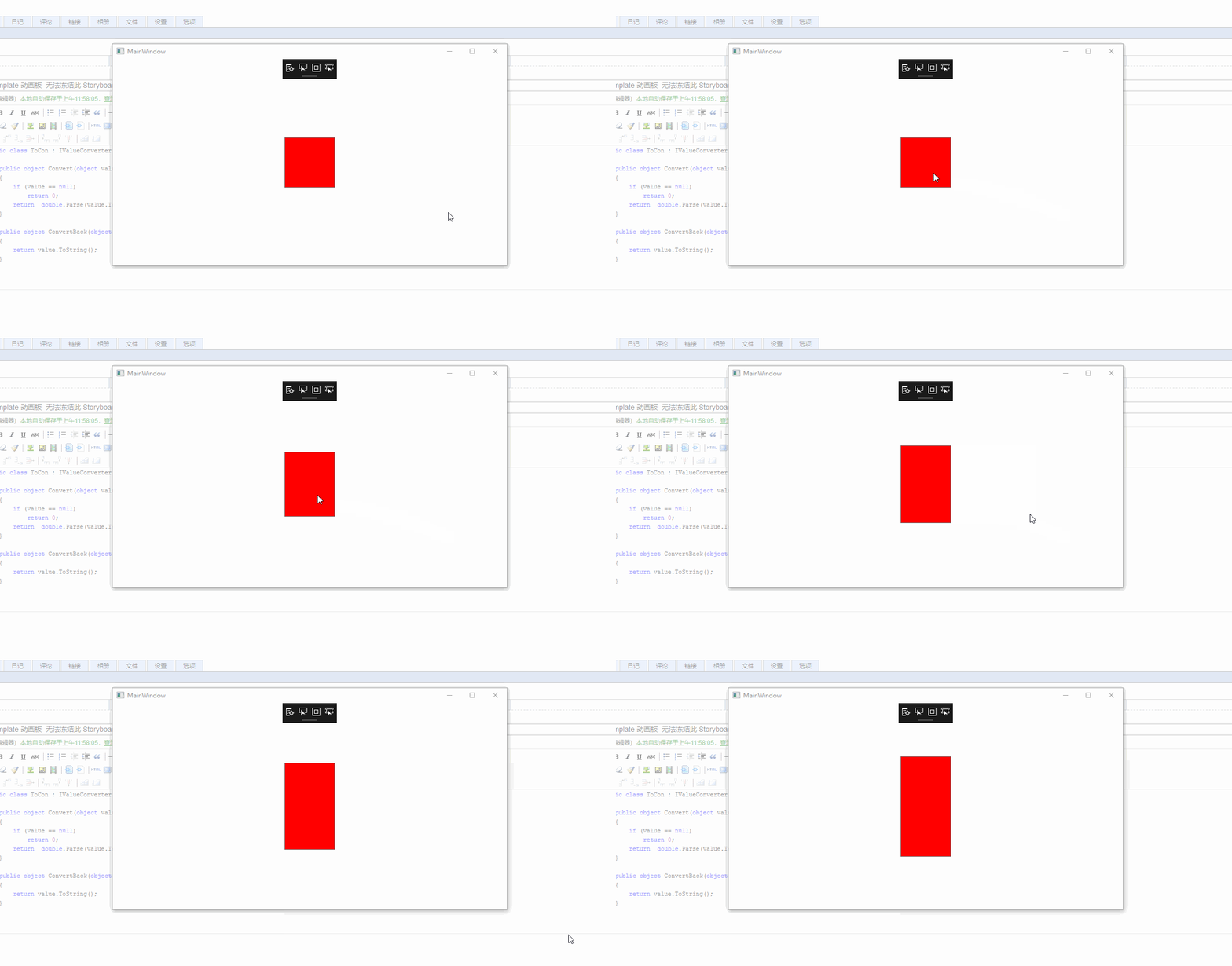
WPF 内部Template 动画板 无法冻结此 Storyboard 时间线树供跨线程使用的更多相关文章
- WPF性能调试系列 – 应用程序时间线
WPF性能调试系列文章: WPF页面渲染优化:Application Timeline WPF页面业务加载优化:Ants Performance Profiler WPF内存优化:Ants Memor ...
- WPF的消息机制(二)- WPF内部的5个窗口之隐藏消息窗口
目录 WPF的消息机制(一)-让应用程序动起来 WPF的消息机制(二)-WPF内部的5个窗口 (1)隐藏消息窗口 (2)处理激活和关闭的消息的窗口和系统资源通知窗口 (3)用于用户交互的可见窗口 (4 ...
- WPF 内部的5个窗口之 MediaContextNotificationWindow
原文:WPF 内部的5个窗口之 MediaContextNotificationWindow 本文告诉大家在 WPF 内部的5个窗口的 MediaContextNotificationWindow 是 ...
- WPF的消息机制(三)- WPF内部的5个窗口之处理激活和关闭的消息窗口以及系统资源通知窗口
原文:WPF的消息机制(三)- WPF内部的5个窗口之处理激活和关闭的消息窗口以及系统资源通知窗口 版权声明:本文为博主原创文章,未经博主允许不得转载. https://blog.csdn.net/p ...
- WPF与缓动(三) 指数缓动
原文:WPF与缓动(三) 指数缓动 WPF与缓动(三) 指数缓动 ...
- WPF与缓动(四) 弧形缓动
原文:WPF与缓动(四) 弧形缓动 WPF与缓动(四) 弧形缓动 ...
- WPF与缓动(二) 正弦与余弦缓动
原文:WPF与缓动(二) 正弦与余弦缓动 WPF与缓动(二) 正弦与余弦缓动 ...
- WPF与缓动(一) N次缓动
原文:WPF与缓动(一) N次缓动 WPF与缓动(一) N次缓动 ...
- 【C#】wpf添加gif动图支持
原文:[C#]wpf添加gif动图支持 1.nuget里下载XamlAnimatedGif包,然后安装. 2.添加XamlAnimatedGif包的命名空间:xmlns:gif="https ...
随机推荐
- [原创]Spring Boot + Mybatis 简易使用指南(一)基础环境搭建
前言 作者: Ant QQ:517377100 相对于使用JdbcTemplate,Mybatis可自动建立pojo类型与数据库列的映射关系,数据库访问层的开发简单了许多 所有数据库访问操作,均封装在 ...
- CB XE7 C11 64位编译器 成员变量初始化
看到了C++11,看到了XE7的64位,想实现下面方便的类成员初始化,失望. 一.64位用法 clang3,64位编译器,不支持中文变量名,编写代码提示没有32位快,风格简单不用写单独的赋值语句函数, ...
- PS7.0快捷键和使用技巧
选择工具:矩形.椭圆选框工具 [M]裁剪工具 [C]移动工具 [V]套索.多边形套索.磁性套索 [L]魔棒工具 [W] 编辑工具:修复画笔.修补工具 [J]画笔.铅笔工具 [B]橡皮图章.图案图章 [ ...
- c# 之 new 关键字
1.实例化变量 DataTable dt = new DataTable(); 2.调用构造函数 class CoOrds { public int x, y; // 实例构造函数(默认构造函数) ...
- acoj-1735 输油管道 【中位数】
题目链接:http://acdream.info/problem?pid=1735 输油管道 Time Limit: 2000/1000MS (Java/Others) Memory Limit: 2 ...
- SqlMapConfig配置文件中的typeAliases标签用于自定义别名
1.mybatis支持别名: 别名 映射的类型 _byte byte _long long _short short _int int _integer int _double double _flo ...
- ResourceUtils读取properties文件
注意: properties文件要放在classPath下面,也就是与src下. path.properties(在properties文件中\代表着没有完,下行同本行是一个内容) perfectMa ...
- iOS 越狱Keynote
[iOS Keynote] 1.2009年暴露的IKee病毒是iOS上公开的第一款蠕虫病毒,它会感染那些已经越狱并且安装了SSH,但是又没有更改其默认root密码"alpine"的 ...
- Servlet.service() for servlet UserServlet threw exception java.lang.NullPointerException 空指针异常
错误付现: 严重: Servlet.service() for servlet UserServlet threw exceptionjava.lang.NullPointerException at ...
- metasploitable实践
使用Fimap和metasploitable2文件包含漏洞测试 fimap 首先查看msf已经存在的漏洞: root@kali:~# fimap -u 'http://192.168.136.130/ ...