
ansible 循环与条件判断when
普通循环
with_itemes  变量组

  { item }  循环变量
示例
- name: 覆盖配置文件

      copy: src=/root/{{ item }} dest=/root/test/{{ item }}

      with_items:

      - a.txt

      - b.txt

      - c.txt

      - d.txt

      - shell   (目录)
##会依次将abcd 四个txt文件和 shell目录拷贝到目标文件夹下
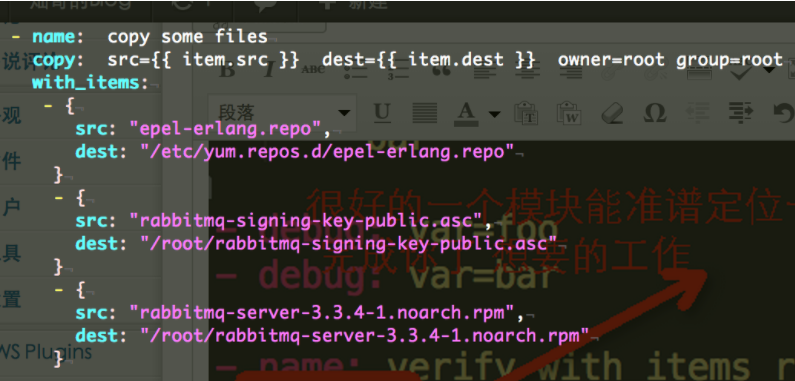
引用sc的一个示例:
字典循环
#添加用户

- name: add users

  user: name={{ item }} state=present groups=wheel

  with_items:

  - testuser1

  - testuser2

- name: add users

  user: name={{ item.name }} state=present groups={{ item.groups }}

  with_items:

  - { name: 'testuser1', groups: 'test1' }

  - { name: 'testuser2', groups: 'test2' }
示例二
users:

  alice:

    name: Alice Appleworth

    telephone: 123-456-7890

  bob:              #key

    name: Bob Bananarama    #value1

    telephone: 987-654-3210   #value2

tasks:

  - name: Print records

    debug: msg="User {{ item.key }} is {{ item.value.name }} ({{ item.value.telephone }})"

    with_dict: "{{ users }}"
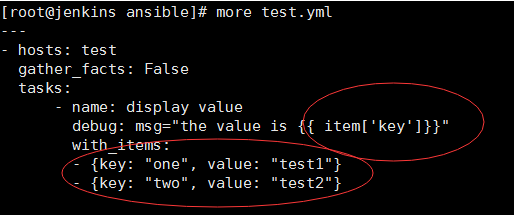
示例三
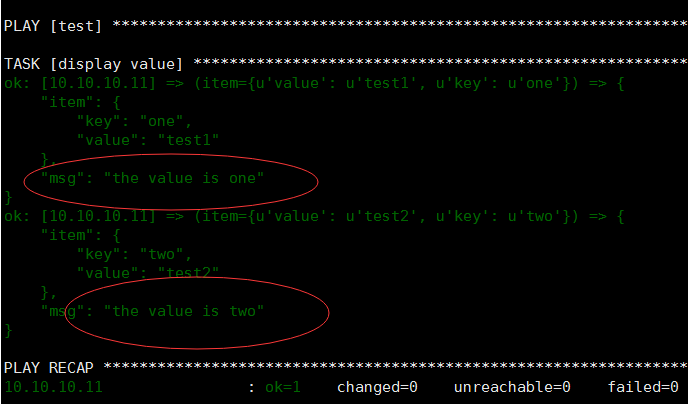
执行结果
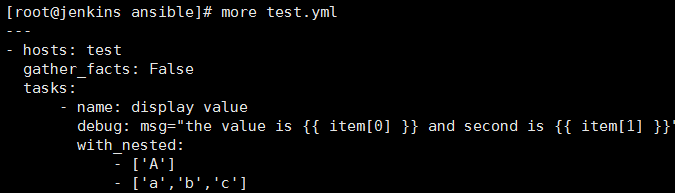
嵌套循环
---

- name: test

  hosts: test

  tasks:

    - name: test

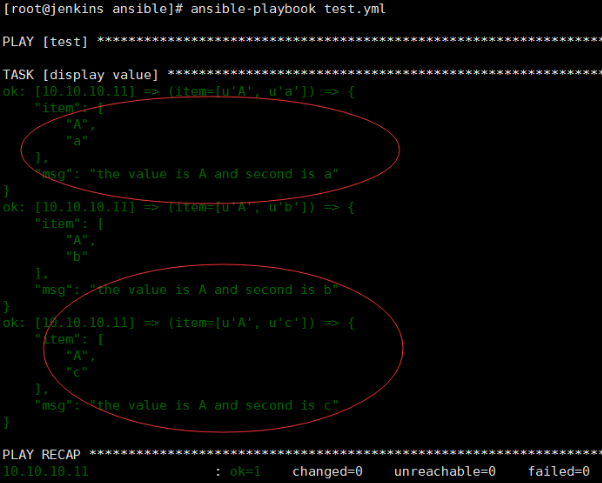
      command: "echo name={{ item[0] }} priv={{ item[1] }}"

      with_nested:

        - [ 'alice', 'bob' ]

        - [ 'clientdb', 'employeedb', 'providerdb' ]

##item[0]是循环的第一个列表的值['alice','bob'];item[1]是第二个列表的值。
打印结果:
文件循环
inventory循环(with_inventory_hostnames)
# show all the hosts in the inventory

- debug: msg={{ item }}

  with_inventory_hostnames: all

# show all the hosts matching the pattern, ie all but the group www

- debug: msg={{ item }}

  with_inventory_hostnames: all:!www
with_fileglob:
---

- hosts: test

  gather_facts: False

  tasks:

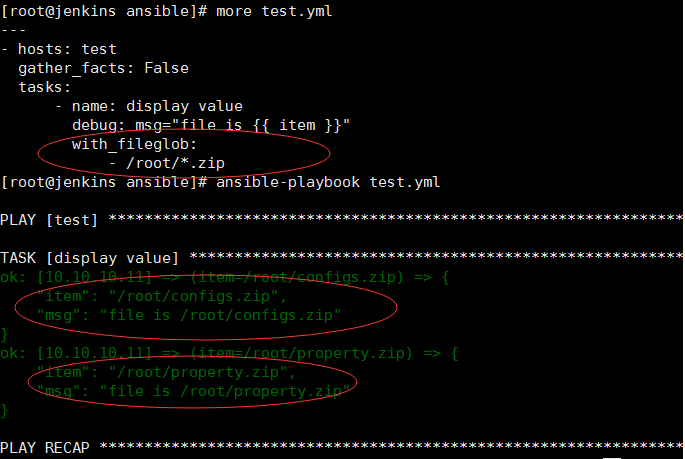
      - name: display value    ##列举某个目录下的某些文件

        debug: msg="file is {{ item }}"

        with_fileglob:

            - /root/*.zip
条件判断when与register变量
register官网示例


register 可接受多个task的结果作为变量临时存储,示例:
---

- hosts: test

  gather_facts: False

  tasks:

      - name: display value

        shell: "{{ item }}"

        with_items:

            - hostname

            - uname

        register: ret

      - name: display loops

        debug: msg="{% for i in ret.results %} {{ i.stdout }} {% endfor %}"
执行结果:

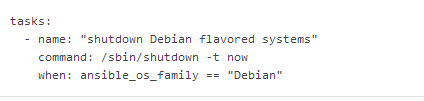
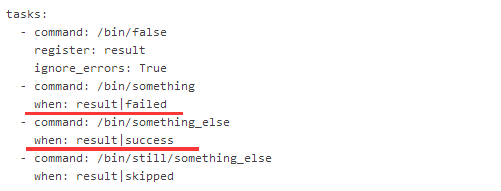
when 官网示例
其它示例:
判断分支是否在git分支列表,如果不在,运行某个脚本
- command: chdir=/path/to/project  git branch

  register: git_branches

- command: /path/to/project/git-clean.sh

  when: "('release-v2' no in git_branches.stdout)"
判断某个文件是否存在
- stat: path=/etc/hosts

   register: host_file

- copy: src=/path/to/local/file  dest=/path/to/remote/file

   when: host_file.stat.exists == false
其它示例

changed_when && failed_when
对命令运行结果进行判断。
示例
比如判断某个软件是否安装成功

- name: install git

   yum: name=git state=latest

   register: git_install

   changed_when: " 'nothing to install or upgrade' not in git_install.stdout"    #表示输出的结果中没有 notthing to install ..才返回change结果
ignore_errors: true 屏蔽错误信息
ansible 循环与条件判断when的更多相关文章
- python Django教程 之模板渲染、循环、条件判断、常用的标签、过滤器
python3.5 manage.py runserver python Django教程 之模板渲染.循环.条件判断.常用的标签.过滤器 一.Django模板渲染模板 1. 创建一个 zqxt_tm ...
- Ansible系列(六):循环和条件判断
本文目录:1. 循环 1.1 with_items迭代列表 1.2 with_dict迭代字典项 1.3 with_fileglob迭代文件 1.4 with_lines迭代行 1.5 with_ne ...
- PHP和JS在循环、条件判断中的不同之处
一.条件判断: php中算 false 的情况 1. boolean:false 2. 整形:0 3.浮点型:0 4.字符串:"" "0"(其他都对) 5.空 ...
- Java 控制语句:循环、条件判断
基础很重要,基础很重要,基础很重要.重要的事情说三遍,. 程序设计中的控制语句主要有三种:顺序.分支和循环.我们每天写的代码,除了业务相关,里面会包含大量的控制语句.但是控制语句的基本使用,是否有些坑 ...
- Ansible Playbook 使用条件判断语句
先介绍一下 gather_facts 参数,该参数用于指定在执行任务前,是否先执行 setup 模块获取主机相关信息,以便给后面的任务使用 [root@localhost ~]# ansible 19 ...
- Go语言之循环与条件判断
一.for循环 Go 语言中没有 while 循环,只有一个 for 循环 for 变量初始化;条件;变量自增/自减 { 循环体内容 } 1.基本使用 for i := 0; i < 10; i ...
- ansible实践3-playbook条件判断
--- - hosts: testhost user: root gather_facts: True tasks: - name: use when shell: t ...
- 求1+2+…+n,要求不能使用乘除法、for、while、if、else、s witch、case 等关键字以及条件判断语句(A?B:C)和不用循环/goto/递归输出1~100的10种写法
来源:据说是某一年某个公司的面试题 题目:求1+2+…+n, 要求不能使用乘除法.for.while.if.else.s witch.case 等关键字以及条件判断语句(A?B:C) 分析:这题本来很 ...
- shell条件判断与流程控制
一 条件判断式语句 1.按文件类型进行判断 测试类型 作用 -b 文件 判断文件是否存在,并且是否为块设备文件(是块设备文件为真) -c 文件 判断文件是否存在,并且是否为字符设备文件(是字符设备设备 ...
随机推荐
- Github以及推广
非常抱歉,我忘记在这个博客上发一遍了,之前是我同学代发,而我忘记把链接给发过来... Github: http://www.cnblogs.com/case1/p/5060015.html 推广: h ...
- “数学口袋精灵”App的第三个Sprint计划----开发日记(第十一天12.17)
项目进度: 基本完成一个小游戏,游戏具有:随机产生算式,判断对错功能.通过轻快的背景音乐,音效,给玩家提供一个良好的氛围. 任务分配: 冯美欣:设计"数学口袋精灵"App图标.整 ...
- zookeeper安装(Linux)
安装环境: Linux:centos6.4 Jdk:1.7以上版本 Zookeeper是java开发的可以运行在windows.linux环境.需要先安装jdk. 安装步骤: 第一步:安装jdk 第二 ...
- 传参在mybatis的sql映射文件中正确获取
1.单个参数: 非自定义对象 传参:getStuById(Integer id): 取值:#{id} 单个基本类型参数,随便取值都行:#{ok} 对象: 传参:saveStudent(Student ...
- 使用Java+Kotlin双语言的LeetCode刷题之路(三)
BasedLeetCode LeetCode learning records based on Java,Kotlin,Python...Github 地址 序号对应 LeetCode 中题目序号 ...
- vue props 用法(转载)
前面的话 组件接受的选项大部分与Vue实例一样,而选项props是组件中非常重要的一个选项.在 Vue 中,父子组件的关系可以总结为 props down, events up.父组件通过 props ...
- java.lang.Exception: No tests found matching Method tes(com.bw.test.Testrefiect) from org.junit.vintage.engine.descriptor.RunnerRequest@3bfdc050 at org.junit.internal.requests.FilterRequest.getRunner
junit 方法 没有加上注解 @Test java.lang.Exception: No tests found matching Method tes(com.bw.test.Testre ...
- MyBatis 集合操作语法范例:配合SQL的in关键字
Java语法: private String[] tagIds; MyBatis语法 <delete id="deleteByIds" parameterType=" ...
- WebLogic: 内存溢出
每次部署完项目,重启Weblogic服务,总是遇到java.lang.OutOfMemoryError: PermGen space,其实物理内存也是够的,当时的解决方法就是多重启几次Weblogic ...
- Win10删除微软拼音输入法的方法
1. 控制面板 2.更换输入法 选择添加语言 添加上英文输入法之后 进行上下移动 然后删除中文输入法即可 需要在英文的语言栏里面添加-选项-增加输入法 然后删除中文即可.