
04-体验一下apache组织封装的BeanUtil工具包
apache 自己为程序员们封装了一个专门用于处理的工具类,其功能有(数据类型会自动转成与JavaBean相关的)
map转javabean
javabean转map
javabean对象复制
获取javabean对象属性值
设置javabean对象属性值…………
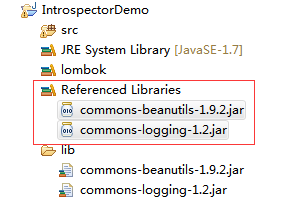
两个相关jar包文件 Build Path到项目当中去
commons-beanutils-1.9.2.jar
commons-logging-1.2.jar
1.将Map转换成JavaBean对象
/**

     * 刘诗华

     * @param args

     * @throws Exception

     */

    public static void main(String[] args) throws Exception {

        Map<String, Object> m=new HashMap<String, Object>();

        m.put("id", "28");

        m.put("userName", "刘诗华");

        m.put("password", "123456");

        User user=new User();

        //BeanUtils.copyProperties(dest, orig);  dest:目标    orig:源

        BeanUtils.copyProperties(user,m);

        System.out.println(user);  //结果:User(id=28, userName=刘诗华, password=123456)

        Integer id = user.getId(); //我们设置给Map集合的时候,给的是一个字符串,BeanUtils工具自动帮我们转换成包装类Integer类型

        System.out.println(id);

    }
2.JavaBean对象复制数据
/**

     * 刘诗华

     * @param args

     * @throws Exception

     */

    public static void main(String[] args) throws Exception {

        User orig=new User(28,"罗小胖","456456");        //源对象

        User dest=new User();                        //目标对象  空对象

        BeanUtils.copyProperties(dest,orig);        //JavaBean对象复制数据

        System.out.println(dest);

        //User(id=28, userName=罗小胖, password=456456)

    }
3.设置Date时间格式转换
/**

     * 申请注册时间格式

     * @param args

     * @throws Exception

     */

    public static void main(String[] args) throws Exception {

        //源数据

        Map<String, Object> m=new HashMap<String, Object>();

        m.put("id", "");

        m.put("userName", "刘诗华");

        m.put("password", "123456");

        m.put("hireDate", "2018/11/19");

        //目标数据

        User user=new User();

        //时间数据格式对象

        DateConverter converter=new DateConverter();

        //converter.setPattern("yyyy-MM-dd HH:mm:ss"); //单个数据格式

        //一组时间格式

        String[] pattern=new String[3];

        pattern[0]="yyyy-MM-dd HH:mm:ss";

        pattern[1]="yyyy-MM-dd";

        pattern[2]="yyyy/MM/dd";

        converter.setPatterns(pattern);

        //如果Id上面没有数据,则设置为null

        IntegerConverter integerConverter=new IntegerConverter(null);

        ConvertUtils.register(integerConverter, Integer.class);

        //注册Date时间对象格式

        ConvertUtils.register(converter, Date.class);

        //开始复制数据信息

        BeanUtils.copyProperties(user, m);

        System.out.println(user);

        //User(id=null, userName=刘诗华, password=123456, hireDate=Mon Nov 19 00:00:00 CST 2018)

    }
04-体验一下apache组织封装的BeanUtil工具包的更多相关文章
- 如何在Ubuntu 18.04上安装Apache Web服务器
一. apt库安装 1.在终端输入更新检查命令,sudo apt-get update 2. 在更新完成后(如果不想检查更新,也可直接输入此步)输入:sudo apt-get install apac ...
- Log4J是Apache组织的开源一个开源项目,通过Log4J,可以指定日志信息输出的目的地,如console、file等。Log4J采用日志级别机制,请按照输出级别由低到高的顺序写出日志输出级别。
Log4J是Apache组织的开源一个开源项目,通过Log4J,可以指定日志信息输出的目的地,如console.file等.Log4J采用日志级别机制,请按照输出级别由低到高的顺序写出日志输出级别. ...
- Ubuntu 18.04安装配置Apache Ant
Ubuntu 18.04安装配置Apache Ant 文章目录 Ubuntu 18.04安装配置Apache Ant 下载 执行以下命令 `/etc/profile`中配置环境变量 载入配置 测试 执 ...
- 如何在Ubuntu 16.04上安装Apache Web服务器
转载自:https://www.howtoing.com/how-to-install-the-apache-web-server-on-ubuntu-16-04 介绍 Apache HTTP服务器是 ...
- Ubuntu 16.04 集成安装Apache+PHP+Kerberos+LDAP+phpLDAPadmin
一.安装Apache 1.1.安装Apache apt-get update apt-get install apache2 过程如下: root@duke01:~# apt-get update命中 ...
- 百度云的ubuntu16.04.1部署Apache服务器+Django项目
使用Apache和mod_wsgi部署Django 是一种久经考验的将Django投入生产的方法. mod_wsgi是一个Apache模块,可以托管任何Python WSGI应用程序,包括Django ...
- Ubuntu 18.04上安装Apache, MySQL, PHP, LAMP
1.安装 Apache $ sudo apt update && sudo apt install apache2 中间会遇到停顿询问是否继续, 输入 y 然后 回车. 2.测试 Ap ...
- Ubuntu20.04 体验和美化
Ubuntu20.04美化和体验 windows用久了,换下系统也挺好的.ubuntu20.04优化后,用起来蛮舒服的. 系统配置 1.修改软件源 Ubuntu默认是国外的软件源, 我们可以手动切换为 ...
- Ubuntu12.04 下修改Apache端口号
1:$sudo vim /etc/apache2/ports.conf NameVirtualHost *:80Listen 8090 #将此行的80修改成8090 2:sudo vim /etc/a ...
随机推荐
- cout关闭输出缓冲,调试用
cout.setf(std::ios::unitbuf);
- django中的ORM介绍和字段及字段参数
Object Relational Mapping(ORM) ORM介绍 ORM概念 对象关系映射(Object Relational Mapping,简称ORM)模式是一种为了解决面向对象与关系数据 ...
- Python _Mix*9
1. 函数 函数是对功能的封装 语法: def 函数名(形参列表): 函数体(代码块) 代码块中有可能包含return 调用: 函数名(实参列表) def mix(a,b): #def 函数名(a和b ...
- java项目改为web项目
1.进入项目目录,可看到.project文件,打开. 2.找到<natures...</natures代码段. 3.在第2步的代码段中加入如下标签内容并保存: <nature& ...
- Android stdio 报错 error invoking main method
打开Android stdio失败 报错:error invoking main method 想想前一天做了什么事?? 昨天把企图把Android Stdio文件包移盘,但是中途截止了,也就是说移动 ...
- 剑指Offer 27. 字符串的排列 (字符串)
题目描述 输入一个字符串,按字典序打印出该字符串中字符的所有排列.例如输入字符串abc,则打印出由字符a,b,c所能排列出来的所有字符串abc,acb,bac,bca,cab和cba. 输入描述: 输 ...
- canvas 绘画随机点
直接看图吧: 这样的随机点,是小圆点组成的,然后一直在动,记录一下,万一以后要用到呢: canvas的具体设置我就不写了,另一篇文档里有: drawRandomDot () { let leftCan ...
- 无法新建EXCLE
Regedit 进入注册表,找到HKEY_CLASSES_ROOT>.xls和.xlsx的ShellNew的值设置为:C:\Windows\ShellNew\EXCEL12.XLSX
- 深入理解synchronized方法同步的是方法还是对象?
一.运用synchronized关键字 首先我们来看看一个多线程中线程不安全的列子 代码如下: 共享数据类: public class NotSynchronizated extends Thread ...
- Python全栈之路----文件处理
文件操作分为读.写.修改,我们先从读开始 f = open(file = 'D:/工作日常/ABCD.txt',mode = 'r',encoding = 'utf-8') #file 是文件路径 m ...