
CSS 按钮特效(二)
1 案例
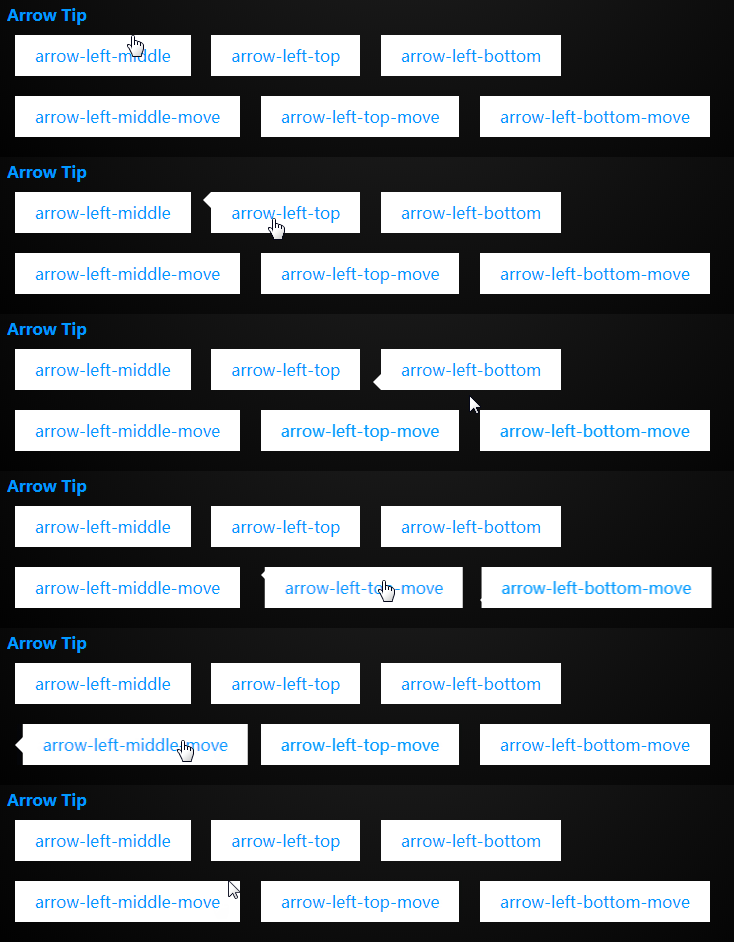
2. HTML 代码
<div class="arrow arrow-left-middle">

    arrow-left-middle

</div>

<div class="arrow arrow-left-top">

    arrow-left-top

</div>

<div class="arrow arrow-left-bottom">

    arrow-left-bottom

</div>

<div class="arrow arrow-left-middle-move">

    arrow-left-middle-move

</div>

<div class="arrow arrow-left-top-move">

    arrow-left-top-move

</div>

<div class="arrow arrow-left-bottom-move">

    arrow-left-bottom-move

</div>
3. CSS 代码
.arrow{

    box-sizing: content-box;

    border:;

    margin:10px 0.5em;

    cursor: pointer;

    box-sizing: border-box;

    display: inline-block;

    color: #09f;

    background: white;

    padding: 10px 20px;

    text-align: center;

    /* 设置相对定位 */

    position: relative;

    transition: all 0.3s;

    /* 设置层次 会被before after在上面 */

    z-index:;

}

/* 设置位置和border的颜色-需要与 4(4面) * 3(上中下) * 2(移动) = 24 */

.arrow-left-top:before,

.arrow-left-top-move:before,

.arrow-left-middle:before,

.arrow-left-middle-move:before,

.arrow-left-bottom:before,

.arrow-left-bottom-move:before{

    transition: all 0.3s;

    content: '';

    border-style: solid;

    width:;

    height:;

    display: block;

    position: absolute;

    margin:auto;

}

.arrow-left-top:before,

.arrow-left-top-move:before,

.arrow-left-middle:before,

.arrow-left-middle-move:before,

.arrow-left-bottom:before,

.arrow-left-bottom-move:before{

    border-width:0.5em 0.5em 0.5em 0;

    border-color:transparent white transparent transparent;

}

/* 中间 */

.arrow-left-middle-move:before,

.arrow-left-middle:before{

    /* top 与 bottom 都为0 就会在中间 margin:auto; */

    top:;

    bottom:;

    left:;

}

/*顶部*/

.arrow-left-top:before,

.arrow-left-top-move:before{

    top:;

    left:;

}

/*底部*/

.arrow-left-bottom:before,

.arrow-left-bottom-move:before{

    bottom:;

    left:;

}

.arrow-left-middle-move:hover:before,

.arrow-left-top-move:hover:before,

.arrow-left-bottom-move:hover:before,

.arrow-left-middle:hover:before,

.arrow-right-middle-move:hover,

.arrow-left-top:hover:before,

.arrow-right-top-move:hover,

.arrow-right-bottom-move:hover,

.arrow-left-bottom:hover:before{

    transform: translateX(-0.5em);

}

.arrow-right-middle-move:hover:before,

.arrow-right-top-move:hover:before,

.arrow-right-bottom-move:hover:before,

.arrow-right-middle:hover:before,

.arrow-left-middle-move:hover,

.arrow-right-top:hover:before,

.arrow-left-top-move:hover,

.arrow-left-bottom-move:hover,

.arrow-right-bottom:hover:before{

    transform: translateX(0.5em);

}
4 .练习
目前只是做了左边的效果。按照这种效果总共有24个。可以把css的类进行拆分并且把其他3面的写出来
CSS 按钮特效(二)的更多相关文章
- css 按钮悬停效霓虹灯特效
css 按钮悬停效霓虹灯特效 <!DOCTYPE html> <html lang="en"> <head> <meta charset=
- js,jquery,css,html5特效
包含js,jquery,css,html5特效,源代码 本文地址:http://www.cnblogs.com/roucheng/p/texiao.html 2017新年快乐特效 jQuery最新最全 ...
- ybutton 高端大气上档次华丽的按钮特效
小菜偶然在某网站中看到一款非常华丽的按钮特效,感觉十分有必要抄袭下来,以备日后使用. 简单描述一下按钮的效果:鼠标移到按钮上的时候,会出现灯光闪过的效果,非常的高端. 但遗憾的,这么牛逼的效果,仅仅兼 ...
- 10个超漂亮的CSS 3D特效
10个超漂亮的CSS 3D特效 一.总结 一句话总结: 后面有空得好好练一练,也可以作为录课素材 二.10个超漂亮的CSS 3D特效 转自或参考:10个超漂亮的CSS 3D特效https://blog ...
- CSS 按钮
总结有关按钮的各种样式 ㈠基本按钮样式 看一下没有进行css样式设计时按钮的样子与进行样式设计的按钮样子 <!DOCTYPE html> <html> <head> ...
- 7款外观迷人的HTML5/CSS3 3D特效按钮特效
下面我整理了7款外观都十分迷人的HTML5/CSS3 3D按钮特效,有几个还挺实用的,分享给大家. 1.CSS3超酷3D弹性按钮 按钮实现非常简单 之前我们分享过几款不错的CSS3 3D立体按钮,比如 ...
- 《基于JQuery和CSS的特效整理》系列分享专栏
<基于JQuery和CSS的特效整理>已整理成PDF文档,点击可直接下载至本地查阅https://www.webfalse.com/read/201724.html 文章 一款基于jQue ...
- 漂亮的CSS按钮样式集以及在线生成工具
以前我们制作一样带带阴影.圆角或3D感的按钮都需要用图片来制作,但CSS3出来后就可以不用图片了,由于是代码写的按钮样式,在Retina上浏览依然清晰美观.虽然不错,但我们写一个阴影+质感的按钮还是挺 ...
- 基于jQuery点击加载动画按钮特效
分享一款基于jQuery点击加载动画按钮特效.这是一款基于jQuery+CSS3实现的鼠标点击按钮加载动画特效代码.效果图如下: 在线预览 源码下载 实现的代码. html代码: <div ...
随机推荐
- echarts模拟highcharts实现折线图的虚实转换
多的不说直接上代码: <html><html lang="en"><head> <meta charset="utf-8&quo ...
- linux 硬件中断调节
什么是中断 中断interrupts是指硬件主动的来告诉CPU去做某些事情.比如网卡收到数据后可能主动的告诉CPU来处理自己接受到的数据,键盘有了按键输入后会主动告知CPU来读取输入. 硬件主动的打扰 ...
- 上下文( Contexts )
在 Indy9 的服务器中,链接特定(connection specific)的数据被作为线程类的一部分被存储. 实现这个要不然通过使用 thread.data 属性要不然通过继承对应的 thread ...
- 当遇到Mac的Excel或者Word老是重复崩溃的时候
打开Number,新建文件然后导出为Excel.之后再用Excel打开,一切都OK了.
- python批量删除文件
敲代码測试时总会碰到要删除日志目录下的日志或者删除一些历史文件.每次都会生成,再測试的时候为了查找错误原因方便总是要在測试前删除这些文件.手动删除比較麻烦.所以写一个批量删除脚本 import os ...
- mysql查看所有存储过程,函数,视图,触发器,表
查询数据库中的存储过程和函数 方法一: select `name` from mysql.proc where db = 'your_db_name' and `type` = 'PROCEDURE' ...
- JavaScriptSerializer 序列号datatime时少了8小时
有人说主要的因素是在于JSON格式不直接支持日期和时间. 简单一点处理办法是ToLocalTime()一下:dt = dt.ToLocalTime(); 参考http://blog.csdn.net/ ...
- 【bzoj4196】[Noi2015]软件包管理器
裸的树链剖分. 对于安装 查询和维护到根路径 对于卸载 查询和维护子树信息 一开始线段树add[]标记要全赋值为-1 #include<algorithm> #include<ios ...
- spi和I2c的速率
I2C协议v2.1规定了100K,400K和3.4M三种速率(bps).SPI是一种事实标准,由Motorola开发,并没有一个官方标准.已知的有的器件SPI已达到50Mbps.具体到产品中SPI的速 ...
- html5 canvas程序演示--P1197 [JSOI2008]星球大战
html5 canvas程序演示--P1197 [JSOI2008]星球大战 <!doctype html> <html> <head> <meta char ...