
Code-NFine:下来框和复选框
| ylbtech-Code-NFine:下来框和复选框 |
| 1.返回顶部 |
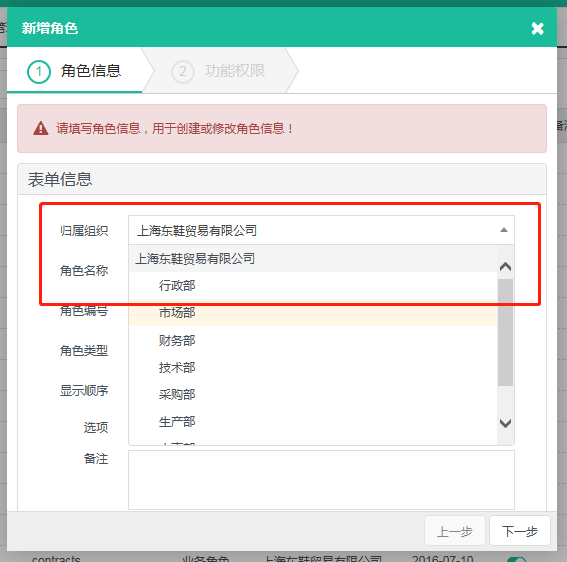
 $("#F_OrganizeId").bindSelect({

            url: "/SystemManage/Organize/GetTreeSelectJson",

        });
-
<select id="F_OrganizeId" name="F_OrganizeId" class="form-control required">

</select>
[HttpGet]

        [HandlerAjaxOnly]

        public ActionResult GetTreeSelectJson()

        {

            var data = organizeApp.GetList();

            var treeList = new List<TreeSelectModel>();

            foreach (OrganizeEntity item in data)

            {

                TreeSelectModel treeModel = new TreeSelectModel();

                treeModel.id = item.F_Id;

                treeModel.text = item.F_FullName;

                treeModel.parentId = item.F_ParentId;

                treeModel.data = item;

                treeList.Add(treeModel);

            }

            return Content(treeList.TreeSelectJson());

        }
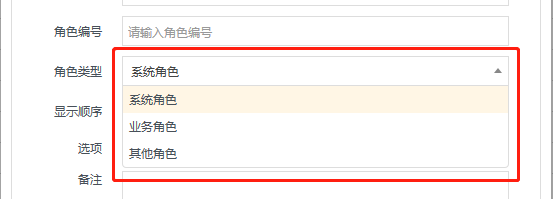
 $("#F_Type").bindSelect({

            url: "/SystemManage/ItemsData/GetSelectJson",

            param: { enCode: "RoleType" }

        });
-
<select id="F_Type" name="F_Type" class="form-control required">

</select>
[HttpGet]

        [HandlerAjaxOnly]

        public ActionResult GetSelectJson(string enCode)

        {

            var data = itemsDetailApp.GetItemList(enCode);

            List<object> list = new List<object>();

            foreach (ItemsDetailEntity item in data)

            {

                list.Add(new { id = item.F_ItemCode, text = item.F_ItemName });

            }

            return Content(list.ToJson());

        }
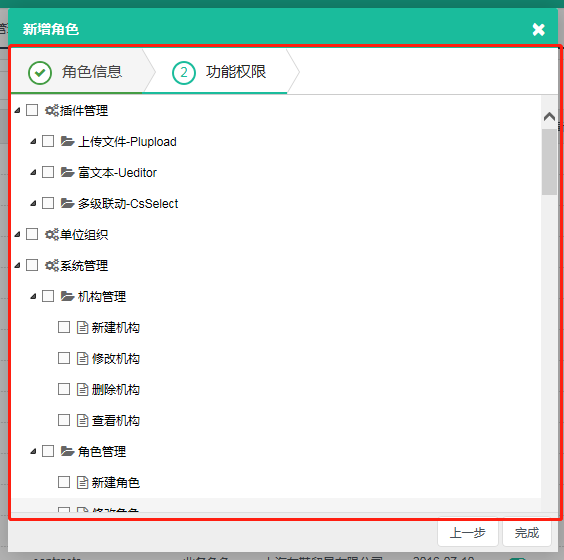
$("#permissionTree").treeview({

            height: 444,

            showcheck: true,

            url: "/SystemManage/RoleAuthorize/GetPermissionTree",

            param: { roleId: keyValue }

        });
-
<div id="permissionTree"></div>
public ActionResult GetPermissionTree(string roleId)

        {

            var moduledata = moduleApp.GetList();

            var buttondata = moduleButtonApp.GetList();

            var authorizedata = new List<RoleAuthorizeEntity>();

            if (!string.IsNullOrEmpty(roleId))

            {

                authorizedata = roleAuthorizeApp.GetList(roleId);

            }

            var treeList = new List<TreeViewModel>();

            foreach (ModuleEntity item in moduledata)

            {

                TreeViewModel tree = new TreeViewModel();

                bool hasChildren = moduledata.Count(t => t.F_ParentId == item.F_Id) ==  ? false : true;

                tree.id = item.F_Id;

                tree.text = item.F_FullName;

                tree.value = item.F_EnCode;

                tree.parentId = item.F_ParentId;

                tree.isexpand = true;

                tree.complete = true;

                tree.showcheck = true;

                tree.checkstate = authorizedata.Count(t => t.F_ItemId == item.F_Id);

                tree.hasChildren = true;

                tree.img = item.F_Icon == "" ? "" : item.F_Icon;

                treeList.Add(tree);

            }

            foreach (ModuleButtonEntity item in buttondata)

            {

                TreeViewModel tree = new TreeViewModel();

                bool hasChildren = buttondata.Count(t => t.F_ParentId == item.F_Id) ==  ? false : true;

                tree.id = item.F_Id;

                tree.text = item.F_FullName;

                tree.value = item.F_EnCode;

                tree.parentId = item.F_ParentId == "" ? item.F_ModuleId : item.F_ParentId;

                tree.isexpand = true;

                tree.complete = true;

                tree.showcheck = true;

                tree.checkstate = authorizedata.Count(t => t.F_ItemId == item.F_Id);

                tree.hasChildren = hasChildren;

                tree.img = item.F_Icon == "" ? "" : item.F_Icon;

                treeList.Add(tree);

            }

            return Content(treeList.TreeViewJson());

        }
| 2.返回顶部 |
| 3.返回顶部 |
| 4.返回顶部 |
| 5.返回顶部 |
| 6.返回顶部 |
 |
作者:ylbtech 出处:http://ylbtech.cnblogs.com/ 本文版权归作者和博客园共有,欢迎转载,但未经作者同意必须保留此段声明,且在文章页面明显位置给出原文连接,否则保留追究法律责任的权利。 |
Code-NFine:下来框和复选框的更多相关文章
- Selenium2+python自动化19-单选框和复选框(radiobox、checkbox)
本篇主要介绍单选框和复选框的操作 一.认识单选框和复选框 1.先认清楚单选框和复选框长什么样 2.各位小伙伴看清楚哦,上面的单选框是圆的:下图复选框是方的,这个是业界的标准,要是开发小伙伴把图标弄错了 ...
- CSS学习笔记三:自定义单选框,复选框,开关
一点一点学习CCS,这次学习了如何自定义单选框,复选框以及开关. 一.单选框 1.先写好body里面的样式,先写几个框 <body> <div class="radio-1 ...
- 自动化测试-15.selenium单选框与复选框状态判断
本篇主要介绍单选框和复选框的操作 一.认识单选框和复选框 1.先认清楚单选框和复选框长什么样 2.各位小伙伴看清楚哦,上面的单选框是圆的:下图复选框是方的,这个是业界的标准,要是开发小伙伴把图标弄错了 ...
- 2.12 单选框和复选框(radiobox、checkbox)
2.12 单选框和复选框(radiobox.checkbox) 本篇主要介绍单选框和复选框的操作一.认识单选框和复选框 1.先认清楚单选框和复选框长什么样 2.各位小伙伴看清楚哦,上面的单选框是 ...
- Selenium2学习(十五)-- 单选框和复选框(radiobox、checkbox)
本篇主要介绍单选框和复选框的操作 一.认识单选框和复选框 1.先认清楚单选框和复选框长什么样 2.各位小伙伴看清楚哦,上面的单选框是圆的:下图复选框是方的,这个是业界的标准,要是开发小伙伴把图标弄错了 ...
- Selenium2+python自动化19-单选框和复选框(radiobox、checkbox)【转载】
本篇主要介绍单选框和复选框的操作 一.认识单选框和复选框 1.先认清楚单选框和复选框长什么样 2.各位小伙伴看清楚哦,上面的单选框是圆的:下图复选框是方的,这个是业界的标准,要是开发小伙伴把图标弄错了 ...
- 微信小程序-修改单选框和复选框大小的方法
方法有两种: 一:采用css的zoom属性 zoom缩放会将元素保持在左上角,并且会有毛边,可能会稍稍改变元素原来的形状. 二:采用css3的transform:scale属性 zoom缩放会将元素保 ...
- HTML--使用单选框、复选框,让用户选择
在使用表单设计调查表时,为了减少用户的操作,使用选择框是一个好主意,html中有两种选择框,即单选框和复选框,两者的区别是单选框中的选项用户只能选择一项,而复选框中用户可以任意选择多项,甚至全选.请看 ...
- Selenium3+python自动化 单选框和复选框
一.认识单选框和复选框 1.先认清楚单选框和复选框长什么样 2.各位小伙伴看清楚哦,上面的单选框是圆的:下图复选框是方的,这个是业界的标准,要是开发小伙伴把图标弄错了,可以先抽他了. 二.radio和 ...
随机推荐
- How to Upgrade PIP in Windows
https://datatofish.com/upgrade-pip/ 这个网站写的非常的全
- Linux下&/jobs/fg/bg命令的使用(转)
一.& 这个用在一个命令的最后,可以把这个命令放到后台执行. 二.[Ctrl]+[Z] 可以将一个正在前台执行的命令放到后台,并且暂停. 三.jobs 查看当前有多少在后台运行的命令. 四.f ...
- android EditText禁止复制粘贴完整代码
<!-- 定义基础布局LinearLayout --> <LinearLayout xmlns:android="http://schemas.android.com/ap ...
- python requests接收chunked编码问题-python源码修改
python requests接收chunked编码问题-python源码修改 学习了:https://blog.csdn.net/wangzuxi/article/details/40377467
- 高速清除winXP系统中explorer.exe病毒
关于这个explorer.exe病毒.是眼下xp最为常见的一个病毒,会大量的消耗系统资源,造成电脑特别的卡顿. 1.关闭还原(假设没有,则跳过),为的是防止我们改动后,还原之后又回来了. 2.打开注冊 ...
- angularjs中下拉框select option默认值
1.问题说明: option ng-repeat多空白项 2.解决方案: html: <ion-view hide-nav-bar="true"> <ion-co ...
- Python源代码--整数对象(PyIntObject)的内存池
[背景] 原文链接:http://blog.csdn.net/ordeder/article/details/25343633 Python整数对象是不可变对象,什么意思呢?比如运行例如以下pytho ...
- android-custom-tab-with-viewpager
https://github.com/eltld/android-custom-tab-with-viewpager
- TinyXML:属性
TiXmlAttribute: 代表XML中的属性,TiXmlAttribute中定义了一系列对属性的操作 TiXmlAttribute的友元类: friend class TiXmlAttribut ...
- C++游戏系列2:角色装备武器
很多其它见:C++游戏系列文件夹 知识点:类的组合,A类的数据成员.是B类的对象,或B类的对象.做A类的数据成员 [项目-带武器的游戏角色] 设计一个武器类,其数据成员至少要有武器名.威力,还能够加上 ...