
Code-NFine:下来框和复选框
| ylbtech-Code-NFine:下来框和复选框 |
| 1.返回顶部 |
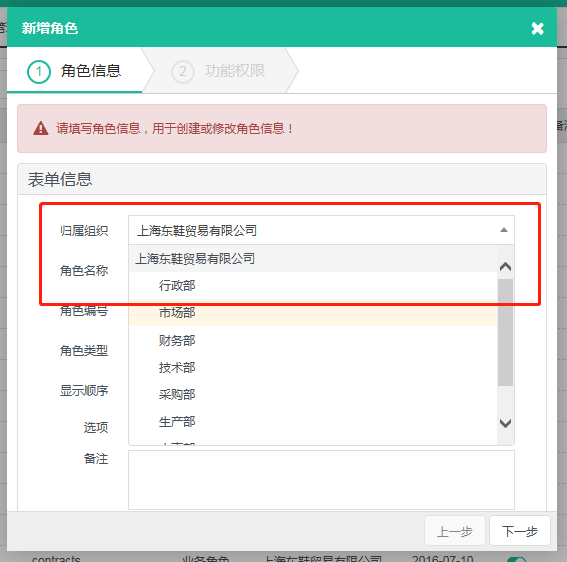
 $("#F_OrganizeId").bindSelect({

            url: "/SystemManage/Organize/GetTreeSelectJson",

        });
-
<select id="F_OrganizeId" name="F_OrganizeId" class="form-control required">

</select>
[HttpGet]

        [HandlerAjaxOnly]

        public ActionResult GetTreeSelectJson()

        {

            var data = organizeApp.GetList();

            var treeList = new List<TreeSelectModel>();

            foreach (OrganizeEntity item in data)

            {

                TreeSelectModel treeModel = new TreeSelectModel();

                treeModel.id = item.F_Id;

                treeModel.text = item.F_FullName;

                treeModel.parentId = item.F_ParentId;

                treeModel.data = item;

                treeList.Add(treeModel);

            }

            return Content(treeList.TreeSelectJson());

        }
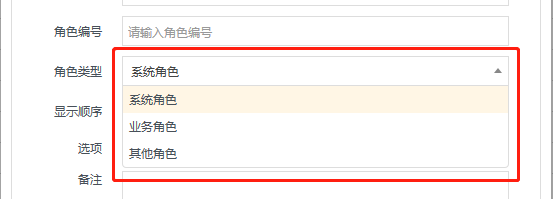
 $("#F_Type").bindSelect({

            url: "/SystemManage/ItemsData/GetSelectJson",

            param: { enCode: "RoleType" }

        });
-
<select id="F_Type" name="F_Type" class="form-control required">

</select>
[HttpGet]

        [HandlerAjaxOnly]

        public ActionResult GetSelectJson(string enCode)

        {

            var data = itemsDetailApp.GetItemList(enCode);

            List<object> list = new List<object>();

            foreach (ItemsDetailEntity item in data)

            {

                list.Add(new { id = item.F_ItemCode, text = item.F_ItemName });

            }

            return Content(list.ToJson());

        }
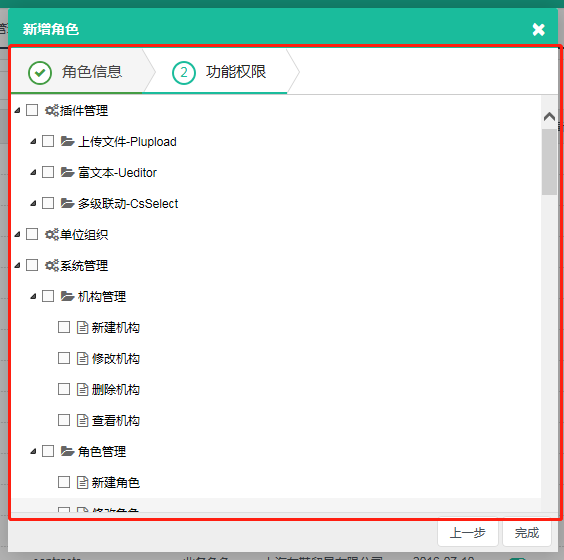
$("#permissionTree").treeview({

            height: 444,

            showcheck: true,

            url: "/SystemManage/RoleAuthorize/GetPermissionTree",

            param: { roleId: keyValue }

        });
-
<div id="permissionTree"></div>
public ActionResult GetPermissionTree(string roleId)

        {

            var moduledata = moduleApp.GetList();

            var buttondata = moduleButtonApp.GetList();

            var authorizedata = new List<RoleAuthorizeEntity>();

            if (!string.IsNullOrEmpty(roleId))

            {

                authorizedata = roleAuthorizeApp.GetList(roleId);

            }

            var treeList = new List<TreeViewModel>();

            foreach (ModuleEntity item in moduledata)

            {

                TreeViewModel tree = new TreeViewModel();

                bool hasChildren = moduledata.Count(t => t.F_ParentId == item.F_Id) ==  ? false : true;

                tree.id = item.F_Id;

                tree.text = item.F_FullName;

                tree.value = item.F_EnCode;

                tree.parentId = item.F_ParentId;

                tree.isexpand = true;

                tree.complete = true;

                tree.showcheck = true;

                tree.checkstate = authorizedata.Count(t => t.F_ItemId == item.F_Id);

                tree.hasChildren = true;

                tree.img = item.F_Icon == "" ? "" : item.F_Icon;

                treeList.Add(tree);

            }

            foreach (ModuleButtonEntity item in buttondata)

            {

                TreeViewModel tree = new TreeViewModel();

                bool hasChildren = buttondata.Count(t => t.F_ParentId == item.F_Id) ==  ? false : true;

                tree.id = item.F_Id;

                tree.text = item.F_FullName;

                tree.value = item.F_EnCode;

                tree.parentId = item.F_ParentId == "" ? item.F_ModuleId : item.F_ParentId;

                tree.isexpand = true;

                tree.complete = true;

                tree.showcheck = true;

                tree.checkstate = authorizedata.Count(t => t.F_ItemId == item.F_Id);

                tree.hasChildren = hasChildren;

                tree.img = item.F_Icon == "" ? "" : item.F_Icon;

                treeList.Add(tree);

            }

            return Content(treeList.TreeViewJson());

        }
| 2.返回顶部 |
| 3.返回顶部 |
| 4.返回顶部 |
| 5.返回顶部 |
| 6.返回顶部 |
 |
作者:ylbtech 出处:http://ylbtech.cnblogs.com/ 本文版权归作者和博客园共有,欢迎转载,但未经作者同意必须保留此段声明,且在文章页面明显位置给出原文连接,否则保留追究法律责任的权利。 |
Code-NFine:下来框和复选框的更多相关文章
- Selenium2+python自动化19-单选框和复选框(radiobox、checkbox)
本篇主要介绍单选框和复选框的操作 一.认识单选框和复选框 1.先认清楚单选框和复选框长什么样 2.各位小伙伴看清楚哦,上面的单选框是圆的:下图复选框是方的,这个是业界的标准,要是开发小伙伴把图标弄错了 ...
- CSS学习笔记三:自定义单选框,复选框,开关
一点一点学习CCS,这次学习了如何自定义单选框,复选框以及开关. 一.单选框 1.先写好body里面的样式,先写几个框 <body> <div class="radio-1 ...
- 自动化测试-15.selenium单选框与复选框状态判断
本篇主要介绍单选框和复选框的操作 一.认识单选框和复选框 1.先认清楚单选框和复选框长什么样 2.各位小伙伴看清楚哦,上面的单选框是圆的:下图复选框是方的,这个是业界的标准,要是开发小伙伴把图标弄错了 ...
- 2.12 单选框和复选框(radiobox、checkbox)
2.12 单选框和复选框(radiobox.checkbox) 本篇主要介绍单选框和复选框的操作一.认识单选框和复选框 1.先认清楚单选框和复选框长什么样 2.各位小伙伴看清楚哦,上面的单选框是 ...
- Selenium2学习(十五)-- 单选框和复选框(radiobox、checkbox)
本篇主要介绍单选框和复选框的操作 一.认识单选框和复选框 1.先认清楚单选框和复选框长什么样 2.各位小伙伴看清楚哦,上面的单选框是圆的:下图复选框是方的,这个是业界的标准,要是开发小伙伴把图标弄错了 ...
- Selenium2+python自动化19-单选框和复选框(radiobox、checkbox)【转载】
本篇主要介绍单选框和复选框的操作 一.认识单选框和复选框 1.先认清楚单选框和复选框长什么样 2.各位小伙伴看清楚哦,上面的单选框是圆的:下图复选框是方的,这个是业界的标准,要是开发小伙伴把图标弄错了 ...
- 微信小程序-修改单选框和复选框大小的方法
方法有两种: 一:采用css的zoom属性 zoom缩放会将元素保持在左上角,并且会有毛边,可能会稍稍改变元素原来的形状. 二:采用css3的transform:scale属性 zoom缩放会将元素保 ...
- HTML--使用单选框、复选框,让用户选择
在使用表单设计调查表时,为了减少用户的操作,使用选择框是一个好主意,html中有两种选择框,即单选框和复选框,两者的区别是单选框中的选项用户只能选择一项,而复选框中用户可以任意选择多项,甚至全选.请看 ...
- Selenium3+python自动化 单选框和复选框
一.认识单选框和复选框 1.先认清楚单选框和复选框长什么样 2.各位小伙伴看清楚哦,上面的单选框是圆的:下图复选框是方的,这个是业界的标准,要是开发小伙伴把图标弄错了,可以先抽他了. 二.radio和 ...
随机推荐
- C#-訪问轰炸机,新建进程,结束进程...(ConsoleApp)---ShinePans
这个程序能够自己主动打开要打开的网址,而且自己主动结束进程,这样能够达到博文点击流量的添加 program.cs using System; using System.Collections.Gene ...
- Python基础语法07--面向对象+正则表达式
Python 面向对象 Python从设计之初就已经是一门面向对象的语言,正因为如此,在Python中创建一个类和对象是很容易的.本章节我们将详细介绍Python的面向对象编程. 如果你以前没有接触过 ...
- 手游产品经理初探(八)CasinoStar玩家离开原因分析
通过Delta DNA分析报告.综合我们的游戏进行思考,我总结了几条玩家流失的经验: 1.在有限的前60秒我们没有花足够的精力去吸引玩家.就是说我们要花大量的经历在玩家进入游戏的60秒的体验上(我的澳 ...
- [CSS3] Define Form Element States with CSS Form Pseudo Classes
Using just semantic CSS Pseudo-Classes you can help define important states for form elements that e ...
- 几种自己主动运行js代码的方式
近期在看jquery,发现他竟然能自己主动运行js代码,于是就查了下.收集了几种经常使用的实现方法 jquery的方法 使用场景:不论什么须要运行的js特效 $(document).ready(fun ...
- Office转SWF的一些感想(Office2007和Office2010)
Office2007需要借助SaveAsPDFandXPS的插件完成,Office2010可以直接兼容. Office2PDF主要采用的是 Microsoft.Office.Interop的方式进行, ...
- 使用 Docker 在 Linux 上托管 ASP.NET Core 应用程序
说在前面 在阅读本文之前,您必须对 Docker 的中涉及的基本概念以及常见命令有一定了解,本文侧重实战,不会对相关概念详述. 同时请确保您本地开发机器已完成如下安装: Docker 18.06 或更 ...
- iOS应用崩溃日志分析 iOS应用崩溃日志揭秘
转自:http://www.raywenderlich.com/zh-hans/30818/ios%E5%BA%94%E7%94%A8%E5%B4%A9%E6%BA%83%E6%97%A5%E5%BF ...
- 读书笔记-2java虚拟机的可达性算法与finalize方法
JAVA通过可达性分析算法来确定堆中哪些对象是应该被回收的. 非常多人包含我曾经在不了解的时候总以为是通过引用计数器来推断某个对象是否应该被回收可是后来想了想包含查阅一些资料发现不是这种.由于假设採用 ...
- (转)OutOfMemory时抓取heap 快照
转自:https://testerhome.com/topics/579 首先说一下,在程序没有崩溃的时候如何抓取heap快照.这个大家应该都知道,在ddms中自带此功能. 见上图首先我们选中一个 ...