
redux 及 相关插件 项目实战
目录结构
+-- app

|   +-- actions

|       +-- index.js

|   +-- components

|       +-- content.js

|       +-- footer.js

|       +-- searchBar.js

|   +-- constants

|       +-- ActionTypes.js

|   +-- containers

|       +-- App.js

|   +-- reducers

|       +-- index.js

|       +-- items.js

|       +-- filter.js

|   +-- utils

|   +-- configureStore.js

|   +-- index.js

+-- css

|   +-- pure.min.css

+-- index.html
Index.js
在入口文件中,我们需要把App和redux建立起联系。Provider是react-redux提供的组件,它的作用是把store和视图绑定在了一起,这里的Store就是那个唯一的State树。当Store发生改变的时候,整个App就可以作出对应的变化。{() => }是声明了一个返回的函数传进Provider的props.children里,这个方法将会在React的 0.14版本得到简化。
/* app/index.js */

import React from 'react';

import { Provider } from 'react-redux';

import App from './containers/App';

import configureStore from './configureStore';

const store = configureStore();

React.render(

    <div>

        <Provider store={store}>

            {() => <App /> }

        </Provider>

    </div>,

    document.getElementById('app'));
Constants
keyMirror这个方法非常的有用,它可以帮助我们轻松创建与键值key相等的常量。
/* app/constants/actionTypes.js */

import keyMirror from 'react/lib/keyMirror';

export default keyMirror({

    ADD_ITEM: null,

    DELETE_ITEM: null,

    DELETE_ALL: null,

    FILTER_ITEM: null

});

// 等于

// export const ADD_ITEM = 'ADD_ITEM';

// export const DELETE_ITEM = 'DELETE_ITEM';

// export const DELETE_ALL = 'DELETE_ALL';

// export const FILTER_ITEM = 'FILTER_ITEM';
Actions
Action向store派发指令,action 函数会返回一个带有 type 属性的 Javascript Plain Object,store将会根据不同的action.type来执行相应的方法。addItem函数的异步操作我使用了一点小技巧,使用redux-thunk中间件去改变dispatch,dispatch是在View层中用bindActionCreators绑定的。使用这个改变的dispatch我们可以向store发送异步的指令。比如说,可以在action中放入向服务端的请求(ajax),也强烈推荐这样去做。
/* app/actions/index.js */

import { ADD_ITEM, DELETE_ITEM, DELETE_ALL, FILTER_ITEM } from '../constants/actionTypes';

export function addItem(item) {

    return dispatch => {

       setTimeout(() => dispatch({type: ADD_ITEM}), 1000)

    }

}

export function deleteItem(item, e) {

    return {

       type: DELETE_ITEM,

       item

    }

}

export function deleteAll() {

    return {

       type: DELETE_ALL

    }

}

export function filterItem(e) {

    let filterItem = e.target.value;

    return {

       type: FILTER_ITEM,

       filterItem

    }

}
Reducers
Redux有且只有一个State状态树,为了避免这个状态树变得越来越复杂,Redux通过 Reducers来负责管理整个应用的State树,而Reducers可以被分成一个个Reducer。
Reduce在javascript Array的方法中出现过,只是不太常用。简单快速的用代码样例来回顾一下:
/* Array.prototype.reduce */

var arr = [1,2,3,4];

var initialValue = 5;

var result = arr.reduce(function(previousValue, currentValue) {

    return previousValue + currentValue

}, initialValue)

console.log(result)

// 15

// 该回调函数的返回值为累积结果,并且此返回值在下一次调用该回调函数时作为参数提供。

// 整个函数执行的过程大致是这样 ((((5+1)+2)+3)+4)
回到Redux中来看,整个的状态就相当于从[初始状态]merge一个[action.state]从而得到一个新的状态,随着action的不断传入,不断的得到新的状态的过程。(previousState, action) => newState,注意:任何情况下都不要改变previousState,因为这样View层在比较State的改变时只需要简单比较即可,而避免了深度循环比较。Reducer的数据结构我们可以用immutable-js,这样我们在View层只需要react-immutable-render-mixin插件就可以轻松的跳过更新那些state没有发生改变的组件子树。
/* app/reducers/items.js */

import Immutable from 'immutable';

import { ADD_ITEM, DELETE_ITEM, DELETE_ALL } from '../constants/actionTypes';

const initialItems = Immutable.List([1,2,3]);

export default function items(state = initialItems, action) {

    switch(action.type) {

        case ADD_ITEM:

            return state.push( state.size !=0 ? state.get(-1)+1 : 1 );

        case DELETE_ITEM:

            return state.delete( state.indexOf(action.item) );

        case DELETE_ALL:

            return state.clear();

        default:

            return state;

    }

}
连接reducers
Redux提供的combineReducers函数可以帮助我们把reducer组合在一起,这样我们就可以把Reducers拆分成一个个小的Reducer来管理Store了。
/* app/reducers/index.js */

import { combineReducers } from 'redux';

import items from './items';

import filter from './filter';

const rootReducer = combineReducers({

  items,

  filter

});

export default rootReducer;
Middleware
在Redux中,Middleware 主要是负责改变Store中的dispatch方法,从而能处理不同类型的 action 输入,得到最终的 Javascript Plain Object 形式的 action 对象。
以redux-thunk为例子:
/* redux-thunk */

export default function thunkMiddleware({ dispatch, getState }) {

  return next =>

     action =>

       typeof action === ‘function’ ?

         action(dispatch, getState) :

         next(action);

}
当ThunkMiddleware 判断action传入的是一个函数,就会为该thunk函数补齐dispatch和getState参数,否则,就调用next(action),给后续的Middleware(Middleware 插件可以被绑定多个)得到使用dispatch的机会。
/* app/configureStore.js */

import { compose, createStore, applyMiddleware } from 'redux';

import thunk from 'redux-thunk';

import rootReducer from './reducers';

var buildStore = compose(applyMiddleware(thunk), createStore)

export default function configureStore(initialState) {

   return buildStore(rootReducer, initialState);

}
UI
智能组件和木偶组件,因为本文主要是介绍Redux,对这个感兴趣的同学可以看一下这篇文章Smart and Dumb Components。本项目中在结构上会把智能组件放在containers中,木偶组件放于components中。
containers
智能组件,会通过react-redux函数提供的connect函数把state和actions转换为旗下木偶组件所需要的props。
/* app/containers/App.js */

import React from 'react';

import SearchBar from '../components/searchBar';

import Content from '../components/content';

import Footer from '../components/footer';

import { connect } from 'react-redux';

import ImmutableRenderMixin from 'react-immutable-render-mixin';

import * as ItemsActions from '../actions';

import { bindActionCreators } from 'redux';

let App = React.createClass({

     mixins: [ImmutableRenderMixin],

     propTypes: {

         items: React.PropTypes.object,

         filter: React.PropTypes.string

     },

     render() {

         let styles = {

             width: '200px',

             margin: '30px auto 0'

         }

         const actions = this.props.actions;

         return (

             <div style={styles}>

                 <h2>Manage Items</h2>

                 <SearchBar filterItem={actions.filterItem}/>

                 <Content items={this.props.items} filter={this.props.filter} deleteItem={actions.deleteItem}/>

                 <Footer addItem={actions.addItem} deleteAll={actions.deleteAll}/>

             </div>

         )

     }

 })

export default connect(state => ({

     items: state.items,

     filter: state.filter

}), dispatch => ({

     actions: bindActionCreators(ItemsActions, dispatch)

}))(App);
components
木偶组件,各司其职,没有什么关于actions和stores的依赖,拿出项目中也可独立使用,甚至可以和别的actions,stores进行绑定。
- SearchBar:查找Item。
- Content:控制Items的显示,删除一个Item。
- Footer:新增Item,删除全部Item。
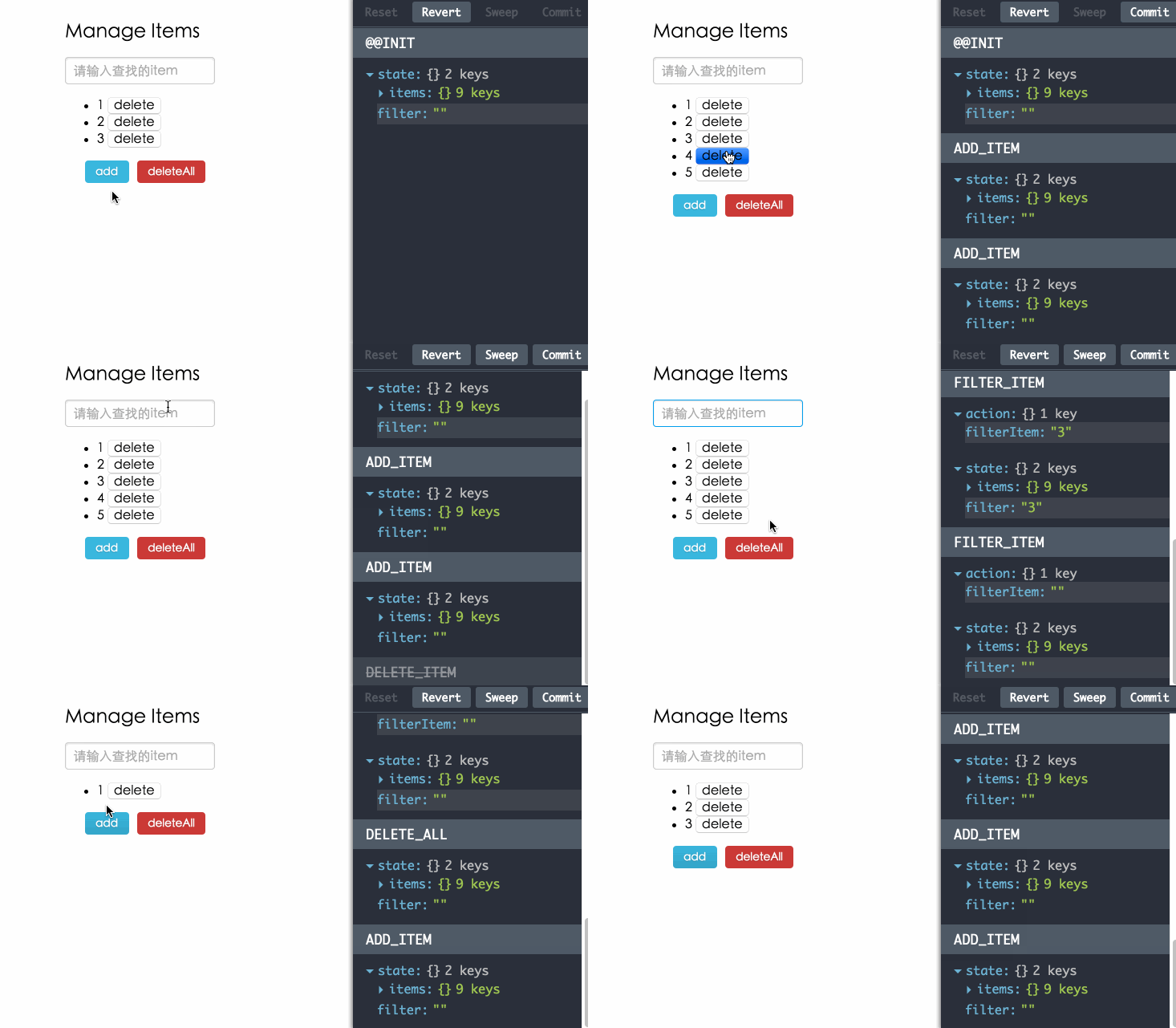
调试工具
使用redux-devtools调试,为你在开发过程中带来乐趣。
/* app/index.js */

function renderDevTools(store) {

  if (__DEBUG__) {

    let {DevTools, DebugPanel, LogMonitor} = require('redux-devtools/lib/react');

    return (

      <DebugPanel top right bottom>

        <DevTools store={store} monitor={LogMonitor} />

      </DebugPanel>

    );

  }else {

    return null;

  }

}

React.render(

    <div>

        <Provider store={store}>

            {() => <App /> }

        </Provider>

        {renderDevTools(store)}

    </div>,

  document.getElementById('app'));

/* app/configureStore.js */

var buildStore;

if(__DEBUG__) {

  buildStore = compose(

    applyMiddleware(thunk),

    require('redux-devtools').devTools(),

    require('redux-devtools').persistState(window.location.href.match(/[?&]debug_session=([^&]+)\b/)),

    createStore

  )

}else {

  buildStore = compose(applyMiddleware(thunk), createStore)

}

export default function configureStore(initialState) {

  return buildStore(rootReducer, initialState);

}
在你的代码中加上上面的两段代码,运行npm run debug命令,就可以用调试工具来管理你的项目了。
效果图:
https://github.com/matthew-sun/redux-example
redux 及 相关插件 项目实战的更多相关文章
- 【大话QT之十六】使用ctkPluginFramework插件系统构建项目实战
"使用ctkPluginFramework插件系统构建项目实战",这篇文章是写博客以来最纠结的一篇文章. 倒不是由于技术都多么困难,而是想去描写叙述一个项目架构採用ctkPlugi ...
- (转载)项目实战工具类(一):PhoneUtil(手机信息相关)
项目实战工具类(一):PhoneUtil(手机信息相关) 可以使用的功能: 1.获取手机系统版本号 2.获取手机型号 3.获取手机宽度 4.获取手机高度 5.获取手机imei串号 ,GSM手机的 ...
- 【腾讯Bugly干货分享】React Native项目实战总结
本文来自于腾讯bugly开发者社区,非经作者同意,请勿转载,原文地址:http://dev.qq.com/topic/577e16a7640ad7b4682c64a7 “8小时内拼工作,8小时外拼成长 ...
- Asp.Net Core 项目实战之权限管理系统(1) 使用AdminLTE搭建前端
0 Asp.Net Core 项目实战之权限管理系统(0) 无中生有 1 Asp.Net Core 项目实战之权限管理系统(1) 使用AdminLTE搭建前端 2 Asp.Net Core 项目实战之 ...
- Asp.Net Core 项目实战之权限管理系统(6) 功能管理
0 Asp.Net Core 项目实战之权限管理系统(0) 无中生有 1 Asp.Net Core 项目实战之权限管理系统(1) 使用AdminLTE搭建前端 2 Asp.Net Core 项目实战之 ...
- Asp.Net Core 项目实战之权限管理系统(7) 组织机构、角色、用户权限
0 Asp.Net Core 项目实战之权限管理系统(0) 无中生有 1 Asp.Net Core 项目实战之权限管理系统(1) 使用AdminLTE搭建前端 2 Asp.Net Core 项目实战之 ...
- angularJs项目实战!01:模块划分和目录组织
近日来我有幸主导了一个典型的web app开发.该项目从产品层次来说是个典型的CRUD应用,故而我毫不犹豫地采用了grunt + boilerplate + angularjs + bootstrap ...
- 项目实战12.1—企业级监控工具应用实战-zabbix安装与基础操作
无监控,不运维.好了,废话不多说,下面都是干货. 警告:流量党勿入,图片太多!!! 项目实战系列,总架构图 http://www.cnblogs.com/along21/p/8000812.html ...
- webpack+vue项目实战(四,前端与后端的数据交互和前端展示数据)
地址:https://segmentfault.com/a/1190000010063757 1.前言 今天要做的,就是在上一篇文章的基础上,进行功能页面的开发.简单点说呢,就是与后端的数据交互和怎么 ...
随机推荐
- 排序算法C语言实现——堆排序
/*堆排nlog(n)*//*堆排复杂度分析1.建堆((n*log(n))/2) 循环n/2次,每次调用HeapAdjust函数 HeapAdjust内部循环log(n)2.调整堆(((n ...
- Redis 数据类型分析 字符串 哈希 列表 集合 有序集合 优缺点 分析 注意事项 存储结构
一.提高Redis使用性能秘诀 KEY尽量少的原则,能放在1个KEY的就放入1个KEY,KEY开销很大尽量减少与Redis发生的交互次数,能批量的就批量,能事务.管道的就事务.管道从业务架构分析确定使 ...
- flask中的上下文_请求上下文和应用上下文
前引 在了解flask上下文管理机制之前,先来一波必知必会的知识点. 面向对象双下方法 首先,先来聊一聊面向对象中的一些特殊的双下划线方法,比如__call__.__getattr__系列.__get ...
- 00031_ArrayList集合中常用的方法
1.ArrayList集合提供的一些常用方法 import java.util.ArrayList; public class ArrayListDemo01 { public static void ...
- nginx+django+uwsgi+https 配置问题点
- ssl 证书申请 申请域名的网站申请下载对应文件即可 - nginx 配置 https [root@VM_2_29_centos conf]# nginx -t nginx: [emerg] u ...
- Exchange 2010 打补丁的顺序
升级的顺序: 客户端访问服务器 ——> 集线器传输服务器 ——>统一消息服务器(如果有的话)——> 邮箱服务器 ——> 边缘服务器.
- NYOJ 293 Sticks
Sticks 时间限制:3000 ms | 内存限制:65535 KB 难度:5 描述 George took sticks of the same length and cut them r ...
- NYOJ 104 最大和
最大和 时间限制:1000 ms | 内存限制:65535 KB 难度:5 描述 给定一个由整数组成二维矩阵(r*c),现在需要找出它的一个子矩阵,使得这个子矩阵内的所有元素之和最大,并把这个 ...
- pat 1029 1029. 旧键盘(20)
旧键盘上坏了几个键,于是在敲一段文字的时候,对应的字符就不会出现.现在给出应该输入的一段文字.以及实际被输入的文字,请你列出肯定坏掉的那些键. 输入格式: 输入在2行中分别给出应该输入的文字.以及实际 ...
- TOJ 2596: Music Notes
2596: Music Notes Time Limit(Common/Java):1000MS/10000MS Memory Limit:65536KByteTotal Submit: 3 ...