
weexapp 开发流程(一)开发环境配置
1.创建项目
weexpack create weexapp
2.安装必要插件
npm i jwt-simple vue-resource vue-router vuex vuex-router-sync weex-ui -S

npm i babel-plugin-component babel-preset-stage-0 history quick-local-ip weex-builder weex-router -D
3.修改 scripts 指令
package.json
"scripts": {

    "build": "webpack",

    "build_plugin": "webpack --config ./tools/webpack.config.plugin.js --color",

    "dev": "webpack --config webpack.config.js --watch",

    "serve": "webpack-dev-server --config webpack.dev.js --progress --watch --open",

    "start": "webpack && webpack-dev-server --config webpack.dev.js --progress --watch --open",

    "create": "weexpack run android"

},
4.配置 weex-ui
.babelrc
{

  "presets": ["es2015", "stage-0"],

  "plugins": [

    [

      "component",

      {

        "libraryName": "weex-ui",

        "libDir": "packages"

      }

    ]

  ]

}
5.修改 webpack 模块管理
webpack.config.js
步骤一:

步骤二:
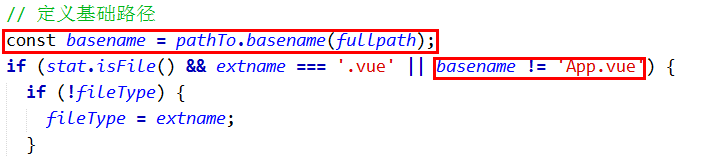
步骤三:

步骤四:

步骤五:
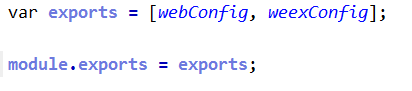
修改后:
webpack.config.js
const pathTo = require('path');

const fs = require('fs-extra');

const webpack = require('webpack');

const entry = {index: pathTo.resolve('src', 'entry.js')};

const weexEntry = {index: pathTo.resolve('src', 'entry.js')};

const vueWebTemp = 'temp';

const hasPluginInstalled = fs.existsSync('./web/plugin.js');

var isWin = /^win/.test(process.platform);

function getEntryFileContent(entryPath, vueFilePath) {

    let relativePath = pathTo.relative(pathTo.join(entryPath, '../'), vueFilePath);

    let contents = '';

    if (hasPluginInstalled) {

        const plugindir = pathTo.resolve('./web/plugin.js');

        contents = 'require(\'' + plugindir + '\') \n';

    }

    if (isWin) {

        relativePath = relativePath.replace(/\\/g,'\\\\');

    }

    contents += 'var App = require(\'' + relativePath + '\')\n';

    contents += 'App.el = \'#root\'\n';

    contents += 'new Vue(App)\n';

    return contents;

}

var fileType = '';

function walk(dir) {

    dir = dir || '.';

    const directory = pathTo.join(__dirname, 'src', dir);

    fs.readdirSync(directory)

        .forEach((file) => {

            const fullpath = pathTo.join(directory, file);

            const stat = fs.statSync(fullpath);

            const extname = pathTo.extname(fullpath);

            const basename = pathTo.basename(fullpath);

            if (stat.isFile() && extname === '.vue' && basename != 'App.vue' ) {

                if (!fileType) {

                    fileType = extname;

                }

                if (fileType && extname !== fileType) {

                    console.log('Error: This is not a good practice when you use ".we" and ".vue" togither!');

                }

                const name = pathTo.join(dir, pathTo.basename(file, extname));

                if (extname === '.vue') {

                    const entryFile = pathTo.join(vueWebTemp, dir, pathTo.basename(file, extname) + '.js');

                    fs.outputFileSync(pathTo.join(entryFile), getEntryFileContent(entryFile, fullpath));

                    entry[name] = pathTo.join(__dirname, entryFile) + '?entry=true';

                }

                weexEntry[name] = fullpath + '?entry=true';

            } else if (stat.isDirectory() && ['build','include','assets','filters','mixins'].indexOf(file) == -1 ) {

                const subdir = pathTo.join(dir, file);

                walk(subdir);

            }

        });

}

walk();

// web need vue-loader

const plugins = [

    new webpack.optimize.UglifyJsPlugin({minimize: true}),

    new webpack.BannerPlugin({

        banner: '// { "framework": ' + (fileType === '.vue' ? '"Vue"' : '"Weex"') + '} \n',

        raw: true,

        exclude: 'Vue'

    })

];

const webConfig = {

    context: pathTo.join(__dirname, ''),

    entry: entry,

    output: {

        path: pathTo.join(__dirname, 'dist'),

        filename: '[name].web.js',

    },

    module: {

        // webpack 2.0

        rules: [

            {

                test: /\.js$/,

                use: [{

                    loader: 'babel-loader',

                    options: {

                        presets: ['es2015']

                    }

                }]

            },

            {

                test: /\.css$/,

                use: [{

                    loader: 'css-loader'

                }]

            },

            {

                test: /\.vue(\?[^?]+)?$/,

                use: [{

                    loader: 'vue-loader'

                }]

            }

        ]

    },

    plugins: plugins

};

const weexConfig = {

    entry: weexEntry,

    output: {

        path: pathTo.join(__dirname, 'dist'),

        filename: '[name].js',

    },

    module: {

        rules: [

            {

                test: /\.js$/,

                use: [{

                    loader: 'babel-loader',

                }]

            },

            {

                test: /\.vue(\?[^?]+)?$/,

                use: [{

                    loader: 'weex-loader'

                }]

            },

            {

                test: /\.we(\?[^?]+)?$/,

                use: [{

                    loader: 'weex-loader'

                }]

            }

        ],

    },

    plugins: plugins,

};

var exports = [webConfig, weexConfig];

module.exports = exports;
6.修改 webpack 开发环境文件
webpack.dev.js
const ip = require('quick-local-ip').getLocalIP4();

const configs = require('./webpack.config.js');

const webpack = require('webpack');

const pathTo = require('path');

const chalk = require('chalk');

let config = Array.isArray(configs) ? configs[0] : configs;

config.devServer = {

    contentBase: pathTo.join(__dirname, ''),

    compress: true,

    // hot: true,

    host: '0.0.0.0',

    public: ip + ':8080/web',

    // publicPath: '/dist/',

};

// configs.plugins.push(new webpack.HotModuleReplacementPlugin());

console.log('server is running! Please open ' + chalk.green('http://' + ip + ':8080/web/index.html'));

module.exports = config;
7.提取 weex-ui 组件
项目名称 / index.js
/**

 * weex-ui 常用组件

 */

import Utils from './packages/utils';

import WxcButton from './packages/wxc-button';

import WxcCell from './packages/wxc-cell';

import WxcCheckbox from './packages/wxc-checkbox';

import WxcCheckboxList from './packages/wxc-checkbox-list';

import WxcCountdown from './packages/wxc-countdown';

import WxcDialog from './packages/wxc-dialog';

import WxcEpSlider from './packages/wxc-ep-slider';

import WxcPanItem from './packages/wxc-pan-item';

import WxcGridSelect from './packages/wxc-grid-select';

import WxcIndexlist from './packages/wxc-indexlist';

import WxcLightbox from './packages/wxc-lightbox';

import WxcLoading from './packages/wxc-loading';

import WxcPartLoading from './packages/wxc-part-loading';

import WxcMask from './packages/wxc-mask';

import WxcMinibar from './packages/wxc-minibar';

import WxcLotteryRain from './packages/wxc-lottery-rain';

import WxcNoticebar from './packages/wxc-noticebar';

import WxcOverlay from './packages/wxc-overlay';

import WxcPageCalendar from './packages/wxc-page-calendar';

import WxcPopup from './packages/wxc-popup';

import WxcProgress from './packages/wxc-progress';

import WxcRadio from './packages/wxc-radio';

import WxcResult from './packages/wxc-result';

import WxcRichText from './packages/wxc-rich-text';

import WxcSpecialRichText from './packages/wxc-special-rich-text';

import WxcSearchbar from './packages/wxc-searchbar';

import WxcSimpleFlow from './packages/wxc-simple-flow';

import WxcSlideNav from './packages/wxc-slide-nav';

import WxcSliderBar from './packages/wxc-slider-bar';

import WxcStepper from './packages/wxc-stepper';

import WxcTabPage from './packages/wxc-tab-page';

import WxcTabBar from './packages/wxc-tab-bar';

import WxcTag from './packages/wxc-tag';

export {

  Utils,

  WxcButton,

  WxcCell,

  WxcCheckbox,

  WxcCheckboxList,

  WxcCountdown,

  WxcDialog,

  WxcEpSlider,

  WxcPanItem,

  WxcGridSelect,

  WxcIndexlist,

  WxcLightbox,

  WxcLoading,

  WxcPartLoading,

  WxcMask,

  WxcMinibar,

  WxcLotteryRain,

  WxcNoticebar,

  WxcOverlay,

  WxcPageCalendar,

  WxcPopup,

  WxcProgress,

  WxcRadio,

  WxcResult,

  WxcRichText,

  WxcSpecialRichText,

  WxcSearchbar,

  WxcSimpleFlow,

  WxcSlideNav,

  WxcSliderBar,

  WxcStepper,

  WxcTabPage,

  WxcTabBar,

  WxcTag

};
.
weexapp 开发流程(一)开发环境配置的更多相关文章
- Xamarin Anroid开发教程之验证环境配置是否正确
Xamarin Anroid开发教程之验证环境配置是否正确 经过前面几节的内容已经把所有的编程环境设置完成了,但是如何才能确定所有的一切都处理争取并且没有任何错误呢?这就需要使用相应的实例来验证,本节 ...
- 使用EmBitz开发STM32项目的环境配置
一.EmBitz软件获取与安装 1.EmBitz软件的获取 EmBitz原名Em::Blocks,是基于Code::Blocks开发的,面向嵌入式的C/C++集成开发环境.支持J-Link和ST-Li ...
- PHP开发:Eclipse版环境配置
软件: 1.eclipse php版本下载地址:http://www.eclipse.org/downloads/packages/eclipse-php-developers/heliosr 2.A ...
- Dapr微服务应用开发系列1:环境配置
题记:上篇Dapr系列文章简要介绍了Dapr,这篇来谈一下开发和运行环境配置 本机开发环境配置 安装Docker 为了方便进行Dapr开发,最好(其实不一定必须)首先在本机(开发机器)上安装Docke ...
- weex 开发踩坑日记--环境配置、安卓运行、adb、开发
环境配置方面 1.需要安装java和android环境,java的话一定要下载jdk而不是jre. 在"系统变量"新建一个变量名为JAVA_HOME的变量,变量值为你本地java的 ...
- Android开发快速入门(环境配置、Android Studio安装)
Android是一种激动人心的开源移动平台,它像手机一样无处不在,得到了Google以及其他一些开放手机联盟成员(如三星.HTC.中国移动.Verizon和AT&T等)的支持,因而不能不加以学 ...
- 开发流程和Maven的配置
按照何种开发模型? V模型:项目需求--->概要设计(功能模块) --->详细设计(页面的设计,数据库的设计) --->编码(框架的搭建,功能的实现)---->测试(单元测试, ...
- MapReduce开发程序,运行环境配置
Hadoop主机:linux 开发环境主机:Win7 + Itellij 本地运行 1. 下载hadoop安装包,放到本地目录中. 2. 配置环境变量$HADOOP_HOME及$PATH=$HADOO ...
- Andriod开发 --插件安装、环境配置、问题集锦
1.用Eclipse搭建Android开发环境和创建第一个Android项目(Windows平台) 链接阅读http://www.cnblogs.com/allenzheng/archive/2012 ...
- Stardew Valley(星露谷物语)Mod开发之路 1环境配置
首先来说明一下,我写这个章节本身也是对学习过程的记录,主要参考了http://canimod.com/guides/creating-a-smapi-mod中的内容.也推荐大家看看. *这些是我的开发 ...
随机推荐
- 创建虚拟机、安装centos系统,xshell连接虚拟机
创建虚拟机 文件--->新建虚拟机--->自定义最高级 选择虚拟机兼容性: workstation12.0:限制少,而且兼容的多 稍后安装操作系统 选择Linux系统 可选择centos7 ...
- 递归函数&二分查找
一.递归函数 1)定义 在函数中调用函数本身,就是递归 在python中递归的深度最大为1000,但实际达不到1000 def func(): print("-----func-----&q ...
- uboot顶层mkconfig分析
GNU make:http://www.gnu.org/software/make/manual/make.html#Rules 为了便于理解把uboot中的Makefile配置部分弄出来便于理解,这 ...
- spring mvc3 配置<mvc:resources/> @Controller失效
因为配置了:<mvc:resources location=" " mapping="" /> ,@Controller失效访问404 这里还 ...
- 【01】在 issue 中创建 list
[01]在 issue 中创建 list 你想在你的 issue中看到可多选的 list 么? 当你查看问题时,你想不想让它变成 2 of 5 这样的形式. 如果想,你可以在 issue 中使用以下句 ...
- 大数据学习——sqoop导出数据
把数据从hadoop导出到关系型数据库 将数据从HDFS导出到RDBMS数据库 导出前,目标表必须存在于目标数据库中. u 默认操作是从将文件中的数据使用INSERT语句插入到表中 u 更新模式下 ...
- SPOJ - ADALIST,双端队列入门模板!
ADALIST - Ada and List 这道题时限6.5s,激动人心啊,好多人STL一顿乱写AC,哈哈,如果熟悉双端队列的话这道题其实是很水的. 题意:n个数的数列,然后接下来Q次操作,每次可以 ...
- SPOJ-COLONY - Linearian Colony!简单二分思想
COLONY - Linearian Colony 一道很水的题却坑我两天!在CF上做过类似的题,用递归可以找到答案,但感觉不会这么麻烦,于是看看有没有什么规律,对Y分奇偶貌似可以找到规律,但WA了三 ...
- Python之虚拟机操作:利用VIX二次开发,实现自己的pyvix(系列一)成果展示和python实例
在日常工作中,需要使用python脚本去自动化控制VMware虚拟机,现有的pyvix功能较少,而且不适合个人编程习惯,故萌发了开发一个berlin版本pyvix的想法,暂且叫其OpenPyVix.O ...
- 【bzoj2989】数列 KD-tree+旋转坐标系
题目描述 给定一个长度为n的正整数数列a[i]. 定义2个位置的graze值为两者位置差与数值差的和,即graze(x,y)=|x-y|+|a[x]-a[y]|. 2种操作(k都是正整数): 1.Mo ...