
Web Scraping with R: How to Fill Missing Value (爬虫:如何处理缺失值)
网络上有大量的信息与数据。我们可以利用爬虫技术来获取这些巨大的数据资源。
这次用 IMDb 网站的2018年100部最欢迎的电影 来练练手,顺便总结一下 R 爬虫的方法。
##### >> Preparation
感谢 Hadley Wickham 大大,我们有 rvest 包可以用。因此爬虫前先安装并加载 rvest 包。
#install package

install.package('rvest')

#loading library

library('rvest')
##### >> Downloading and parsing HTML file
指定网页地址并且使用 read_html() 函数将网页转为 XML 对象。
url <- 'https://www.imdb.com/search/title?count=100&release_date=2018-01-01,2018-12-31&view=advanced'

webpage <- read_html(url)
##### >> Extracting Nodes
我期望获取的数据包括:
- Rank: 排名
- Title:电影名称
- Runtime:电影时长
- Genre:电影类型
- Rating:观众评分
- Metascore:媒体评分
- Description:电影简介
- Votes:观众投票支持的票数
- Gross:电影票房
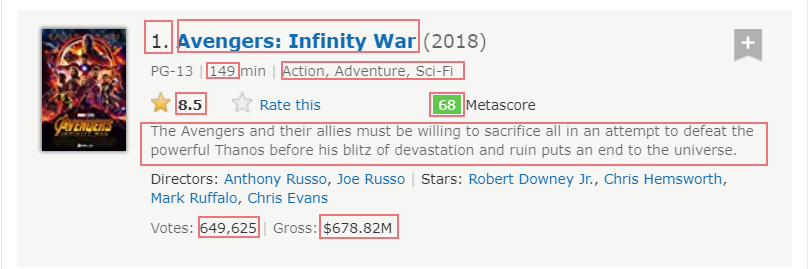
使用 html_nodes() 函数可以提取 XML 对象中的元素。其中该函数利用 CSS 选择器来匹配吻合的元素。
#Using CSS selectors to extract node

rank_data_html <- html_nodes(webpage, '.text-primary')

#Converting the node to text

rank_data <- html_text(rank_data_html)

#Converting text value to numeric value

rank_data <- as.numeric(rank_data)
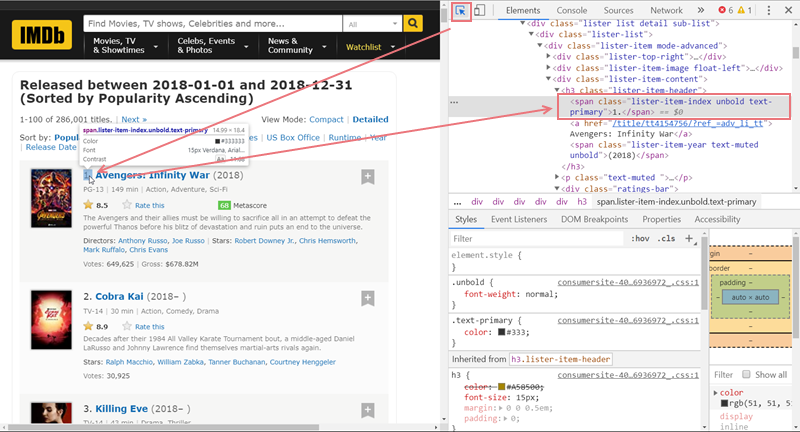
因为需要利用 CSS 选择器, 所以这个部分或许需要一点 HTML/CSS 的基础知识。如果不熟悉 HTML/CSS,分享一个小方法:
- 用浏览器(以 Chrome 为例)打开那个网页,然后按 F12 打开开发者工具
- 点击开发者工具左上角的箭头去选择那个需要爬取的数据
- 对应的那行代码就会在右侧的开发者工具被选中
- 对着 CSS 选择器的文档查查就知道该怎么写了
接着用类似的 Script 提取其他元素的数据。
##### >> Handling Missing Values
爬取元素后,如果仔细检查每组元素的长度,就会发现其实某些元素是有缺失值的。比如说 Metascore
metascore_data_html <- html_nodes(webpage,'.metascore')

metascore_data <- html_text(metascore_data_html)

length(metascore_data)
怎么将网页中不存在的相应值用 NA 表示呢?
这里要了解一下 html_node 和 html_nodes 的区别了。运行 ?html_node 查看帮助文档:
html_node is like [[ it always extracts exactly one element. When given a list of nodes, html_node will always return a list of the same length, the length of html_nodes might be longer or shorter.
所以简单地说,就是我们可以先提取一组没有缺失值的父级 DOM,然后从这组 DOM 中逐个提取所需的子级 DOM。
粗暴地说,上代码:
metascore_data_html <- html_node(html_nodes(webpage, '.lister-item-content'), '.metascore')

metascore_data <- html_text(metascore_data_html)

length(metascore_data)
##### >> Making a Data Frame
等所有数据都爬取完毕,就可以将其组合成 data frame 用于后续的分析了。
movies <- data.frame(

  rank = rank_data,

  title = title_data,

  description = description_data,

  runtime = runtime_data,

  genre = genre_data,

  rating = rating_data,

  metascorre = metascore_data,

  votes = votes_data,

  gross = gross_data

)
##### >> Exporting CSV File
如果不想马上开始分析工作,还可以存为 csv 文件以后用。
write.csv(movies, file = file.choose(new = TRUE), row.names = FALSE)
搞定爬虫后,现在网络上已经有很多数据资源等我们用咯。
##### >> Notes
rvest 包还有其他有用的函数可以发掘一下的:
html_tag(): 提取DOM 的 tag namehtml_attr(): 提取DOM 的 一个属性html_attrs(): 提取DOM 的 所有属性guess_encoding()andrepair_encoding(): 检测编码和修复编码 (爬取中文网页的时候会用的到的~)jump_to(),follow_link(),back(),forward(): 爬取多页面网页的时候或许会用到
##### >> Sample Code
Web Scraping with R: How to Fill Missing Value (爬虫:如何处理缺失值)的更多相关文章
- 阅读OReilly.Web.Scraping.with.Python.2015.6笔记---Crawl
阅读OReilly.Web.Scraping.with.Python.2015.6笔记---Crawl 1.函数调用它自身,这样就形成了一个循环,一环套一环: from urllib.request ...
- 首部讲Python爬虫电子书 Web Scraping with Python
首部python爬虫的电子书2015.6pdf<web scraping with python> http://pan.baidu.com/s/1jGL625g 可直接下载 waterm ...
- Web Scraping with Python读书笔记及思考
Web Scraping with Python读书笔记 标签(空格分隔): web scraping ,python 做数据抓取一定一定要明确:抓取\解析数据不是目的,目的是对数据的利用 一般的数据 ...
- [Node.js] Web Scraping with Pagination and Advanced Selectors
When web scraping, you'll often want to get more than just one page of data. Xray supports paginatio ...
- <Web Scraping with Python>:Chapter 1 & 2
<Web Scraping with Python> Chapter 1 & 2: Your First Web Scraper & Advanced HTML Parsi ...
- Web scraping with Python (part II) « Jean, aka Sig(gg)
Web scraping with Python (part II) « Jean, aka Sig(gg) Web scraping with Python (part II)
- 《Web Scraping With Python》Chapter 2的学习笔记
You Don't Always Need a Hammer When Michelangelo was asked how he could sculpt a work of art as mast ...
- Web Scraping with Python
Python爬虫视频教程零基础小白到scrapy爬虫高手-轻松入门 https://item.taobao.com/item.htm?spm=a1z38n.10677092.0.0.482434a6E ...
- 阅读OReilly.Web.Scraping.with.Python.2015.6笔记---找出网页中所有的href
阅读OReilly.Web.Scraping.with.Python.2015.6笔记---找出网页中所有的href 1.查找以<a>开头的所有文本,然后判断href是否在<a> ...
随机推荐
- EF关联
public CustomerMap() { this.ToTable("Customer"); this.HasKey(c => c.Id); this.Property( ...
- ffm算法
www.csie.ntu.edu.tw/~cjlin/papers/ffm.pdf 读书笔记 The effect of feature conjunctions(组合特征) is difficul ...
- 小心入怀Yaf
http://www.laruence.com/2015/05/14/3021.html, 鸟哥文章 看了这个文章,更加要小心的对待 Yaf Yar 框架了. 不正确 glib 有一定的了解进来就是深 ...
- Use JavaScript to Export Your Data as CSV
原文: http://halistechnology.com/2015/05/28/use-javascript-to-export-your-data-as-csv/ --------------- ...
- Java线程池的简单使用
最近由于公司的业务需求,需要使用线程池来进行对数据进行处理,所以就简单的学习了一下线程池的东西,刚接触感觉挺难的,不过使用了就不感觉那么难了,还是蛮简单的, package com.yd.sms.jo ...
- url加密并计算时间
将URL地址参数进行加密传输提高网站安全性 加密算法,直接调用就好 function keyED($txt,$encrypt_key){ $encrypt_key = md5($encrypt_key ...
- JavaScript操作符(关系操作符、相等操作符和条件操作符)
关系操作符用于对两个值进行比较,返回一个布尔值.关系操作符包括大于(>),小于(<),大于等于(>=),小于等于(<=).当关系操作符用于非数值时,也要先进行数值的转换.如 v ...
- Elasticsearch - 搜索类型与搜索位置
一.搜索类型: Elasticsearch同意用户选择其所希望的处理查询的方式. 由于存在一些不同的情形,对其使用不同的搜索类型才是合适的.为了控制查询的运行方式,我们能够在请求中使用search_t ...
- [IT练习册]Python练习项目 思路
1.爬虫:爬取如下网站一年的内容. http://www.calvarymoravian.org/dailytext 2.蛇形棋: 开发一个类似蛇形棋的游戏.最好基于Web. 3.爬虫+通讯录: 从公 ...
- The server committed a protocol violation. Section=ResponseHeader Detail=CR must be followed by LF
打开表单偶尔会出现这个提示,解决方法: web.config增加配置: <configuration> <system.net> <settings> <ht ...