
SpringCloud介绍及入门一
springcloud是什么
基于spring boot实现的服务治理工具包,管理和协微服务
把别人的东西拿来组合在一起,形成各种组件
微服务协调者【service registtry注册中心 Eureka】--统一的网关【api gateway-zuul】
负载均衡【ribbon】--分布式配置 【config】-断路器【hystrix】
服务者--消费者 都向Eureka注册中心去注册,一个负责生产,一个负责消费
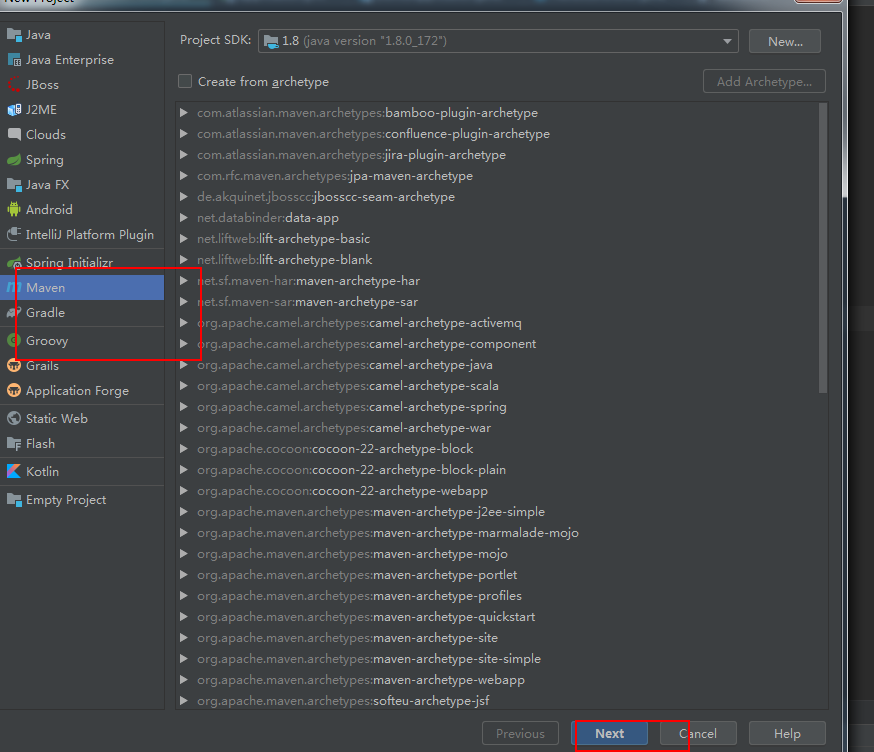
idea 如何创建多个模块 。
和eclipse有点区别,创建maven项目
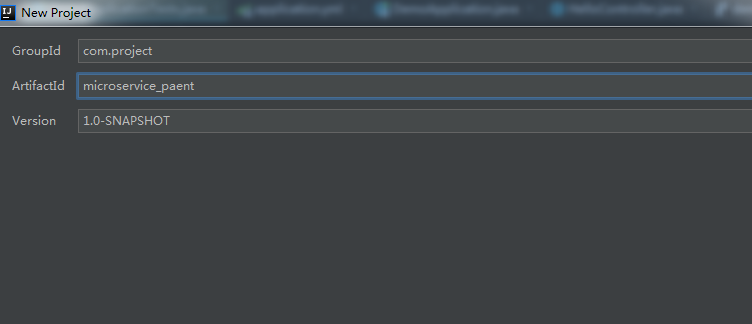
看下项目结构
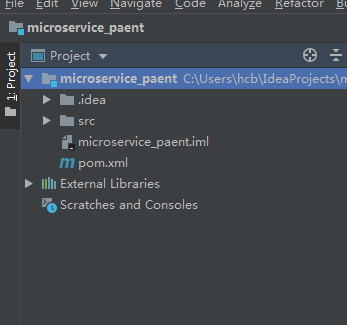
和eclipse中的workspace一样。
1.创建EurekaServer
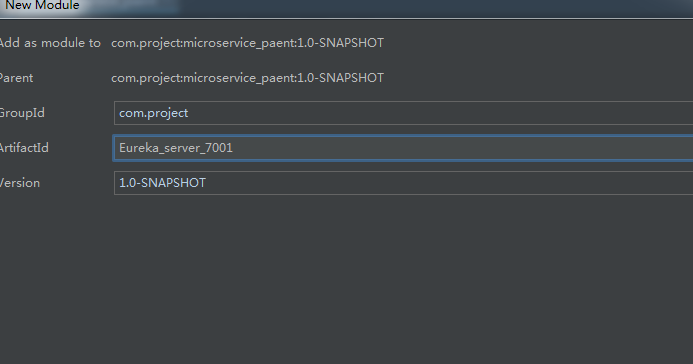
带个端口明确一下。
2.创建生产者和消者共用的接口
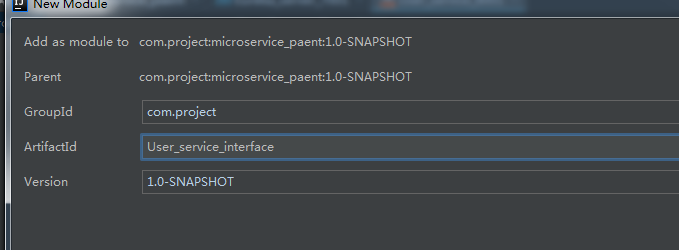
3.创建服务提供者
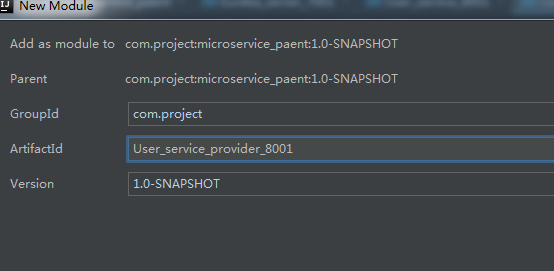
4.创建服务消费者
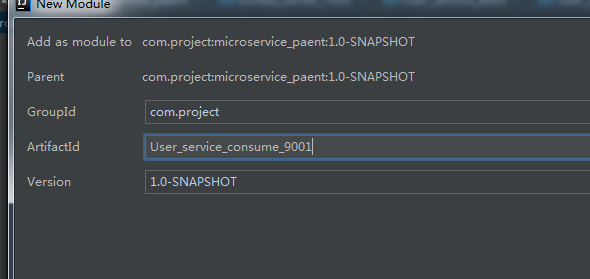
现在的项目架构
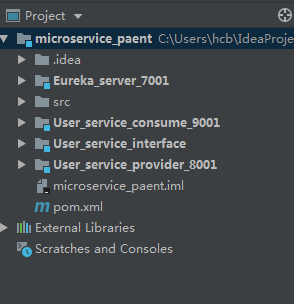
开始配置
想让项目中的四个模块 都拥有spring boot
让四个模块继承一个父亲 。在总项目的pom.xml中添加spring boot ,这个下面的四个模块都会继承
总项目的pom.xml
${spring-cloud.version} 是一个变量,要定义在properties中。
以下代码是引入spring cloud.
一定要注意版本是否正确。我在这里就入了一个大坑 。
先开始定义的spring-cloud.version写成了 spring-cloud.verison,导致cloud怎么也导入不进来
费了很大功夫才发现。
 <properties>

        <project.build.sourceEncoding>UTF-8</project.build.sourceEncoding>

        <project.reporting.outputEncoding>UTF-8</project.reporting.outputEncoding>

        <java-version>1.8</java-version>

        <spring-cloud.version>Finchley.SR1</spring-cloud.version>

    </properties>

    <dependencyManagement>

        <dependencies>

            <dependency>

                <groupId>org.springframework.cloud</groupId>

                <artifactId>spring-cloud-dependencies</artifactId>

                <version>${spring-cloud.version}</version>

                <type>pom</type>

                <scope>import</scope>

            </dependency>

        </dependencies>

    </dependencyManagement>
springboot 与springcoud 的版本选择
这里要注意springboot 与springcoud 的版本的匹配,可以参考:
https://spring.io/projects/spring-cloud
springboot的最新版 ,springcloud不一定就支持,要看对应关系 。
这里有一位同学写的踩坑旅程,有兴趣的可以参考一下。少走一些弯路
https://blog.51cto.com/honly/2156583?source=dra
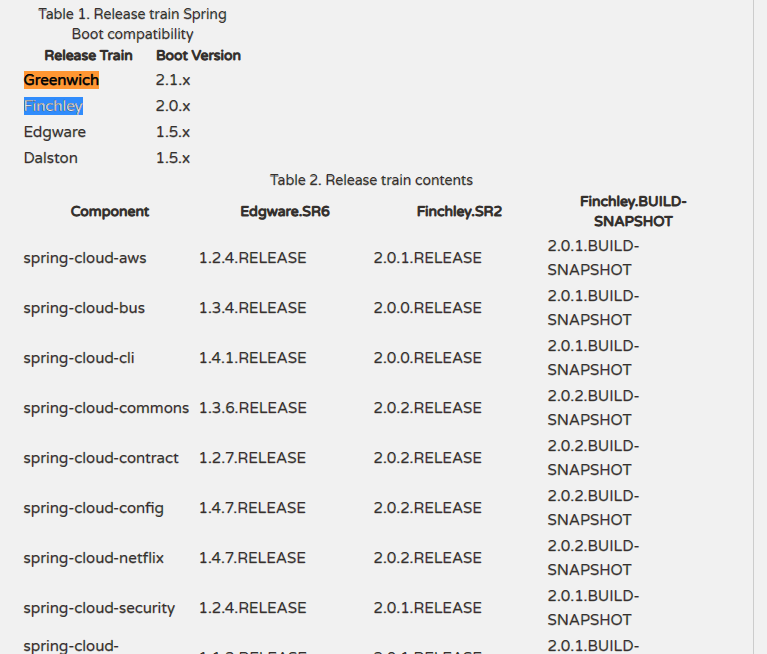
以下图中可以看到。srpingboot 2.0开 头的版本,要用springcloud的Finchley来适配
Finchley 又分为 Release ,SR1-SR4 . 选择自己需要的就可以。 比如Finchley Release 或者Finchley SR1
以下网址是springcloud maven中面仓库的地址
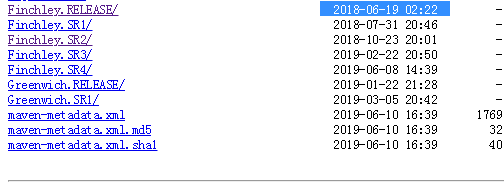
https://repo1.maven.org/maven2/org/springframework/cloud/spring-cloud-dependencies/
可以看到Finchley.Release是Finchley最新发布的一个版本,之后才有sr1-4
然后是Greenwich.Releash版本,这个是针对springboot 2.1.x版本做的适配
每个版本都有针对的说明 : 比如
finchley.Release的官方说明:https://spring.io/blog/2018/06/19/spring-cloud-finchley-release-is-available
中文说明 参考:https://www.oschina.net/news/97226/spring-cloud-finchley-released
显著变化:
- 与 Spring Boot 2.0.x 兼容
- 不支持 Spring Boot 1.5.x
- 最低要求 Java 8
- 新增 Spring Cloud Function 和 Spring Cloud Gateway
以下代码是表示所有的模块都继承springboot
<parent>

        <groupId>org.springframework.boot</groupId>

        <artifactId>spring-boot-starter-parent</artifactId>

        <version>2.0.5.RELEASE</version>

        <relativePath/> <!-- lookup parent from repository -->

    </parent>
如果表示模块继承了,在模块的pom.xml中
//<artifactId>microservice_paent</artifactId> 表示继承了父类

<parent>

        <artifactId>microservice_paent</artifactId>

        <groupId>com.project</groupId>

        <version>1.0-SNAPSHOT</version>

    </parent>
Eureka注册中心的pom.xml
添加springboot ,spring.cloud的依赖。
 <dependencies>

        <dependency>

            <groupId>org.springframework.cloud</groupId>

            <artifactId>spring-cloud-starter-netflix-eureka-server</artifactId>

        </dependency>

        <dependency>

            <groupId>org.springframework.boot</groupId>

            <artifactId>spring-boot-starter-web</artifactId>

        </dependency>

        <dependency>

            <groupId>org.springframework.boot</groupId>

            <artifactId>spring-boot-starter-test</artifactId>

            <scope>test</scope>

        </dependency>

    </dependencies>
Eureka注册的配置
在src->main->resources中添加 application.yml.指定服务器端口号,同时配置 Eureka的配置
server:

  port: 7001

eureka:

  instance:

    hostname: 127.0.0.1

  client:

    register-with-eureka: false

    fetch-registry: false

    service-url:

      defaultZone:http://${eureka.instance.hostname}:${server.port}/eureka/
在src->main->java中添加新类。
这些类似于单项目 springboot项目的创建。
这里如果@EnableEurekaServer不出现智能提示,或者明显有错误,需要去检查springcloud是否导入 进来
import org.springframework.boot.autoconfigure.SpringBootApplication;

import org.springframework.cloud.netflix.eureka.server.EnableEurekaServer;

@SpringBootApplication

@EnableEurekaServer

public class EurekaServiceApplication {

    public static void main(String[] args) {

        SpringBootApplication.run(EurekaServiceApplication.class,args);

    }

}
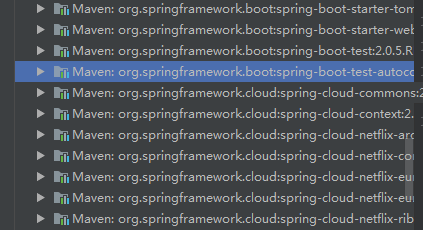
也可以去检查依赖的包里是否有cloud的字样,比如下图,如果没有,检查配置 pom.xml确保springcloud导入进来再进行操作。
下面就会有区别了。请等下一篇 ,今天有几个坑入的比较深
SpringCloud介绍及入门一的更多相关文章
- SpringCloud介绍及入门(二)
接口的实现 在user_service_interface中添加一个User的类. 增加私有属性 id,name , 并利用快捷键Alt+Insert 实现get,set的快速生成. 实体类User ...
- java框架之SpringCloud(1)-微服务及SpringCloud介绍
微服务概述 是什么 业界大牛 Martin Fowler 这样描述微服务: 参考[微服务(Microservices)-微服务原作者Martin Flower博客翻译]. 下面是关于上述博客中的部分重 ...
- .NET平台开源项目速览(6)FluentValidation验证组件介绍与入门(一)
在文章:这些.NET开源项目你知道吗?让.NET开源来得更加猛烈些吧!(第二辑)中,给大家初步介绍了一下FluentValidation验证组件.那里只是概述了一下,并没有对其使用和强大功能做深入研究 ...
- freemarker语法介绍及其入门教程实例
# freemarker语法介绍及其入门教程实例 # ## FreeMarker标签使用 #####一.FreeMarker模板文件主要有4个部分组成</br>#### 1.文本,直接输 ...
- (转)私有代码存放仓库 BitBucket介绍及入门操作
转自:http://blog.csdn.net/lhb_0531/article/details/8602139 私有代码存放仓库 BitBucket介绍及入门操作 分类: 研发管理2013-02-2 ...
- NET平台开源项目速览(6)FluentValidation验证组件介绍与入门(转载)
原文地址:http://www.cnblogs.com/asxinyu/p/dotnet_Opensource_project_FluentValidation_1.html 阅读目录 1.基本介绍 ...
- springcloud+eureka简单入门案例
springcloud+eureka简单入门案例 一.服务提供者 直接提供服务,入门案例没有特别要设置的地方,注意下端口,由于要启动多个服务,可能会冲突 配置文件(src/main/resources ...
- 读写Word的组件DocX介绍与入门
本文为转载内容: 文章原地址:http://www.cnblogs.com/asxinyu/archive/2013/02/22/2921861.html 开源Word读写组件DocX介绍与入门 阅读 ...
- [转帖]Druid介绍及入门
Druid介绍及入门 2018-09-19 19:38:36 拿着核武器的程序员 阅读数 22552更多 分类专栏: Druid 版权声明:本文为博主原创文章,遵循CC 4.0 BY-SA版权协议 ...
随机推荐
- 【转载】 C#使用string.Join快速用特定字符串串联起数组
在C#中有时候我们的数组元素需要通过一些特定的字符串串联起来,例如将整形Int数组通过逗号快速串联起来成为一个字符串,可以使用String.Join方法.或者一个字符串string类型数组所有元素快速 ...
- SMARTY的知识
smarty的原理: <?php class Smarty { $ldelimiter = "{";//左分隔符 $rdelimiter = "}";// ...
- 【leetcode】366.Find Leaves of Binary Tree
原题 Given a binary tree, collect a tree's nodes as if you were doing this: Collect and remove all lea ...
- c# 属性成员
- Linux之Vim的使用
所有的 Unix Like 系统都会内建 vi 文书编辑器,其他的文书编辑器则不一定会存在. 但是目前我们使用比较多的是 vim 编辑器. vim 具有程序编辑的能力,可以主动的以字体颜色辨别语法的正 ...
- 记录一下JProfiler的使用
刚入职实习,第四天了,昨晚老大安排我在公司机器上装个JProfiler看一情况. 然后网上都是什么跟tomcat一起使用的,所以折腾了很久才搞出来. 我这里没用什么服务器,因为公司用的是Play!框架 ...
- 【问题】man手册如何查看区分printf命令和printf函数
参考:UNIX / Linux Man Command Example to View Man Pages 今天再看别人博客的时候,先仔细看看printf命令是怎么玩的,于是man手册查了下.结果搜出 ...
- 创建第一kubernetes应用以及基本操作(六)
1.创建一个测试用的deployment kubectl run net-test --image=alpine --replicas= sleep 2.查看获取IP情况 [root@linux ~] ...
- 2019-ACM-ICPC-沈阳区网络赛-K. Guanguan's Happy water-高斯消元+矩阵快速幂
2019-ACM-ICPC-沈阳区网络赛-K. Guanguan's Happy water-高斯消元+矩阵快速幂 [Problem Description] 已知前\(2k\)个\(f(i)\),且 ...
- ES6 正则扩展
一.新增 flags 属性 ES6 为正则表达式新增了flags属性,会返回正则表达式的修饰符. // ES5 的 source 属性 // 返回正则表达式的正文 /abc/ig.source // ...