
(二)发布第一个WebService服务与DSWL文档解析
1. 编写接口
package service;

import javax.jws.WebService;

/**

 * 第一个webservice服务,

 * @WebService注解表示这是一个webservice服务

 * @author Administrator

 *

 */

@WebService

public interface WebService_1 {

    public int add(int x,int y);

}
2. 编写实现类
package serviceImpl;

import javax.jws.WebService;

import javax.swing.plaf.synth.SynthSeparatorUI;

import service.WebService_1;

/**

 * web服务的实现类,endpointInterface指的是对外提供服务的接口

 * @author Administrator

 *

 */

@WebService(endpointInterface = "service.WebService_1")

public class WebService_1_impl implements WebService_1 {

    @Override

    public int add(int x, int y) {

        System.out.println("返回两数相加结果");

        return x + y;

    }

}
3. 发布
package test;

import javax.xml.ws.Endpoint;

import serviceImpl.WebService_1_impl;

public class Test {

    public static void main(String[] args) {
    //publish方法第一个参数是发布后访问的请求地址,第二个参数是服务的实现

        Endpoint.publish("http://localhost:3031/first", new WebService_1_impl());

        System.out.println("发布成功......");

    }

}
4. 结果并解析
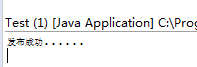

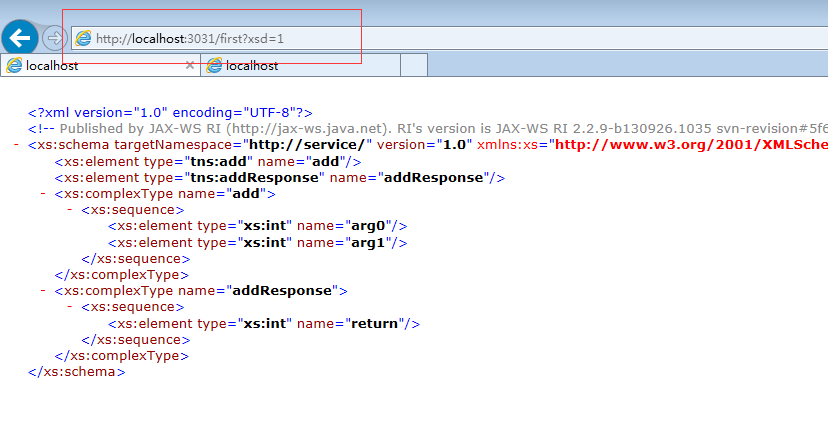
5. wsdl文档解析
WSDL(Web Services Description Language,Web服务描述语言)是为描述Web Services发布的XML格式。W3C组织没有批准1.1版的WSDL,但是2.0版本已经在製訂中,2.0版将被作为推荐标准(recommendation)(一种官方标准),并将被W3C组织批准为正式标准。WSDL描述Web服务的公共接口。这是一个基于XML的关于如何与Web服务通讯和使用的服务描述;也就是描述与目录中列出的Web服务进行交互时需要绑定的协议和信息格式。通常采用抽象语言描述该服务支持的操作和信息,使用的时候再将实际的网络协议和信息格式绑定给该服务。
WSDL 文档仅仅是一个简单的 XML 文档。它包含一系列描述某个 web service 的定义。
WebMthod的定义:
 1:  [WebService(Namespace = "http://tempuri.org/")]

 2:  [WebServiceBinding(ConformsTo = WsiProfiles.BasicProfile1_1)]

 3:  [System.ComponentModel.ToolboxItem(false)]

 4:  public class WebService2 : System.Web.Services.WebService

 5:  {

 6:      [WebMethod]

 7:      public bool Add(TestClass testClass,int id)

 8:      {

 9:          return true;

10:      }

11:  }

12:

13:  public class TestClass

14:  {

15:      public int a;

16:      public string b;

17:      public DateTime c;

18:  }

19:
WSDL的结构:
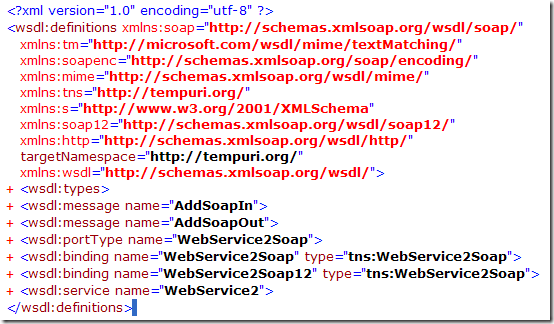
一个WSDL文档通常包含有以下元素,即types、message、portType、operation、binding、 service元素。这些元素嵌套在definitions元素中。
definitions是WSDL文档的根元素,definitions还声明各命名空间。
types,数据类型定义的容器,它使用某种类型系统(一般地使用XML Schema中的类型系统)。
 1:    <wsdl:types>

 2:      <s:schema elementFormDefault="qualified" targetNamespace="http://tempuri.org/">

 3:        <s:element name="Add">

 4:          <s:complexType>

 5:            <s:sequence>

 6:              <s:element minOccurs="0" maxOccurs="1" name="testClass" type="tns:TestClass" />

 7:              <s:element minOccurs="1" maxOccurs="1" name="id" type="s:int" />

 8:            </s:sequence>

 9:          </s:complexType>

10:        </s:element>

11:        <s:complexType name="TestClass">

12:          <s:sequence>

13:            <s:element minOccurs="1" maxOccurs="1" name="a" type="s:int" />

14:            <s:element minOccurs="0" maxOccurs="1" name="b" type="s:string" />

15:            <s:element minOccurs="1" maxOccurs="1" name="c" type="s:dateTime" />

16:          </s:sequence>

17:        </s:complexType>

18:        <s:element name="AddResponse">

19:          <s:complexType>

20:            <s:sequence>

21:              <s:element minOccurs="1" maxOccurs="1" name="AddResult" type="s:boolean" />

22:            </s:sequence>

23:          </s:complexType>

24:        </s:element>

25:      </s:schema>

26:    </wsdl:types>
types描述WebMethod的名称(Add),传入参数(testClass——包括对TestClass的详细描述,id),响应信息(AddResponse)。
message描述通信消息的数据结构的抽象类型化定义,使用types的描述的类型来定义整个消息的数据结构。
1:    <wsdl:message name="AddSoapIn">

2:      <wsdl:part name="parameters" element="tns:Add" />

3:    </wsdl:message>

4:    <wsdl:message name="AddSoapOut">

5:      <wsdl:part name="parameters" element="tns:AddResponse" />

6:    </wsdl:message>
portType和operation描述服务和服务的方法。operation包括输入和输出(使用message的描述)。
1:    <wsdl:portType name="WebService2Soap">

2:      <wsdl:operation name="Add">

3:        <wsdl:input message="tns:AddSoapIn" />

4:        <wsdl:output message="tns:AddSoapOut" />

5:      </wsdl:operation>

6:    </wsdl:portType>
binding描述Web Services的通信协议。 <soap:binding/>描述使用SOAP协议,binding还描述Web Services的方法、输入、输出。
 1:    <wsdl:binding name="WebService2Soap" type="tns:WebService2Soap">

 2:      <soap:binding transport="http://schemas.xmlsoap.org/soap/http" />

 3:      <wsdl:operation name="Add">

 4:        <soap:operation soapAction="http://tempuri.org/Add" style="document" />

 5:        <wsdl:input>

 6:          <soap:body use="literal" />

 7:        </wsdl:input>

 8:        <wsdl:output>

 9:          <soap:body use="literal" />

10:        </wsdl:output>

11:      </wsdl:operation>

12:    </wsdl:binding>
service描述Web Services访问点的集合。因为包括SOAP1.1和SOAP1.2的描述,所以一个方法有对应两描述。
<wsdl:service name="WebService2"><wsdl:port name="WebService2Soap" binding="tns:WebService2Soap"><soap:address location="http://localhost:1552/WebService2.asmx" /></wsdl:port><wsdl:port name="WebService2Soap12" binding="tns:WebService2Soap12"><soap12:address location="http://localhost:1552/WebService2.asmx" /></wsdl:port></wsdl:service>
(二)发布第一个WebService服务与DSWL文档解析的更多相关文章
- WebService-01-使用jdk发布第一个WebService服务并调用
Webservice是SOAP+XML,SOAP是基于Http的,Http底层是Socket,先回顾一下Socket: Server: public class Server { public sta ...
- (一)CXF之发布第一个WebService服务
一.CXF入门 1.1 前提 Apache CXF 是一个开源的 Services 框架,CXF 帮助您利用 Frontend 编程 API 来构建和开发 Services ,像 JAX-WS .这些 ...
- 基于 jdk1.7 发布一个 WebService 服务
1 服务端的发布 第一步: 创建一个 Java 项目第二步: 创建一个类, 加入 Webservice 注解第三步: 提供一个方法 sayHello第四步: 在 main 方法中调用 jdk 提供的发 ...
- 自定义及发布一个webservice服务
自定义及发布一个webservice服务 - 声明 某个业务服务为webservice服务 通过@webservice 注解来声明 - 发布webservice服务 ...
- 微服务·API文档
阅文时长 | 3.92分钟 字数统计 | 2754.05字符 主要内容 | 1.什么是API文档 2.API文档的使用 3.声明与参考资料 『微服务·API文档』 编写人 | SCscHero 编写时 ...
- 调用webapi 错误:使用 HTTP 谓词 POST 向虚拟目录发送了一个请求,而默认文档是不支持 GET 或 HEAD 以外的 HTTP 谓词的静态文件。的解决方案
第一次调用webapi出错如下: <!DOCTYPE html PUBLIC "-//W3C//DTD XHTML 1.0 Strict//EN" "http:// ...
- 书剑恩仇录online全套源代码(服务端+client+文档)
书剑恩仇录online全套源代码(服务端+client+文档).vc++开发,解压后将近10G大小,眼下网上最完整版本号,包括client源代码.服务端源代码.工具源代码.sdk.文档-- <书 ...
- contents() 查找匹配元素内部所有的子节点(包括文本节点)。如果元素是一个iframe,则查找文档内容
contents() V1.2概述 查找匹配元素内部所有的子节点(包括文本节点).如果元素是一个iframe,则查找文档内容 示例 描述:大理石平台检定规程 查找所有文本节点并加粗 HTML 代码 ...
- 2018-8-10-docfx-做一个和微软一样的文档平台
title author date CreateTime categories docfx 做一个和微软一样的文档平台 lindexi 2018-08-10 19:16:51 +0800 2018-2 ...
随机推荐
- java类什么时候加载?,加载类的原理机制是怎么样的?
java类什么时候加载?,加载原理机制是怎么样的? 答: 很多人都不是很清楚java的class类什么时候加载在运行内存中,其实类加载的时间是发生在一下几种情况: 1.实例化对象时,就像sprin ...
- [ML] Bayesian Linear Regression
热身预览 1.1.10. Bayesian Regression 1.1.10.1. Bayesian Ridge Regression 1.1.10.2. Automatic Relevance D ...
- MySQL导入utf8编码的CSV文件
首先,作为测试,我们在这里创建一个名为testdb的数据库,和一个名为test_table的表: create database if not exists testdb default charse ...
- 连载三:RobotFramework+Selenium+Jenkins分布式构建
目标:Jenkins安装在服务器上,而使用Jenkins调用本机的脚本并在本机执行. 步骤: (1)需要有RobotFrameWork+Selenium的运行环境: python2.7,Robotfr ...
- .Net Core 常用开发工具
组件名 描述 可选版本 推荐版本 Visual Studio Community 社区免费版 For Visual Studio 2017 For Visual Studio 2019 Visual ...
- 分享一个关于Opencv的小总结
import cv2 #opencv读取的格式是BGR import numpy as np 一.#读入文件 img=cv2.imread('cat.jpg') #’’引号内是图片所在盘的地址+名 ...
- leetcode903 Valid Permutations for DI Sequence
思路: dp[i][j]表示到第i + 1个位置为止,并且以剩下的所有数字中第j + 1小的数字为结尾所有的合法序列数. 实现: class Solution { public: int numPer ...
- 【VS开发】【数据库开发】libevent windows下基于VS2010的编译
libevent是一个常用的网络库,下面就看看在windows下面编译测试的过程吧. 一 环境 系统:win8.1编译器:VS2013官方下载地址:http://libevent.org/版本:2.0 ...
- redis 启动配置文件加载报错 service redis does not support chkconfig
# chkconfig: # description:Redis is a persistent key-value database 网上资料 上面的注释的意思是,redis服务必须在运行级2,3, ...
- 根据start和limit从已有的数据列表中获取从start开始的limit个数据
代码记录(需求:根据start和limit从已有的数据列表中获取从start开始的limit个数据) 已有的数据列表:这个数据列表是经过处理的,可能是在SQL查询时无法处理的如多条件排序,而排序条件需 ...