
使用.Net Core 2.2创建windows服务
使用.Net Core 2.2创建windows服务
我的环境
- win 10 home
- Visual Studio 2019 v16.1.3
- 安装有.net core 2.2
创建项目
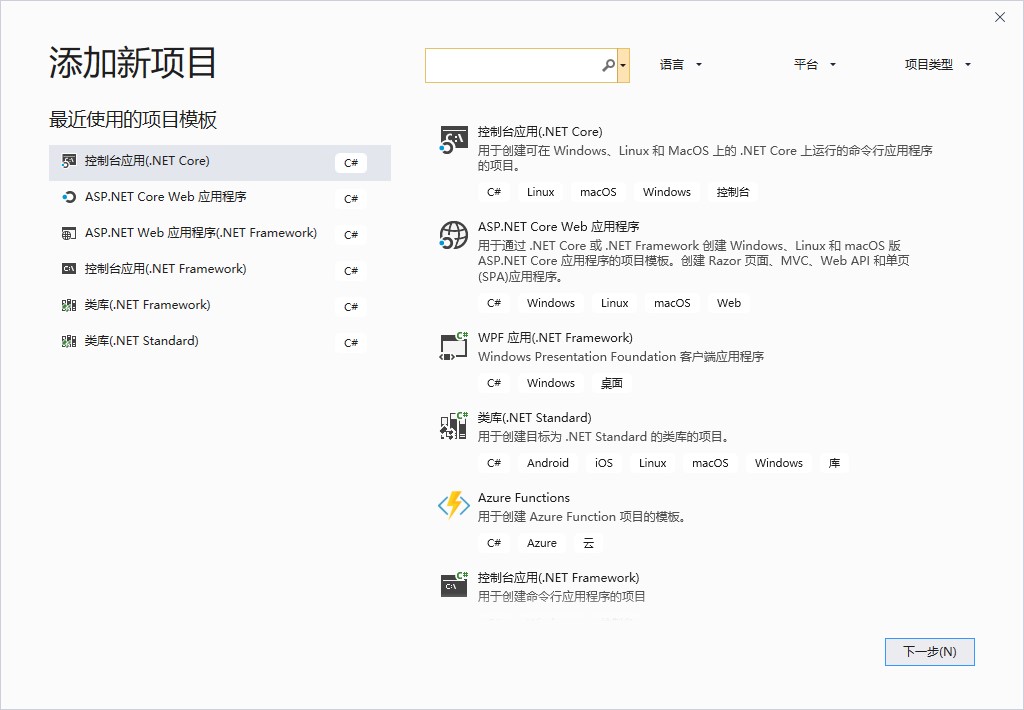
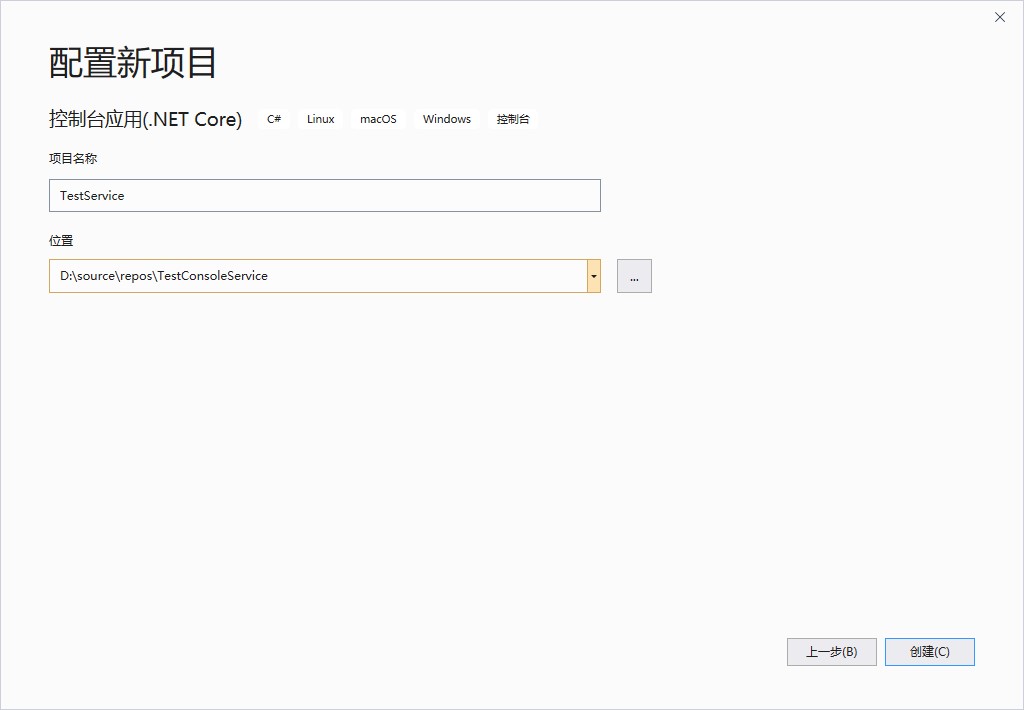
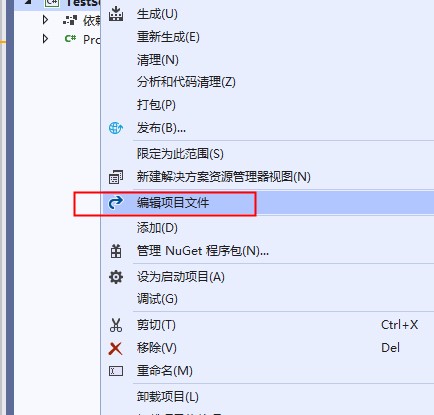
编辑项目文件
在 PropertyGroup 配置节 加入属性 <RuntimeIdentifier>win-x64</RuntimeIdentifier>
保存后,重新生成项目
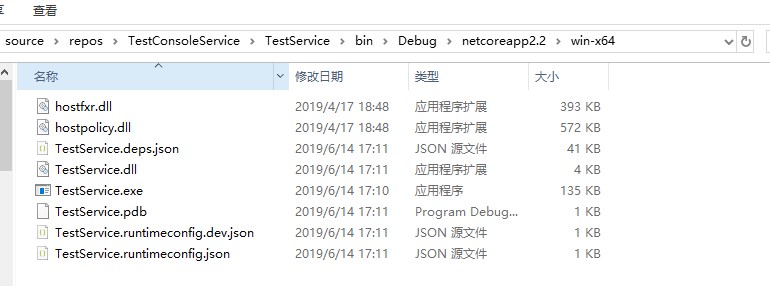
在项目文件夹下,会有文件夹 bin\Debug\netcoreapp2.2\win-x64,里面包含了exe文件。
测试服务类的编写
安装nuget包
Install-Package System.ServiceProcess.ServiceController -Version 4.5.0
修改启动类 Programe.cs
using System;

using System.IO;

using System.ServiceProcess;

namespace TestService

{

    class Program

    {

        static void Main(string[] args)

        {

            using (var service = new TestSevice())

            {

                ServiceBase.Run(service);

            }

        }

    }

    internal class TestSevice : ServiceBase

    {

        public TestSevice()

        {

            ServiceName = "TestService";

        }

        protected override void OnStart(string[] args)

        {

            string filename = CheckFileExists();

            File.AppendAllText(filename, $"{DateTime.Now} started.{Environment.NewLine}");

        }

        protected override void OnStop()

        {

            string filename = CheckFileExists();

            File.AppendAllText(filename, $"{DateTime.Now} stopped.{Environment.NewLine}");

        }

        private static string CheckFileExists()

        {

            string filename = System.AppDomain.CurrentDomain.BaseDirectory + @"\MyService.txt";

            if (!File.Exists(filename))

            {

                File.Create(filename);

            }

            return filename;

        }

    }

}
服务安装、启动、卸载
安装
sc create testservice binpath=D:\source\repos\TestConsoleService\TestService\bin\Debug\netcoreapp2.2\win-x64\TestService.exe
卸载
sc delete testservice
启动
不能通过命令行启动服务
sc start testservice
只能去服务管理器使用鼠标启动服务,具体原因暂未研究
反复启动停止,然后去exe所在目录下查看MyService.txt的内容,确认服务的启动。
参考文档
- Running a .NET Core Generic Host App as a Windows Service
- Create windows service using .Net Core (Console application)
使用.Net Core 2.2创建windows服务的更多相关文章
- 使用.NET Core中创建Windows服务(一) - 使用官方推荐方式
原文:Creating Windows Services In .NET Core – Part 1 – The "Microsoft" Way 作者:Dotnet Core Tu ...
- 使用.NET Core创建Windows服务(二) - 使用Topshelf方式
原文:Creating Windows Services In .NET Core – Part 2 – The "Topshelf" Way 作者:Dotnet Core Tut ...
- 使用.NET Core创建Windows服务 - 使用.NET Core工作器方式
原文:Creating Windows Services In .NET Core – Part 3 – The ".NET Core Worker" Way 作者:Dotnet ...
- .net core+topshelf+quartz创建windows定时任务服务
.net core+topshelf+quartz创建windows定时任务服务 准备工作 创建.net core 控制台应用程序,这里不做过多介绍 添加TopShelf包:TopShelf: 添加Q ...
- .NET Core 创建Windows服务
.NET Core 创建Windows服务 作者:高堂 原文地址:https://www.cnblogs.com/gaotang/p/10850564.html 写在前面 使用 TopShelf+Au ...
- 使用.NET Core创建Windows服务(一) - 使用官方推荐方式
原文:使用.NET Core创建Windows服务(一) - 使用官方推荐方式 原文:Creating Windows Services In .NET Core – Part 1 – The &qu ...
- C#/.NET基于Topshelf创建Windows服务的守护程序作为服务启动的客户端桌面程序不显示UI界面的问题分析和解决方案
本文首发于:码友网--一个专注.NET/.NET Core开发的编程爱好者社区. 文章目录 C#/.NET基于Topshelf创建Windows服务的系列文章目录: C#/.NET基于Topshelf ...
- 用C#创建Windows服务(Windows Services)
用C#创建Windows服务(Windows Services) 学习: 第一步:创建服务框架 创建一个新的 Windows 服务项目,可以从Visual C# 工程中选取 Windows 服务(W ...
- 玩转Windows服务系列——创建Windows服务
创建Windows服务的项目 新建项目->C++语言->ATL->ATL项目->服务(EXE) 这样就创建了一个Windows服务项目. 生成的解决方案包含两个项目:Servi ...
随机推荐
- 学习ArrayList的扩容机制
基于jdk8 1.首先我们看new ArrayList中 public ArrayList() { this.elementData = DEFAULTCAPACITY_EMPTY_ELEMENTDA ...
- DBCA创建数据库
工具/原料 oracle database 11g 步骤/方法 1 确保安装好oracle database 11g 2 打开命令提示符(运行中输入CMD打开 或是在 附件中点击打开) 3 输入dbc ...
- SQL-W3School-高级:SQL 通配符
ylbtech-SQL-W3School-高级:SQL 通配符 1.返回顶部 1. 在搜索数据库中的数据时,您可以使用 SQL 通配符. SQL 通配符 在搜索数据库中的数据时,SQL 通配符可以替代 ...
- centos7 搭建FTP
通过yum安装vsftpd yum install -y vsftpd 修改vsftpd的配置文件 vim /etc/vsftpd/vsftpd.conf 修改配置文件如下: 1.不允许匿名访问 an ...
- Hystrix-基本概念(设计原则和两种隔离技术)
一.Hystrix是什么在微服务的架构系统中,每个服务都可能会调用很多其他服务,被调用的那些服务就是依赖服务.有的时候某些依赖服务出现故障也是很正常的.Hystrix可以让我们在对服务间的调用进行控制 ...
- 删除badi及badi interface
转自:https://blog.csdn.net/zeewjj/article/details/7963147 Use Function Module OO_INTERFACE_DELETE and ...
- nginx使用vhost子目录
在主配置文件http模块最后添加如下一句话 [root@host---- ~]# vi /etc/nginx/nginx.conf include /etc/nginx/conf.d/*.conf; ...
- C++中使用OPENCV对深度学习的特征图进行可视化
//需要先在运行目录下创建文件夹opencv_layers #include <iostream> #include <unistd.h> #include <openc ...
- QFramework 使用指南 2020(九):Res Kit(3)异步加载 与 异步队列加载
在上一篇我们了解了 Res Kit 的一些背后设计原理,讲解了一些概念,比如:开发阶段.真机阶段等. 在这一篇,我们回到 Res Kit 使用细节上. 在 Res Kit 的第一篇,我们介绍了 Res ...
- 《精通并发与Netty》学习笔记(09 - Java中流的概念)
Java中流的概念 java程序通过流来完成输入/输出.流是生产或消费信息的抽象.流通过java的输入/输出与物理设备链接.尽管与它们链接的物理设备不尽相同,所有流的行为具有同样的方式.这样,相同的输 ...