
.NET Core 创建Windows服务
.NET Core 创建Windows服务
写在前面
使用 TopShelf+Autofac+AutoMapper+Quartz+NLog 完成现有项目定时调度任务
1.相关NetGet包
- 依赖注入 Alexinea.Autofac.Extensions.DependencyInjection
- 对象映射 AutoMapper.Extensions.Microsoft.DependencyInjection
- 调度 Autofac.Extras.Quartz
- Topshelf注入 Topshelf.Autofac
- Topshelf日志 Topshelf.NLog/Topshelf.Log4Net
2.添加Autofac自动映射服务
- 引入 Alexinea.Autofac.Extensions.DependencyInjection
3.添加AutoMapper自动映射类
- 引入 AutoMapper.Extensions.Microsoft.DependencyInjection
- 添加测试类 User、UserDto
- 添加服务类 IUserRepository、UserRepository、IUserService、UserService,获取配置文件中的User信息并转换为业务模型UserDto
- 添加映射配置文件 MapperProfiles
- 添加Autofac扩展 AutoMapperExtensions
public static class AutoMapperExtensions

{

    public static ContainerBuilder ConfigureAutoMapper(this ContainerBuilder builder)

    {

        builder.RegisterAssemblyTypes(AppDomain.CurrentDomain.GetAssemblies())

            .AsClosedTypesOf(typeof(ITypeConverter<,>))

            .AsImplementedInterfaces();

        builder.RegisterAssemblyTypes(typeof(AutoMapperExtensions).Assembly)

            .AssignableTo<Profile>().As<Profile>();

        builder.Register(c => {

            var profiles = c.Resolve<IEnumerable<Profile>>();

            var context = c.Resolve<IComponentContext>();

            return new MapperConfiguration(x => {

                foreach (var profile in profiles) x.AddProfile(profile);

                x.ConstructServicesUsing(context.Resolve);

            });

        }).SingleInstance().AsSelf();

        builder.Register(c => {

            var context = c.Resolve<IComponentContext>();

            var config = context.Resolve<MapperConfiguration>();

            return config.CreateMapper();

        }).As<IMapper>();

        return builder;

    }

}
- 添加自定义服务扩展 ServicesExtensions
public static class ServicesExtensions

{

    public static ContainerBuilder ConfigureSelf(this ContainerBuilder builder)

    {

        var services = new ServiceCollection();

        // register appsettings.json

        services.Configure<User>("UserConfig", Settings.Instance.Configuration.GetSection("User"));

        builder.Populate(services);

        // register services repositories

        builder.RegisterAssemblyTypes(typeof(UserRepository).Assembly)

                .Where(t => t.Name.EndsWith("Repository"))

                .AsImplementedInterfaces();

        builder.RegisterAssemblyTypes(typeof(UserService).Assembly)

                .Where(t => t.Name.EndsWith("Service"))

                .AsImplementedInterfaces();

        return builder;

    }

}
4.添加Quartz调度任务
- 引入 Autofac.Extras.Quartz
- 添加调度任务类 MyJob1
- 添加Autofac扩展 QuartzExtensions
public static ContainerBuilder ConfigureQuartz(this ContainerBuilder builder)

{

    // 1) Register IScheduler

    builder.RegisterModule(new QuartzAutofacFactoryModule());

    // 2) Register jobs

    builder.RegisterModule(new QuartzAutofacJobsModule(typeof(MyJob1).Assembly));

    return builder;

}
5.添加日志
- 引入 NLog.Extensions.Logging
6.创建TopShelf服务
- 引入 Topshelf.NLog
- 引入 Topshelf.Autofac
7.发布并添加Windows服务
- 发布为独立文件
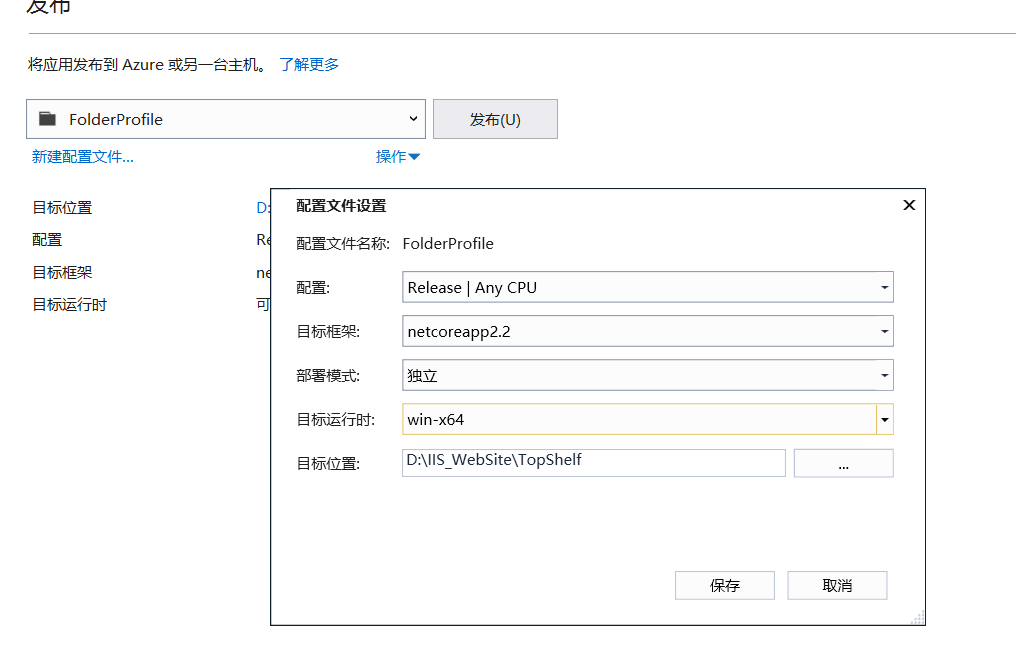
- 添加安装(install.bat)和卸载文件(uninstall.bat)
cd /d %~dp0

Sample.Topshelf.exe install

pause
cd /d %~dp0

Sample.Topshelf.exe uninstall

pause
源码
参考资料
.NET Core 创建Windows服务的更多相关文章
- 使用.NET Core创建Windows服务(二) - 使用Topshelf方式
原文:Creating Windows Services In .NET Core – Part 2 – The "Topshelf" Way 作者:Dotnet Core Tut ...
- 使用.NET Core创建Windows服务 - 使用.NET Core工作器方式
原文:Creating Windows Services In .NET Core – Part 3 – The ".NET Core Worker" Way 作者:Dotnet ...
- 使用.NET Core创建Windows服务(一) - 使用官方推荐方式
原文:使用.NET Core创建Windows服务(一) - 使用官方推荐方式 原文:Creating Windows Services In .NET Core – Part 1 – The &qu ...
- 使用.NET Core创建Windows服务详细步骤
目录 #创建步骤 1.使用Visual Studio创建 2.使用命令行创建 #项目结构说明 #将应用转换成Window服务 1.引入Microsoft.Extensions.Hosting.Wind ...
- 使用.NET Core中创建Windows服务(一) - 使用官方推荐方式
原文:Creating Windows Services In .NET Core – Part 1 – The "Microsoft" Way 作者:Dotnet Core Tu ...
- 使用.Net Core 2.2创建windows服务
使用.Net Core 2.2创建windows服务 我的环境 win 10 home Visual Studio 2019 v16.1.3 安装有.net core 2.2 创建项目 编辑项目文件 ...
- C#/.NET基于Topshelf创建Windows服务的守护程序作为服务启动的客户端桌面程序不显示UI界面的问题分析和解决方案
本文首发于:码友网--一个专注.NET/.NET Core开发的编程爱好者社区. 文章目录 C#/.NET基于Topshelf创建Windows服务的系列文章目录: C#/.NET基于Topshelf ...
- 用C#创建Windows服务(Windows Services)
用C#创建Windows服务(Windows Services) 学习: 第一步:创建服务框架 创建一个新的 Windows 服务项目,可以从Visual C# 工程中选取 Windows 服务(W ...
- 玩转Windows服务系列——创建Windows服务
创建Windows服务的项目 新建项目->C++语言->ATL->ATL项目->服务(EXE) 这样就创建了一个Windows服务项目. 生成的解决方案包含两个项目:Servi ...
随机推荐
- IDEA配置Hadoop开发环境&编译运行WordCount程序
有关hadoop及java安装配置请见:https://www.cnblogs.com/lxc1910/p/11734477.html 1.新建Java project: 选择合适的jdk,如图所示: ...
- APP界面架构设计
作为PM,信息架构和页面流的设计想必烂熟于心,当确定好产品战略层和范围层即为何种目标用户提供何种服务后,就要着手搭建功能架构,将目标功能通过良好的用户体验传递给用户,目的是高效解决用户痛点,从而实现价 ...
- selenium 隐式等待报错 value must be a non-negative integer
笔者运行代码使用selenium的隐式等待时出现报错: from selenium import webdriver # 从selenium导入webdriver import time driver ...
- android指纹识别认证实现
Android从6.0系统支持指纹认证功能 启动页面简单实现 package com.loaderman.samplecollect.zhiwen; import android.annotation ...
- 关于Jetson Kit开发相关资料
首先是nVidia官方对于Jetson Kit的介绍: http://www.nvidia.com/object/jetson-tk1-embedded-dev-kit.html https://de ...
- 监控查询慢sql
mysql:--查询慢sql:业务db用户 select b.time, b.host, b.id, b.state, b.user, b.db, b.info from information_s ...
- ubuntu tensorflow cpu faster-rcnn 测试自己训练的模型
(flappbird) luo@luo-All-Series:~/MyFile/tf-faster-rcnn_box$ (flappbird) luo@luo-All-Series:~/MyFile/ ...
- 【leetcode_easy】551. Student Attendance Record I
problem 551. Student Attendance Record I 题意: solution: class Solution { public: bool checkRecord(str ...
- Kuhn-Munkras算法解决二分图最优权值匹配
在看这篇博文之前建议看一下上一篇匈牙利法解决二分图最大匹配问题: https://www.cnblogs.com/fangxiaoqi/p/10808729.html 这篇博文参考自:https:// ...
- OpenGL(6)——坐标系
在掌握基本变换后,学习如何变换coordinate space. 对coordinate space进行变换的目的是将local space中各顶点坐标转换成normalized device coo ...