
Unity2017-HTC项目串流Pico摇杆移动功能
最近公司PC项目需要串流到Piconec3上运行,HTC手柄是圆盘键按下移动还可以,但是Piconeo3是摇杆,按下移动的话显得不科学,所以写了一套基于圆盘键,使用摇杆移动的方法
第一步:编写摇杆左右旋转功能
using System.Collections;

using System.Collections.Generic;

using UnityEngine;

using HTC.UnityPlugin.Vive;

using UnityEngine.UI;

using DG.Tweening;

public class RockerTest : MonoBehaviour {

	public Text hint;

	public Transform VR_Head;

	public GameObject rightRay;

	// Use this for initialization

	void Start () {

	}

	bool isRotate = true;

	// Update is called once per frame

	void Update () {

		Vector2 rightPos = ViveInput.GetPadAxis(HandRole.RightHand);

		if (isRotate && Mathf.Abs(rightPos.x)>.7f)

		{

			rightRay.SetActive(false);

			isRotate = false;

			Invoke("ResetRotate",1);

			if (rightPos.x>0)

			{

				hint.text += "—向右旋转";

				Debug.Log("向右旋转");

				VR_Head.rotation = Quaternion.AngleAxis(30, Vector3.up) * VR_Head.rotation;

				//VR_Head.DORotateQuaternion(Quaternion.AngleAxis(30, Vector3.up) * VR_Head.transform.rotation,1);

			}

			else

			{

				hint.text += "—向左旋转";

				Debug.Log("向左旋转");

				VR_Head.rotation = Quaternion.AngleAxis(-30, Vector3.up) * VR_Head.rotation;

				//VR_Head.DORotateQuaternion(Quaternion.AngleAxis(-30, Vector3.up) * VR_Head.transform.rotation, 1);

			}

		}

	}

	void ResetRotate() {

		isRotate = true;

		rightRay.SetActive(true);

	}

}
第二步:移动功能,修改原HTC自带的脚本ViveInputVirtualButton
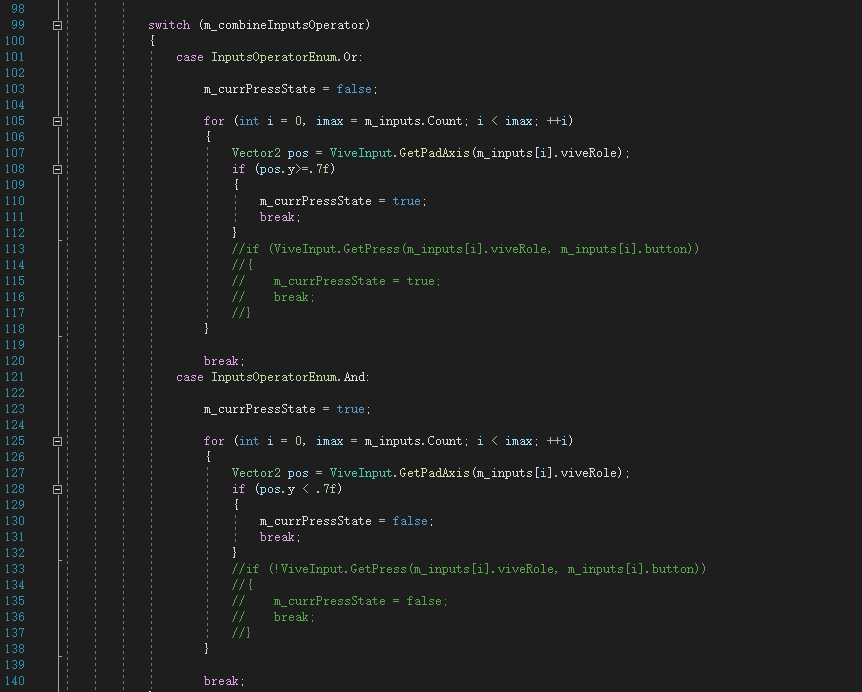
第二步修改完以后发现它只是能够显示与隐藏射线,真实的移动在Teleportable脚本里边
第三步,修改移动脚本如下,Unity属性面板选择PadTouch选项
//========= Copyright 2016-2017, HTC Corporation. All rights reserved. ===========

using HTC.UnityPlugin.Vive;

using System.Collections;

using UnityEngine;

using UnityEngine.EventSystems;

public class Teleportable : MonoBehaviour

    , IPointerExitHandler

{

    public enum TeleportButton

    {

        Trigger,

        Pad,

        Grip,

        PadTouch,

    }

    public Transform target;  // The actual transfrom that will be moved Ex. CameraRig

    public Transform pivot;  // The actual pivot point that want to be teleported to the pointed location Ex. CameraHead

    public float fadeDuration = 0.3f;

    public TeleportButton teleportButton = TeleportButton.Pad;

    private Coroutine teleportCoroutine;

    public ControllerButton teleportViveButton

    {

        get

        {

            switch (teleportButton)

            {

                case TeleportButton.PadTouch:

                    return ControllerButton.PadTouch;

                case TeleportButton.Pad:

                    return ControllerButton.Pad;

                case TeleportButton.Grip:

                    return ControllerButton.Grip;

                case TeleportButton.Trigger:

                default:

                    return ControllerButton.Trigger;

            }

        }

    }

#if UNITY_EDITOR

    private void Reset()

    {

        FindTeleportPivotAndTarget();

    }

#endif

    private void FindTeleportPivotAndTarget()

    {

        foreach (var cam in Camera.allCameras)

        {

            if (!cam.enabled) { continue; }

#if UNITY_5_4_OR_NEWER

            // try find vr camera eye

            if (cam.stereoTargetEye != StereoTargetEyeMask.Both) { continue; }

#endif

            pivot = cam.transform;

            target = cam.transform.root == null ? cam.transform : cam.transform.root;

        }

    }

    public void OnPointerExit(PointerEventData eventData)

    {

        Debug.Log("释放触摸");

        // skip if it was teleporting

        if (teleportCoroutine != null) { return; }

        // don't teleport if it was not releasing the button

        //if (eventData.eligibleForClick) { return; }

        //VivePointerEventData viveEventData;

        //if (!eventData.TryGetViveButtonEventData(out viveEventData)) { return; }

        //if (viveEventData.viveButton != teleportViveButton) { return; }

        var hitResult = eventData.pointerCurrentRaycast;

        if (!hitResult.isValid) { return; }

        if (target == null || pivot == null)

        {

            FindTeleportPivotAndTarget();

        }

        var headVector = Vector3.ProjectOnPlane(pivot.position - target.position, target.up);

        var targetPos = hitResult.worldPosition - headVector;

        teleportCoroutine = StartCoroutine(StartTeleport(targetPos, fadeDuration));

    }

#if VIU_STEAMVR

    private bool m_steamVRFadeInitialized;

    public IEnumerator StartTeleport(Vector3 position, float duration)

    {

        var halfDuration = Mathf.Max(0f, duration * 0.5f);

        if (!Mathf.Approximately(halfDuration, 0f))

        {

            if (!m_steamVRFadeInitialized)

            {

                // add SteamVR_Fade to the last rendered stereo camera

                var fadeScripts = FindObjectsOfType<SteamVR_Fade>();

                if (fadeScripts == null || fadeScripts.Length <= 0)

                {

                    var topCam = SteamVR_Render.Top().gameObject;

                    if (topCam != null)

                    {

                        topCam.gameObject.AddComponent<SteamVR_Fade>();

                    }

                }

                m_steamVRFadeInitialized = true;

            }

            SteamVR_Fade.Start(new Color(0f, 0f, 0f, 1f), halfDuration);

            yield return new WaitForSeconds(halfDuration);

            yield return new WaitForEndOfFrame(); // to avoid from rendering guideline in wrong position

            target.position = position;

            SteamVR_Fade.Start(new Color(0f, 0f, 0f, 0f), halfDuration);

            yield return new WaitForSeconds(halfDuration);

        }

        else

        {

            yield return new WaitForEndOfFrame(); // to avoid from rendering guideline in wrong position

            target.position = position;

        }

        teleportCoroutine = null;

    }

#else

    public IEnumerator StartTeleport(Vector3 position, float duration)

    {

        var halfDuration = Mathf.Max(0f, duration * 0.5f);

        if (!Mathf.Approximately(halfDuration, 0f))

        {

            Debug.LogWarning("SteamVR plugin not found! install it to enable SteamVR_Fade!");

            fadeDuration = 0f;

        }

        yield return new WaitForEndOfFrame(); // to avoid from rendering guideline in wrong position

        target.position = position;

        teleportCoroutine = null;

    }

#endif

}
//进行测试,旋转与移动都可以正常运行了
Unity2017-HTC项目串流Pico摇杆移动功能的更多相关文章
- .NET Core + gRPC 实现数据串流 (Streaming)
引入 gRPC 是谷歌推出的一个高性能优秀的 RPC 框架,基于 HTTP/2 实现.并且该框架对 .NET Core 有着优秀的支持.最近在做一个项目正好用到了 gRPC,遇到了需要串流传输的问题. ...
- Nginx模块之————RTMP模块在Ubuntu上以串流直播HLS视频
Nginx的安装在Ubuntu上以串流直播HLS视频 https://www.vultr.com/docs/setup-nginx-on-ubuntu-to-stream-live-hls-video
- 利用OData轻易实现串流数据的可视化
OData(开放数据协议,Open Data Protocol)一直是我喜欢一种的标准(OASIS 标准),它基于RESTful协议提供了一种强大的查询和编辑数据的访问接口.虽然是微软推出的,不过在诞 ...
- ffmpeg利用libav库把yuv视频流转换为TS串流
今天到月末了,才发我这个月的第一篇文章,因为这个月前三周一直在看ffmpeg的libavcodec和libavformat两个库源码.实验室要做一个“小传大”的软件,就是android手机或平板电脑的 ...
- Unity3d项目入门之虚拟摇杆
Unity本身不提供摇杆的组件,开发者可以使用牛逼的EasyTouch插件或者应用NGUI实现相关的需求,下面本文通过Unity自身的UGUI属性,实现虚拟摇杆的功能. 主参考 <Unity:使 ...
- VLC接收网络串流缓冲时间的计算 (转)
原帖地址:http://blog.csdn.net/coroutines/article/details/7472743 VLC版本2.0.1 最近研究IP-STB音视频同步问题,发现方案自带的自动S ...
- 两个VLC实现播放串流测试
实现原理: 一个VLC打开视频文件发布串流(格式HTTP.RTP.RTSP等),另一个VLC打开串流播放 发布串流步骤: 1.菜单“媒体”->“流”,先添加视频文件.选择“串流”,如下图: 2. ...
- C++: I/O流详解(三)——串流
一.串流 串流类是 ios 中的派生类 C++的串流对象可以连接string对象或字符串 串流提取数据时对字符串按变量类型解释:插入数据时把类型 数据转换成字符串 串流I/O具有格式化功能 例: #i ...
- 两个VLC实现播放串流测试 (转)
实现原理: 一个VLC打开视频文件发布串流(格式HTTP.RTP.RTSP等),另一个VLC打开串流播放 发布串流步骤: 1.菜单“媒体”->“流”,先添加视频文件.选择“串流”,如下图: 2. ...
- Storm项目:流数据监控1《设计文档…
博客公告: (1)本博客全部博客文章搬迁至<博客虫>http://blogchong.com/ (2)文章相应的源代码下载链接參考博客虫站点首页的"代码GIT". (3 ...
随机推荐
- ZIP文件操作工具类
2 3 import lombok.extern.slf4j.Slf4j; 4 import org.apache.commons.io.FilenameUtils; 5 6 import java. ...
- QSlider CSS样式
QSlider::groove:horizontal{ border:0px; height:15px; background:#deffe5; } QSlider::sub-page:horizon ...
- python 快速搭建局域网文件服务器 SimpleHTTPServer http.server
py2: python2 -m SimpleHTTPServer [port] py3: python3 -m http.server [port] python2请注意大小写. 在Windows ...
- 使用element上传图片的时候的限制只上传一个的问题
<el-form-item label="轮播图图片" prop="image"> <el-upload class="avatar ...
- 【SQL Server】numeric——精确数字的数据类型
NUMERIC数据类型是一种精确数字数据类型. numeric是标准sql的数据类型,格式是numeric(m,n).最多精确位数为38位,其中m表示总位数,n表示保留的小数点位数. 参数 含义 默认 ...
- holiday07
第七天 grep常用的两种模式查找 参数 含义 ^a 行首,搜寻以a开头的行 ke$ 行尾搜寻以ke结束的行 echo 文字内容 echo会在终端显示指定参数的文字,通常会和重定向 联合使用 重定向& ...
- Unity 简易聊天室(基于TCP)(1)
为了准备毕业设计,学习了服务器与客户端之间传输的一些简单的知识,并跟着网络上的教程制作了一个简易的Unity聊天室 服务器:用C# .Net Framework写的 结构分为:main(主函数).Se ...
- kafka消费者3种分配策略
0.10.2.1 版本的Kafka 有两种分配策略,由消费者测的参数partition.assignment.strategy来控制. RoundRobinAssignor分配策略 RangeAssi ...
- docker-io安装报错
一般修改两个文件即可 1.文件 :/etc/docker/daemon.json { "storage-driver": "devicemapper" } 2. ...
- 微信小程序——计算器
知识点: wxml: hover-class: 实现点击态效果 hover-class样式显示的原理是 点击时把样式加到class的样式中,冲突时,谁在后面就显示谁! data-val: 用于传数据, ...