
springcloud zuul网关整合swagger2,swagger被拦截问题
首先感谢一位博主的分享https://www.cnblogs.com/xiaohouzai/p/8886671.html
话不多说直接上图和代码
首先我们要有一个springcloud分布式项目
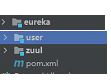
我就简单的一个eureka注册中心然后就是一个user用户然后当然就是zuul网关拉。
eureka的配置我就不多说了,我直接贴zuul网关和swagger的相关配置
zuul中的配置
<dependency>

    <groupId>org.springframework.boot</groupId>

    <artifactId>spring-boot-starter-web</artifactId>

    <version>2.3.2.RELEASE</version>

</dependency>

<--swagger2依赖-->

<dependency>

    <groupId>io.springfox</groupId>

    <artifactId>springfox-swagger2</artifactId>

    <version>2.7.0</version>

</dependency>

<dependency>

    <groupId>io.springfox</groupId>

    <artifactId>springfox-swagger-ui</artifactId>

    <version>2.7.0</version>

</dependency>
zuul 的application.yml
#网关配置

zuul:

  LogFilter:    #自定义过滤器的名称

    pre:        #自定义过滤器类型

      disable: true  # 是否禁用false

  prefix: /api/      #网关前缀如:http://localhost;8080/api/其他服务名

  routes:   #路由规则

    user-server: #用户的服务名

      path: /user/**  #你定义的zuul网关名
import org.springframework.context.annotation.Bean;

import org.springframework.context.annotation.Configuration;

import springfox.documentation.builders.ApiInfoBuilder;

import springfox.documentation.service.ApiInfo;

import springfox.documentation.service.Contact;

import springfox.documentation.spi.DocumentationType;

import springfox.documentation.spring.web.plugins.Docket;

import springfox.documentation.swagger.web.UiConfiguration;

import springfox.documentation.swagger2.annotations.EnableSwagger2;

@Configuration

@EnableSwagger2

public class SwaggerConfig {

    @Bean

    public Docket createRestApi() {

        return new Docket(DocumentationType.SWAGGER_2)

                .apiInfo(apiInfo());

    }

    private ApiInfo apiInfo() {

        return new ApiInfoBuilder()

                .title("分布式某某系统")

                .description("某某系统接口文档说明")

                .termsOfServiceUrl("http://localhost:8081")

                .contact(new Contact("vker", "", "6492178@gmail.com"))

                .version("1.0")

                .build();

    }

    @Bean

    UiConfiguration uiConfig() {

        return new UiConfiguration(null, "list", "alpha", "schema",

                UiConfiguration.Constants.DEFAULT_SUBMIT_METHODS, false, true, 60000L);

    }

}
import org.springframework.context.annotation.Primary;
import org.springframework.stereotype.Component;
import springfox.documentation.swagger.web.SwaggerResource;
import springfox.documentation.swagger.web.SwaggerResourcesProvider;
import java.util.ArrayList;
import java.util.List;
@Component
@Primary
public class DocumentationConfig implements SwaggerResourcesProvider {
@Override
public List<SwaggerResource> get() {
List<SwaggerResource> resources = new ArrayList<>();
//第一个参数随便写,中间的参数是你zuul中application中的配置路径,第三是版本信息,随意
resources.add(swaggerResource("随便填", "/api/user/v2/api-docs", "2.0"));
return resources;
}
private SwaggerResource swaggerResource(String name, String location, String version) {
SwaggerResource swaggerResource = new SwaggerResource();
swaggerResource.setName(name);
swaggerResource.setLocation(location);
swaggerResource.setSwaggerVersion(version);
return swaggerResource;
}
}然后就是user的配置
<dependency>

    <groupId>org.springframework.boot</groupId>

    <artifactId>spring-boot-starter-web</artifactId>

    <version>2.3.2.RELEASE</version>

</dependency>

<--swagger2依赖-->

<dependency>

    <groupId>io.springfox</groupId>

    <artifactId>springfox-swagger2</artifactId>

    <version>2.7.0</version>

</dependency>

<dependency>

    <groupId>io.springfox</groupId>

    <artifactId>springfox-swagger-ui</artifactId>

    <version>2.7.0</version>

</dependency>
import org.springframework.context.annotation.Bean;
import org.springframework.context.annotation.Configuration;
import springfox.documentation.builders.ApiInfoBuilder;
import springfox.documentation.builders.PathSelectors;
import springfox.documentation.builders.RequestHandlerSelectors;
import springfox.documentation.service.ApiInfo;
import springfox.documentation.spi.DocumentationType;
import springfox.documentation.spring.web.plugins.Docket;
import springfox.documentation.swagger2.annotations.EnableSwagger2;
@Configuration
@EnableSwagger2
public class Swagger2Config {
@Bean
public Docket createRestApi(){
return new Docket(DocumentationType.SWAGGER_2)
.apiInfo(apiInfo())
.select()
//为当前包下controller生成API文档
.apis(RequestHandlerSelectors.basePackage("com.cn.me.controller"))
//为有@Api注解的Controller生成API文档
// .apis(RequestHandlerSelectors.withClassAnnotation(Api.class))
//为有@ApiOperation注解的方法生成API文档
// .apis(RequestHandlerSelectors.withMethodAnnotation(ApiOperation.class))
.paths(PathSelectors.any())
.build();
}
private ApiInfo apiInfo() {
return new ApiInfoBuilder()
.title("xxxxx")//自己定义标题
.description("部门、用户等接口")
.version("1.0")
.build();
}
}springcloud zuul网关整合swagger2,swagger被拦截问题的更多相关文章
- SpringCloud Zuul网关的简单理解
Zuul网关功能 请求路由.服务路由.请求过滤 请求路由 参数配置如下所示,所有能够配置path规则的请求,都会被zuul网关转发到对应的url上. zuul.routes.user-service. ...
- spring-cloud zuul网关
API Gateway 是随着微服务(Microservice)这个概念一起兴起的一种架构模式,它用于解决微服务过于分散,没有一个统一的出入口进行流量管理的问题. 使用 Zuul 实现 API Gat ...
- SpringCloud zuul 网关限流分析
最近项目中 spring cloud zuul 运用到限流功能,打算配置一下就直接使用,不过在压测与调优过程中遇到一些没有预测到的问题,附上排查与解析结果 yml.pom配置 强烈推荐,按最新gith ...
- SpringCloud Zuul网关超时
最近在使用SpringCloudZuul网关时,报错"NUMBEROF_RETRIES_NEXTSERVER_EXCEEDED", 查询资料后,发现: ribbon.Connect ...
- springCloud Zuul网关
1.springboot 仅2.0.x 支持,在此选择 2.0.7 2.新建Module eureka-zuul-client 3.导入依赖 <?xml version="1.0&qu ...
- springCloud zuul网关服务
第一步:编写application.properties文件 spring.application.name=api-gateway server.port=5555 zuul.routes.user ...
- 创建swagger的springboot-stater,并在spring cloud zuul网关中引入
Swagger 是一款RESTFUL接口的.基于YAML.JSON语言的文档在线自动生成.代码自动生成的工具. 通过在controller中添加注解,即可轻易实现代码文档化. Swagger提供ui界 ...
- 白话SpringCloud | 第十一章:路由网关(Zuul):利用swagger2聚合API文档
前言 通过之前的两篇文章,可以简单的搭建一个路由网关了.而我们知道,现在都奉行前后端分离开发,前后端开发的沟通成本就增加了,所以一般上我们都是通过swagger进行api文档生成的.现在由于使用了统一 ...
- Spring Cloud Zuul 网关的分布式系统中整合Swagger(转)和 zuul跨域访问问题
首先恭喜自己终于找对了努力的方向,很荣幸能在公司接触到微服务架构,也很高兴公司一个大佬哥们愿意带我,他技术确实很牛逼,我也很佩服他,前后端通吃,干了六年能有这样的水平.最近跟着在搞微服务架构,给我分配 ...
- springboot+cloud 学习(四)Zuul整合Swagger2
前言 在微服务架构下,服务是分散的,怎么把所有服务接口整合到一起是我们需要关注的. 下面举例用zuul作为分布式系统的网关,同时使用swagger生成文档,想把整个系统的文档整合在同一个页面上来说明. ...
随机推荐
- Java学习笔记:2022年1月9日(其一)
Java学习笔记:2022年1月9日(其一) 摘要:这篇笔记主要记录了Java运行时中的两种变量.以及参数的两种传递方式. 目录 Java学习笔记:2022年1月9日(其一) 1.不同变量的详细探讨 ...
- .NET周报【1月第2期 2023-01-13】
国内文章 [ASP.NET Core]按用户等级授权 https://www.cnblogs.com/tcjiaan/p/17024363.html 本文介绍了ASP.NET Core如何按照用户等级 ...
- Redefinition of 'y1' as different kind of symbol
Redefinition of 'y1' as different kind of symbol 原因 解释:此次定义的y1变量与函数库中定义的y1重名了,所以编译错误,重定义了y1变量. 解决方法: ...
- django框架之drf:2、restful规范,序列、反序列化,drf安装及使用(django原生接口及drf接口编写)
Django之drf 一.restful规范 1.概念 REST全称是Representational State Transfer,中文意思是表述:表征性状态转移,它首次出现在2000年Roy ...
- spring.jackson.default-property-inclusion 不生效问题分析
背景 项目里每个返回体里都有@JsonInclude(JsonInclude.Include.NON_NULL) 这个注解,也就是不返回null字段 想有没有办法全局配置一下,这样就不用每个类都加这个 ...
- C# Replace:一个熟悉而又陌生的替换
前言 Replace 的作用就是,通过指定内容的替换,返回一个新字符串. 返回值中,已将当前字符串中的指定 Unicode 字符或 String 的 所有匹配项,替换为指定的新的 Unicode 字符 ...
- vivo版本发布平台:带宽智能调控优化实践-平台产品系列03
vivo 互联网平台产品研发团队 - Peng Zhong 随着分发规模地逐步增长,各企业对CDN带宽的使用越来越多.并且,各类业务使用CDN的场景各式各样,导致带宽会不断地出现骤增骤降等问题.基于成 ...
- 物语(monogatari)
\(Description\) 某一天,少年邂逅了同病相连的IA.见面后,IA一把牵起少年的手,决定和他一起逃离部落,离开这个无法容身的是非之地. 要逃离部落,少年和IA就需要先选择一条耗时最少的路线 ...
- Luogu P3919 【模板】可持久化线段树 1(可持久化数组)
板子,正好温习一下主席树的写法 记得数组开 \(32\) 倍!! \(Code\) #include<cstdio> using namespace std; const int N = ...
- 【论文笔记】UNet
语义分割的U-Net网络结构Unet是2015年诞生的模型,它几乎是当前segmentation项目中应用最广的模型.Unet能从更少的训练图像中进行学习,当它在少于40张图的生物医学数据集上训练时, ...