
springboot+cloud 学习(四)Zuul整合Swagger2
前言
在微服务架构下,服务是分散的,怎么把所有服务接口整合到一起是我们需要关注的。
下面举例用zuul作为分布式系统的网关,同时使用swagger生成文档,想把整个系统的文档整合在同一个页面上来说明。
项目结构
eureka-server:eureka服务注册中心,端口8761,
eureka-server2:eureka服务注册中心,端口8762,
eureka-server3:eureka服务注册中心,端口8763,
zuul-swagger2:zuul网关,端口8090,
management-device:外接设备系统,端口8083,
management-equip:设备管理系统,端口8082,

Zuul整合Swagger2
eureka注册中心的搭建这里不再讲述,直接来看zuul-swagger2项目里怎么集成swagger
pom.xml文件中引入依赖:
<!-- 必须要引入 springboot parent ,帮我们实现了很多jar包的依赖管理 -->

    <parent>

        <groupId>org.springframework.boot</groupId>

        <artifactId>spring-boot-starter-parent</artifactId>

        <version>2.0..RELEASE</version>

        <relativePath /> <!-- lookup parent from repository -->

    </parent>

    <dependencyManagement>

        <dependencies>

            <!-- https://mvnrepository.com/artifact/org.springframework.cloud/spring-cloud-dependencies -->

            <dependency>

                <groupId>org.springframework.cloud</groupId>

                <artifactId>spring-cloud-dependencies</artifactId>

                <version>Finchley.RELEASE</version>

                <type>pom</type>

                <scope>import</scope>

            </dependency>

        </dependencies>

    </dependencyManagement>

    <!-- 版本集中配置 -->

    <properties>

        <swagger2.version>2.9.</swagger2.version>

    </properties>

    <dependencies>

        <!-- eureka client -->

        <dependency>

            <groupId>org.springframework.cloud</groupId>

            <artifactId>spring-cloud-starter-netflix-eureka-client</artifactId>

        </dependency>

        <!-- zuul -->

        <dependency>

            <groupId>org.springframework.cloud</groupId>

            <artifactId>spring-cloud-starter-netflix-zuul</artifactId>

        </dependency>

        <!-- swagger2 依赖 -->

        <dependency>

            <groupId>io.springfox</groupId>

            <artifactId>springfox-swagger2</artifactId>

            <version>${swagger2.version}</version>

        </dependency>

        <dependency>

            <groupId>io.springfox</groupId>

            <artifactId>springfox-swagger-ui</artifactId>

            <version>${swagger2.version}</version>

        </dependency>

    </dependencies>
在配置文件application.yml中添加配置(这里只做了eureka注册,没有做路由映射):
#端口

server:

  port:

#应用名称

spring:

  application:

    name: zuul-swagger2

#服务注册

eureka:

  instance:

    hostname: zuul-swagger2

  client:

    serviceUrl:

      defaultZone: http://skyworth:skyworth1@eureka-server:8761/eureka/,http://skyworth:skyworth2@eureka-server2:8762/eureka/,http://skyworth:skyworth3@eureka-server3:8763/eureka/

# 路由配置方式一

#zuul:

#  routes:

#所有请求management-equip的请求,都会被拦截,并且转发到equip上

#    management-equip: /equip/**

# 路由配置方式二

#zuul:

#  routes:

#    # 其中equip是路由名称,可以随便定义,但是path和service-id需要一一对应

#    equip:

#      path: /equip/**

#      # management-equip为注册到Eureka上的服务名

#      service-id: management-equip
Swagger2配置类:
这里比较重要的是2个配置类。第一个:SwaggerConfig.class是swagger的配置类,DocumentationConfig,用于整合配置接口文档
SwaggerConfig.class
@Configuration

@EnableSwagger2

public class SwaggerConfig {

    @Bean

    public Docket buildDocket() {

    return new Docket(DocumentationType.SWAGGER_2)

        .apiInfo(buildApiInf()) // .apiInfo(apiInfo())

        .select()

        .apis(RequestHandlerSelectors.basePackage(""))// 需要生成文档的包的位置

        .paths(PathSelectors.any())

        .build();

    }

    private ApiInfo buildApiInf() {

    return new ApiInfoBuilder()

        .title("海外智能云平台系统接口详情")

        .description("Zuul+Swagger2构建RESTful APIs")

        .termsOfServiceUrl("http://www.skyworth.com")

        .contact(new Contact("skyworth", "http://www.skyworth.com", ""))

        .version("1.0")

        .build();

    }

}
DocumentationConfig.class(注意红色部分,通过遍历eureka路由方式自动添加所有微服务 API 文档,SwaggerResourcesProvider 是资源提供者,我们重写他,把各个微服务的API文档资源路径返回,注释部分为手动添加的方式)
@Component

@Primary

public class DocumentationConfig implements SwaggerResourcesProvider {

    private final RouteLocator routeLocator;

    public DocumentationConfig(RouteLocator routeLocator) {

    this.routeLocator = routeLocator;

    }

    @Override

    public List<SwaggerResource> get() {

    List<SwaggerResource> resources = new ArrayList<>();

    List<Route> routes = routeLocator.getRoutes();

    routes.forEach(route -> {

        resources.add(swaggerResource(route.getId(), route.getFullPath().replace("**", "v2/api-docs"), "1.0"));

    });

    return resources;

    }

//    @Override

//        public List<SwaggerResource> get() {

//            List resources = new ArrayList<>();

//            resources.add(swaggerResource("外接设备系统", "/management-device/v2/api-docs", "1.0"));

//            resources.add(swaggerResource("设备管理系统", "/management-equip/v2/api-docs", "1.0"));

//            return resources;

//        }

    private SwaggerResource swaggerResource(String name, String location, String version) {

    SwaggerResource swaggerResource = new SwaggerResource();

    swaggerResource.setName(name);

    swaggerResource.setLocation(location);

    swaggerResource.setSwaggerVersion(version);

    return swaggerResource;

    }

}
最后是启动类Application
@SpringBootApplication

@EnableZuulProxy

public class Application {

    public static void main(String[] args) {

        SpringApplication.run(Application.class, args);

    }

}
运行相关服务和zuul-swagger网关,输入:http://localhost:8090/swagger-ui.html

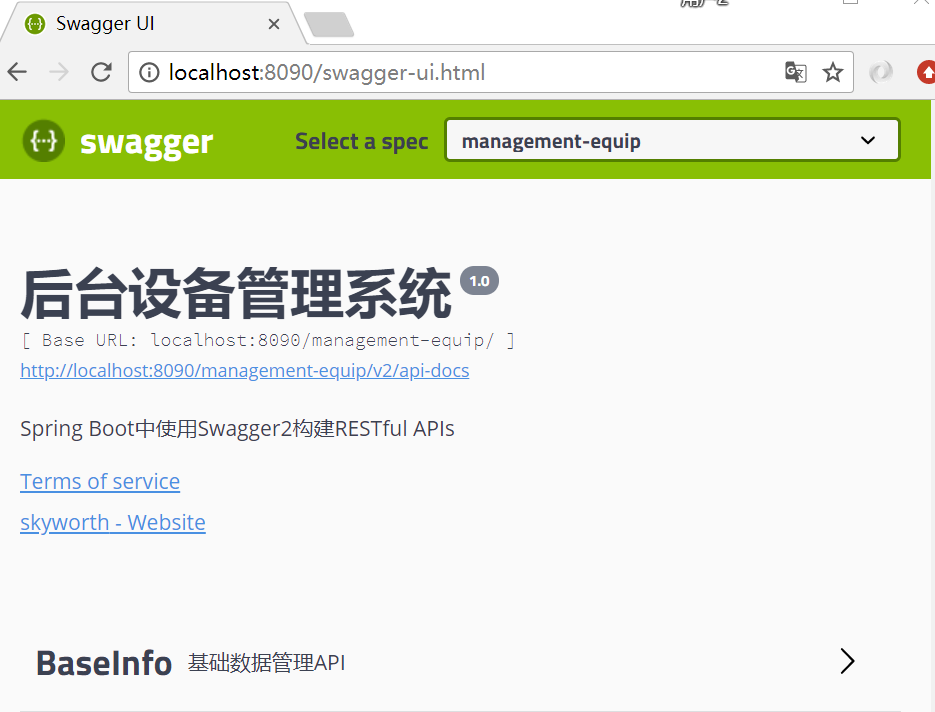
另外谈谈遇到的一个坑,之前没有加eureka.instance.prefer-ip-address=true,导致zuul一直访问不到其他服务(可能是eureka.instance.prefer-ip-address = true 就可以将IP注册到Eureka Server上,而如果不配置就是机器的主机名,而主机名没有做ip映射导致访问不大,具体原因需要探究)。
#服务注册

eureka:

  instance:

    hostname: device

    prefer-ip-address: true
springboot+cloud 学习(四)Zuul整合Swagger2的更多相关文章
- SpringBoot(十四)-- 整合Swagger2
1.pom依赖 <dependency> <groupId>io.springfox</groupId> <artifactId>springfox-s ...
- spring cloud 学习(6) - zuul 微服务网关
微服务架构体系中,通常一个业务系统会有很多的微服务,比如:OrderService.ProductService.UserService...,为了让调用更简单,一般会在这些服务前端再封装一层,类似下 ...
- springboot学习四:整合mybatis
在application.properties加入配置 ## Mybatis 配置 mybatis.typeAliasesPackage=org.spring.springboot.domain my ...
- spring cloud学习(四) 动态路由
Zuul的主要功能是路由和过滤器.路由功能是微服务的一部分,zuul实现了负载均衡. 1.1 新建模块zuul pom.xml <?xml version="1.0" enc ...
- springboot+cloud 学习(五)统一配置中心 spring cloud config + cloud bus + WebHooks +RibbitMQ
前言 微服务要实现集中管理微服务配置.不同环境不同配置.运行期间也可动态调整.配置修改后可以自动更新的需求,Spring Cloud Config同时满足了以上要求.Spring Cloud Conf ...
- springboot+cloud 学习(三)消息中间件 RibbitMQ+Stream
安装RabbitMQ window下安装: (1):下载erlang,原因在于RabbitMQ服务端代码是使用并发式语言erlang编写的,下载地址:http://www.erlang.org/dow ...
- springboot+cloud 学习(二)应用间通信Feign(伪RPC,实则HTTP)
在微服务中,使用什么协议来构建服务体系,一直是个热门话题. 争论的焦点集中在两个候选技术: RPC or Restful Restful架构是基于Http应用层协议的产物,RPC架构是基于TCP传输 ...
- SpringBoot实战(十四)之整合KafKa
本人今天上午参考了不少博文,发现不少博文不是特别好,不是因为依赖冲突问题就是因为版本问题. 于是我结合相关的博文和案例,自己改写了下并参考了下,于是就有了这篇文章.希望能够给大家帮助,少走一些弯路. ...
- springboot深入学习(四)-----tomcat配置、websocket
一.更改servlet服务器 springboot中默认可以集成多种servlet容器,当引入如下依赖时: springboot默认以tomcat作为项目的servlet容器,如果用户想要替换tomc ...
随机推荐
- 可以用到的XSS跨站语句
我们常用的测试XSS跨站的语句一般是alert比如: <script>alert(“sex”)</script> <script>alert(/sex/)</ ...
- Oracle异常:Caused by: java.sql.SQLException: ORA-01536: 超出表空间 '登录名' 的空间限额 (JPA保存数据)
原因: Oracle表空间为0,没有分配空间内存. 解决办法在代码框里: 1. 查看用户表空间的限额 select * from user_ts_quotas; max_bytes字段就是了 -1是代 ...
- 2019.02.15 bzoj5210: 最大连通子块和(链分治+ddp)
传送门 题意:支持单点修改,维护子树里的最大连通子块和. 思路: 扯皮: bzojbzojbzoj卡常差评. 网上的题解大多用了跟什么最大子段和一样的转移方法. 但是我们实际上是可以用矩阵转移的传统d ...
- ABP框架系列之四十一:(Nuget-Packages-Nuget包)
Packages ASP.NET Boilerplate is distributed on nuget. Here, a list of all official packages. Abp Cor ...
- (PMP)第7章-----项目成本管理
7.1 规划成本管理 输入 工具与技术 输出 1.项目章程 2.项目管理计划 (进度管理计划, 风险管理计划) 3.事业环境因素 4.组织过程资产 1.专家判断 2.数据分析 3.会议 1.成本管理计 ...
- springboot 使用maven 打包 报 (请使用 -source 7 或更高版本以启用 diamond 运算符) 错误解决办法
在使用springboot maven 打包时 报如下错误 (请使用 -source 7 或更高版本以启用 diamond 运算符) pom.xml编译插件 配置如下: <plugin> ...
- centos7升级系统内核
1)升级 方法一: rpm --import https://www.elrepo.org/RPM-GPG-KEY-elrepo.org rpm -Uvh http://www.elrepo.or ...
- Nginx+Django搭建
本机环境介绍 虚拟机操作系统版本如下 [root@node1 ~]# cat /etc/redhat-release CentOS Linux release 7.2.1511 (Core) IP地址 ...
- EF6学习笔记(六) 创建复杂的数据模型
EF6学习笔记总目录:ASP.NET MVC5 及 EF6 学习笔记 - (目录整理) 本篇原文地址:Creating a More Complex Data Model 本篇讲的比较碎,很多内容本人 ...
- Android Studio中的大量findViewById
一. 分析 在Android Studio中开发时,findViewById是用的最多的函数之一.经常需要对返回的view进行类型转换,输入麻烦.代码丑陋. 本文提供两种方案来解决这个问题: 1.安装 ...