
【八】Spring Cloud Config
一、分布式系统面临的--配置问题
微服务意味着要将单体应用中的业务拆分成一个个子服务,每个服务的力度相对较小,因此系统中会出现大量的服务。由于每个服务都需要必要的配置信息才能运行,所以一套集中式的、动态配置管理设施是必不可少的。SpringCloud提供了ConfigServer来解决这个问题。我们一个微服务自己带着一个application.yml,上百个项目,上百个配置文件管理。。。。。。~~/(ToT)/~~
二、SpringCloud Config 是什么?
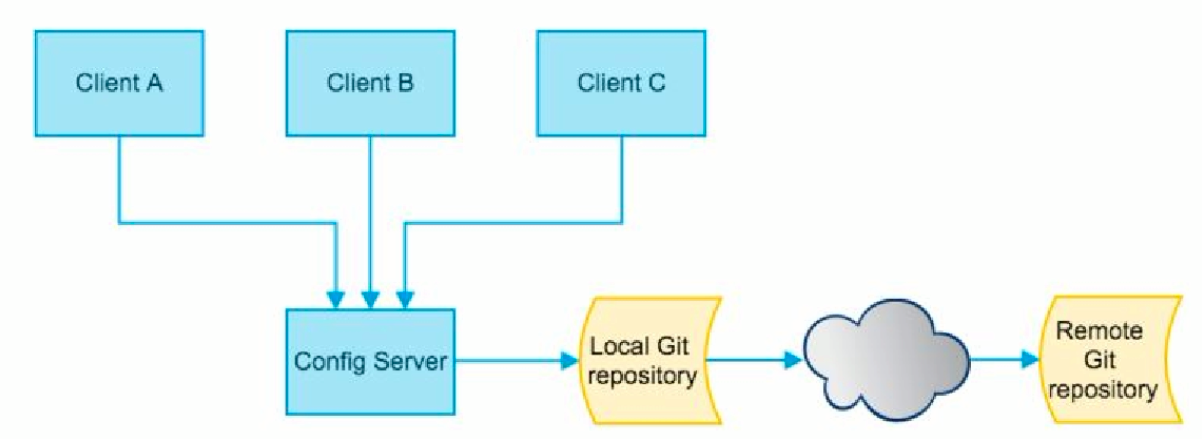
SpringCloud Config 为微服务架构中的微服务提供集中化的外部配置支持,配置服务器为各个不同微服务应用的所有环境提供了一个中心化的外部配置。
SpringCloud Config 分为服务端和客户端两部分
1、服务端也称为分布式配置中心,它是一个独立的微服务应用,用来连接配置服务器并为客户端提供获取配置信息,加密/解密信息等访问接口。
2、客户端则是通过指定的配置中心来管理应用资源,以及与业务相关的配置内容,并在启动的时候从配置中心获取和加载配置信息
3、配置服务器默认采用Git来存储配置信息。这样有助于对环境配置进行版本管理,并且可以通过Git客户端工具来方便地管理和访问配置内容
三、SpringCloud Config 能干嘛
1、集中管理配置文件
2、不同环境不同配置,动态化的配置更新,分环境部署比如dev/test/prod/beta/release
3、运行期间动态调整配置,不再需要在每个服务部署的机器上编写配置文件,服务会向配置中心统一拉取配置自己的信息
4、当配置发生变动是,服务不需要重启即可感知到配置文件的变化并应用新的配置
5、将配置信息以REST接口的形式暴露
6、 由于SpringCloud Config默认使用Git来存储配置文件(也有其他方式,比如支持SVN和本地文件),但最推荐的还是Git,而且使用的是http/https访问的形式
四、SpringCloud Config 服务端使用步骤
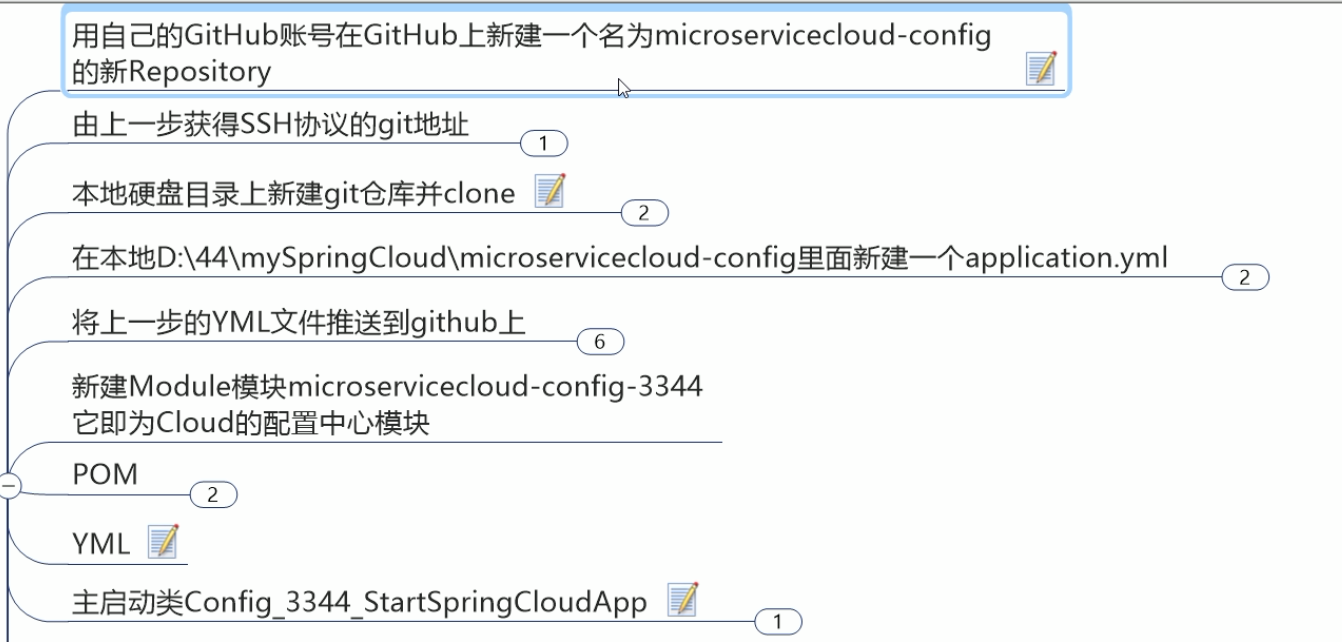
application.yml
spring:

    profiles:

        active:

            - dev

---

spring:

    profiles: dev #开发环境

    application:

        name: microservicecloud-config-everjiankang-dev

---

spring:

    profiles: test #测试环境

    application:

        name: microservicecloud-config-everjiankang-test

#请保存为UTF-8编码格式
*注意*:profiles 和application是平级,一开始把application写在了profiles下面,结果一直报错
将yml文件推送到git上
git add .

git commit -m "init yml"

git push origin master
新建项目microservicecloud-config-3344
pom.xml
<project xmlns="http://maven.apache.org/POM/4.0.0" xmlns:xsi="http://www.w3.org/2001/XMLSchema-instance"

    xsi:schemaLocation="http://maven.apache.org/POM/4.0.0 http://maven.apache.org/xsd/maven-4.0.0.xsd">

    <modelVersion>4.0.0</modelVersion>

    <parent>

        <groupId>com.atguigu.springcloud</groupId>

        <artifactId>microservicecloud</artifactId>

        <version>0.0.1-SNAPSHOT</version>

    </parent>

    <artifactId>microservicecloud-config-3344</artifactId>

    <dependencies>

        <!-- springCloud Config -->

        <dependency>

            <groupId>org.springframework.cloud</groupId>

            <artifactId>spring-cloud-config-server</artifactId>

        </dependency>

        <!-- 避免Config的Git插件报错:org/eclipse/jgit/api/TransportConfigCallback -->

        <dependency>

            <groupId>org.eclipse.jgit</groupId>

            <artifactId>org.eclipse.jgit</artifactId>

            <version>4.10.0.201712302008-r</version>

        </dependency>

        <!-- 图形化监控 -->

        <dependency>

            <groupId>org.springframework.boot</groupId>

            <artifactId>spring-boot-starter-actuator</artifactId>

        </dependency>

        <!-- 熔断 -->

        <dependency>

            <groupId>org.springframework.cloud</groupId>

            <artifactId>spring-cloud-starter-hystrix</artifactId>

        </dependency>

        <dependency>

            <groupId>org.springframework.cloud</groupId>

            <artifactId>spring-cloud-starter-eureka</artifactId>

        </dependency>

        <dependency>

            <groupId>org.springframework.cloud</groupId>

            <artifactId>spring-cloud-starter-config</artifactId>

        </dependency>

        <dependency>

            <groupId>org.springframework.boot</groupId>

            <artifactId>spring-boot-starter-jetty</artifactId>

        </dependency>

        <dependency>

            <groupId>org.springframework.boot</groupId>

            <artifactId>spring-boot-starter-web</artifactId>

        </dependency>

        <dependency>

            <groupId>org.springframework.boot</groupId>

            <artifactId>spring-boot-starter-test</artifactId>

        </dependency>

        <!-- 热部署插件 -->

        <dependency>

            <groupId>org.springframework</groupId>

            <artifactId>springloaded</artifactId>

        </dependency>

        <dependency>

            <groupId>org.springframework.boot</groupId>

            <artifactId>spring-boot-devtools</artifactId>

        </dependency>

    </dependencies>

</project>
application.yml
server:

  port:

spring:

  application:

    name:  microservicecloud-config

  cloud:

    config:

      server:

        git:

          uri: git@github.com:ChaoYiJueChen/microservicecloud-config.git  #GitHub上面的git仓库名字
主启动类
import org.springframework.boot.SpringApplication;

import org.springframework.boot.autoconfigure.SpringBootApplication;

import org.springframework.cloud.config.server.EnableConfigServer;

@SpringBootApplication

@EnableConfigServer

public class Config_3344_StartSpringCloudApp

{

    public static void main(String[] args)

    {

        SpringApplication.run(Config_3344_StartSpringCloudApp.class, args);

    }

}
修改host文件:
127.0.0.1 config-.com
测试通过config微服务是否可以从github上获取配置内容
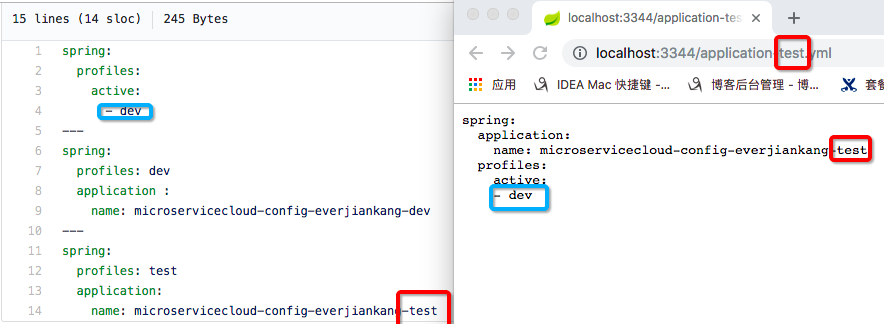
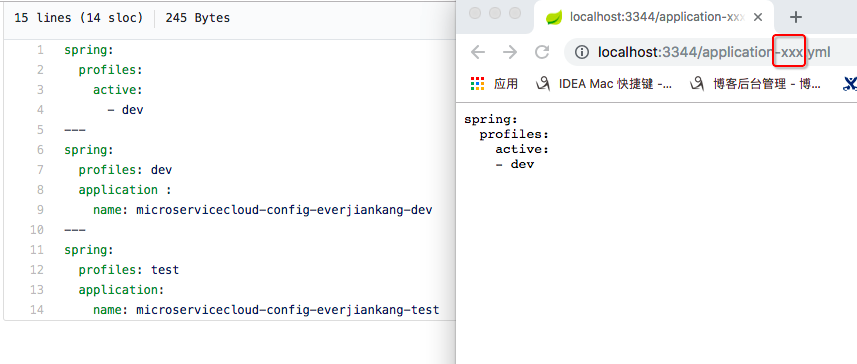
1)启动3344项目
2)http://config-3344.com:3344/application-dev.yml
3)http://config-3344.com:3344/application-test.yml
4)http://config-3344.com:3344/application-xxx.yml (不存在的配置)

官网
/{application}/{profile}[/{label}]

/{application}-{profile}.yml

/{label}/{application}-{profile}.yml

/{application}-{profile}.properties

/{label}/{application}-{profile}.properties
http://localhost:3344/application/dev/master
http://localhost:3344/application/test/master
http://localhost:3344/application/dev/master

http://localhost:3344/master/application-dev.yml

五、SpringCloud Config 客户端使用步骤
1、新建microservicecloud-config-client.yml并提交到github
spring:

    profiles:

        active:

            一 dev

---

server:

    port:

sprlng :

    profiles: dev

    application:

        name: microservicecloudconfig-client

eureka:

    client:

        service一url:

            defaultZone: http://eureka-dev.com:7001/eureka/

---

server:

    port:

spring:

    profiles: test

    application:

        name: microservicecloud-config-client

eureka:

    client:

        service一url:

            defaultZone : http://eureka-dev.com:7001/eureka/
2、新建项目microservicecloud-config-config-3355
设置pom.xml
<project xmlns="http://maven.apache.org/POM/4.0.0" xmlns:xsi="http://www.w3.org/2001/XMLSchema-instance"

    xsi:schemaLocation="http://maven.apache.org/POM/4.0.0 http://maven.apache.org/xsd/maven-4.0.0.xsd">

    <modelVersion>4.0.0</modelVersion>

    <parent>

        <groupId>com.atguigu.springcloud</groupId>

        <artifactId>microservicecloud</artifactId>

        <version>0.0.1-SNAPSHOT</version>

    </parent>

    <artifactId>microservicecloud-config-client-3355</artifactId>

    <dependencies>

        <!-- SpringCloud Config客户端 -->

        <dependency>

            <groupId>org.springframework.cloud</groupId>

            <artifactId>spring-cloud-starter-config</artifactId>

        </dependency>

        <dependency>

            <groupId>org.springframework.boot</groupId>

            <artifactId>spring-boot-starter-actuator</artifactId>

        </dependency>

        <dependency>

            <groupId>org.springframework.cloud</groupId>

            <artifactId>spring-cloud-starter-hystrix</artifactId>

        </dependency>

        <dependency>

            <groupId>org.springframework.cloud</groupId>

            <artifactId>spring-cloud-starter-eureka</artifactId>

        </dependency>

        <dependency>

            <groupId>org.springframework.cloud</groupId>

            <artifactId>spring-cloud-starter-config</artifactId>

        </dependency>

        <dependency>

            <groupId>org.springframework.boot</groupId>

            <artifactId>spring-boot-starter-jetty</artifactId>

        </dependency>

        <dependency>

            <groupId>org.springframework.boot</groupId>

            <artifactId>spring-boot-starter-web</artifactId>

        </dependency>

        <dependency>

            <groupId>org.springframework.boot</groupId>

            <artifactId>spring-boot-starter-test</artifactId>

        </dependency>

        <dependency>

            <groupId>org.springframework</groupId>

            <artifactId>springloaded</artifactId>

        </dependency>

        <dependency>

            <groupId>org.springframework.boot</groupId>

            <artifactId>spring-boot-devtools</artifactId>

        </dependency>

    </dependencies>

</project>
applicaiton.yml是用户级的资源配置项
bootstrap.yml是系统级的,优先级更高
Spring Cloud会创建一个`Bootstrap Context` 作为Spring应用的`Application Context`的父上下文。初始化的时候,
'Bootstrap Context'负责从外部源加载配置属性并解析配置。这两个上下文共享个从外部获取的'Environment'。
'Bootstrap'属性有高优先级,默认情况下,它们不会被本地配置覆盖。'Bootstrap context'和'Application Context'有着不同的 约定,
所以新增了一个'bootstrap.yml'文件,保证'Bootstrap Context'和'Application Context'配置的分离。
bootstrap.yml
spring:

  cloud:

    config:

      name: microservicecloud-config-client #需要从github上读取的资源名称,注意没有yml后缀名

      profile: test   #本次访问的配置项

      label: master

      uri: http://config-3344.com:3344  #本微服务启动后先去找3344号服务,通过SpringCloudConfig获取GitHub的服务地址
application.yml
spring:

  application:

    name: microservicecloud-config-client
配置host映射
127.0.0.1 client-config.com
创建Controller,从gitHub的配置文件中获取信息
package com.everjiankang.springcloud.rest;

import org.springframework.beans.factory.annotation.Value;

import org.springframework.web.bind.annotation.RequestMapping;

import org.springframework.web.bind.annotation.RestController;

@RestController

public class ConfigClientRest

{

    @Value("${spring.application.name}")

    private String applicationName;

    @Value("${eureka.client.service-url.defaultZone}")

    private String eurekaServers;

    @Value("${server.port}")

    private String port;

    @RequestMapping("/config")

    public String getConfig()

    {

        String str = "applicationName: " + applicationName + "\t eurekaServers:" + eurekaServers + "\t port: " + port;

        System.out.println("******str: " + str);

        return "applicationName: " + applicationName + "\t eurekaServers:" + eurekaServers + "\t port: " + port;

    }

}
主启动类
import org.springframework.boot.SpringApplication;

import org.springframework.boot.autoconfigure.SpringBootApplication;

@SpringBootApplication

public class ConfigClient_3355_StartSpringCloudApp

{

    public static void main(String[] args)

    {

        SpringApplication.run(ConfigClient_3355_StartSpringCloudApp.class, args);

    }

}
启动配置中心3344微服务
启动3355微服务作为client访问3344微服务
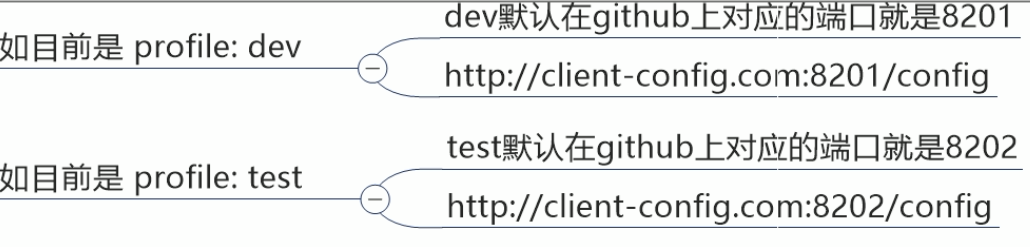
3355微服务的bootstrap.yml里的profile的值是什么,决定github上读取什么
3355微服务作为client访问3344微服务通过github获取配置信息
【八】Spring Cloud Config的更多相关文章
- Spring Cloud(八)高可用的分布式配置中心 Spring Cloud Config
在分布式系统中,由于服务数量巨多,为了方便服务配置文件统一管理,实时更新,所以需要分布式配置中心组件.在Spring Cloud中,有分布式配置中心组件spring cloud config,它支持配 ...
- Spring Cloud Config(一):聊聊分布式配置中心 Spring Cloud Config
目录 Spring Cloud Config(一):聊聊分布式配置中心 Spring Cloud Config Spring Cloud Config(二):基于Git搭建配置中心 Spring Cl ...
- spring cloud config 入门
简介 Spring cloud config 分为两部分 server client config-server 配置服务端,服务管理配置信息 config-client 客户端,客户端调用serve ...
- Spring Cloud Config
Spring Cloud Config provides server and client-side support for externalized configuration in a dist ...
- Spring Cloud官方文档中文版-Spring Cloud Config(上)
官方文档地址为:http://cloud.spring.io/spring-cloud-static/Dalston.SR2/#spring-cloud-feign 文中例子我做了一些测试在:http ...
- Spring Cloud官方文档中文版-Spring Cloud Config(下)-客户端等
官方文档地址为:http://cloud.spring.io/spring-cloud-static/Dalston.SR2/#_serving_alternative_formats 文中例子我做了 ...
- SpringCloud的配置管理:Spring Cloud Config
演示如何使用ConfigServer提供统一的参数配置服务 ###################################################################一.概 ...
- 搭建spring cloud config
很久没更新了,因为不是专职研究spring cloud,因此更新速度得看工作强度大不大,每天能抽出的时间不多,如果更新太慢了,并且有小伙伴看的话,请见谅了. Spring Cloud简介 Spring ...
- Spring Cloud Config - RSA简介以及使用RSA加密配置文件
简介 RSA非对称加密有着非常强大的安全性,HTTPS的SSL加密就是使用这种方法进行HTTPS请求加密传输的.因为RSA算法会涉及Private Key和Public Key分别用来加密和解密,所以 ...
随机推荐
- [luogu2051][bzoj1801][AHOI2009]chess中国象棋【动态规划】
题目描述 这次小可可想解决的难题和中国象棋有关,在一个N行M列的棋盘上,让你放若干个炮(可以是0个),使得没有一个炮可以攻击到另一个炮,请问有多少种放置方法.大家肯定很清楚,在中国象棋中炮的行走方式是 ...
- Docker使用阿里云docker镜像加速
首先进入阿里云docker库首页 https://dev.aliyun.com/ 点击 管理中心 点击 加速器 复制下面的加速地址 进入docker的 Settings 把basic 切换成 adva ...
- cf351B Jeff and Furik (树状数组)
逆序对数=0的时候,这个数列是有序的 然后交换相邻的,看哪个比较大,逆序对数会加1或减1 Jeff用的是最优策略所以他肯定让逆序对数-1 设f[i]表示Jeff操作前,逆序对数为i,最终的期望次数 那 ...
- Chinese Mahjong UVA - 11210 (DFS)
先记录下每一种麻将出现的次数,然后枚举每一种可能得到的麻将,对于这个新的麻将牌,去判断可不可能胡,如果可以胡,就可以把这张牌输出出来. 因为eye只能有一张,所以这个是最好枚举的,就枚举每张牌成为ey ...
- UVALive - 4222
题目链接:https://vjudge.net/contest/244167#problem/D 题目: For a dance to be proper in the Altered Culture ...
- A1098. Insertion or Heap Sort
According to Wikipedia: Insertion sort iterates, consuming one input element each repetition, and gr ...
- 【洛谷P2925 [USACO08DEC]干草出售Hay For Sale】
题意翻译 题目描述 农民john面临一个很可怕的事实,因为防范失措他存储的所有稻草给澳大利亚蟑螂吃光了,他将面临没有稻草喂养奶牛的局面.在奶牛断粮之前,john拉着他的马车到农民Don的农场中买一些稻 ...
- 解决win10环境下python Selenuim调用Chrome时提示data 及Chrome正在受自动软件控制的方法
用python自动访问谷歌浏览器时会出现data界面,很是烦人.在网上搜索,有说是因为webdriver和google版本不匹配导致的,就下过各种版本,结果都一样. 后来明白了,出现data的原因只是 ...
- C++基础知识-Day8
2.类的作用域运算符 shadow 在我们之前讲的内容中,我们会发现一种情况,就是在我们在不同类中的打印函数我们都是尽量让其名字不同,那么为什么会有这种情况呢?首先我们来看一个函数 void func ...
- python自动化开发-[第一天]-练习题
1.使用while循环输入 1 2 3 4 5 6 8 9 10 i = 1 while i < 11: if i == 7: i += 1 continue print (i) i += 1 ...