
ESP32入门示例 - SD卡Web服务器
这个是来自ESP32官方示例的改版,官方的示例由于存在一些问题所以我进行了修改
原本的示例有点逻辑上的问题,所以进行了一些修改
主要修改有:
1.新增SD卡测试部分 复制自官方SD卡示例
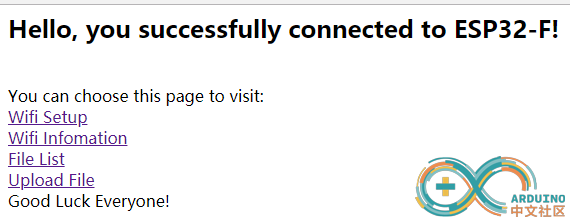
2.新增一个根目录页,访问根目录就可以看到
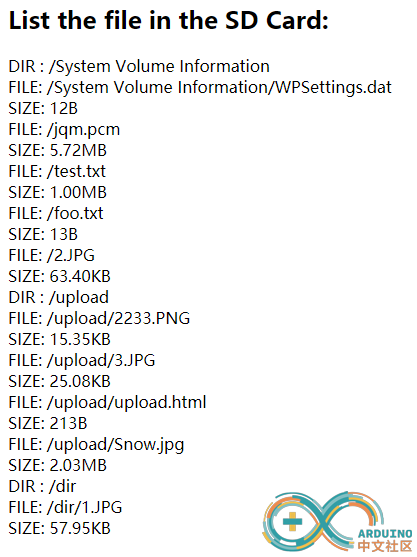
3.修改了目录展示页,可以通过"ip地址/list"看到,原本这个页面只会返回"BAD ARGS"
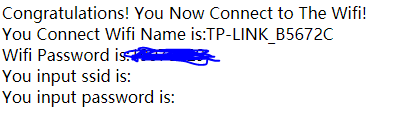
4.新增Wifi设置页,可以通过Wifi设置页更改链接的Wifi(但是建议不要随便更改,除非连着串口,不然你看不到新的IP地址)
5.新增文件上传页,可以通过网页进行上传(调用原本的"/edit"的链接)
下面是页面展示:
主页
/*

  SDWebServer - Example WebServer with SD Card backend for esp8266

  Copyright (c) 2015 Hristo Gochkov. All rights reserved.

  This file is part of the WebServer library for Arduino environment.

  This library is free software; you can redistribute it and/or

  modify it under the terms of the GNU Lesser General Public

  License as published by the Free Software Foundation; either

  version 2.1 of the License, or (at your option) any later version.

  This library is distributed in the hope that it will be useful,

  but WITHOUT ANY WARRANTY; without even the implied warranty of

  MERCHANTABILITY or FITNESS FOR A PARTICULAR PURPOSE.  See the GNU

  Lesser General Public License for more details.

  You should have received a copy of the GNU Lesser General Public

  License along with this library; if not, write to the Free Software

  Foundation, Inc., 51 Franklin St, Fifth Floor, Boston, MA  02110-1301  USA

  Have a FAT Formatted SD Card connected to the SPI port of the ESP8266

  The web root is the SD Card root folder

  File extensions with more than 3 charecters are not supported by the SD Library

  File Names longer than 8 charecters will be truncated by the SD library, so keep filenames shorter

  index.htm is the default index (works on subfolders as well)

  upload the contents of SdRoot to the root of the SDcard and access the editor by going to http://esp8266sd.local/edit

Modified by Maoweicao 2018.8.27

*/

#include <WiFi.h>

#include <WiFiClient.h>

#include <WebServer.h>

#include <ESPmDNS.h>

#include <SPI.h>

#include <SD.h>

#include "FS.h"

#define DBG_OUTPUT_PORT Serial

const char* ssid = "................."; //Replace youself wifi ssid

const char* password = "......................"; //Replace youself wifi password

const char* host = "esp32sd";

String wifissid = "";

String wifipwd = "";

WebServer server(80);

static bool hasSD = false;

File uploadFile;

//format bytes

String formatBytes(size_t bytes) {

  if (bytes < 1024) {

    return String(bytes) + "B";

  } else if (bytes < (1024 * 1024)) {

    return String(bytes / 1024.0) + "KB";

  } else if (bytes < (1024 * 1024 * 1024)) {

    return String(bytes / 1024.0 / 1024.0) + "MB";

  } else {

    return String(bytes / 1024.0 / 1024.0 / 1024.0) + "GB";

  }

}

void listDir(fs::FS &fs, const char * dirname, uint8_t levels){

    Serial.printf("Listing directory: %s\n", dirname);

    File root = fs.open(dirname);

    if(!root){

        Serial.println("Failed to open directory");

        return;

    }

    if(!root.isDirectory()){

        Serial.println("Not a directory");

        return;

    }

    File file = root.openNextFile();

    while(file){

        if(file.isDirectory()){

            Serial.print("  DIR : ");

            Serial.println(file.name());

            if(levels){

                listDir(fs, file.name(), levels -1);

            }

        } else {

            Serial.print("  FILE: ");

            Serial.print(file.name());

            Serial.print("  SIZE: ");

            Serial.println(file.size());

        }

        file = root.openNextFile();

    }

}

void createDir(fs::FS &fs, const char * path){

    Serial.printf("Creating Dir: %s\n", path);

    if(fs.mkdir(path)){

        Serial.println("Dir created");

    } else {

        Serial.println("mkdir failed");

    }

}

void removeDir(fs::FS &fs, const char * path){

    Serial.printf("Removing Dir: %s\n", path);

    if(fs.rmdir(path)){

        Serial.println("Dir removed");

    } else {

        Serial.println("rmdir failed");

    }

}

void readFile(fs::FS &fs, const char * path){

    Serial.printf("Reading file: %s\n", path);

    File file = fs.open(path);

    if(!file){

        Serial.println("Failed to open file for reading");

        return;

    }

    Serial.print("Read from file: ");

    while(file.available()){

        Serial.write(file.read());

    }

    file.close();

}

void writeFile(fs::FS &fs, const char * path, const char * message){

    Serial.printf("Writing file: %s\n", path);

    File file = fs.open(path, FILE_WRITE);

    if(!file){

        Serial.println("Failed to open file for writing");

        return;

    }

    if(file.print(message)){

        Serial.println("File written");

    } else {

        Serial.println("Write failed");

    }

    file.close();

}

void appendFile(fs::FS &fs, const char * path, const char * message){

    Serial.printf("Appending to file: %s\n", path);

    File file = fs.open(path, FILE_APPEND);

    if(!file){

        Serial.println("Failed to open file for appending");

        return;

    }

    if(file.print(message)){

        Serial.println("Message appended");

    } else {

        Serial.println("Append failed");

    }

    file.close();

}

void renameFile(fs::FS &fs, const char * path1, const char * path2){

    Serial.printf("Renaming file %s to %s\n", path1, path2);

    if (fs.rename(path1, path2)) {

        Serial.println("File renamed");

    } else {

        Serial.println("Rename failed");

    }

}

void deleteFile(fs::FS &fs, const char * path){

    Serial.printf("Deleting file: %s\n", path);

    if(fs.remove(path)){

        Serial.println("File deleted");

    } else {

        Serial.println("Delete failed");

    }

}

void testFileIO(fs::FS &fs, const char * path){

    File file = fs.open(path);

    static uint8_t buf[512];

    size_t len = 0;

    uint32_t start = millis();

    uint32_t end = start;

    if(file){

        len = file.size();

        size_t flen = len;

        start = millis();

        while(len){

            size_t toRead = len;

            if(toRead > 512){

                toRead = 512;

            }

            file.read(buf, toRead);

            len -= toRead;

        }

        end = millis() - start;

        Serial.printf("%u bytes read for %u ms\n", flen, end);

        file.close();

    } else {

        Serial.println("Failed to open file for reading");

    }

    file = fs.open(path, FILE_WRITE);

    if(!file){

        Serial.println("Failed to open file for writing");

        return;

    }

    size_t i;

    start = millis();

    for(i=0; i<2048; i++){

        file.write(buf, 512);

    }

    end = millis() - start;

    Serial.printf("%u bytes written for %u ms\n", 2048 * 512, end);

    file.close();

}

void returnOK() {

  server.send(200, "text/plain", "");

}

void returnOK(String msg) {

  server.send(200, "text/plain", msg+"\r\n");

}

void returnFail(String msg) {

  server.send(500, "text/plain", msg + "\r\n");

}

bool loadFromSdCard(String path) {

  String dataType = "text/plain";

  if (path.endsWith("/")) {

    path += "index.htm";

  }

  if (path.endsWith(".src")) {

    path = path.substring(0, path.lastIndexOf("."));

  } else if (path.endsWith(".htm")) {

    dataType = "text/html";

  } else if (path.endsWith(".css")) {

    dataType = "text/css";

  } else if (path.endsWith(".js")) {

    dataType = "application/javascript";

  } else if (path.endsWith(".png")) {

    dataType = "image/png";

  } else if (path.endsWith(".gif")) {

    dataType = "image/gif";

  } else if (path.endsWith(".jpg")) {

    dataType = "image/jpeg";

  } else if (path.endsWith(".ico")) {

    dataType = "image/x-icon";

  } else if (path.endsWith(".xml")) {

    dataType = "text/xml";

  } else if (path.endsWith(".pdf")) {

    dataType = "application/pdf";

  } else if (path.endsWith(".zip")) {

    dataType = "application/zip";

  }

  File dataFile = SD.open(path.c_str());

  if (dataFile.isDirectory()) {

    path += "/index.htm";

    dataType = "text/html";

    dataFile = SD.open(path.c_str());

  }

  if (!dataFile) {

    return false;

  }

  if (server.hasArg("download")) {

    dataType = "application/octet-stream";

  }

  if (server.streamFile(dataFile, dataType) != dataFile.size()) {

    DBG_OUTPUT_PORT.println("Sent less data than expected!");

  }

  dataFile.close();

  return true;

}

void handleWifiPage()

{

  String content = "<html><body>Congratulations! You Now Connect to The Wifi!<br>";

    content += "You Connect Wifi Name is:"+String(ssid)+"<br>";

    content += "Wifi Password is:"+String(password)+"<br>";

    content += "You input ssid is:" + wifissid + "<br>";

    content += "You input password is:"+wifipwd+"<br>";

    content += "</body></html>";

    server.send(200, "text/html", content);

}

void handleSetWifi()

{

  String msg;

  if (server.hasArg("DISCONNECT")){

    Serial.println("Disconnection");

    String header = "HTTP/1.1 301 OK\r\nSet-Cookie: ESPSESSIONID=0\r\nLocation: /wifiinfo\r\nCache-Control: no-cache\r\n\r\n";

    server.sendContent(header);

    return;

  }

  if (server.hasArg("WIFINAME") && server.hasArg("WIFIPWD")){

      wifissid=server.arg("WIFINAME");

      wifipwd=server.arg("WIFIPWD");

      String header = "HTTP/1.1 301 OK\r\nSet-Cookie: ESPSESSIONID=1\r\nLocation: /wifiinfo\r\nCache-Control: no-cache\r\n\r\n";

      server.sendContent(header);

      Serial.println("WIFI INFO:");

      Serial.println("Wifi Name:"+wifissid);

      Serial.println("Wifi Password:"+wifipwd);

      if(WiFi.isConnected())

      {

        WiFi.disconnect();

      }

      WiFi.begin(wifissid.c_str(),wifipwd.c_str());

      int i=0;

      while (WiFi.status() != WL_CONNECTED && i++ < 50) {//wait 25 seconds

         Serial.print(".");

        delay(500);

      }

    if (i == 51) {

        DBG_OUTPUT_PORT.print("Could not connect to");

        DBG_OUTPUT_PORT.println(wifissid);

        while (1) {

        delay(500);

      }

    }

      DBG_OUTPUT_PORT.print("Connected! IP address: ");

       DBG_OUTPUT_PORT.println(WiFi.localIP());

      return;

    }

    String content = "<html><body><form method='POST'>This is a Wifi Setting Page<br>";

    content += "Wifi SSID:<input type='text' name='WIFINAME' placeholder='wifi ssid'><br>";

    content += "Wifi Password:<input type='password' name='WIFIPWD' placeholder='wifi password''><br>";

    content += "<input type='submit' name='SUBMIT' value='Submit'></form>" + msg + "<br>";

    content += "We Can Scan The Wifi List is:<br>";

    int n = WiFi.scanNetworks();

    if(n==0)

      content += "There is no wifi can use!<br>";

    else

    {

      content += "<ol>";

      for(int i=0; i<n;i++){

        content += (String("<li>")+String(" Wifi SSID:")+String(WiFi.SSID(i))+String(" Wifi RSSI:")+String(WiFi.RSSI(i))+String((WiFi.encryptionType(i) == WIFI_AUTH_OPEN)?String(" "):String("*"))+String("</li>"));

      }

      content += "</ol>";

    }

    content += "</body></html>";

    server.send(200, "text/html", content);

}

void handleRoot(){

  Serial.println("Enter handleRoot");

  String header;

  String content = "<html><body><H2>Hello, you successfully connected to ESP32-F!</H2><br>";

  if (server.hasHeader("User-Agent")){

    content += "the user agent used is : " + server.header("User-Agent") + "<br><br>";

  }

  content += "You can choose this page to visit:<br>";

  content +="<a href='/wifiset' class='button'>Wifi Setup</a><br />";

  content +="<a href='/wifiinfo' class='button'>Wifi Infomation</a><br />";

  content +="<a href='/list' class='button'>File List</a><br />";

  content +="<a href='/upload' class='button'>Upload File</a><br />";

  content +="Good Luck Everyone!";

  content += "</body></html>";

  server.send(200, "text/html", content);

}

void handleUploadWeb()

{

  File html=SD.open("/upload/upload.html");

  String dataType = "text/html";

  server.streamFile(html,dataType);

  Serial.println("Open Upload File");

}

void handleFileUpload() {

  bool updone=false;

  if (server.uri() != "/edit") {

    return;

  }

  String fileName = "";

  HTTPUpload& upload = server.upload();

  if (upload.status == UPLOAD_FILE_START) {

    if (SD.exists((char *)upload.filename.c_str())) {

      SD.remove((char *)upload.filename.c_str());

    }

    fileName = "/upload/"+upload.filename.substring(upload.filename.lastIndexOf('\\')+1);

    Serial.println(fileName);

    uploadFile = SD.open(fileName, FILE_WRITE);

    if(uploadFile!=NULL)

      Serial.println("File exsist!");

    DBG_OUTPUT_PORT.print("Upload: START, filename: "); DBG_OUTPUT_PORT.println(upload.filename);

  } else if (upload.status == UPLOAD_FILE_WRITE) {

    if (uploadFile) {

      if(uploadFile.write(upload.buf, upload.currentSize))

        Serial.println("write Done");

    }

    DBG_OUTPUT_PORT.print("Upload: WRITE, Bytes: "); DBG_OUTPUT_PORT.println(upload.currentSize);

  } else if (upload.status == UPLOAD_FILE_END) {

      uploadFile.close();

    DBG_OUTPUT_PORT.print("Upload: END, Size: "); DBG_OUTPUT_PORT.println(upload.totalSize);

      String message = "Upload Done!\n\n";

    message += "URI: ";

    message += server.uri();

    message += "\nMethod: ";

    message += (server.method() == HTTP_GET) ? "GET" : "POST";

    message += "\nArguments: ";

    message += server.args();

    message += "\n";

    for (uint8_t i = 0; i < server.args(); i++) {

     message += " NAME:" + server.argName(i) + "\n VALUE:" + server.arg(i) + "\n";

    }

    server.send(200, "text/plain", message);

    updone=true;

  }

  if(updone)

    if(fileName!="")

      readFile(SD,fileName.c_str());

    }

void deleteRecursive(String path) {

  File file = SD.open((char *)path.c_str());

  if (!file.isDirectory()) {

    file.close();

    SD.remove((char *)path.c_str());

    return;

  }

  file.rewindDirectory();

  while (true) {

    File entry = file.openNextFile();

    if (!entry) {

      break;

    }

    String entryPath = path + "/" + entry.name();

    if (entry.isDirectory()) {

      entry.close();

      deleteRecursive(entryPath);

    } else {

      entry.close();

      SD.remove((char *)entryPath.c_str());

    }

    yield();

  }

  SD.rmdir((char *)path.c_str());

  file.close();

}

void handleDelete() {

  if (server.args() == 0) {

    return returnFail("BAD ARGS");

  }

  String path = server.arg(0);

  if (path == "/" || !SD.exists((char *)path.c_str())) {

    returnFail("BAD PATH");

    return;

  }

  deleteRecursive(path);

  returnOK();

}

void handleCreate() {

  if (server.args() == 0) {

    return returnFail("BAD ARGS");

  }

  String path = server.arg(0);

  if (path == "/" || SD.exists((char *)path.c_str())) {

    returnFail("BAD PATH");

    return;

  }

  if (path.indexOf('.') > 0) {

    File file = SD.open((char *)path.c_str(), FILE_WRITE);

    if (file) {

      file.write(0);

      file.close();

    }

  } else {

    SD.mkdir((char *)path.c_str());

  }

  returnOK();

}

String listDir2Web(fs::FS &fs, const char * dirname, uint8_t levels)

{

  String message="";

  File root = fs.open(dirname);

    if(!root){

        message += "Failed to open directory <br />";

        return message;

    }

    if(!root.isDirectory()){

        message += "Not a directory <br />";

        return message;

    }

    File file = root.openNextFile();

    while(file){

        if(file.isDirectory()){

           message +="  DIR : ";

           message += String(file.name())+String("<br />");

            if(levels){

                message += listDir2Web(fs, file.name(), levels -1);

            }

        } else {

            message += String("  FILE: ");

            message += String(file.name())+String("<br />");

            message += String("  SIZE: ");

            message += formatBytes(file.size())+String("<br />");

        }

        file = root.openNextFile();

    }

    return message;

}

void printDirectory() {

    String header = "<html><body>";

    String message= header + "<h2>List the file in the SD Card:</h2>";

    message += listDir2Web(SD,"/",5);

    server.send(200,"text/html",message);

}

void handleNotFound() {

  if (hasSD && loadFromSdCard(server.uri())) {

    return;

  }

  String message = "SDCARD Not Detected\n\n";

  message += "URI: ";

  message += server.uri();

  message += "\nMethod: ";

  message += (server.method() == HTTP_GET) ? "GET" : "POST";

  message += "\nArguments: ";

  message += server.args();

  message += "\n";

  for (uint8_t i = 0; i < server.args(); i++) {

    message += " NAME:" + server.argName(i) + "\n VALUE:" + server.arg(i) + "\n";

  }

  server.send(404, "text/plain", message);

  DBG_OUTPUT_PORT.print(message);

}

void setup(void) {

  DBG_OUTPUT_PORT.begin(115200);

  DBG_OUTPUT_PORT.setDebugOutput(true);

  DBG_OUTPUT_PORT.print("\n");

  WiFi.mode(WIFI_STA);

  //Soft AP Setting

  /*IPAddress softLocal(192,168,25,1);

  IPAddress softGateway(192,168,25,1);

  IPAddress softSubnet(255,255,255,0);

  WiFi.softAPConfig(softLocal,softGateway,softSubnet);

  WiFi.softAP("ESP32_5672C","adminadmin");

   Serial.println("SoftAP IPAdress:"+WiFi.softAPIP());*/

  //Station Setting

  WiFi.begin(ssid, password);

  DBG_OUTPUT_PORT.print("Connecting to ");

  DBG_OUTPUT_PORT.println(ssid);

  // Wait for connection

  uint8_t i = 0;

  while (WiFi.status() != WL_CONNECTED && i++ < 50) {//wait 25 seconds

    Serial.print(".");

    delay(500);

  }

  if (i == 51) {

    DBG_OUTPUT_PORT.print("Could not connect to");

    DBG_OUTPUT_PORT.println(ssid);

    while (1) {

      delay(500);

    }

  }

  DBG_OUTPUT_PORT.print("Connected! IP address: ");

  DBG_OUTPUT_PORT.println(WiFi.localIP());

  //Setting sub network

  if (MDNS.begin(host)) {

    MDNS.addService("http", "tcp", 80);

    DBG_OUTPUT_PORT.println("MDNS responder started");

    DBG_OUTPUT_PORT.print("You can now connect to http://");

    DBG_OUTPUT_PORT.print(host);

    DBG_OUTPUT_PORT.println(".local");

  }

  server.on("/",handleRoot);

  server.on("/list", HTTP_GET, printDirectory);

  server.on("/edit", HTTP_DELETE, handleDelete);

  server.on("/edit", HTTP_PUT, handleCreate);

  server.on("/upload",HTTP_GET,handleUploadWeb);

  server.on("/wifiinfo",HTTP_GET,handleWifiPage);

  server.on("/wifiset",HTTP_GET,handleSetWifi);

  server.on("/wifiset",HTTP_POST,handleSetWifi);

  server.on("/edit", HTTP_POST, []() {

    returnOK();

  }, handleFileUpload);

  server.onNotFound(handleNotFound);

  server.begin();

  DBG_OUTPUT_PORT.println("HTTP server started");

  /*if (SD.begin(SS)) {

    DBG_OUTPUT_PORT.println("SD Card initialized.");

    hasSD = true;

  }**/

 if(!SD.begin()){

        Serial.println("Card Mount Failed");

        return;

    }

    else

    {

      Serial.println("SD Card Ready!");

      hasSD=true;

    }

    uint8_t cardType = SD.cardType();

    if(cardType == CARD_NONE){

        Serial.println("No SD card attached");

        return;

    }

    Serial.print("SD Card Type: ");

    if(cardType == CARD_MMC){

        Serial.println("MMC");

    } else if(cardType == CARD_SD){

        Serial.println("SDSC");

    } else if(cardType == CARD_SDHC){

        Serial.println("SDHC");

    } else {

        Serial.println("UNKNOWN");

    }

    uint64_t cardSize = SD.cardSize() / (1024 * 1024);

    Serial.printf("SD Card Size: %lluMB\n", cardSize);

    listDir(SD, "/", 0);

    createDir(SD, "/mydir");

    createDir(SD, "/upload");

    listDir(SD, "/", 0);

    removeDir(SD, "/mydir");

    listDir(SD, "/", 2);

    writeFile(SD, "/hello.txt", "Hello ");

    appendFile(SD, "/hello.txt", "World!\n");

    readFile(SD, "/hello.txt");

    deleteFile(SD, "/foo.txt");

    renameFile(SD, "/hello.txt", "/foo.txt");

    readFile(SD, "/foo.txt");

    testFileIO(SD, "/test.txt");

    Serial.printf("Total space: %lluMB\n", SD.totalBytes() / (1024 * 1024));

    Serial.printf("Used space: %lluMB\n", SD.usedBytes() / (1024 * 1024));

}

void loop(void) {

  server.handleClient();

}
ESP32入门示例 - SD卡Web服务器的更多相关文章
- Hessian探究(一)Hessian入门示例
一.hessian的maven信息: [html] view plain copy print? <dependency> <groupId>com.caucho</gr ...
- 高性能Web服务器Nginx的配置与部署研究(1)Nginx简介及入门示例
概述 从这篇博文起,将带领读者们一起领略Nginx的强大. Nginx 是做什么用的?我相信很多朋友都已经使用过,如果你没有,那么你一定知道以下这些名称之一:Apache,Lighttpd,Tomca ...
- SD卡中FAT32文件格式快速入门(图文详细介绍)【转】
本文转自:http://blog.csdn.net/mjx91282041/article/details/8904705 说明: MBR :Master Boot Record ( 主引导记录) D ...
- SD卡中FAT32文件格式快速入门(图文详细介绍)
说明: MBR :Master Boot Record ( 主引导记录) DBR :DOS Boot Record ( 引导扇区) FAT :File Allocation Table ( 文件分配表 ...
- Android开发之下载Tomcat服务器的文件到模拟器的SD卡
Tomcat服务器可以到Apache的官网去下载http://tomcat.apache.org/,如何配置和使用百度下也有很多介绍,只要把Java的SDK配下java_home环境变量就行了,因为T ...
- Web Service简单入门示例
Web Service简单入门示例 我们一般实现Web Service的方法有非常多种.当中我主要使用了CXF Apache插件和Axis 2两种. Web Service是应用服务商为了解决 ...
- Netty入门(三)之web服务器
Netty入门(三)之web服务器 阅读前请参考 Netty入门(一)之webSocket聊天室 Netty入门(二)之PC聊天室 有了前两篇的使用基础,学习本文也很简单!只需要在前两文的基础上稍微改 ...
- 【转】前端Web开发MVC模式-入门示例
前端Web开发MVC模式-入门示例 MVC概论起初来之桌面应用开发.其实java的structs框架最能体现MVC框架:model模型是理解成服务器端的模块程序:view为发送给客服端的内容:cont ...
- 【Android】14.0 第14章 内部存储与外部SD卡存储—本章示例主界面
分类:C#.Android.VS2015: 创建日期:2016-02-27 一.简介 Android使用的文件系统是基于Linux的文件系统,在Android应用程序中,开发人员既可以建立和访问程序自 ...
随机推荐
- 移动前端—H5实现图片先压缩再上传
在做移动端图片上传的时候,用户传的都是手机本地图片,而本地图片一般都相对比较大,拿iphone6来说,平时拍很多图片都是一两M的,如果直接这样上传,那图片就太大了,如果用户用的是移动流量,完全把图片上 ...
- Caused by: Java.lang.NoSuchMethodError: javax.persistence.JoinColumn.foreignKey()Ljavax/persistence/ForeignKey;
Caused by: Java.lang.NoSuchMethodError: javax.persistence.JoinColumn.foreignKey()Ljavax/persistence/ ...
- [Python][小知识][NO.2] Python 字符串跨行连接,或拆分为多行显示
1.前言 又是一个字符串很长,但又是一种格式的小字符串直接连接而成的大字符串. 这么我们拆成多行,即美感,又易于我们修改. 例如 文件选择框中的 通配符: wildcard = "Pytho ...
- 学习用Node.js和Elasticsearch构建搜索引擎(6):实际项目中常用命令使用记录
1.检测集群是否健康. curl -XGET 'localhost:9200/_cat/health?v' #后面加一个v表示让输出内容表格显示表头 绿色表示一切正常,黄色表示所有的数据可用但是部分副 ...
- python 正则表达式中反斜杠(\)的麻烦和陷阱
这里是一点小心得:由于下面两个原因,在正则表达式中使用反斜杠就会产生了一个双重转换的问题. (1).python自身处理字符串时,反斜杠是用于转义字符 (2).正则表达式也使用反斜杠来转义字符 ...
- git多个远程仓库
1. 前言 用GitHub管理自己的开源项目有几年了,最近一年更新得比较多,仓库也越来越多越来越大.有时候感觉GitHub太慢,尤其是最近感觉更为明显,于是萌生了再找个国内类似GitHub的代码托 ...
- SQL Server 索引重建手册
注意: 索引重建前建议把数据库切换为完整模式,否则索引复制会在数据文件中进行,导致数据文件很大,而数据文件的收缩比日志文件的收缩要困难的多,且会对业务造成影响. 步骤一: 查询索引碎片,脚本如下,库比 ...
- hive笔记:转义字符的使用
hive中的转义符 Hadoop和Hive都是用UTF-8编码的,所以, 所有中文必须是UTF-8编码, 才能正常使用 备注:中文数据load到表里面, 如果字符集不同,很有可能全是乱码需要做转码的, ...
- MATLAB一元线性回归分析
MATLAB一元线性回归分析应用举例 作者:凯鲁嘎吉 - 博客园 http://www.cnblogs.com/kailugaji/ huigui.m function [b,bint,r,rint, ...
- C++ 中operator用法:隐式类型转换
[转]C++ operator两种用法 C++,有时它的确是个耐玩的东东,就比如operator,它有两种用法,一种是operator overloading(操作符重载),一种是operator c ...