
在线图片上传、预览、裁切、放大、缩小之 cropbox.js 的应用
cropbox.js 是一个实现了图像在线剪裁的 jQuery 、YUI 插件和 JavaScript 库。
上DEMO:
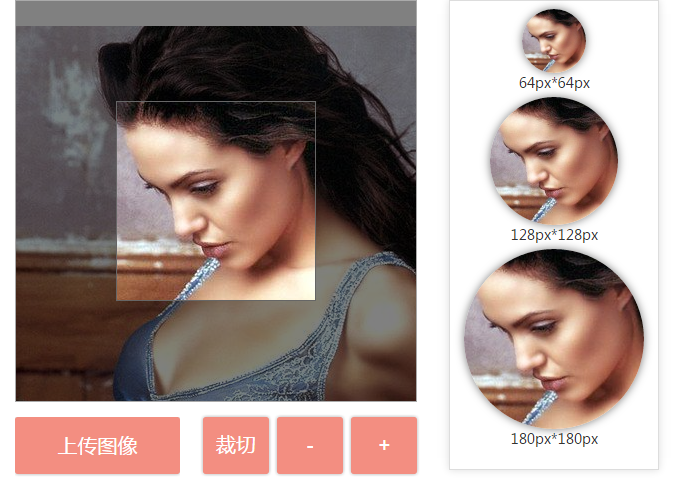
上传的图片可以使用滚轮放大与缩小当前选择的图片,后点击“裁切”后,在右侧的预览图中可以看到裁切成不同尺寸的图片缩略图。
本 demo 使用的 cropbox.js 的版本为:
"use strict";

(function (factory) {

    if (typeof define === 'function' && define.amd) {

        define(['jquery'], factory);

    } else {

        factory(jQuery);

    }

}(function ($) {

    var cropbox = function(options, el){

        var el = el || $(options.imageBox),

            obj =

            {

                state : {},

                ratio : 1,

                options : options,

                imageBox : el,

                thumbBox : el.find(options.thumbBox),

                spinner : el.find(options.spinner),

                image : new Image(),

                getDataURL: function ()

                {

                    var width = this.thumbBox.width(),

                        height = this.thumbBox.height(),

                        canvas = document.createElement("canvas"),

                        dim = el.css('background-position').split(' '),

                        size = el.css('background-size').split(' '),

                        dx = parseInt(dim[0]) - el.width()/2 + width/2,

                        dy = parseInt(dim[1]) - el.height()/2 + height/2,

                        dw = parseInt(size[0]),

                        dh = parseInt(size[1]),

                        sh = parseInt(this.image.height),

                        sw = parseInt(this.image.width);

                    canvas.width = width;

                    canvas.height = height;

                    var context = canvas.getContext("2d");

                    context.drawImage(this.image, 0, 0, sw, sh, dx, dy, dw, dh);

                    var imageData = canvas.toDataURL('image/png');

                    return imageData;

                },

                getBlob: function()

                {

                    var imageData = this.getDataURL();

                    var b64 = imageData.replace('data:image/png;base64,','');

                    var binary = atob(b64);

                    var array = [];

                    for (var i = 0; i < binary.length; i++) {

                        array.push(binary.charCodeAt(i));

                    }

                    return  new Blob([new Uint8Array(array)], {type: 'image/png'});

                },

                zoomIn: function ()

                {

                    this.ratio*=1.1;

                    setBackground();

                },

                zoomOut: function ()

                {

                    this.ratio*=0.9;

                    setBackground();

                }

            },

            setBackground = function()

            {

                var w =  parseInt(obj.image.width)*obj.ratio;

                var h =  parseInt(obj.image.height)*obj.ratio;

                var pw = (el.width() - w) / 2;

                var ph = (el.height() - h) / 2;

                el.css({

                    'background-image': 'url(' + obj.image.src + ')',

                    'background-size': w +'px ' + h + 'px',

                    'background-position': pw + 'px ' + ph + 'px',

                    'background-repeat': 'no-repeat'});

            },

            imgMouseDown = function(e)

            {

                e.stopImmediatePropagation();

                obj.state.dragable = true;

                obj.state.mouseX = e.clientX;

                obj.state.mouseY = e.clientY;

            },

            imgMouseMove = function(e)

            {

                e.stopImmediatePropagation();

                if (obj.state.dragable)

                {

                    var x = e.clientX - obj.state.mouseX;

                    var y = e.clientY - obj.state.mouseY;

                    var bg = el.css('background-position').split(' ');

                    var bgX = x + parseInt(bg[0]);

                    var bgY = y + parseInt(bg[1]);

                    el.css('background-position', bgX +'px ' + bgY + 'px');

                    obj.state.mouseX = e.clientX;

                    obj.state.mouseY = e.clientY;

                }

            },

            imgMouseUp = function(e)

            {

                e.stopImmediatePropagation();

                obj.state.dragable = false;

            },

            zoomImage = function(e)

            {

                e.originalEvent.wheelDelta > 0 || e.originalEvent.detail < 0 ? obj.ratio*=1.1 : obj.ratio*=0.9;

                setBackground();

            }

        obj.spinner.show();

        obj.image.onload = function() {

            obj.spinner.hide();

            setBackground();

            el.bind('mousedown', imgMouseDown);

            el.bind('mousemove', imgMouseMove);

            $(window).bind('mouseup', imgMouseUp);

            el.bind('mousewheel DOMMouseScroll', zoomImage);

        };

        obj.image.src = options.imgSrc;

        el.on('remove', function(){$(window).unbind('mouseup', imgMouseUp)});

        return obj;

    };

    jQuery.fn.cropbox = function(options){

        return new cropbox(options, this);

    };

}));
cropbox.js 可以从上面这个使用方法中下载,根据需要可以下载不同版本的 cropbox.js,在下面的 demo 中将不再描述下载地址。
下面是这个demo的 html / css / js 文件结构:
cropbox
- css
rest.css
index.css
- js
cropbox.js
jquery-1.11.1.min.js /*经过测试,只能使用这个版本的 jquey,还没找到原因*/
img
koala.jpg /*默认显示的图片*/
index.html
HTML:
<!DOCTYPE html>

<html>

    <head>

        <meta charset="UTF-8">

        <meta http-equiv="X-UA-Compatible" content="IE=edge,chrome=1">

        <meta name="viewport" content="width=device-width, initial-scale=1, maximum-scale=1, user-scalable=no" />

        <title>在线图片裁切</title>

        <!--rest.css-->

        <link rel="stylesheet" href="../rest-css/rest.css" />

        <link rel="stylesheet" href="index.css" />

    </head>

    <body>

        <div class="container">

            <div class="row">

                <div class="col-md-8">

                    <div class="img-box">

                        <div class="thumb-box"></div>

                        <div class="spinner"></div>

                    </div>

                    <div class="action">

                        <div id="file" class="new-contentarea tc">

                            <a href="javascript:void(0)" class="upload-img">

                                <label for="upload-file">上传图像</label>

                            </a>

                            <input type="file" class="" name="upload-file" id="upload-file">

                        </div>

                        <input type="button" id="btnCrop" class="btn-crop" value="裁切" />

                        <input type="button" id="btnZoomIn" class="btn-zoom-in" value="-" />

                        <input type="button" id="btnZoomOut" class="btn-zoom-out" value="+" />

                    </div>

                </div>

                <div class="col-md-4">

                    <div class="cropped"></div>

                </div>

            </div>

            <script src="js/jquery-1.11.1.min.js" type="text/javascript"></script>

            <!--cropbox.js 是一个实现了图像在线剪裁的 jQuery 、YUI 插件和 JavaScript 库。-->

            <script type="text/javascript" src="js/cropbox.js"></script>

    </body>

</html>
在 rest.css 中,把 bootstrap.css 中的部分 css 提取出来,为了减少文件的大小,并没有全部加载。主要把 媒体查询 及 栅格系统中所有用到的类名提取,并把其它的默认的样式统一放在这个 css 文件中。
/**

 * rest css

 */

*{

    margin:;

    padding:;

}

*:after,

*:before{

    -webkit-box-sizing: border-box;

    -moz-box-sizing: border-box;

    box-sizing: border-box;

}

.clearfix:before,

.clearfix:after,

body:before,

row:before,

row:after{

    content: "";

    display: table;

}

ul>li{

    list-style: none;

}

body{

    font-family: "微软雅黑";,"Segoe UI", "Lucida Grande", Helvetica, Arial,sans-serif;

    font-size: 14px;

    line-height: 1.42857143;

    color: #333;

}

html,body{

    width: 100%;

    height: 100%;

}

a{

    color: rgba(255,255,255,0.6);

    outline: none;

    text-decoration: none;

    -webkit-transition: 0.2s;

    transition: 0.2s;

}

a:hover,

a:focus{

    color: #74777b;

    text-decoration: none;

}

/**

 * .container 响应式布局

 * .container-fluid 流式布局

 *

 */

.container{

    padding-right: 15px;

    padding-left: 15px;

    margin-right: auto;

    margin-left: auto;

}

@media(min-width: 768px) {

    .container{

        width: 750px;

    }

}

@media(min-width: 922px) {

    .container{

        width: 970px;

    }

}

@media(min-width: 1200px) {

    .container{

        width: 1170px;

    }

}

.container-fluid{

    margin-right: auto;

    margin-left: auto;

    padding-left: 15px;

    padding-right: 15px;

}

.row{

    margin-right: -15px;

    margin-left: -15px;

    display: inline-flex;

    display: -webkit-box; /*定义老版本flex*/

    display: -moz-box;

    display: -webkit-flex;

    display: -ms-flexbox;

    display: flex;/*定义flex*/

}

.col-xs-1,

.col-sm-1,

.col-md-1,

.col-lg-1,

.col-xs-2,

.col-sm-2,

.col-md-2,

.col-lg-2,

.col-xs-3,

.col-sm-3,

.col-md-3,

.col-lg-3,

.col-xs-4,

.col-sm-4,

.col-md-4,

.col-lg-4,

.col-xs-5,

.col-sm-5,

.col-md-5,

.col-lg-5,

.col-xs-6,

.col-sm-6,

.col-md-6,

.col-lg-6,

.col-xs-7,

.col-sm-7,

.col-md-7,

.col-lg-7,

.col-xs-8,

.col-sm-8,

.col-md-8,

.col-lg-8,

.col-xs-9,

.col-sm-9,

.col-md-9,

.col-lg-9,

.col-xs-10,

.col-sm-10,

.col-md-10,

.col-lg-10,

.col-xs-11,

.col-sm-11,

.col-md-11,

.col-lg-11,

.col-xs-12,

.col-sm-12,

.col-md-12,

.col-lg-12 {

    position: relative;

    min-height: 1px;

    padding-left: 15px;

    padding-right: 15px;

}

.col-xs-1, .col-xs-2, .col-xs-3, .col-xs-4, .col-xs-5, .col-xs-6, .col-xs-7, .col-xs-8, .col-xs-9, .col-xs-10, .col-xs-11, .col-xs-12 {

  float: left;

}

.col-xs-12 {

  width: 100%;

}

.col-xs-11 {

  width: 91.66666667%;

}

.col-xs-10 {

  width: 83.33333333%;

}

.col-xs-9 {

  width: 75%;

}

.col-xs-8 {

  width: 66.66666667%;

}

.col-xs-7 {

  width: 58.33333333%;

}

.col-xs-6 {

  width: 50%;

}

.col-xs-5 {

  width: 41.66666667%;

}

.col-xs-4 {

  width: 33.33333333%;

}

.col-xs-3 {

  width: 25%;

}

.col-xs-2 {

  width: 16.66666667%;

}

.col-xs-1 {

  width: 8.33333333%;

}

.col-xs-pull-12 {

  right: 100%;

}

.col-xs-pull-11 {

  right: 91.66666667%;

}

.col-xs-pull-10 {

  right: 83.33333333%;

}

.col-xs-pull-9 {

  right: 75%;

}

.col-xs-pull-8 {

  right: 66.66666667%;

}

.col-xs-pull-7 {

  right: 58.33333333%;

}

.col-xs-pull-6 {

  right: 50%;

}

.col-xs-pull-5 {

  right: 41.66666667%;

}

.col-xs-pull-4 {

  right: 33.33333333%;

}

.col-xs-pull-3 {

  right: 25%;

}

.col-xs-pull-2 {

  right: 16.66666667%;

}

.col-xs-pull-1 {

  right: 8.33333333%;

}

.col-xs-pull-0 {

  right: auto;

}

.col-xs-push-12 {

  left: 100%;

}

.col-xs-push-11 {

  left: 91.66666667%;

}

.col-xs-push-10 {

  left: 83.33333333%;

}

.col-xs-push-9 {

  left: 75%;

}

.col-xs-push-8 {

  left: 66.66666667%;

}

.col-xs-push-7 {

  left: 58.33333333%;

}

.col-xs-push-6 {

  left: 50%;

}

.col-xs-push-5 {

  left: 41.66666667%;

}

.col-xs-push-4 {

  left: 33.33333333%;

}

.col-xs-push-3 {

  left: 25%;

}

.col-xs-push-2 {

  left: 16.66666667%;

}

.col-xs-push-1 {

  left: 8.33333333%;

}

.col-xs-push-0 {

  left: auto;

}

.col-xs-offset-12 {

  margin-left: 100%;

}

.col-xs-offset-11 {

  margin-left: 91.66666667%;

}

.col-xs-offset-10 {

  margin-left: 83.33333333%;

}

.col-xs-offset-9 {

  margin-left: 75%;

}

.col-xs-offset-8 {

  margin-left: 66.66666667%;

}

.col-xs-offset-7 {

  margin-left: 58.33333333%;

}

.col-xs-offset-6 {

  margin-left: 50%;

}

.col-xs-offset-5 {

  margin-left: 41.66666667%;

}

.col-xs-offset-4 {

  margin-left: 33.33333333%;

}

.col-xs-offset-3 {

  margin-left: 25%;

}

.col-xs-offset-2 {

  margin-left: 16.66666667%;

}

.col-xs-offset-1 {

  margin-left: 8.33333333%;

}

.col-xs-offset-0 {

  margin-left: 0%;

}

@media (min-width: 768px) {

  .col-sm-1, .col-sm-2, .col-sm-3, .col-sm-4, .col-sm-5, .col-sm-6, .col-sm-7, .col-sm-8, .col-sm-9, .col-sm-10, .col-sm-11, .col-sm-12 {

    float: left;

  }

  .col-sm-12 {

    width: 100%;

  }

  .col-sm-11 {

    width: 91.66666667%;

  }

  .col-sm-10 {

    width: 83.33333333%;

  }

  .col-sm-9 {

    width: 75%;

  }

  .col-sm-8 {

    width: 66.66666667%;

  }

  .col-sm-7 {

    width: 58.33333333%;

  }

  .col-sm-6 {

    width: 50%;

  }

  .col-sm-5 {

    width: 41.66666667%;

  }

  .col-sm-4 {

    width: 33.33333333%;

  }

  .col-sm-3 {

    width: 25%;

  }

  .col-sm-2 {

    width: 16.66666667%;

  }

  .col-sm-1 {

    width: 8.33333333%;

  }

  .col-sm-pull-12 {

    right: 100%;

  }

  .col-sm-pull-11 {

    right: 91.66666667%;

  }

  .col-sm-pull-10 {

    right: 83.33333333%;

  }

  .col-sm-pull-9 {

    right: 75%;

  }

  .col-sm-pull-8 {

    right: 66.66666667%;

  }

  .col-sm-pull-7 {

    right: 58.33333333%;

  }

  .col-sm-pull-6 {

    right: 50%;

  }

  .col-sm-pull-5 {

    right: 41.66666667%;

  }

  .col-sm-pull-4 {

    right: 33.33333333%;

  }

  .col-sm-pull-3 {

    right: 25%;

  }

  .col-sm-pull-2 {

    right: 16.66666667%;

  }

  .col-sm-pull-1 {

    right: 8.33333333%;

  }

  .col-sm-pull-0 {

    right: auto;

  }

  .col-sm-push-12 {

    left: 100%;

  }

  .col-sm-push-11 {

    left: 91.66666667%;

  }

  .col-sm-push-10 {

    left: 83.33333333%;

  }

  .col-sm-push-9 {

    left: 75%;

  }

  .col-sm-push-8 {

    left: 66.66666667%;

  }

  .col-sm-push-7 {

    left: 58.33333333%;

  }

  .col-sm-push-6 {

    left: 50%;

  }

  .col-sm-push-5 {

    left: 41.66666667%;

  }

  .col-sm-push-4 {

    left: 33.33333333%;

  }

  .col-sm-push-3 {

    left: 25%;

  }

  .col-sm-push-2 {

    left: 16.66666667%;

  }

  .col-sm-push-1 {

    left: 8.33333333%;

  }

  .col-sm-push-0 {

    left: auto;

  }

  .col-sm-offset-12 {

    margin-left: 100%;

  }

  .col-sm-offset-11 {

    margin-left: 91.66666667%;

  }

  .col-sm-offset-10 {

    margin-left: 83.33333333%;

  }

  .col-sm-offset-9 {

    margin-left: 75%;

  }

  .col-sm-offset-8 {

    margin-left: 66.66666667%;

  }

  .col-sm-offset-7 {

    margin-left: 58.33333333%;

  }

  .col-sm-offset-6 {

    margin-left: 50%;

  }

  .col-sm-offset-5 {

    margin-left: 41.66666667%;

  }

  .col-sm-offset-4 {

    margin-left: 33.33333333%;

  }

  .col-sm-offset-3 {

    margin-left: 25%;

  }

  .col-sm-offset-2 {

    margin-left: 16.66666667%;

  }

  .col-sm-offset-1 {

    margin-left: 8.33333333%;

  }

  .col-sm-offset-0 {

    margin-left: 0%;

  }

}

@media (min-width: 992px) {

  .col-md-1, .col-md-2, .col-md-3, .col-md-4, .col-md-5, .col-md-6, .col-md-7, .col-md-8, .col-md-9, .col-md-10, .col-md-11, .col-md-12 {

    float: left;

  }

  .col-md-12 {

    width: 100%;

  }

  .col-md-11 {

    width: 91.66666667%;

  }

  .col-md-10 {

    width: 83.33333333%;

  }

  .col-md-9 {

    width: 75%;

  }

  .col-md-8 {

    width: 66.66666667%;

  }

  .col-md-7 {

    width: 58.33333333%;

  }

  .col-md-6 {

    width: 50%;

  }

  .col-md-5 {

    width: 41.66666667%;

  }

  .col-md-4 {

    width: 33.33333333%;

  }

  .col-md-3 {

    width: 25%;

  }

  .col-md-2 {

    width: 16.66666667%;

  }

  .col-md-1 {

    width: 8.33333333%;

  }

  .col-md-pull-12 {

    right: 100%;

  }

  .col-md-pull-11 {

    right: 91.66666667%;

  }

  .col-md-pull-10 {

    right: 83.33333333%;

  }

  .col-md-pull-9 {

    right: 75%;

  }

  .col-md-pull-8 {

    right: 66.66666667%;

  }

  .col-md-pull-7 {

    right: 58.33333333%;

  }

  .col-md-pull-6 {

    right: 50%;

  }

  .col-md-pull-5 {

    right: 41.66666667%;

  }

  .col-md-pull-4 {

    right: 33.33333333%;

  }

  .col-md-pull-3 {

    right: 25%;

  }

  .col-md-pull-2 {

    right: 16.66666667%;

  }

  .col-md-pull-1 {

    right: 8.33333333%;

  }

  .col-md-pull-0 {

    right: auto;

  }

  .col-md-push-12 {

    left: 100%;

  }

  .col-md-push-11 {

    left: 91.66666667%;

  }

  .col-md-push-10 {

    left: 83.33333333%;

  }

  .col-md-push-9 {

    left: 75%;

  }

  .col-md-push-8 {

    left: 66.66666667%;

  }

  .col-md-push-7 {

    left: 58.33333333%;

  }

  .col-md-push-6 {

    left: 50%;

  }

  .col-md-push-5 {

    left: 41.66666667%;

  }

  .col-md-push-4 {

    left: 33.33333333%;

  }

  .col-md-push-3 {

    left: 25%;

  }

  .col-md-push-2 {

    left: 16.66666667%;

  }

  .col-md-push-1 {

    left: 8.33333333%;

  }

  .col-md-push-0 {

    left: auto;

  }

  .col-md-offset-12 {

    margin-left: 100%;

  }

  .col-md-offset-11 {

    margin-left: 91.66666667%;

  }

  .col-md-offset-10 {

    margin-left: 83.33333333%;

  }

  .col-md-offset-9 {

    margin-left: 75%;

  }

  .col-md-offset-8 {

    margin-left: 66.66666667%;

  }

  .col-md-offset-7 {

    margin-left: 58.33333333%;

  }

  .col-md-offset-6 {

    margin-left: 50%;

  }

  .col-md-offset-5 {

    margin-left: 41.66666667%;

  }

  .col-md-offset-4 {

    margin-left: 33.33333333%;

  }

  .col-md-offset-3 {

    margin-left: 25%;

  }

  .col-md-offset-2 {

    margin-left: 16.66666667%;

  }

  .col-md-offset-1 {

    margin-left: 8.33333333%;

  }

  .col-md-offset-0 {

    margin-left: 0%;

  }

}

@media (min-width: 1200px) {

  .col-lg-1, .col-lg-2, .col-lg-3, .col-lg-4, .col-lg-5, .col-lg-6, .col-lg-7, .col-lg-8, .col-lg-9, .col-lg-10, .col-lg-11, .col-lg-12 {

    float: left;

  }

  .col-lg-12 {

    width: 100%;

  }

  .col-lg-11 {

    width: 91.66666667%;

  }

  .col-lg-10 {

    width: 83.33333333%;

  }

  .col-lg-9 {

    width: 75%;

  }

  .col-lg-8 {

    width: 66.66666667%;

  }

  .col-lg-7 {

    width: 58.33333333%;

  }

  .col-lg-6 {

    width: 50%;

  }

  .col-lg-5 {

    width: 41.66666667%;

  }

  .col-lg-4 {

    width: 33.33333333%;

  }

  .col-lg-3 {

    width: 25%;

  }

  .col-lg-2 {

    width: 16.66666667%;

  }

  .col-lg-1 {

    width: 8.33333333%;

  }

  .col-lg-pull-12 {

    right: 100%;

  }

  .col-lg-pull-11 {

    right: 91.66666667%;

  }

  .col-lg-pull-10 {

    right: 83.33333333%;

  }

  .col-lg-pull-9 {

    right: 75%;

  }

  .col-lg-pull-8 {

    right: 66.66666667%;

  }

  .col-lg-pull-7 {

    right: 58.33333333%;

  }

  .col-lg-pull-6 {

    right: 50%;

  }

  .col-lg-pull-5 {

    right: 41.66666667%;

  }

  .col-lg-pull-4 {

    right: 33.33333333%;

  }

  .col-lg-pull-3 {

    right: 25%;

  }

  .col-lg-pull-2 {

    right: 16.66666667%;

  }

  .col-lg-pull-1 {

    right: 8.33333333%;

  }

  .col-lg-pull-0 {

    right: auto;

  }

  .col-lg-push-12 {

    left: 100%;

  }

  .col-lg-push-11 {

    left: 91.66666667%;

  }

  .col-lg-push-10 {

    left: 83.33333333%;

  }

  .col-lg-push-9 {

    left: 75%;

  }

  .col-lg-push-8 {

    left: 66.66666667%;

  }

  .col-lg-push-7 {

    left: 58.33333333%;

  }

  .col-lg-push-6 {

    left: 50%;

  }

  .col-lg-push-5 {

    left: 41.66666667%;

  }

  .col-lg-push-4 {

    left: 33.33333333%;

  }

  .col-lg-push-3 {

    left: 25%;

  }

  .col-lg-push-2 {

    left: 16.66666667%;

  }

  .col-lg-push-1 {

    left: 8.33333333%;

  }

  .col-lg-push-0 {

    left: auto;

  }

  .col-lg-offset-12 {

    margin-left: 100%;

  }

  .col-lg-offset-11 {

    margin-left: 91.66666667%;

  }

  .col-lg-offset-10 {

    margin-left: 83.33333333%;

  }

  .col-lg-offset-9 {

    margin-left: 75%;

  }

  .col-lg-offset-8 {

    margin-left: 66.66666667%;

  }

  .col-lg-offset-7 {

    margin-left: 58.33333333%;

  }

  .col-lg-offset-6 {

    margin-left: 50%;

  }

  .col-lg-offset-5 {

    margin-left: 41.66666667%;

  }

  .col-lg-offset-4 {

    margin-left: 33.33333333%;

  }

  .col-lg-offset-3 {

    margin-left: 25%;

  }

  .col-lg-offset-2 {

    margin-left: 16.66666667%;

  }

  .col-lg-offset-1 {

    margin-left: 8.33333333%;

  }

  .col-lg-offset-0 {

    margin-left: 0%;

  }

}
这个 demo 的其它样式,主要是 input[type]的个性化样式:
/**

 * 页面部分

 */

.img-box{

    position: relative;

    height: 400px;

    width: 400px;

    border: 1px solid #aaa;

    overflow: hidden;

    background-repeat: no-repeat;

    cursor: move;/*可移动的鼠标指针*/

}

.img-box .thumb-box{

    position: absolute;

    top: 50%;

    left: 50%;

    width: 200px;

    height: 200px;

    margin-top: -100px;

    margin-left: -100px;

    box-sizing: border-box;

    border: 1px solid rgb(102, 102, 102);

    box-shadow: 0 0 0 1000px rgba(0, 0, 0, 0.5);

    background: none repeat scroll 0% 0% transparent;/*如果一个元素覆盖在另外一个元素之上,而你想显示下面的元素,这时你就需要把上面这个元素的background设置transparent*/

}

.img-box .spinner{

    position: absolute;

    top:;

    left:;

    bottom:;

    right:;

    text-align: center;

    line-height: 400px;

    background: rgba(0,0,0,0.7);

}

.action{

    height: 45px;

    margin-top: 15px;

}

.tc{

    text-align: center;

    cursor: pointer;

}

/*input[typw] 上传文件按钮*/

.new-contentarea{

    width: 165px;

    overflow: hidden;

    margin: 0 auto;

    position: relative;

    float: left;

    margin-right: 21px;

}

.new-contentarea .upload-img{

    width: 165px;

    display: inline-block;

    margin-bottom: 10px;

    height: 57px;

    line-height: 57px;

    font-size: 20px;

    color: #FFFFFF;

    background-color: #f38e81;

    border-radius: 3px;

    text-decoration: none;

    cursor: pointer;

    border: 0px #fff solid;

    box-shadow: 0px 0px 5px #B0B0B0;

}

.new-contentarea .upload-img:hover{

    background-color: #d6796d;

}

.new-contentarea input[type=file]{

    width: 188px;

    height: 60px;

    background: #333;

    margin: 0 auto;

    position: absolute;

    right: 50%;

    margin-right: -94px;

    top:;

    right/*\**/: 0px\9;

    margin-right/*\**/: 0px\9;

    width/*\**/: 10px\9;

    opacity:;

    filter: alpha(opacity=0);

    z-index:;

    cursor: pointer;

}

.action .btn-zoom-in,

.action .btn-zoom-out,

.action .btn-crop

{

    width: 66px;

    display: inline-block;

    margin-bottom: 10px;

    height: 57px;

    line-height: 57px;

    font-size: 20px;

    color: #FFFFFF;

    margin: 0px 2px;

    background-color: #f38e81;

    border-radius: 3px;

    text-decoration: none;

    cursor: pointer;

    box-shadow: 0px 0px 5px #B0B0B0;

    border: 0px #fff solid;

    margin-bottom: 10px;

}

.cropped{

    width: 200px;

    border: 1px #ddd solid;

    height: 460px;

    padding: 4px;

    box-shadow: 0px 0px 12px #ddd;

    text-align: center;

}
下面是这个 demo 的实现方法:
<script type="text/javascript">

                $(window).load(function() {
           //options 是首次加载显示的默认的图片样式

                    var options = {

                        thumbBox: '.thumb-box',

                        spinner: '.spinner',

                        imgSrc: './img/koala.jpg'

                    }


                    var cropper = $('.img-box').cropbox(options);

                    $('#upload-file').on('change', function() {

                        var reader = new FileReader();

                        reader.onload = function(e) {

                            options.imgSrc = e.target.result;

                            cropper = $('.img-box').cropbox(options);

                        }

                        reader.readAsDataURL(this.files[0]);

                        this.files = [];

                    })

                    $('#btnCrop').on('click', function() {

                        var img = cropper.getDataURL();

                        $('.cropped').html('');

                        $('.cropped').append('<img src="' + img + '" align="absmiddle" style="width:64px;margin-top:4px;border-radius:64px;box-shadow:0px 0px 12px #7E7E7E;" ><p>64px*64px</p>');

                        $('.cropped').append('<img src="' + img + '" align="absmiddle" style="width:128px;margin-top:4px;border-radius:128px;box-shadow:0px 0px 12px #7E7E7E;"><p>128px*128px</p>');

                        $('.cropped').append('<img src="' + img + '" align="absmiddle" style="width:180px;margin-top:4px;border-radius:180px;box-shadow:0px 0px 12px #7E7E7E;"><p>180px*180px</p>');

                    })

                    $('#btnZoomIn').on('click', function() {
              //鼠标滚轮缩小

                        cropper.zoomIn();

                    })

                    $('#btnZoomOut').on('click', function() {
              //鼠标滚轮放大

                        cropper.zoomOut();

                    })

                });

            </script>
下面这个 demo 因为 jsfiddle 加载外部的JS时,必须是 https,但是 cropbox.js 暂时不知道怎么加载进来,因此看不到它的具体效果,请知道的大侠们指点:
在这个 demo 中,有两个知识点:
- css 中 :background: none repeat scroll 0% 0% transparent;/*如果一个元素覆盖在另外一个元素之上,而你想显示下面的元素,这时你就需要把上面这个元素的background设置transparent*/
- input[type=file] 样式美化,在说它的美化前,需要把它的结构了解清楚
/*input file上传按钮的美化思路是,先把之前的按钮透明度opacity设置为0,然后,外层用div包裹,就实现了美化功能。*/

<div id="file" class="new-contentarea tc">

    <a href="javascript:void(0)" class="upload-img">

        <label for="upload-file">上传图像</label>

    </a>

    <input type="file" class="" name="upload-file" id="upload-file">

</div>
.tc{

    text-align: center;

    cursor: pointer;

}

/*input[typw] 上传文件按钮*/

.new-contentarea{

    width: 165px;

    overflow: hidden;

    margin: 0 auto;

    position: relative;

    float: left;

    margin-right: 21px;

}

.new-contentarea .upload-img{

    width: 165px;

    display: inline-block;

    margin-bottom: 10px;

    height: 57px;

    line-height: 57px;

    font-size: 20px;

    color: #FFFFFF;

    background-color: #f38e81;

    border-radius: 3px;

    text-decoration: none;

    cursor: pointer;

    border: 0px #fff solid;

    box-shadow: 0px 0px 5px #B0B0B0;

}

.new-contentarea .upload-img:hover{

    background-color: #d6796d;

}

.new-contentarea input[type=file]{

    width: 188px;

    height: 60px;

    background: #333;

    margin: 0 auto;

    position: absolute;

    right: 50%;

    margin-right: -94px;

    top:;

    right/*\**/: 0px\9;

    margin-right/*\**/: 0px\9;

    width/*\**/: 10px\9;

    opacity:;

    filter: alpha(opacity=0);

    z-index:;

    cursor: pointer;

}
也可以查看这个 上传按钮美化的教程
在线图片上传、预览、裁切、放大、缩小之 cropbox.js 的应用的更多相关文章
- 兼容好的JS图片上传预览代码
转 : http://www.codefans.net/articles/1395.shtml 兼容好的JS图片上传预览代码 (谷歌,IE11) <html xmlns="http:/ ...
- Jquery图片上传预览效果
uploadPreview.js jQuery.fn.extend({ uploadPreview: function (opts) { var _self = this, _this = $(thi ...
- [前端 4] 使用Js实现图片上传预览
导读:今天做图片上传预览,刚开始的做法是,先将图片上传到Nginx,然后重新加载页面才能看到这个图片.在这个过程中,用户一直都看不到自己上传的文件是什么样子.Ps:我发现我真的有强迫症了,都告诉我说不 ...
- Javascript之图片上传预览
使用Javascript之图片上传预览,我们无需上传到服务器中,兼容所有浏览器. 关键方法是使用微软库filter:progid:DXImageTransform.Microsoft.AlphaIma ...
- HTML5 图片上传预览
<!DOCTYPE html> <html lang="zh-cn"> <head> <meta charset="utf-8& ...
- ASP.NET工作笔记之一:图片上传预览及无刷新上传
转自:http://www.cnblogs.com/sibiyellow/archive/2012/04/27/jqueryformjs.html 最近项目里面涉及到无刷新上传图片的功能,其实也就是上 ...
- php 图片上传预览(转)
网上找的图片上传预览: <!DOCTYPE html PUBLIC "-//W3C//DTD XHTML 1.0 Transitional//EN" "http:/ ...
- js实现图片上传预览及进度条
原文js实现图片上传预览及进度条 最近在做图片上传的时候,由于产品设计的比较fashion,上网找了比较久还没有现成的,因此自己做了一个,实现的功能如下: 1:去除浏览器<input type= ...
- html 图片上传预览
Html5 upload img 2012年12月27日 20:36 <!DOCTYPE HTML> <html> <head> <meta http-equ ...
- js前端实现多图图片上传预览
<html xmlns="http://www.w3.org/1999/xhtml"> <head> <meta http-equiv="C ...
随机推荐
- RESTful规范1
RESTful规范 一 什么是RESTful REST与技术无关,代表的是一种软件架构风格,REST是Representational State Transfer的简称,中文翻译为"表征状 ...
- spark最新源码下载并导入到开发环境下助推高质量代码(Scala IDEA for Eclipse和IntelliJ IDEA皆适用)(以spark2.2.0源码包为例)(图文详解)
不多说,直接上干货! 前言 其实啊,无论你是初学者还是具备了有一定spark编程经验,都需要对spark源码足够重视起来. 本人,肺腑之己见,想要成为大数据的大牛和顶尖专家,多结合源码和操练编程. ...
- Ubuntu16.04配置静态IP地址
ubuntu如何设置静态IP? 设置静态IP 1.编辑/etc/network/interfaces文件: # This file describes the network interfaces a ...
- Nodejs sublime text 3安装与配置
1.下载subline的nodejs插件 2.解压zip文件, 并重命名文件夹“Nodejs” 3. 打开sublime,操作"preference" --> " ...
- [Linux] deepin15.8搭建LNMP环境
LAMP和LNMP LAMP==Linux+Apache+Mysql+PHP LNMP==Linux+Nginx+Mysql+PHP 安装nginx sudo apt install nginx 安装 ...
- @property、@sythesize以及Ivar和@dynamic讲解(下)
下面仅仅是一些基本知识,可能有些知识用的比较少,不过知道怎么使用或者了解这个知识,还是不错的,毕竟技多不压身嘛!读完这篇文章大约需要5-10分钟左右!!! 一.@property 1.在头文件中: @ ...
- 【转载】C#使用正则表达式校验邮箱
在C#中,可以使用Regex正则表达式类来校验前台提交过来的邮箱字段信息是否符合要求,Regex类是C#中有关正则表达式处理的相关类,功能强大,我们只需要在实例化Regex类的时候指定相应的规则为邮箱 ...
- Spring Boot搭建Web项目常用功能
搭建WEB项目过程中,哪些点需要注意: 1.技术选型: 前端:freemarker.vue 后端:spring boot.spring mvc 2.如何包装返回统一结构结果数据? 首先要弄清楚为什么要 ...
- cronolog日志切割catalina.out
cronolog日志切割catalina.out (一)解压安装cronolog 1:wget https://files.cnblogs.com/files/crazyzero/cronolog- ...
- 虚拟机与Docker有何不同?
译者按: 各种虚拟机技术开启了云计算时代:而Docker,作为下一代虚拟化技术,正在改变我们开发.测试.部署应用的方式.那虚拟机与Docker究竟有何不同呢? 原文: Comparing Virtua ...