
mysql数据库进阶篇
一、连表操作
1)为何需要连表操作
、把所有数据都存放于一张表的弊端

    、表的组织结构复杂不清晰

    、浪费空间

    、扩展性极差
2)表设计,分析表与表之间的关系
寻找表与表之间的关系的套路

举例:emp表   dep表

步骤一:

    part1:

    、先站在左表emp的角度

    、去找左表emp的多条记录能否对应右表dep的一条记录

    、翻译2的意义:

        左表emp的多条记录==》多个员工

        右表dep的一条记录==》一个部门

        最终翻译结果:多个员工是否可以属于一个部门?

        如果是则需要进行part2的流程

    part2:

    、站在右表dep的角度

    、去找右表dep的多条记录能否对应左表emp的一条记录

    、翻译2的意义:

        右表dep的多条记录==》多个部门

        左表emp的一条记录==》一个员工

        最终翻译结果:多个部门是否可以包含同一个员工

        如果不可以,则可以确定emp与dep的关系只一个单向的多对一

        如何实现?

            在emp表中新增一个dep_id字段,该字段指向dep表的id字段
3)表之间的关系多对一
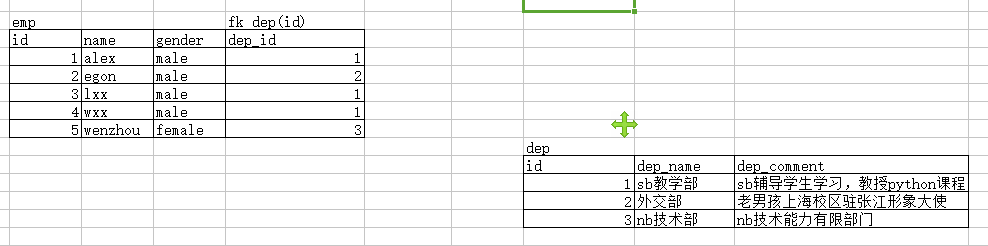
约束1:在创建表时,先建被关联的表dep,才能建关联表emp。
强调:生产环境不要加foreign key(dep_id),会强耦合在一起,以后无法扩展。应该从应用逻辑程序来限制
create table dep(

    id int primary key auto_increment,

    dep_name char(),

    dep_comment char()

);

create table emp(

    id int primary key auto_increment,

    name char(),

    gender enum('male','female') not null default 'male',

    dep_id int,

    foreign key(dep_id) references dep(id)

);
约束2:在插入记录时,必须先插被关联的表dep,才能插关联表emp
insert into dep(dep_name,dep_comment) values

('sb教学部','sb辅导学生学习,教授python课程'),

('外交部','老男孩上海校区驻张江形象大使'),

('nb技术部','nb技术能力有限部门');

insert into emp(name,gender,dep_id)  values

('alex','male',),

('egon','male',),

('lxx','male',),

('wxx','male',),

('wenzhou','female',);
约束3:更新与删除都需要考虑到关联与被关联的关系
解决方案:

、先删除关联表emp,再删除被关联表dep,准备重建

mysql> drop table emp;

Query OK,  rows affected (0.11 sec)

mysql> drop table dep;

Query OK,  rows affected (0.04 sec)
解决方法 :重建:新增功能,同步更新,同步删除
create table dep(

    id int primary key auto_increment,

    dep_name char(),

    dep_comment char()

);

create table emp(

    id int primary key auto_increment,

    name char(),

    gender enum('male','female') not null default 'male',

    dep_id int,

    foreign key(dep_id) references dep(id)

    on update cascade

    on delete cascade

);

insert into dep(dep_name,dep_comment) values

('sb教学部','sb辅导学生学习,教授python课程'),

('外交部','老男孩上海校区驻张江形象大使'),

('nb技术部','nb技术能力有限部门');

insert into emp(name,gender,dep_id)  values

('alex','male',),

('egon','male',),

('lxx','male',),

('wxx','male',),

('wenzhou','female',);
4)表与表之间多对多的关系
两张表之间是一个双向的多对一关系,称之为多对多

如何实现?

建立第三张表,该表中有一个字段fk左表的id,还有一个字段是fk右表的id
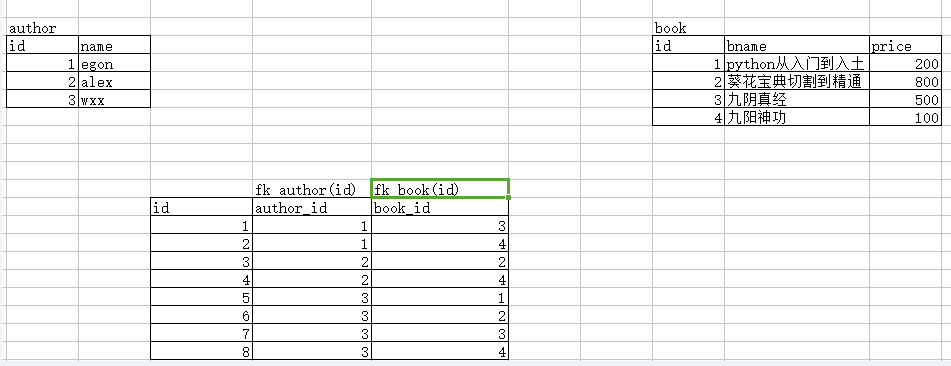
先建立2张没有关系的表
create table author(

    id int primary key auto_increment,

    name char()

);

create table book(

    id int primary key auto_increment,

    bname char(),

    price int

);

insert into author(name) values

('egon'),

('alex'),

('wxx')

;

insert into book(bname,price) values

('python从入门到入土',),

('葵花宝典切割到精通',),

('九阴真经',),

('九阳神功',)

;
再建立连接2张表的关系表
create table author2book(

    id int primary key auto_increment,

    author_id int,

    book_id int,

    foreign key(author_id) references author(id)

    on update cascade

    on delete cascade,

    foreign key(book_id) references book(id)

    on update cascade

    on delete cascade

);

insert into author2book(author_id,book_id) values

(,),

(,),

(,),

(,),

(,),

(,),

(,),

(,);
没有foreign key,都是关联表,可对比查看
create table author2book(

id int not null unique auto_increment,

author_id int not null,

book_id int not null,

constraint fk_author foreign key(author_id) references author(id)

on delete cascade

on update cascade,

constraint fk_book foreign key(book_id) references book(id)

on delete cascade

on update cascade,

primary key(author_id,book_id)

);
5)表之间的关系一对一的关系表
左表的一条记录唯一对应右表的一条记录,反之也一样

create table customer(

    id int primary key auto_increment,

    name char() not null,

    qq char() not null,

    phone char() not null

);

create table student(

    id int primary key auto_increment,

    class_name char() not null,

    customer_id int unique, #该字段一定要是唯一的

    foreign key(customer_id) references customer(id) #外键的字段一定要保证unique

    on delete cascade

    on update cascade

);

insert into customer(name,qq,phone) values

('李飞机','',),

('王大炮','',),

('守榴弹','',),

('吴坦克','',),

('赢火箭','',),

('战地雷','',)

;

#增加学生

insert into student(class_name,customer_id) values

('脱产3班',),

('周末19期',),

('周末19期',)

;
二、单表操作
1)插入数据 insert
. 插入完整数据(顺序插入)

    语法一:

    INSERT INTO 表名(字段1,字段2,字段3…字段n) VALUES(值1,值2,值3…值n);

    语法二:

    INSERT INTO 表名 VALUES (值1,值2,值3…值n);

. 指定字段插入数据

    语法:

    INSERT INTO 表名(字段1,字段2,字段3…) VALUES (值1,值2,值3…);

. 插入多条记录

    语法:

    INSERT INTO 表名 VALUES

        (值1,值2,值3…值n),

        (值1,值2,值3…值n),

        (值1,值2,值3…值n);

. 插入查询结果

    语法:

    INSERT INTO 表名(字段1,字段2,字段3…字段n)

                    SELECT (字段1,字段2,字段3…字段n) FROM 表2

                    WHERE …;
2)更新数据 update
语法:

    UPDATE 表名 SET

        字段1=值1,

        字段2=值2,

        WHERE CONDITION;

示例:

    UPDATE mysql.user SET password=password(‘’)

        where user=’root’ and host=’localhost’;
3)删除数据 delete。删除所有数据并非清空数据。truncate 清空表数据
语法:

    DELETE FROM 表名

        WHERE CONITION;

示例:

    DELETE FROM mysql.user

        WHERE password=’’;

练习:

    更新MySQL root用户密码为mysql123

    删除除从本地登录的root用户以外的所有用户
三、重点。单表操作之单表查询
查询表语法结构
# distinct 去重
# 单表查询语法:

select distinct 字段1,字段2,字段3,... from 表名

    where 条件

    group by 分组的字段

    having 条件

    order by 排序字段

    limit 限制显示的条数
1)创建表,及先创建好环境
# 先创建表

create table employee(

id int not null unique auto_increment,

name varchar() not null,

sex enum('male','female') not null default 'male', #大部分是男的

age int() unsigned not null default ,

hire_date date not null,

post varchar(),

post_comment varchar(),

salary double(,),

office int, #一个部门一个屋子

depart_id int

);

#查看表结构

mysql> desc employee;

+--------------+-----------------------+------+-----+---------+----------------+

| Field        | Type                  | Null | Key | Default | Extra          |

+--------------+-----------------------+------+-----+---------+----------------+

| id           | int()               | NO   | PRI | NULL    | auto_increment |

| name         | varchar()           | NO   |     | NULL    |                |

| sex          | enum('male','female') | NO   |     | male    |                |

| age          | int() unsigned       | NO   |     |       |                |

| hire_date    | date                  | NO   |     | NULL    |                |

| post         | varchar()           | YES  |     | NULL    |                |

| post_comment | varchar()          | YES  |     | NULL    |                |

| salary       | double(,)          | YES  |     | NULL    |                |

| office       | int()               | YES  |     | NULL    |                |

| depart_id    | int()               | YES  |     | NULL    |                |

+--------------+-----------------------+------+-----+---------+----------------+

#插入记录

#三个部门:教学,销售,运营

insert into employee(name,sex,age,hire_date,post,salary,office,depart_id) values

('egon','male',,'','老男孩驻沙河办事处外交大使',7300.33,,), #以下是教学部

('alex','male',,'','teacher',1000000.31,,),

('wupeiqi','male',,'','teacher',,,),

('yuanhao','male',,'','teacher',,,),

('liwenzhou','male',,'','teacher',,,),

('jingliyang','female',,'','teacher',,,),

('jinxin','male',,'','teacher',,,),

('成龙','male',,'','teacher',,,),

('歪歪','female',,'','sale',3000.13,,),#以下是销售部门

('丫丫','female',,'','sale',2000.35,,),

('丁丁','female',,'','sale',1000.37,,),

('星星','female',,'','sale',3000.29,,),

('格格','female',,'','sale',4000.33,,),

('张野','male',,'','operation',10000.13,,), #以下是运营部门

('程咬金','male',,'','operation',,,),

('程咬银','female',,'','operation',,,),

('程咬铜','male',,'','operation',,,),

('程咬铁','female',,'','operation',,,)

;

# 删除多余的字段

alter table employee drop office;

alter table employee drop depart_id;
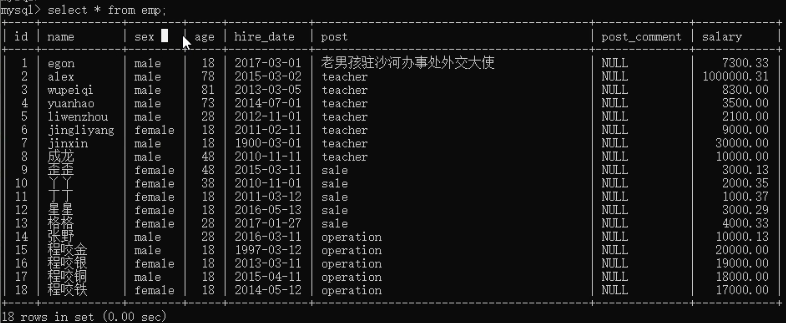
2)查看所有员工的姓名和薪资:select name,salary from employee;

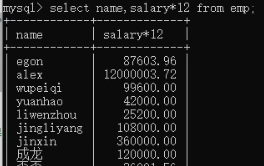
3)查询过程中的四则运算:select name,salary*12 from employee;
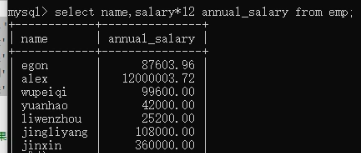
4)字段名起别名:select name,salary*12 annual_salary from employee;
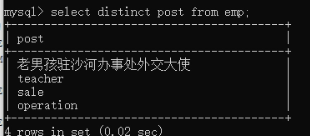
5)查看有多少post职位。需要去重:select distinct post from employee;
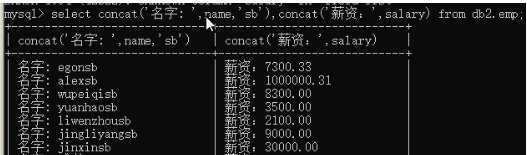
6)查询显示结果 名字:egon 薪资:7300。select concat('名字: ',name,'sb'),concat('薪资: ','salary') from emp
7) 加上重命名字段:select concat('名字: ',name,'sb') as new_name,concat('薪资: ','salary') as new_sal from emp
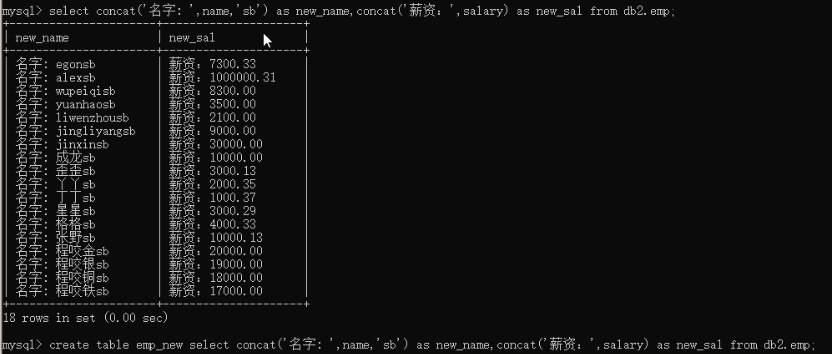
也可实现将输入结果重定向与新表
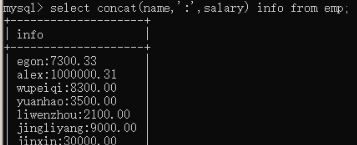
8)实现 名字:薪资。。select concat(name,':',salary) info from employee;
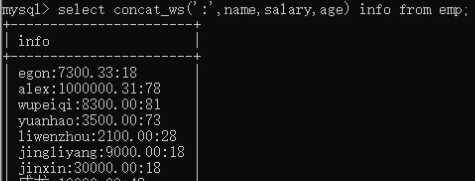
9)concat_ws,拼接多个字段,且是相同的分割符。select concat_ws(':',name,salary,age) info from employee;
10)查询语句的逻辑判断
select

(

    case

        when name = 'egon' then

            concat(name,'_nb')

        when name = 'alex' then

            concat(name,'_dsb')

        else

            column(name,'_sb')

    end

) as new_name

from employee;

建议使用python来做逻辑应用判断
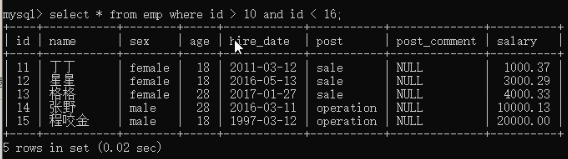
11)条件筛选 where 和 and使用。select * from employee where id > 10 and id < 16;
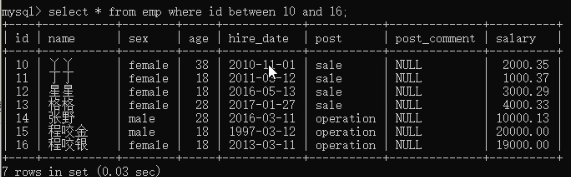
select * from employee where id between 10 and 16;
select * from employee where id = 3 or id = 5 or id =7;
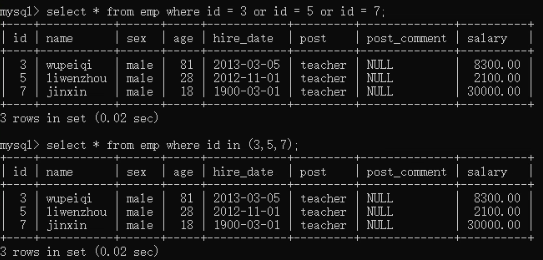
上面也可以取反操作

12)like模糊匹配

12)group by 分组使用:select post,count(id) from employee group by post;
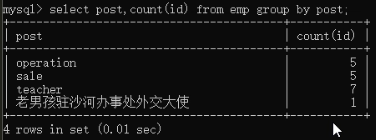
13)聚合函数。统计最高工资。select post,max(salary) from employee group by post;

select post,max(salary) from employee group by post;   最高工资

select post,min(salary) from employee group by post;   最低工资

select post,avg(salary) from employee group by post;   平均工资

select post,sum(salary) from employee group by post;   工资和
14)组和组成员:select post,group_concat(name) from employee group by post;
也可以 : select post,group_concat(name,'_SB') from employee group by post;
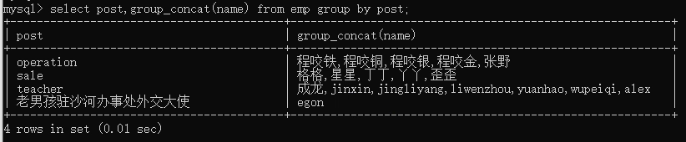
15)查出每个部门年龄在30岁以上的人员的平均工资
select post,avg(salary) from employee

    where age >=

    group by post;
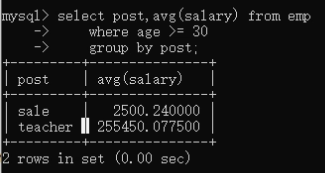
16)查出平均工资大于10000的部门
select post,avg(salary) from employee

  group by post

  having avg(salary) > ;

查出30岁以上员工的平均薪资在10000以上的部门
select post,avg(salary) from employe

    where age <=

    group by post

    having avg(salary) > ;
17)排序,order by。 select * from employe by salary; 默认升序
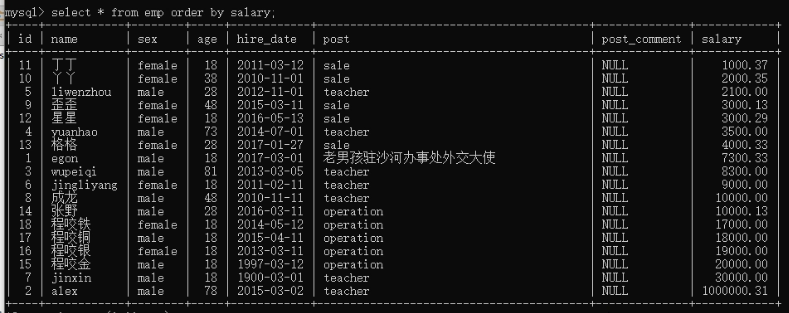
select * from employe by salary desc; 降序
select * from employe by age,asc,salary desc; 双重比较。先按照年龄升序排,再安装工资降序排
select post,avg(salary) from employee group by post order by avg(salary); 取出每个部门的平均工资进行排序
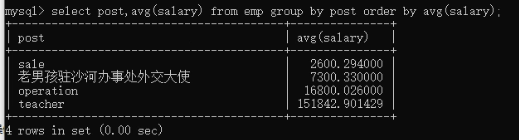
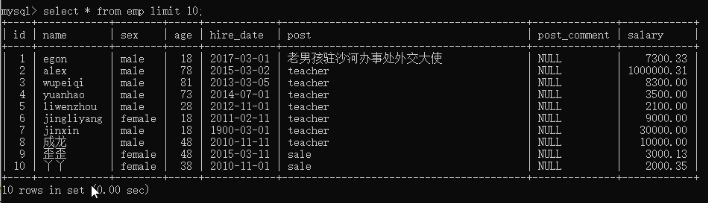
18)limit 取出前10行的信息:select * from employee limit 10;
select * from employee order by salary desc limit 1; 先安装倒序的工资排序,再取出第一个
select * from employee limit 0,5; 从0开始往后取5条
select * from employee limit 5,5; 从5开始往后取5条
select * from employee limit 10,5; 从10开始往后取5条
19)regexp 正则匹配 select * from employee where name regexp '^jin.*(g|n)$';

五、多表查询
1)准备工作,准备表
#建表

create table department(

id int,

name varchar()

);

create table employee(

id int primary key auto_increment,

name varchar(),

sex enum('male','female') not null default 'male',

age int,

dep_id int

);

#插入数据

insert into department values

(,'技术'),

(,'人力资源'),

(,'销售'),

(,'运营');

insert into employee(name,sex,age,dep_id) values

('egon','male',,),

('alex','female',,),

('wupeiqi','male',,),

('yuanhao','female',,),

('liwenzhou','male',,),

('jingliyang','female',,)

;

mysql> select * from department;

+------+--------------+

| id | name |

+------+--------------+

|  | 技术 |

|  | 人力资源 |

|  | 销售 |

|  | 运营 |

+------+--------------+

mysql> select * from employee;

+----+------------+--------+------+--------+

| id | name | sex | age | dep_id |

+----+------------+--------+------+--------+

|  | egon | male |  |  |

|  | alex | female |  |  |

|  | wupeiqi | male |  |  |

|  | yuanhao | female |  |  |

|  | liwenzhou | male |  |  |

|  | jingliyang | female |  |  |

+----+------------+--------+------+--------+

alter table employee rename emp;

alter table department rename dmp;
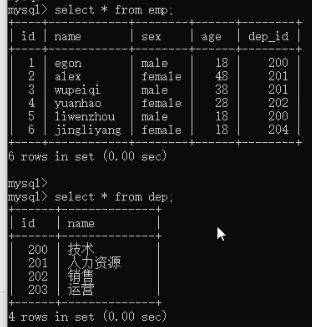
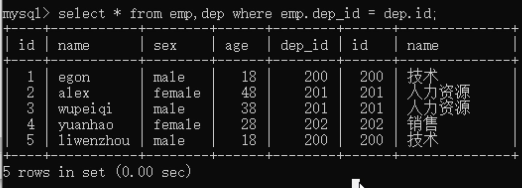
2)非专业连表查询方法where。select * from emp,dep where emp.dep_id = dep.id;
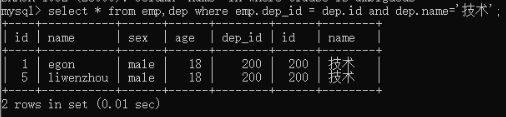
select * from emp,dep where emp.dep_id = dep.id and dep.name='技术'; # 可能出现相同的字段,所有需要指定 表名.字段
3)专业的连表查询方法,inner join 方法
inner/left/right join:连接2张有关系的表

select * from emp inner join dep

    on emp.dep_id = dep.id;        # 取有对应关系的部分

select * from emp inner join dep

    on emp.dep_id = dep.id

    where dep.name = '技术';    # 再取出技术部吗

select * from emp left join dep    # 在jnner基础上,再保留左表部分,null填充

    on emp.dep_id = dep.id;

select * from emp right join dep    # 在jnner基础上,再保留右表部分,null填充

    on emp.dep_id = dep.id;

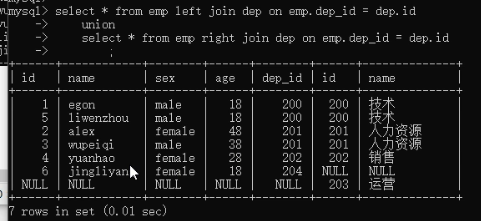
select * from emp left join dep on emp.dep_id = dep.id

union

select * from emp right join dep on emp.dep_id = dep.id;    # 分别优先保留2张表,再去重
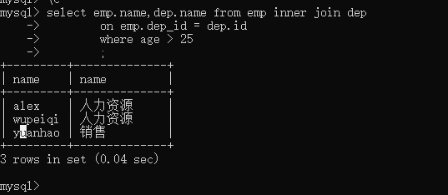
4)组合条件查询。找到年龄大于25岁的员工以及员工所在的部门
select emp.name,dep.name from emp inner join dep

    on emp.dep_id = dep.id

    where age > ;
找到平均年龄>=20岁的部门
找到平均年龄>=20岁的部门

select dep.name,avg(age) from emp inner join dep

    on emp.dep_id = dep.id

    group by dep.name

    having avg(age) >= ;
六、子查询。一个查询的结果,当做查询条件去使用
1)找到平均年龄>=20岁的部门
第一步:获取到部门id
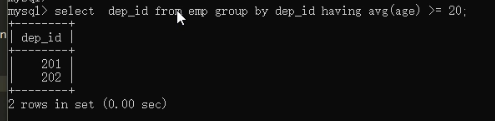
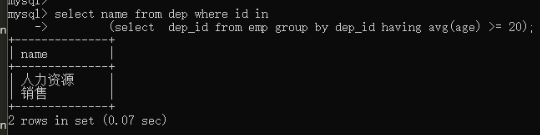
第二步:拿到查询结果做条件
select name from dep where id in

    (select dep_id from emp group by dep_id having avg(age) >= );
2)查看销售部的人员
第一步:select id from dep where name = '销售';
第二步:利用查询结果查询
where * from emp where dep_id =

    (select id from dep where name = '销售');

3)表自己连接自己。自己查询的结果再变成自己查询的条件
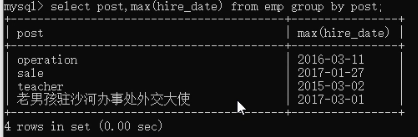
练习。原表查看内容。查询每个部门最新入职的那个员工

第一步:select post,max(hire_date) from emp group by post;
第二步:根据上面的结果,联合表操作
select t1.name,t1.hire_date,t1.post,t2.post,t2.max_date from emp as t1

    inner join

    (select post,max(hire_date) as max_date from emp group by post) as t2;

    on t1.post = t2.post;

第三步:根据上面结果在进行条件查询
select t1.name,t1.hire_date,t1.post,t2.post,t2.max_date from emp as t1

    inner join

    (select post,max(hire_date) as max_date from emp group by post) as t2;

    on t1.post = t2.post

    where t1.hire_date = t2.max_date;

mysql数据库进阶篇的更多相关文章
- Python操作Mysql数据库进阶篇——查询操作详解(一)
前面我们已经介绍了在Python3.x中如何连接一个Mysql数据库,以及怎么样对这个数据库创建一个表,增删改查表里的数据.想必大家对Mysql数据库和简单的sql语句有了一定的了解,其实sql语句博 ...
- mysql 开发进阶篇系列 55 权限与安全(安全事项 )
一. 操作系统层面安全 对于数据库来说,安全很重要,本章将从操作系统和数据库两个层面对mysql的安全问题进行了解. 1. 严格控制操作系统账号和权限 在数据库服务器上要严格控制操作系统的账号和权限, ...
- mysql 开发进阶篇系列 47 物理备份与恢复(xtrabackup 的完全备份恢复,恢复后重启失败总结)
一. 完全备份恢复说明 xtrabackup二进制文件有一个xtrabackup --copy-back选项,它将备份复制到服务器的datadir目录下.下面是通过 --target-dir 指定完全 ...
- mysql 开发进阶篇系列 46 物理备份与恢复( xtrabackup的 选项说明,增加备份用户,完全备份案例)
一. xtrabackup 选项说明 在操作xtrabackup备份与恢复之前,先看下该工具的选项,下面记录了xtrabackup二进制文件的部分命令行选项,后期把常用的选项在补上.点击查看xtrab ...
- mysql 开发进阶篇系列 42 逻辑备份与恢复(mysqldump 的完全恢复)
一.概述 在作何数据库里,备份与恢复都是非常重要的.好的备份方法和备份策略将会使得数据库中的数据更加高效和安全.对于DBA来说,进行备份或恢复操作时要考虑的因素大概有如下: (1) 确定要备份的表的存 ...
- MYSQL(进阶篇)——一篇文章带你深入掌握MYSQL
MYSQL(进阶篇)--一篇文章带你深入掌握MYSQL 我们在上篇文章中已经学习了MYSQL的基本语法和概念 在这篇文章中我们将讲解底层结构和一些新的语法帮助你更好的运用MYSQL 温馨提醒:该文章大 ...
- mysql 开发进阶篇系列 20 MySQL Server(innodb_lock_wait_timeout,innodb_support_xa,innodb _log_*)
1. innodb_lock_wait_timeout mysql 可以自动监测行锁导致的死锁并进行相应的处理,但是对于表锁导致的死锁不能自动监测,所以该参数主要用于,出现类似情况的时候等待指定的时间 ...
- MySQL数据库扫盲篇
MySQL数据库扫盲篇 作者:尹正杰 版权声明:原创作品,谢绝转载!否则将追究法律责任. 一.MySQL概述 1>.什么是MySQL MySQL是瑞典的MySQL AB公司开发的一个可用于各 ...
- mysql 开发进阶篇系列 53 权限与安全(账号管理的各种权限操作 上)
一. 概述 在了解前两篇的权限系统介绍后,这篇继续讲账号的管理,这些管理包括账号的创建,权限更改,账号删除等.用户连接数据库的第一步都是从账号创建开始. 1. 创建账号 有两种方法可以用来授权账号: ...
随机推荐
- 牛客网练习赛44-B(快速幂+模拟)
题目链接:https://ac.nowcoder.com/acm/contest/548/B 题意:计算m/n小数点后k1位到k2位,1≤m≤n≤109,1<=k1<=k2<=109 ...
- OpenVPN 2.2.1 之后期维护
一.Openvpn 用户注销 每个公司都会用员工离职,因此注销vpn用户也就成了运维人员日常工作的一部分. 其实Openvpn在设计的时候也想到了这点,我们可以使用 revoke-full shell ...
- Array 遍历数组
public static void main(String args){ int a[][] = new int[3][4]; for(int i=0;i<a.length;i++){ for ...
- laravel excel导出调节列宽度,对某列中数据颜色处理
//$cellData 表格标题栏各名称数组 //$result 表格内容数组//$items getForDataTable得到的表格数据 $result = array_merge($cellDa ...
- vue 父子组件相互传参
转自https://blog.csdn.net/u011175079/article/details/79161029 子组件: <template> <div> <di ...
- 【python中单链表的实现】——包括初始化、创建、逆序、遍历等
# coding=utf-8 class mynode(object): def __init__(self, data, nextnode = None): self.data = data sel ...
- TZOJ 5291 游戏之合成(快速幂快速乘)
描述 zzx和city在玩一款小游戏的时候,游戏中有一个宝石合成的功能,需要m个宝石才可以合成下一级的宝石(例如需要m个1级宝石才能合成2级宝石). 这时候zzx问city说“我要合成A级宝石需要多少 ...
- cloud server ribbon 自定义策略配置
虽然ribbon默认为我们提供了多钟负载均衡策略,但有时候我们仍然需要自定义符合自身业务逻辑的规则 使用配置文件的方式:我们只需要在配置文件中添加配置 serviceId.ribbon.NFLoadB ...
- go语言log包的学习(log,Logger)
package main; import ( "log" "os" "time" "fmt" ) func main() ...
- NPOI创建DOCX常用操作
1. 创建文档 XWPFDocument m_Docx = new XWPFDocument(); 2. 页面设置 //1‘=1440twip=25.4mm=72pt(磅point)=96px(像 ...