
WPF ListBox的进阶使用(一)
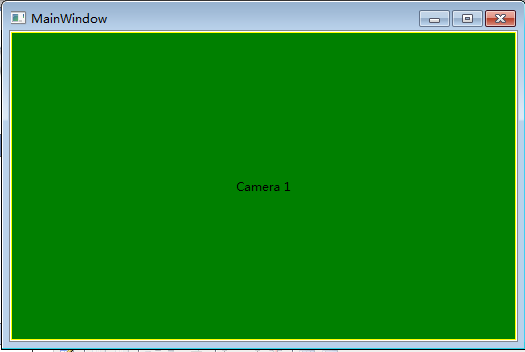
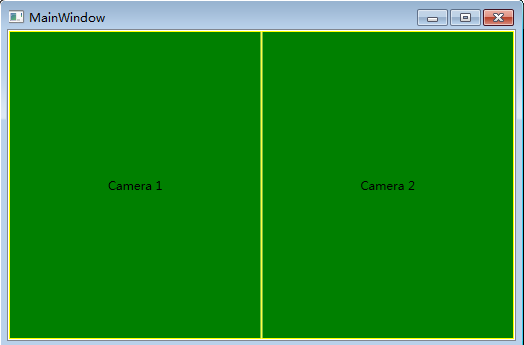
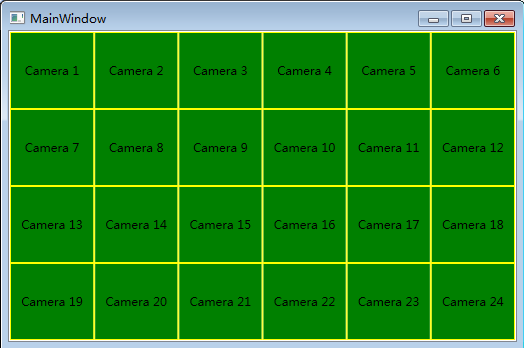
公司项目有个需求,UI界面支持动态平均分割界面,想了想便想到用ListBox来实现,用UniformGrid作为ListBox的ItemsPanelTemplate,通过动态改变UniformGrid的Columns属性,可以动态分割界面。具体实现如下所示:
 <Window x:Class="WpfDemo.MainWindow"

         xmlns="http://schemas.microsoft.com/winfx/2006/xaml/presentation"

         xmlns:x="http://schemas.microsoft.com/winfx/2006/xaml"

         xmlns:comm="clr-namespace:WpfDemo.CommonControls;assembly=WpfDemo.CommonControls"

         xmlns:local="clr-namespace:WpfDemo"

         Title="MainWindow" Height="350" Width="525">

     <Grid>

         <ListBox ItemsSource="{Binding DataSource}">

             <ListBox.ItemsPanel>

                 <ItemsPanelTemplate>

                     <UniformGrid Columns="{Binding Colums}" IsItemsHost="True"/>

                 </ItemsPanelTemplate>

             </ListBox.ItemsPanel>

             <ListBox.ItemContainerStyle>

                 <Style TargetType="{x:Type ListBoxItem}">

                     <Setter Property="Template">

                         <Setter.Value>

                             <ControlTemplate TargetType="{x:Type ListBoxItem}">

                                 <Border HorizontalAlignment="Stretch" VerticalAlignment="Stretch" Background="Green" BorderBrush="Yellow" BorderThickness="1">

                                     <TextBlock Text="{Binding CameraName}" HorizontalAlignment="Center" VerticalAlignment="Center"/>

                                 </Border>

                             </ControlTemplate>

                         </Setter.Value>

                     </Setter>

                 </Style>

             </ListBox.ItemContainerStyle>

         </ListBox>

     </Grid>

 </Window>
对应的ViewModel层代码:
 using System;

 using System.Collections.Generic;

 using System.ComponentModel;

 using System.Linq;

 using System.Runtime.CompilerServices;

 using System.Text;

 using System.Threading.Tasks;

 namespace WpfDemo

 {

     public abstract class NotifyPropertyBase : INotifyPropertyChanged

     {

         protected void SetProperty<T>(ref T storage, T value, [CallerMemberName] string propertyName = null)

         {

             if (object.Equals(storage, value)) return;

             storage = value;

             this.OnPropertyChanged(propertyName);

         }

         protected void OnPropertyChanged([CallerMemberName] string propertyName = null)

         {

             if (this.PropertyChanged != null)

             {

                 this.PropertyChanged(this, new PropertyChangedEventArgs(propertyName));

             }

         }

         public event PropertyChangedEventHandler PropertyChanged;

     }

 }
 using System;

 using System.Collections.Generic;

 using System.Collections.ObjectModel;

 using System.Linq;

 using System.Text;

 using System.Threading.Tasks;

 using System.Windows.Threading;

 namespace WpfDemo

 {

     public class MainWindowVM : NotifyPropertyBase

     {

         private DispatcherTimer timer;

         public MainWindowVM()

         {

             DataSource = new ObservableCollection<WndViewModel>();

             Colums = ;

             timer = new DispatcherTimer();

             timer.Interval = new TimeSpan(, , );

             timer.Tick += timer_Tick;

             timer.Start();

         }

         private int count = ;

         void timer_Tick(object sender, EventArgs e)

         {

             var temp = new WndViewModel()

             {

                 CameraName = string.Format("Camera {0}", ++count),

             };

             DataSource.Add(temp);

             Console.WriteLine(temp.CameraName);

             if (count <= )

             {

                 Colums = count;

             }

             else if (count > )

             {

                 count = ;

                 DataSource.Clear();

                 Colums = ;

             }

         }

         private int colums;

         public int Colums

         {

             get { return colums; }

             set

             {

                 SetProperty(ref colums, value);

             }

         }

         private ObservableCollection<WndViewModel> dataSource;

         public ObservableCollection<WndViewModel> DataSource

         {

             get { return dataSource; }

             set

             {

                 SetProperty(ref dataSource, value);

             }

         }

     }

 }
软件运行的效果:
WPF ListBox的进阶使用(一)的更多相关文章
- WPF ListBox的进阶使用(二)
项目中经常使用需要根据搜索条件查询数据,然后用卡片来展示数据.用卡片展示数据时,界面的宽度发生变化,希望显示的卡片数量也跟随变化.WrapPanel虽然也可以实现这个功能,但是将多余的部分都留在行尾, ...
- 自定义WPF ListBox的选中项样式
首先介绍一种简单地方法:就是通过自定义SystemColors类的参数来自定义WPF ListBox选择颜色的,SystemColors的HighlightBrushKey和HighlightText ...
- WPF ListBox数据绑定
本文来源 http://wshoufeng1989.blog.163.com/blog/static/202047033201282911633670/ 风随影动的博客 使用数据库AllData , ...
- WPF : ListBox的几种Template属性
原文:WPF : ListBox的几种Template属性 属性名 属性的类名 功能 示例 Template ControlTemplate 定义控件自身的外观.其子元素的布局可以自定义,也可以由It ...
- 自定义WPF ListBox的选择样式
(下图:进行多项选择的ListBox) 首先介绍一种简单地方法:就是通过自定义SystemColors类的参数来自定义WPF ListBox选择颜色的,SystemColors的HighlightBr ...
- wpf listbox 选中项 上移下移
原文:wpf listbox 选中项 上移下移 private void MoveUp_Click(object sender, RoutedEventArgs e) { ...
- WPF ListBox 横向排列
WPF ListBox 横向排列 如果只是单纯的让ListBox可以横向配列,这样很简单,只需要更改ListBox的ItemsPanel模板就可以,例如: <ListBox><L ...
- Wpf ListBox数据绑定实例1--绑定字典集合
1.使用ListBox绑定Dictionary字典数据 ListBox常用事件SelectionChanged private void bindListBox() { Dictionary<s ...
- WPF ListBox/ListView/DataGrid 虚拟化时的滚动方式
ListBox的滚动方式 分为像素滚动和列表项滚动 通过ListBox的附加属性ScrollViewer.CanContentScroll来设置.因此ListBox的默认模板中,含有ScrollVie ...
随机推荐
- wcf 使用sqlMembership证书认证
.接口 namespace Aretch.WcfService.Services.Interface { [ServiceContract] public interface ICalculator ...
- .NET发送邮件的方法
整理一下,在.NET中发送邮件的一个方法,代码如下: public static string Net_Email(string strSendto, string strCC, string str ...
- python输出格式对齐问题
采用.format打印输出时,可以定义输出字符串的输出宽度,在 ':' 后传入一个整数, 可以保证该域至少有这么多的宽度. 用于美化表格时很有用. >>> table = {'Goo ...
- 嵌入式C编程代码优化笔记
[优化永远是追求某种平衡而不是走极端,优化是有侧重点的,优化是一门平衡的艺术,它往往要以牺牲程序的可读性或者增加代码长度为代价] 1.选择合适的算法和数据结构 选择一种合适的数据结构很重要,如果在一堆 ...
- redis2
一.安装redis 1) 下载redis安装包 可去官网http://redis.io ,也可通过wget命令, wget http://download.redis.io/redis-sta ...
- java web 大总结
C/s架构: socket.serversocket.awt/swing做一个客户端软件 建好socket连接后,通过IO流交换数据.数据格式由各个开发者自己确定,B/C架 ...
- PHP中两个冒号是什么意思
类中 静态方法和静态属性的引用方法 对类的静态属性和方法的直接引用,这种情况可以不需要实例化类而直接使用“::”调用
- java正则表达式笔记
import java.util.regex.Matcher; import java.util.regex.Pattern; import java.util.regex.PatternSyntax ...
- HTML5与相关类的扩充
1.getElementsByclassName()方法 <body> <div class='a1'>klkx1</div> <ul id='ul1'> ...
- java调用执行cmd指令启动weblogic
这里的例子是启动weblogic import java.io.BufferedReader; import java.io.IOException; import java.io.InputStre ...