
WPF ListBox的进阶使用(二)
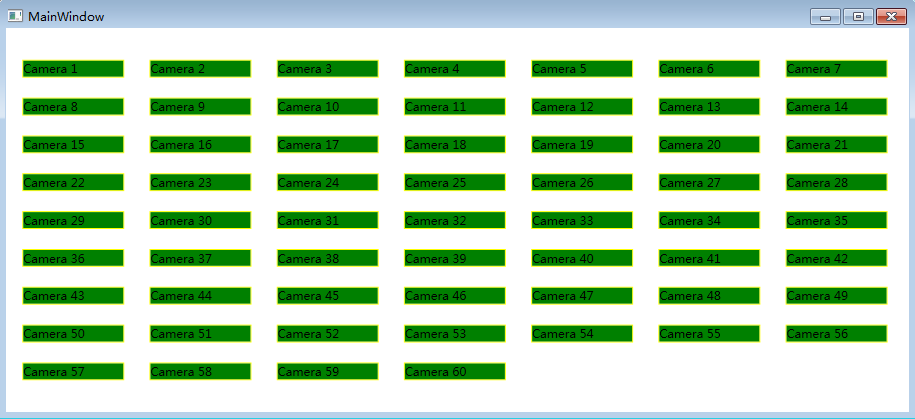
项目中经常使用需要根据搜索条件查询数据,然后用卡片来展示数据。用卡片展示数据时,界面的宽度发生变化,希望显示的卡片数量也跟随变化。WrapPanel虽然也可以实现这个功能,但是将多余的部分都留在行尾,十分不美观,最好是能够将多余的宽度平分在每个ListBoxItem之间,比较美观,也符合项目需求。如下便是我自己实现的Panel:
 using System;

 using System.Collections.Generic;

 using System.Linq;

 using System.Text;

 using System.Threading.Tasks;

 using System.Windows;

 using System.Windows.Controls;

 namespace WpfDemo

 {

     public class MyWrapPanel : Panel

     {

         protected override System.Windows.Size MeasureOverride(System.Windows.Size availableSize)

         {

             Size currentLineSize = new Size();

             Size panelSize = new Size();

             foreach (UIElement element in base.InternalChildren)

             {

                 element.Measure(availableSize);

                 Size desiredSize = element.DesiredSize;

                 if (currentLineSize.Width + desiredSize.Width > availableSize.Width)

                 {

                     panelSize.Width = Math.Max(currentLineSize.Width, panelSize.Width);

                     panelSize.Height += currentLineSize.Height;

                     currentLineSize = desiredSize;

                     if (desiredSize.Width > availableSize.Width)

                     {

                         panelSize.Width = Math.Max(desiredSize.Width, panelSize.Width);

                         panelSize.Height += desiredSize.Height;

                         currentLineSize = new Size();

                     }

                 }

                 else

                 {

                     currentLineSize.Width += desiredSize.Width;

                     currentLineSize.Height = Math.Max(desiredSize.Height, currentLineSize.Height);

                 }

             }

             panelSize.Width = Math.Max(currentLineSize.Width, panelSize.Width);

             panelSize.Height += currentLineSize.Height;

             return panelSize;

         }

         protected override System.Windows.Size ArrangeOverride(System.Windows.Size finalSize)

         {

             int firstInLine = ;

             int lineCount = ;

             Size currentLineSize = new Size();

             double accumulatedHeight = ;

             UIElementCollection elements = base.InternalChildren;

             double interval = 0.0;

             for (int i = ; i < elements.Count; i++)

             {

                 Size desiredSize = elements[i].DesiredSize;

                 if (currentLineSize.Width + desiredSize.Width > finalSize.Width) //need to switch to another line

                 {

                     interval = (finalSize.Width - currentLineSize.Width) / (i - firstInLine + );

                     arrangeLine(accumulatedHeight, currentLineSize.Height, firstInLine, i, interval);

                     accumulatedHeight += currentLineSize.Height;

                     currentLineSize = desiredSize;

                     if (desiredSize.Width > finalSize.Width) //the element is wider then the constraint - give it a separate line

                     {

                         arrangeLine(accumulatedHeight, desiredSize.Height, i, ++i, );

                         accumulatedHeight += desiredSize.Height;

                         currentLineSize = new Size();

                     }

                     firstInLine = i;

                     lineCount++;

                 }

                 else //continue to accumulate a line

                 {

                     currentLineSize.Width += desiredSize.Width;

                     currentLineSize.Height = Math.Max(desiredSize.Height, currentLineSize.Height);

                 }

             }

             if (firstInLine < elements.Count)

             {

                 if (lineCount == )

                 {

                     interval = (finalSize.Width - currentLineSize.Width) / (elements.Count - firstInLine + );

                 }

                 arrangeLine(accumulatedHeight, currentLineSize.Height, firstInLine, elements.Count, interval);

             }

             return finalSize;

         }

         private void arrangeLine(double y, double lineHeight, int start, int end, double interval)

         {

             double x = ;

             UIElementCollection children = InternalChildren;

             for (int i = start; i < end; i++)

             {

                 x += interval;

                 UIElement child = children[i];

                 child.Arrange(new Rect(x, y, child.DesiredSize.Width, lineHeight));

                 x += child.DesiredSize.Width;

             }

         }

     }

 }
接下来,便是将这个MyWrapPanel作为ListBox的ItemsPanelTemplate即可:
 <Window x:Class="WpfDemo.MainWindow"

 xmlns="http://schemas.microsoft.com/winfx/2006/xaml/presentation"

         xmlns:x="http://schemas.microsoft.com/winfx/2006/xaml"

         xmlns:comm="clr-namespace:WpfDemo.CommonControls;assembly=WpfDemo.CommonControls"

         xmlns:local="clr-namespace:WpfDemo"

         Title="MainWindow" Height="" Width="">

     <Grid>

         <ListBox ItemsSource="{Binding DataSource}" ScrollViewer.HorizontalScrollBarVisibility="Disabled"

                  VerticalAlignment="Center" BorderThickness="">

             <ListBox.ItemsPanel>

                 <ItemsPanelTemplate>

                     <local:MyWrapPanel IsItemsHost="True"/>

                 </ItemsPanelTemplate>

             </ListBox.ItemsPanel>

             <ListBox.ItemContainerStyle>

                 <Style TargetType="{x:Type ListBoxItem}">

                     <Setter Property="Template">

                         <Setter.Value>

                             <ControlTemplate TargetType="{x:Type ListBoxItem}">

                                 <Border HorizontalAlignment="Stretch" VerticalAlignment="Stretch" Background="Green" BorderBrush="Yellow" BorderThickness="">

                                     <TextBlock Text="{Binding CameraName}" Width="" HorizontalAlignment="Center" VerticalAlignment="Center"/>

                                 </Border>

                             </ControlTemplate>

                         </Setter.Value>

                     </Setter>

                 </Style>

             </ListBox.ItemContainerStyle>

             <ListBox.Style>

                 <Style TargetType="{x:Type ListBox}">

                 </Style>

             </ListBox.Style>

         </ListBox>

     </Grid>

 </Window>
界面对应的ViewModel:
 using System;

 using System.Collections.Generic;

 using System.Collections.ObjectModel;

 using System.Linq;

 using System.Text;

 using System.Threading.Tasks;

 using System.Windows.Threading;

 namespace WpfDemo

 {

     public class MainWindowVM : NotifyPropertyBase

     {

         private DispatcherTimer timer;

         public MainWindowVM()

         {

             DataSource = new ObservableCollection<WndViewModel>();

             Colums = ;

             for(int i =; i < ; ++i)

             {

                 var temp = new WndViewModel()

                 {

                     CameraName = string.Format("Camera {0}", ++count),

                 };

                 DataSource.Add(temp);

             }

             //timer = new DispatcherTimer();

             //timer.Interval = new TimeSpan(0, 0, 1);

             //timer.Tick += timer_Tick;

             //timer.Start();

         }

         private int count = ;

         void timer_Tick(object sender, EventArgs e)

         {

             var temp = new WndViewModel()

             {

                 CameraName = string.Format("Camera {0}", ++count),

             };

             DataSource.Add(temp);

             Console.WriteLine(temp.CameraName);

             if (count <= )

             {

                 Colums = count;

             }

             else if (count > )

             {

                 count = ;

                 DataSource.Clear();

                 Colums = ;

             }

         }

         private int colums;

         public int Colums

         {

             get { return colums; }

             set

             {

                 SetProperty(ref colums, value);

             }

         }

         private ObservableCollection<WndViewModel> dataSource;

         public ObservableCollection<WndViewModel> DataSource

         {

             get { return dataSource; }

             set

             {

                 SetProperty(ref dataSource, value);

             }

         }

     }

 }
运行结果:

拉伸后:
WPF ListBox的进阶使用(二)的更多相关文章
- WPF ListBox的进阶使用(一)
公司项目有个需求,UI界面支持动态平均分割界面,想了想便想到用ListBox来实现,用UniformGrid作为ListBox的ItemsPanelTemplate,通过动态改变UniformGrid ...
- WPF 4 DataGrid 控件(进阶篇二)
原文:WPF 4 DataGrid 控件(进阶篇二) 上一篇<WPF 4 DataGrid 控件(进阶篇一)>中我们通过DataGridTemplateColumn 类自定义编辑 ...
- MVVM模式和在WPF中的实现(二)数据绑定
MVVM模式解析和在WPF中的实现(二) 数据绑定 系列目录: MVVM模式解析和在WPF中的实现(一)MVVM模式简介 MVVM模式解析和在WPF中的实现(二)数据绑定 MVVM模式解析和在WPF中 ...
- 自定义WPF ListBox的选中项样式
首先介绍一种简单地方法:就是通过自定义SystemColors类的参数来自定义WPF ListBox选择颜色的,SystemColors的HighlightBrushKey和HighlightText ...
- Android高手进阶教程(二十八)之---Android ViewPager控件的使用(基于ViewPager的横向相册)!!!
分类: Android高手进阶 Android基础教程 2012-09-14 18:10 29759人阅读 评论(35) 收藏 举报 android相册layoutobjectclassloade ...
- Wireshark入门与进阶系列(二)
摘自http://blog.csdn.net/howeverpf/article/details/40743705 Wireshark入门与进阶系列(二) “君子生非异也,善假于物也”---荀子 本文 ...
- WPF ListBox数据绑定
本文来源 http://wshoufeng1989.blog.163.com/blog/static/202047033201282911633670/ 风随影动的博客 使用数据库AllData , ...
- WPF的消息机制(二)- WPF内部的5个窗口之隐藏消息窗口
目录 WPF的消息机制(一)-让应用程序动起来 WPF的消息机制(二)-WPF内部的5个窗口 (1)隐藏消息窗口 (2)处理激活和关闭的消息的窗口和系统资源通知窗口 (3)用于用户交互的可见窗口 (4 ...
- SpringBoot进阶教程(二十九)整合Redis 发布订阅
SUBSCRIBE, UNSUBSCRIBE 和 PUBLISH 实现了 发布/订阅消息范例,发送者 (publishers) 不用编程就可以向特定的接受者发送消息 (subscribers). Ra ...
随机推荐
- spring学习 十七 scope属性,单例多例
Scope属性是<bean>中的属性,取值可以有, singleton 默认值, 单例, prototype 多例, 每次获取重新实例化, request 每次请求重新实例化, sessi ...
- 控制台管理apk
http://www.cnblogs.com/mythou/archive/2013/06/11/3132249.html pm命令的具体用法如下: pm 命令是Android里面packageMan ...
- ServiceDesk Plus服务管理软件,减轻帮助台负荷,提高IT效率
- centos7 hive + 远程mysql 搭建笔记
1.require:java环境,本地可用的hadoop,远程可访问的mysql 2.拷贝hive文件(hive-2.2.1) 3.设置环境变量 export HIVE_HOME=/data/spar ...
- 2018.12.23 bzoj2865&&1396: 字符串识别(后缀自动机+线段树)
传送门 卡空间差评! 题意简述:给一个字串,对于每个位置求出经过这个位置且只在字串中出现一次的子串的长度的最小值. 解法:先建出samsamsam,显然只有当sizep=1size_p=1sizep ...
- 2018.12.15 spoj Substrings(后缀自动机)
传送门 后缀自动机基础题. 求长度为iii的子串出现次数的最大值. 对原串建出samsamsam,然后用sizsizsiz更新每个maxlenmaxlenmaxlen的答案. 然后由于后缀链接将其转化 ...
- s4-2 ALOHA 协议
多路访问协议 随机访问协议(Random Access) 特点:站点争用信道,可能出现站点之间的冲突 典型的随机访问协议 • ALOHA协议 • CSMA协议 • CSMA/CD协议(以太网采 ...
- CentOS7 安装可视化脚本安装包Webmin
一.简介 Webmin是一个基于Web的Linux系统管理界面.你就可以通过图形化的方式设置用户账号.Apache.DNS.文件共享等服务. 二.安装 1.下载安装包到本地Windows系统 http ...
- IntelliJ IDEA 2017版 spring-boot2.0.4的yml配置使用
一.必须配置字端两个 server: port: 8080 servlet: context-path: /demo 二.两种mvc转换springboot,一种是注解,一种就是.yml或proper ...
- UVa 10870 Recurrences (矩阵快速幂)
题意:给定 d , n , m (1<=d<=15,1<=n<=2^31-1,1<=m<=46340).a1 , a2 ..... ad.f(1), f(2) .. ...