
MATLAB 文件读取(3)
1、gps ,数值格式的读取
clear all

test=importdata('2017- 9-27- 8-26-51.txt');

[r,c]=size(test.data);%row行,column列

a=max(size(test.data));%行

l=length(test.data);

for i=1:r

    lon(i)=test.data(i,8);%经度

    lat(i)=test.data(i,7);

end

%% 异常处理

lon(find(lon==0))=[];

lat(find(lat==0))=[];

plot(lon,lat);

find(lon==0)

xlabel('经度','fontsize',13,'fontweight','bold');

ylabel('纬度');

title('轨迹')

grid on

save gps_27 lon lat
% 航迹

close all

clear

clc

load gps_27.mat

%%

long_rang = [ 121 125];%[112.7780 114.4754]

lat_rang = [ 29 30.5 ]; % [20.8469 22.4512]

% load coast

m_proj('lambert','long',long_rang,'lat',lat_rang);

m_gshhs_i('patch',[.7 1 .7],'edgecolor','k');

% High Resolution Coastline...

m_grid('linestyle','none','box','fancy','tickdir','in','fontsize',8);

m_line(lon,lat,'linewi',1.5,'color','r');

title('航迹图','fontsize',14);

print(gcf,'-djpeg','-r600','航迹图.jpg');

2、指针末尾,按行读取
(1)
clear all

test=importdata('2017- 9-27- 9-34- 1-server.txt');
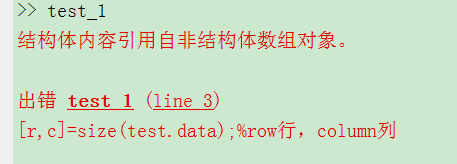
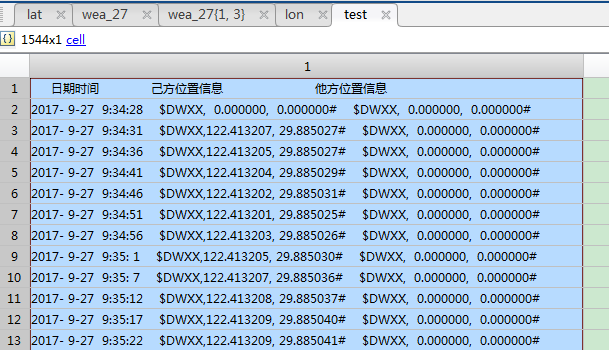
cell结构不能用importdata读取。
(2)
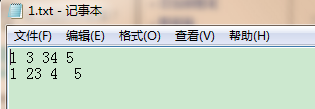
clear all

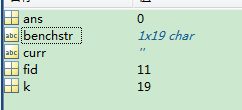
fid = fopen('1.txt');

k = 0;

while feof(fid)~=1 %到末尾返回1,中间位置返回0,判断文件读取是否完成的循环

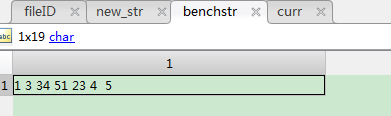
     curr = fscanf(fid,'%c',1);

   % curr = fgetl(fid);

    if ~isempty(curr)

       k = k+1;

       benchstr(k) = curr;

    end

end

fclose(fid);
(2)
clear all

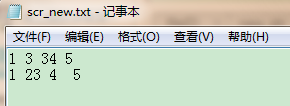
fid = fopen('1.txt');%打开现有文档

fid_new=fopen('scr_new.txt','wt');%新创建存储的文档

k = 0;

while feof(fid)~=1

   curr = fgetl(fid);

    if ~isempty(curr)

       fprintf(fid_new,'%s\n',curr);

    end

end

fclose(fid_new);

(3)
clear all

% fileID = fopen('C:\Users\Administrator\Desktop\2017- 9-29- 7- 5-16.txt','r');

fid=fopen('scr_new_2.txt','wt');      %新建一个txt文件

 phns = ['C:\Users\Administrator\Desktop\舟山_9\波导气象数据\2017- 9-29- 7- 5-23.txt'];  %要读取的文档所在的路径

fpn = fopen (phns, 'rt');           %打开文档

while feof(fpn) ~= 1   %用于判断文件指针p在其所指的文件中的位置,如果到文件末,函数返回1,否则返回0

     file = fgetl(fpn);            %获取文档第一行

     new_str=file;

     fprintf(fid,'%s\n',new_str);%新的字符串写入当新建的txt文档中

 end

   fclose(fid);
按行读取
(4)保存数据(cell)格式
clear all

% fileID = fopen('C:\Users\Administrator\Desktop\舟山_9\波导气象数据\2017- 9-29- 7- 5-16.txt','r');

fid=fopen('scr_new_2.txt','wt');      %新建一个txt文件

phns = ['C:\Users\Administrator\Desktop\舟山_9\波导气象数据\2017- 9-29- 7- 5-23.txt'];  %要读取的文档所在的路径

fpn = fopen (phns, 'rt');    %打开文档

count = 1;

wea_27={}

fgetl(fpn);

while feof(fpn) ~= 1   %用于判断文件指针p在其所指的文件中的位置,如果到文件末,函数返回1,否则返回0

    temp = fgetl(fpn);

    flag = 0;

    flag = 1;

    index = find(temp == ' ');

    date(count,1)=str2double(temp(1:index(1)-1));

    date(count,2)=str2double(temp(index(3)+1:index(4)-1));

    date(count,3)=str2double(temp(index(5)+1:index(6)-1));

    date(count,4)=str2double(temp(index(7)+1:index(8)-1));

    date(count,5)=str2double(temp(index(9)+1:index(10)-1));

    date(count,6)=str2double(temp(index(11)+1:index(12)-1));%年月日时分秒向量表示

    wea_27{count,1} = datestr(date(count,:),31);%时间

    wea_27{count,2} = str2double(temp(index(17)+1:index(18)-1));%经度

    wea_27{count,3} = str2double(temp(index(15)+1:index(16)-1));%纬度

    wea_27{count,4} = str2double(temp(index(28)+1:end));%波导高度

    count = count+1;

    fprintf(fid,'%s %f %f %f \n',wea_27{1,:});

 end

fclose(fid);

save wea_27 wea_27
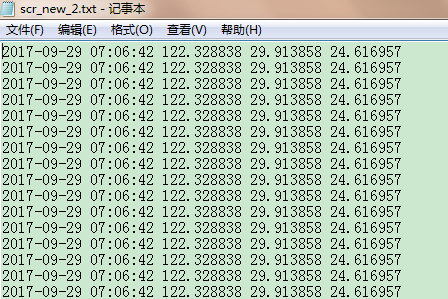
转换时间格式,将经纬度提取出来。
(5)提取数据
clear all

% fileID = fopen('C:\Users\Administrator\Desktop\舟山_9\波导气象数据\2017- 9-29- 7- 5-16.txt','r');

fid=fopen('scr_new_2.txt','wt');      %新建一个txt文件

phns = ['C:\Users\Administrator\Desktop\舟山_9\波导气象数据\2017- 9-29- 7- 5-23.txt'];  %要读取的文档所在的路径

fpn = fopen (phns, 'rt');    %打开文档

count = 1;

fgetl(fpn);

while feof(fpn) ~= 1   %用于判断文件指针p在其所指的文件中的位置,如果到文件末,函数返回1,否则返回0

    temp = fgetl(fpn);

    flag = 0;

    flag = 1;

    index = find(temp == ' ');

    date(count,1)=str2double(temp(1:index(1)-1));

    date(count,2)=str2double(temp(index(3)+1:index(4)-1));

    date(count,3)=str2double(temp(index(5)+1:index(6)-1));

    date(count,4)=str2double(temp(index(7)+1:index(8)-1));

    date(count,5)=str2double(temp(index(9)+1:index(10)-1));

    date(count,6)=str2double(temp(index(11)+1:index(12)-1));%年月日时分秒向量表示

%   data_27(count) = datestr(date(count,:),31);%时间

    wea_27(count,2) = str2double(temp(index(17)+1:index(18)-1));%经度

    wea_27(count,3) = str2double(temp(index(15)+1:index(16)-1));%纬度

    wea_27(count,4) = str2double(temp(index(28)+1:end));%波导高度

    count = count+1;

 end

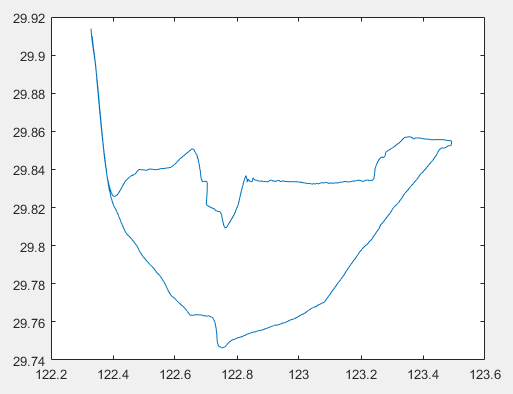
wea_27(find(wea_27(:,2)==0),:)=[];%去除异常数据

a=wea_27(:,2)';

b=wea_27(:,3)';

plot(a,b)
(6)去除NaN
clear

close all

clc

%%

%% 9030A

filename = ['1_27_Sep_2017_11_37_59.txt' ];

fid = fopen(filename,'r+');

flag = 1;

count = 1;

while ( flag )

    temp = fgetl(fid);

     flag = 0;

    if ischar(temp)

        flag = 1;

        index = find(temp == ' ');

       data_9030_27(1,count) = datenum(temp(1:index(1)-1),'dd_mmm_yyyy_HH_MM_SS');

        data_9030_27(2,count) = str2num(temp(index(2)+1:length(temp)));

        count = count+1;

    end

end

data_9030_27(:,any(isnan(data_9030_27)))=[];%清洗数据,去除NaN

plot(data_9030_27(1,:),data_9030_27(2,:),'.r');

grid on

datetick('x','HH:MMPM')

xlabel('时间','fontsize',15)

ylabel('接收电平 (dBm)','fontsize',15)

title('9月27日 9030A实测电平值','fontsize',20)

print(gcf,'-djpeg','-r600','9月27日 9030A实测电平值.jpg');

save data_9030_27 data_9030_27


3、时间 距离显示
(1)
clear all

% fileID = fopen('C:\Users\Administrator\Desktop\舟山_9\波导气象数据\2017- 9-29- 7- 5-16.txt','r');

% fid=fopen('scr_new_2.txt','wt');      %新建一个txt文件

phns = ['9-27-trace.txt'];  %要读取的文档所在的路径

fpn = fopen (phns, 'rt');    %打开文档

count = 1;

fgetl(fpn);%读取第一行表头

while feof(fpn) ~= 1 &count<1356  %用于判断文件指针p在其所指的文件中的位置,如果到文件末,函数返回1,否则返回0

    temp = fgetl(fpn);

    index_1 = find(temp == ',');

    index_2=find(temp=='#');

    index_3=find(temp==' ');

%     date(count,1)=str2num(temp(1:index(1)-1));

%     date(count,2)=str2double(temp(index(3)+1:index(4)-1));

%     date(count,3)=str2double(temp(index(5)+1:index(6)-1));

%     date(count,4)=str2double(temp(index(7)+1:index(8)-1));

%     date(count,5)=str2double(temp(index(9)+1:index(10)-1));

%     date(count,6)=str2double(temp(index(11)+1:index(12)-1));%年月日时分秒向量表示

%     data_27(count,1) = datestr(date(count,:),31);%时间

%     gps_27(count,1)=datenum(temp(1:index_3(4)-1));

    gps_27(count,1)=datenum(temp(1:18));%时间转为数字

    gps_27(count,2) = str2num(temp(index_1(1)+1:index_1(2)-1));%经度

    gps_27(count,3) = str2double(temp(index_1(2)+1:index_2(1)-1));%纬度

%     gps_27(count,2) = str2double(temp(index_1(28)+1:end));%波导高度

    count = count+1;

end

gps_27(find(gps_27(:,2)==0),:)=[];

save gps_27 gps_27

% plot(gps_27(2:end,1)',gps_27(2:end,2)','->')
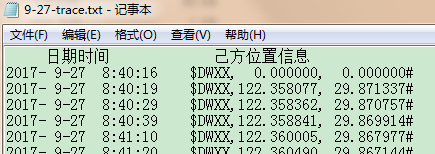
注意直接将时间字符串转为数字形式存储,时间格式如下
(2)坐标到距离
%%

% 计算时间-距离数据

clc

clear

tic

% 岸上平台位置

lat1 = 29.885063;

lon1 = 122.413249;

%

load gps_27.mat

num = size(gps_27,1);

for ii = 1:num

    time_dis_27(ii,1) = gps_27(ii,1);%时间

    lat2 = gps_27(ii,3);%纬度

    lon2 = gps_27(ii,2);%经度

    [arclen,az] = distance(lat1,lon1,lat2,lon2,referenceEllipsoid('wgs84'));

    time_dis_27(ii,2) = arclen;%距离

end

plot(time_dis_27(:,1),time_dis_27(:,2)/1000,'b','linewidth',2)

set(gca,'fontsize',12)

x = time_dis_27(:,1);

datetick('x','HH:MM')

xlabel('Time (9/27/2017)')

ylabel('Distance (km)')

title('9月27日航线 时间-距离 图')

grid on

print(gcf,'-r600','-djpeg','9月27日航线时间-距离图.jpg')

% save time_dis_27.mat time_dis_27

toc
4、跳过错误
(1)
clear all

for i=1:5

    a={[1;1];[1];[1;1];[1];[1]};

    b=1;

    try

      c(i)=a{i,1}(2,1)+b;

    end

end
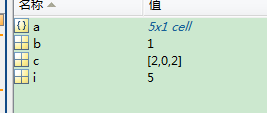
i=2,4,5时出错
出错正常保证循环
(2)
a=1;

b=1;

try

     c=a(1,2)+b %出错

 catch

     c=a(1,1)+b %运行这个程序

end

d=a+b

(3)
 clear all

for i=1:5

a={[1;1];[1];[1;1];[1];[1]};

b=1;

try

   c=a{i,1}(2,1)+b;

catch

   i

end

end
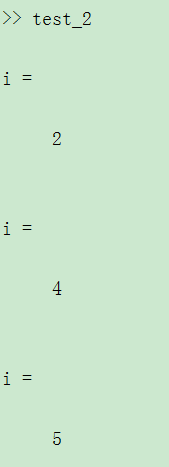
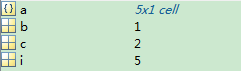
爆出出错位置。
5、时间交错
%%

clear

close all

clc

%%

%距离和电平值联系起来

load data_9030_27.mat %时间,电平值

load time_dis_27.mat%时间,距离

%%

%电平值找位置

num_1 = size(data_9030_27,2);%电平值个数14512

n=0;

for index = 1:num_1

    try %错误了继续

        temp = max(find(abs(data_9030_27(1,index)-time_dis_27(:,1))<(2/3600/24) ));%max 是最接近的数

        path_loss_9030_27(index,1) = data_9030_27(1,index);%时间

        path_loss_9030_27(index,2) = time_dis_27(temp,2);%距离获取

        path_loss_9030_27(index,3) = data_9030_27(2,index);%电平值

    catch

        n=n+1;

        y(n)=index;%显示异常不匹配的时间下标

    end

end

path_loss_9030_27(find(path_loss_9030_27(:,2)==0),:)=[];%清洗不匹配的值

rsl_cexian1_3308B = path_loss_9030_27(:,3);

pt_cexian1_3308B = 20;

gt_cexian1_3308B = 20;

gr_cexian1_3308B = 30;

il_cexian1_3308B = 21+6;

pl_cexian1_3308B=pt_cexian1_3308B+gt_cexian1_3308B+gr_cexian1_3308B-il_cexian1_3308B-rsl_cexian1_3308B;%路径损失

plot(path_loss_9030_27(:,2)/1000,pl_cexian1_3308B,'.b')

set(gca,'fontsize',12)

axis([0 60 100 250])

xlabel('Distance (km)','fontsize',14)

ylabel('Path Loss (dB)','fontsize',14)

set(gca,'ytick',100:25:250)

set(gca,'xtick',10:10:60)

set(gca,'ydir','reverse')%翻转不影响值,

grid on

title('9月27日距离-路径损失图','fontsize',14);

print(gcf,'-djpeg','-r600','9月27日距离-路径损失图.jpg');

save path_loss_9030_27 path_loss_9030_27
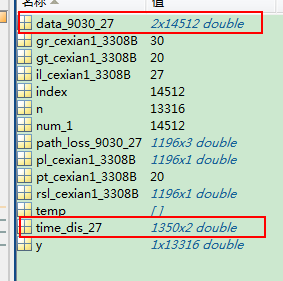
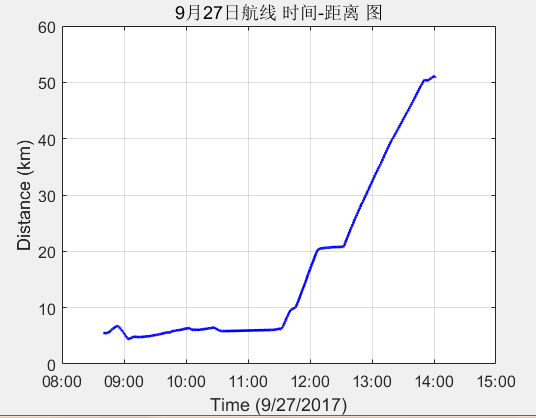
电平值有14512个,距离值有1350。从上面图中可以看出电平值和距离值只有11点半到两点是重合的。折旧要求以时间为纽带,插值进来。最终结果可以看到只有1196个有效值。
MATLAB 文件读取(3)的更多相关文章
- matlab中读取txt数据文件(txt文本文档)
matlab中读取txt数据文件(txt文本文档) 根据txt文档不同种类介绍不同的读取数据方法 一.纯数据文件(没有字母和中文,纯数字) 对于这种txt文档,从matalb中读取就简单多了 例如te ...
- matlab批量读取一个文件夹里类似命名的mat文件
参考网址: Matlab读取同一路径下多个txt或mat文件总结 matlab 批量读取数据文件.mat .dat 整理:matlab批量读入数据文件的方法 首先命名方式体现在只是名字里数字有变化,其 ...
- Matlab批量读取文件夹文件
现在有一个文件夹 里面有50个左右的txt文件 每个文件大概三万行 两列 第一列是字符串 第二列是浮点数字 我只需要读第二列 现在我想写一个.M文件 批量读取这个文件夹里的txt文件 读取完以后的数组 ...
- Matlab 从入门到精通 Chapter11 文件读取I/O
11.1 工作空间数据读取 将工作空间的变量保存为文件,可以使用save命令. save('filename') 将文件保存在当前目录下,文件名为filename.mat save('filenam ...
- MATLAB中TXT数据文件读取并写入元胞数组的方法与步骤
一. TXT数据文件读取 Data = load('train.txt'); %简单的文件读取,这时在工作区可以看到导入的大数据变量Data 二.大数据变量Data装入元胞数组中 D = cell ...
- matlab逐行读取text文件,编写函数提取需要的文字
在数学建模中遇到的数据比较难处理,而且给的是text格式,自己想了好长时间才编出来,现在分享一下,可以交流学习 目标的text文件是 只提取里面的数据 需要自编函数 clc,clear path='D ...
- matlab文件操作及读txt文件(fopen,fseek,fread,fclose)
文件操作是一种重要的输入输出方式,即从数据文件读取数据或将结果写入数据文件.MATLAB提供了一系列低层输入输出函数,专门用于文件操作. 1.文件的打开与关闭 1)打开文件 在读写文件之前,必须先用f ...
- Matlab文件操作
1. Matlab文件操作主要有三个步骤:首先打开文件,然后对文件进行读写操作,最后要关闭文件. 2. fid=fopen(文件名,打开方式) 'r' 只读,文件必须存在(缺省的打开方式) 'w' ...
- MATLAB文件操作及读txt文件
转自:http://blog.csdn.net/vblittleboy/article/details/8049748 文件操作是一种重要的输入输出方式,即从数据文件读取数据或将结果写入数据文件.MA ...
随机推荐
- 续python学习(一)
接上面没写完的知识点继写. 当然,这些知识点都很简单,可能没必要花费太多时间去记忆,多写写代码就会了. 5.字符串的使用.索引和切片是字符串主要的两个应用.索引:顾名思义就是找出某个字符在一个字符串中 ...
- 配置XNA以适用VS2017进行开发
Win10似乎已不再支持使用XNA进行游戏开发,安装XNA Game Studio经常会出现错误,显示不兼容,即使安装VS2010也不行.下面给出方法,可以使用VS2017配合XNA进行游戏开发. 1 ...
- python3.6 单文件爬虫 断点续存 普通版 文件续存方式
# 导入必备的包 # 本文爬取的是顶点小说中的完美世界为列.文中的aa.text,bb.text为自己创建的text文件 import requests from bs4 import Beautif ...
- Java Grammar(三):修饰符
简介 修饰符是用于限定类型以及类型成员申明的一种符号,从修饰对象上可以分为类修饰符,方法修饰符,变量修饰符:从功能上可以划分为访问控制修饰符和非访问修饰符.访问修饰符控制访问权限,不同的访问修饰符有不 ...
- 数据结构 - Collection接口
简介 Collection继承自Iterable,Collection接口是Java集合两大分支中的一支,Queue.List.Set都是Collection的扩展:集合大类分为了Collection ...
- (转)协议森林06 瑞士军刀 (ICMP协议)
协议森林06 瑞士军刀 (ICMP协议) 作者:Vamei 出处:http://www.cnblogs.com/vamei 欢迎转载,也请保留这段声明.谢谢! 到现在为止,我们讲解了网络层中最重要的I ...
- C# MP3播放帮助类
本文为原创文章如需转载请注明出处: /// <summary> /// ************************************************* /// 类名:M ...
- git常用命令学习配详细说明
原文链接 把当前目录变成Git可以管理的仓库 git init 查看仓库当前的状态 git status 添加新/变动文件 git add <文件名> // 添加某个新文件(目录) git ...
- Mol. Cell. Proteomics | 癌细胞衍生的小细胞外囊体通过促进HGF-Met途径促进受体细胞转移
题目:Cancer cell derived small extracellular vesicles contribute to recipient cell metastasis through ...
- 环境篇:VMware Workstation安装Centos7
环境篇:VMware Workstation安装Centos7 1 VMware Workstation安装 CentOS下载地址:http://isoredirect.centos.org/cent ...