
JDBC基本使用方法
JDBC基本使用方法
JDBC固定步骤:
加载驱动
String url="jdbc:mysql://localhost:3306/jdbcstudy?useUnicode=true&characterEncoding=utf-8&serverTimezone=GMT";

String username="root";

String password="123456";

Class.forName("com.mysql.cj.jdbc.Driver");//这里不知道为什么加载com.mysql.jdbc.Driver会报错,有知道的大佬请留言
连接数据库,代表数据库
Connection connection = DriverManager.getConnection(url, username, password);
向数据库发送SQL的对象Statement: CRUD
Statement statement = connection.createStatement();
编写SQL (根据业务, 不同的SQL)
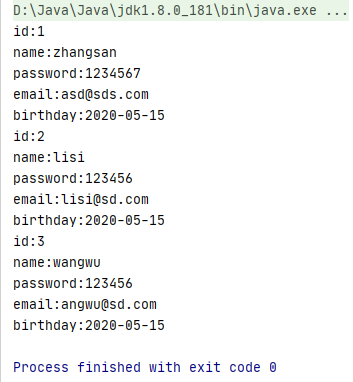
String str1="select * from users";

String str2="insert into users values (4,'赵六','145667','werwef.@eq',current_time) ,(5,'田七','53234','fsd@df',current_time)";

String str3="delete from users where id=5";

String str4="update users set password='987654' where id=4";
执行SQL
//        int i = statement.executeUpdate(str2);

//        int i = statement.executeUpdate(str3);

//        int i = statement.executeUpdate(str4);

        ResultSet resultSet = statement.executeQuery(str1);
遍历结果集
while (resultSet.next()){

            System.out.println("id:"+resultSet.getInt("id"));

            System.out.println("name:"+resultSet.getString("name"));

            System.out.println("password:"+resultSet.getString("password"));

            System.out.println("email:"+resultSet.getString("email"));

            System.out.println("birthday:"+resultSet.getString("birthday"));

        }
关闭连接
resultSet.close();

statement.close();

connection.close();

补充:
statement.executeQuery(); //执行查询操作
statement.executeUpdate(); //执行增删改操作
resultset. beforeFirst(); // 移动到最前面
resu1tSet. afterlast(); //移动到最后面
resultset.next(); //移动到下一个数据
resultset. previous(); //移动到前一行
resu1tset. absolute(row); //移动到指定行
statement不安全使用prepareStatement 可以防SQL注入
以下是prepareStatement 的使用方法
public static void main(String[] args) throws ClassNotFoundException, SQLException {

    String url="jdbc:mysql://localhost:3306/jdbcstudy?useUnicode=true&characterEncoding=utf-8&serverTimezone=GMT";

    String username="root";

    String password="123456";

    //加载驱动

    Class.forName("com.mysql.cj.jdbc.Driver");

    //连接数据库

    Connection connection = DriverManager.getConnection(url, username, password);

    //编写SQL

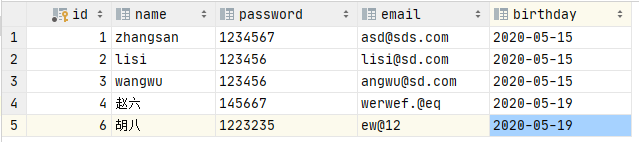
    String str5="insert into users (id,name,password,email,birthday)values (?,?,?,?,?)";

    //预编译

    PreparedStatement ps = connection.prepareStatement(str5);

    ps.setInt(1,6);				//给第一个占位符?赋值6

    ps.setString(2,"胡八");	   //给第二个占位符?赋值"胡八"

    ps.setString(3,"1223235");	//给第三个占位符?赋值”1223235“

    ps.setString(4,"ew@12");	//给第四个占位符?赋值"ew@12"

    ps.setDate(5,new Date(new java.util.Date().getTime()));

    							//给第五个占位符?赋值2020-05-19

    //执行

    int i = ps.executeUpdate();

    if (i>0){

        System.out.println("插入成功");

    }

	//关闭连接

    ps.close();

    connection.close();

}
JDBC基本使用方法的更多相关文章
- JDBC连接MySQL 方法 实例及资料收集
JDBC连接MySQL 方法 实例及资料收集 准备工作 首先,安装MySQL,配置用户名和密码,创建数据库. 可参见之前的文章: http://www.cnblogs.com/mengdd/p/315 ...
- 使用JDBC的addBatch()方法提高效率
在批量更新SQL操作的时候建议使用addBatch,这样效率是高些,数据量越大越能体现出来 Statement接口里有两个方法:void addBatch(String sql)将给定的 SQ ...
- Jmeter之JDBC Request使用方法(oracle)
JDBC Request: 这个sampler可以向数据库发送一个jdbc请求(sql语句),它经常需要和JDBC Connection Configuration 配置元件一起配合使用. 目录: 一 ...
- 加速JDBC的快捷方法
JAVA 应用必须通过 JDBC 从数据库中取数,有时候我们会发现,数据库的负担一点也不重而且 SQL 很简单,但取数的速度仍然很慢.仔细测试会发现,性能瓶颈主要在 JDBC 上,比如 MySQL 的 ...
- JDBC完美连接方法
jdbc:mysql://localhost:3306:test这句里面分如下解析:jdbc:mysql:// 是指JDBC连接方式:localhost: 是指你的本机地址:3306 SQL数据库的端 ...
- 转:JDBC Request使用方法
1. 下载mysql jar包 下载mysql jar包 http://dev.mysql.com/downloads/connector/j/ 网盘下载地址:mysql-connector-ja ...
- JDBC基础-setFetchSize方法
在Statement和ResultSet接口中都有setFetchSize方法 void setFetchSize(int rows) throws SQLException 查看API文档 Stat ...
- jdbc基本查询方法
jdbc操作数据库时,最基本的三种接口是Statement PreparedStatment CallableStatement (1)Statement createStatement() cre ...
- [数据库操作]Java中的JDBC的使用方法.
前言:想必大家在实际编码中都遇到过JDBC的操作, 这里仅做自己的一个总结, 有错误和不完整之处还请大家提出来. 1,JDBC其实一套规范(接口)数据库厂商需要实现此接口(实现类)--数据库驱动 2, ...
随机推荐
- 手机照片的exif里有方向属性
<?php $image = imagecreatefromstring(file_get_contents($_FILES['image_upload']['tmp_name'])); $ex ...
- 【Inno Setup】Pascal 脚本 ---- 事件函数
转载 事件函数 Inno Setup支持以下函数和过程. 1. [安装初始化]该函数在安装程序初始化时调用,返回False 将中断安装,True则继续安装,测试代码如下: function Initi ...
- 学习 .net core 3----蒋金楠 笔记 构建 Asp.net core Web应用
前言:准备系统的学习一下.net core 所以购买了 蒋金楠的 ASP.NET CORE 3 书籍,为了加深印象 特此笔记,会持续更新到学习完为止 使用 命令行 dotnet new co ...
- Unity碰撞检测
2019独角兽企业重金招聘Python工程师标准>>> 我们在用unity做开发的时候,会遇到要用到碰撞检测的问题,比如说,物体撞到墙壁,子弹打到物体等等,所以这里简单介绍一下uni ...
- Linux笔记(shell基础,历史命令,命令补全/别名,通配符,输出重定向)
一.shell 基础 shell是个命令解释器,提供用户和机器之间的交互 每个用户都可以拥有自己特定的shell centos7默认Shell为bash(Bourne Agin shell) 除了ba ...
- 字符串后面空字符的问题(char*与string的转换)
今天AC了不少题,困扰已久的Time limit error 也解决了,记住下次用STL容器的时候一定要清空容器. 其次是字符数组与字符串的浅谈. 字符数组是以'\0'结尾的,所以在字符数组赋值给字符 ...
- 数组输出黑科技----fwrite()
fwrite(const void*buffer,size_t size,size_t count,FILE*stream); (1)buffer:是一个指针,对fwrite来说,是要输出数据的地址. ...
- 图论--最短路-- Dijkstra模板(目前见到的最好用的)
之前的我那个板子,老是卡内存,不知道为什么,我看别人过的那个题都是结构体,我就开始对自己板子做了修改,然后他奶奶的就过了,而且速度也提高了,内存也小了.(自从用了这个板子,隔壁小孩馋哭了)也不知道为啥 ...
- AWS bind: cannot assign requested address
最近在AWS上安装Redis,遇到一个坑. Redis默认配置文件中有个bind配置项,默认为127.0.0.1.此时只能在服务器内部访问Redis. 为了从服务器外部访问Redis,我给bind添加 ...
- Spring Cloud 系列之 Config 配置中心(一)
服务配置现状 配置文件是我们再熟悉不过的,在微服务系统中,每个微服务不仅仅只有代码,还需要连接其他资源,例如数据库的配置或功能性的开关 MySQL.Redis .Security 等相关的配置.除了项 ...