
Spring Cloud 系列之 Config 配置中心(一)
服务配置现状
配置文件是我们再熟悉不过的,在微服务系统中,每个微服务不仅仅只有代码,还需要「连接其他资源」,例如数据库的配置或功能性的开关 MySQL、Redis 、Security 等相关的配置。除了项目运行的基础配置之外,还有一些配置是与我们业务有关系的,比如说七牛存储、短信和邮件相关,或者一些业务上的开关。
但是随着微服务系统的不断迭代,整个微服务系统可能会成为一个「网状结构」,这个时候就要考虑整个微服务系统的「扩展性、伸缩性、耦合性」等等。其中一个很重要的环节就是「配置管理」的问题。
常规配置管理解决方案缺点
硬编码(需要修改代码、繁琐、风险大) properties 或者 yml(集群环境下需要替换和重启) xml(重新打包和重启)
为什么使用 Spring Cloud Config
由于常规配置管理有很大的缺点,所以采用 Spring Cloud Config 「集中式」的配置中心来管理「每个服务」的配置信息。
Spring Cloud Config 在微服务分布式系统中,采用 「Server 服务端」和 「Client 客户端」的方式来提供可扩展的配置服务。服务端提供配置文件的存储,以接口的形式将配置文件的内容提供出去;客户端通过接口获取数据、并依据此数据初始化自己的应用。
配置中心负责「管理所有服务」的各种环境配置文件。
配置中心默认采用 Git 的方式存储配置文件,因此我们可以很容易的部署和修改,有助于环境配置进行版本管理。
Spring Cloud Config 解决了什么问题
Spring Cloud Config 解决了微服务配置的「中心化、版本控制、平台独立、语言独立」等问题。其特性如下:
提供服务端和客户端支持(Spring Cloud Config Server 和 Spring Cloud Config Client) 集中式管理分布式环境下的应用部署 属性值的加密和解密(对称加密和非对称加密) 基于 Spring 环境,无缝与 Spring 应用集成 可用于任何语言开发的程序 默认实现基于 Git ,可以进行版本管理
接下来,我们主要从以下几块来讲一下 Config 的使用。
基础版的配置中心(不集成 Eureka) 集成 Eureka 版的高可用配置中心 基于 Actuator 实现配置的自动刷新 配置中心属性值的加密和解密(对称加密和非对称加密) 基于 Spring Cloud Bus 实现配置的自动刷新 配置中心用户安全认证
环境准备
项目
config-demo 聚合工程。SpringBoot 2.2.4.RELEASE、Spring Cloud Hoxton.SR1。
eureka-server:注册中心(用于集成 Eureka 版的配置中心)eureka-server02:注册中心(用于集成 Eureka 版的配置中心)order-service:订单服务(用于集成 Eureka 版的配置中心)
仓库
config-repo 仓库。
Repository name:仓库名称Description(可选):仓库描述介绍Public,Private:仓库权限(公开共享,私有或指定合作者)Initialize this repository with a README:添加一个 README.mdAdd .gitignore:不需要进行版本管理的文件类型,生成对应文件.gitignoreAdd a license:证书类型,生成对应文件LICENSE
配置文件
不同环境的配置文件,上传至 config-repo 仓库。
❝
配置文件的名称不是乱起的,例如
config-client-dev.yml和config-client-prod.yml这两个文件是同一个项目的不同环境,项目名称为config-client, 一个对应开发环境,一个对应正式环境。test表示测试环境。❞
config-client.yml
server:

  port: 7777 # 端口

spring:

  application:

    name: config-client # 应用名称

# 自定义配置

name: config-client-default
config-client-dev.yml
server:

  port: 7778 # 端口

spring:

  application:

    name: config-client # 应用名称

# 自定义配置

name: config-client-dev
config-client-test.yml
server:

  port: 7779 # 端口

spring:

  application:

    name: config-client # 应用名称

# 自定义配置

name: config-client-test
config-client-prod.yml
server:

  port: 7780 # 端口

spring:

  application:

    name: config-client # 应用名称

# 自定义配置

name: config-client-prod
入门案例
入门案例讲解:基础版的配置中心(不集成 Eureka)
官方文档:https://cloud.spring.io/spring-cloud-static/spring-cloud-config/2.2.2.RELEASE/reference/html/
创建服务端
点击链接观看:Config 入门案例创建服务端视频(获取更多请关注公众号「哈喽沃德先生」)
在 config-demo 父工程下创建子项目 config-server。
添加依赖
添加 spring-cloud-config-server 依赖,完整 pom.xml 文件如下:
<?xml version="1.0" encoding="UTF-8"?>

<project xmlns="http://maven.apache.org/POM/4.0.0" xmlns:xsi="http://www.w3.org/2001/XMLSchema-instance"

         xsi:schemaLocation="http://maven.apache.org/POM/4.0.0 http://maven.apache.org/xsd/maven-4.0.0.xsd">

    <modelVersion>4.0.0</modelVersion>

    <groupId>com.example</groupId>

    <artifactId>config-server</artifactId>

    <version>1.0-SNAPSHOT</version>

    <!-- 继承父依赖 -->

    <parent>

        <groupId>com.example</groupId>

        <artifactId>config-demo</artifactId>

        <version>1.0-SNAPSHOT</version>

    </parent>

    <!-- 项目依赖 -->

    <dependencies>

        <!-- spring cloud config server 依赖 -->

        <dependency>

            <groupId>org.springframework.cloud</groupId>

            <artifactId>spring-cloud-config-server</artifactId>

        </dependency>

        <!-- spring boot test 依赖 -->

        <dependency>

            <groupId>org.springframework.boot</groupId>

            <artifactId>spring-boot-starter-test</artifactId>

            <scope>test</scope>

            <exclusions>

                <exclusion>

                    <groupId>org.junit.vintage</groupId>

                    <artifactId>junit-vintage-engine</artifactId>

                </exclusion>

            </exclusions>

        </dependency>

    </dependencies>

</project>
配置文件
server:

  port: 8888 # 端口

spring:

  application:

    name: config-server # 应用名称

  cloud:

    config:

      server:

        git:

          uri: https://github.com/imrhelloworld/config-repo # 配置文件所在仓库地址

          #username:             # Github 等产品的登录账号

          #password:             # Github 等产品的登录密码

          #default-label: master # 配置文件分支

          #search-paths:         # 配置文件所在根目录
启动类
启动类添加 @EnableConfigServer 注解。
package com.example;

import org.springframework.boot.SpringApplication;

import org.springframework.boot.autoconfigure.SpringBootApplication;

import org.springframework.cloud.config.server.EnableConfigServer;

// 配置中心服务端注解

@EnableConfigServer

@SpringBootApplication

public class ConfigServerApplication {

    public static void main(String[] args) {

        SpringApplication.run(ConfigServerApplication.class, args);

    }

}
访问规则
Spring Cloud Config 有一套访问规则,我们通过这套规则在浏览器上直接访问即可。
/{application}/{profile}[/{label}]

/{application}-{profile}.yml

/{label}/{application}-{profile}.yml

/{application}-{profile}.properties

/{label}/{application}-{profile}.properties
{application}:应用名称(目标服务名称){profile}:获取指定环境配置,项目有开发环境、测试环境、生产环境,对应到配置文件就是以 application-{profile}.yml 加以区分,例如 application-dev.yml、application-test.yml、application-prod.yml。默认值为 default。{label}:表示 git 分支,默认是 master 分支,如果项目是以分支做区分也是可以的,那就可以通过不同的 label 来控制访问不同的配置文件。
「测试」
http://localhost:8888/config-client/default
http://localhost:8888/config-client/dev/master
http://localhost:8888/config-client-test.yml
http://localhost:8888/master/config-client-prod.yml
访问以上地址,如果可以正常返回数据,说明配置中心服务端一切正常。
创建客户端
点击链接观看:Config 入门案例创建客户端视频(获取更多请关注公众号「哈喽沃德先生」)
在 config-demo 父工程下创建子项目 config-client。
添加依赖
添加 spring-cloud-starter-config 依赖,完整 pom.xml 文件如下:
<?xml version="1.0" encoding="UTF-8"?>

<project xmlns="http://maven.apache.org/POM/4.0.0" xmlns:xsi="http://www.w3.org/2001/XMLSchema-instance"

         xsi:schemaLocation="http://maven.apache.org/POM/4.0.0 http://maven.apache.org/xsd/maven-4.0.0.xsd">

    <modelVersion>4.0.0</modelVersion>

    <groupId>com.example</groupId>

    <artifactId>config-client</artifactId>

    <version>1.0-SNAPSHOT</version>

    <!-- 继承父依赖 -->

    <parent>

        <groupId>com.example</groupId>

        <artifactId>config-demo</artifactId>

        <version>1.0-SNAPSHOT</version>

    </parent>

    <!-- 项目依赖 -->

    <dependencies>

        <!-- spring cloud starter config 依赖 -->

        <dependency>

            <groupId>org.springframework.cloud</groupId>

            <artifactId>spring-cloud-starter-config</artifactId>

        </dependency>

        <!-- spring boot web 依赖 -->

        <dependency>

            <groupId>org.springframework.boot</groupId>

            <artifactId>spring-boot-starter-web</artifactId>

        </dependency>

        <!-- spring boot test 依赖 -->

        <dependency>

            <groupId>org.springframework.boot</groupId>

            <artifactId>spring-boot-starter-test</artifactId>

            <scope>test</scope>

            <exclusions>

                <exclusion>

                    <groupId>org.junit.vintage</groupId>

                    <artifactId>junit-vintage-engine</artifactId>

                </exclusion>

            </exclusions>

        </dependency>

    </dependencies>

</project>
配置文件
客户端配置文件名称必须叫 bootstrap.yml
spring:

  cloud:

    config:

      name: config-client # 配置文件名称,对应 git 仓库中配置文件前半部分

      uri: http://localhost:8888 # config-server 服务端地址

      label: master # git 分支

      profile: default # 指定环境
控制层
添加一个 RestController 用于测试获取配置文件信息。
package com.example.controller;

import org.springframework.beans.factory.annotation.Value;

import org.springframework.web.bind.annotation.GetMapping;

import org.springframework.web.bind.annotation.RestController;

@RestController

public class ConfigController {

    @Value("${name}")

    private String name;

    @GetMapping("/name")

    public String getName() {

        return name;

    }

}
启动类
package com.example;

import org.springframework.boot.SpringApplication;

import org.springframework.boot.autoconfigure.SpringBootApplication;

@SpringBootApplication

public class ConfigClientApplication {

    public static void main(String[] args) {

        SpringApplication.run(ConfigClientApplication.class, args);

    }

}
测试
访问:http://localhost:7777/name 结果如下:
修改配置文件为 dev 环境:
spring:

  cloud:

    config:

      name: config-client # 应用名称,对应 git 仓库中配置文件前半部分

      uri: http://localhost:8888 # config-server 服务端地址

      label: master # git 分支

      profile: dev # 指定环境
访问:http://localhost:7778/name 结果如下:
Spring Cloud Config 高可用
以上讲了 Spring Cloud Config 最基础的用法,如果我们的项目中使用了 Eureka 作为服务注册发现中心,那么 Spring Cloud Config 也应该注册到 Eureka,方便其他服务使用,并且可以注册多个配置中心服务端,实现高可用。
接下来就集成 Spring Cloud Config 到 Eureka。关于 Eureka 的相关知识大家可翻阅我的历史文章进行学习。
添加配置文件
在 Github 仓库中增加配置文件。
order-service-dev.yml
server:

  port: 9090 # 端口

spring:

  application:

    name: order-service # 应用名称

# 配置 Eureka Server 注册中心

eureka:

  instance:

    prefer-ip-address: true       # 是否使用 ip 地址注册

    instance-id: ${spring.cloud.client.ip-address}:${server.port} # ip:port

  client:

    service-url:                  # 设置服务注册中心地址

      defaultZone: http://localhost:8761/eureka/,http://localhost:8762/eureka/

# 自定义配置

name: order-service-dev
order-service-prod.yml
server:

  port: 9091 # 端口

spring:

  application:

    name: order-service # 应用名称

# 配置 Eureka Server 注册中心

eureka:

  instance:

    prefer-ip-address: true       # 是否使用 ip 地址注册

    instance-id: ${spring.cloud.client.ip-address}:${server.port} # ip:port

  client:

    service-url:                  # 设置服务注册中心地址

      defaultZone: http://localhost:8761/eureka/,http://localhost:8762/eureka/

# 自定义配置

name: order-service-prod
整合注册中心
案例已经给大家准备好了,无需创建注册中心直接使用即可,为了清楚,把依赖和配置信息给大家贴出来。
依赖
eureka-server 和 eureka-server02 核心依赖部分一致。
<?xml version="1.0" encoding="UTF-8"?>

<project xmlns="http://maven.apache.org/POM/4.0.0" xmlns:xsi="http://www.w3.org/2001/XMLSchema-instance"

         xsi:schemaLocation="http://maven.apache.org/POM/4.0.0 http://maven.apache.org/xsd/maven-4.0.0.xsd">

    <modelVersion>4.0.0</modelVersion>

    <groupId>com.example</groupId>

    <artifactId>eureka-server</artifactId>

    <version>1.0-SNAPSHOT</version>

    <!-- 继承父依赖 -->

    <parent>

        <groupId>com.example</groupId>

        <artifactId>config-demo</artifactId>

        <version>1.0-SNAPSHOT</version>

    </parent>

    <!-- 项目依赖 -->

    <dependencies>

        <!-- netflix eureka server 依赖 -->

        <dependency>

            <groupId>org.springframework.cloud</groupId>

            <artifactId>spring-cloud-starter-netflix-eureka-server</artifactId>

        </dependency>

        <!-- spring boot web 依赖 -->

        <dependency>

            <groupId>org.springframework.boot</groupId>

            <artifactId>spring-boot-starter-web</artifactId>

        </dependency>

        <!-- spring boot test 依赖 -->

        <dependency>

            <groupId>org.springframework.boot</groupId>

            <artifactId>spring-boot-starter-test</artifactId>

            <scope>test</scope>

            <exclusions>

                <exclusion>

                    <groupId>org.junit.vintage</groupId>

                    <artifactId>junit-vintage-engine</artifactId>

                </exclusion>

            </exclusions>

        </dependency>

    </dependencies>

</project>
配置文件
eureka-server 的 application.yml
server:

  port: 8761 # 端口

spring:

  application:

    name: eureka-server # 应用名称(集群下相同)

# 配置 Eureka Server 注册中心

eureka:

  instance:

    hostname: eureka01            # 主机名,不配置的时候将根据操作系统的主机名来获取

    prefer-ip-address: true       # 是否使用 ip 地址注册

    instance-id: ${spring.cloud.client.ip-address}:${server.port} # ip:port

  client:

    # 设置服务注册中心地址,指向另一个注册中心

    service-url:                  # 注册中心对外暴露的注册地址

      defaultZone: http://localhost:8762/eureka/
eureka-server02 的 application.yml
server:

  port: 8762 # 端口

spring:

  application:

    name: eureka-server # 应用名称(集群下相同)

# 配置 Eureka Server 注册中心

eureka:

  instance:

    hostname: eureka02            # 主机名,不配置的时候将根据操作系统的主机名来获取

    prefer-ip-address: true       # 是否使用 ip 地址注册

    instance-id: ${spring.cloud.client.ip-address}:${server.port} # ip:port

  client:

    # 设置服务注册中心地址,指向另一个注册中心

    service-url:                  # 注册中心对外暴露的注册地址

      defaultZone: http://localhost:8761/eureka/
启动类
eureka-server 和 eureka-server02 启动类核心代码一致。
package com.example;

import org.springframework.boot.SpringApplication;

import org.springframework.boot.autoconfigure.SpringBootApplication;

import org.springframework.cloud.netflix.eureka.server.EnableEurekaServer;

@SpringBootApplication

// 开启 EurekaServer 注解

@EnableEurekaServer

public class EurekaServerApplication {

    public static void main(String[] args) {

        SpringApplication.run(EurekaServerApplication.class, args);

    }

}
Spring Cloud Config 服务端
服务端和基础版的配置中心相比多了 Eureka 的配置,其他地方都是一样的。
config-server 服务端构建完成以后再复刻一个 config-server02 实现高可用。
依赖
config-server 和 config-server02 核心依赖部分一致。注意是 spring-cloud-config-server 依赖。
<?xml version="1.0" encoding="UTF-8"?>

<project xmlns="http://maven.apache.org/POM/4.0.0" xmlns:xsi="http://www.w3.org/2001/XMLSchema-instance"

         xsi:schemaLocation="http://maven.apache.org/POM/4.0.0 http://maven.apache.org/xsd/maven-4.0.0.xsd">

    <modelVersion>4.0.0</modelVersion>

    <groupId>com.example</groupId>

    <artifactId>config-server</artifactId>

    <version>1.0-SNAPSHOT</version>

    <!-- 继承父依赖 -->

    <parent>

        <groupId>com.example</groupId>

        <artifactId>config-demo</artifactId>

        <version>1.0-SNAPSHOT</version>

    </parent>

    <!-- 项目依赖 -->

    <dependencies>

        <!-- spring cloud config server 依赖 -->

        <dependency>

            <groupId>org.springframework.cloud</groupId>

            <artifactId>spring-cloud-config-server</artifactId>

        </dependency>

        <!-- netflix eureka client 依赖 -->

        <dependency>

            <groupId>org.springframework.cloud</groupId>

            <artifactId>spring-cloud-starter-netflix-eureka-client</artifactId>

        </dependency>

        <!-- spring boot test 依赖 -->

        <dependency>

            <groupId>org.springframework.boot</groupId>

            <artifactId>spring-boot-starter-test</artifactId>

            <scope>test</scope>

            <exclusions>

                <exclusion>

                    <groupId>org.junit.vintage</groupId>

                    <artifactId>junit-vintage-engine</artifactId>

                </exclusion>

            </exclusions>

        </dependency>

    </dependencies>

</project>
配置文件
config-server 的 application.yml
server:

  port: 8888 # 端口

spring:

  application:

    name: config-server # 应用名称

  cloud:

    config:

      server:

        git:

          uri: https://github.com/imrhelloworld/config-repo # 配置文件所在仓库地址

          #username:             # Github 等产品的登录账号

          #password:             # Github 等产品的登录密码

          #default-label: master # 配置文件分支

          #search-paths:         # 配置文件所在根目录

# 配置 Eureka Server 注册中心

eureka:

  instance:

    prefer-ip-address: true       # 是否使用 ip 地址注册

    instance-id: ${spring.cloud.client.ip-address}:${server.port} # ip:port

  client:

    service-url:                  # 设置服务注册中心地址

      defaultZone: http://localhost:8761/eureka/,http://localhost:8762/eureka/
config-server02 的 application.yml
server:

  port: 8889 # 端口

spring:

  application:

    name: config-server # 应用名称

  cloud:

    config:

      server:

        git:

          uri: https://github.com/imrhelloworld/config-repo # 配置文件所在仓库地址

          #username:             # Github 等产品的登录账号

          #password:             # Github 等产品的登录密码

          #default-label: master # 配置文件分支

          #search-paths:         # 配置文件所在根目录

# 配置 Eureka Server 注册中心

eureka:

  instance:

    prefer-ip-address: true       # 是否使用 ip 地址注册

    instance-id: ${spring.cloud.client.ip-address}:${server.port} # ip:port

  client:

    service-url:                  # 设置服务注册中心地址

      defaultZone: http://localhost:8761/eureka/,http://localhost:8762/eureka/
启动类
config-server 和 config-server02 启动类核心代码一致。
package com.example;

import org.springframework.boot.SpringApplication;

import org.springframework.boot.autoconfigure.SpringBootApplication;

import org.springframework.cloud.config.server.EnableConfigServer;

// 开启 EurekaClient 注解,当前版本如果配置了 Eureka 注册中心,默认会开启该注解

//@EnableEurekaClient

// 配置中心服务端注解

@EnableConfigServer

@SpringBootApplication

public class ConfigServerApplication {

    public static void main(String[] args) {

        SpringApplication.run(ConfigServerApplication.class, args);

    }

}
Spring Cloud Config 客户端
客户端加入 Eureka 以后,就不用直接和配置中心服务端打交道了,而是通过 Eureka 来访问。
依赖
order-service 的 pom.xml。注意是 spring-cloud-starter-config 依赖。
<?xml version="1.0" encoding="UTF-8"?>

<project xmlns="http://maven.apache.org/POM/4.0.0" xmlns:xsi="http://www.w3.org/2001/XMLSchema-instance"

         xsi:schemaLocation="http://maven.apache.org/POM/4.0.0 http://maven.apache.org/xsd/maven-4.0.0.xsd">

    <modelVersion>4.0.0</modelVersion>

    <groupId>com.example</groupId>

    <artifactId>order-service</artifactId>

    <version>1.0-SNAPSHOT</version>

    <!-- 继承父依赖 -->

    <parent>

        <groupId>com.example</groupId>

        <artifactId>config-demo</artifactId>

        <version>1.0-SNAPSHOT</version>

    </parent>

    <!-- 项目依赖 -->

    <dependencies>

        <!-- spring boot web 依赖 -->

        <dependency>

            <groupId>org.springframework.boot</groupId>

            <artifactId>spring-boot-starter-web</artifactId>

        </dependency>

        <!-- netflix eureka client 依赖 -->

        <dependency>

            <groupId>org.springframework.cloud</groupId>

            <artifactId>spring-cloud-starter-netflix-eureka-client</artifactId>

        </dependency>

        <!-- spring cloud starter config 依赖 -->

        <dependency>

            <groupId>org.springframework.cloud</groupId>

            <artifactId>spring-cloud-starter-config</artifactId>

        </dependency>

        <!-- spring boot test 依赖 -->

        <dependency>

            <groupId>org.springframework.boot</groupId>

            <artifactId>spring-boot-starter-test</artifactId>

            <scope>test</scope>

            <exclusions>

                <exclusion>

                    <groupId>org.junit.vintage</groupId>

                    <artifactId>junit-vintage-engine</artifactId>

                </exclusion>

            </exclusions>

        </dependency>

    </dependencies>

</project>
配置文件
order-service 的 bootstrap.yml
spring:

  cloud:

    config:

      name: order-service # 配置文件名称,对应 git 仓库中配置文件前半部分

      label: master # git 分支

      profile: dev # 指定环境

      discovery:

        enabled: true # 开启

        service-id: config-server # 指定配置中心服务端的 service-id
控制层
添加一个 RestController 用于测试获取配置文件信息。
package com.example.controller;

import org.springframework.beans.factory.annotation.Value;

import org.springframework.web.bind.annotation.GetMapping;

import org.springframework.web.bind.annotation.RestController;

@RestController

public class ConfigController {

    @Value("${name}")

    private String name;

    @GetMapping("/name")

    public String getName() {

        return name;

    }

}
启动类
package com.example;

import org.springframework.boot.SpringApplication;

import org.springframework.boot.autoconfigure.SpringBootApplication;

// 开启 EurekaClient 注解,当前版本如果配置了 Eureka 注册中心,默认会开启该注解

//@EnableEurekaClient

@SpringBootApplication

public class OrderServiceApplication {

    public static void main(String[] args) {

        SpringApplication.run(OrderServiceApplication.class, args);

    }

}
测试
启动注册中心 eureka-server 和 eureka-server02。
启动配置中心服务端 config-server。
启动配置中心客户端 order-service。
当前环境在 Eureka UI 界面中如下:
访问:http://localhost:9090/name 结果如下:
配置中心工作原理
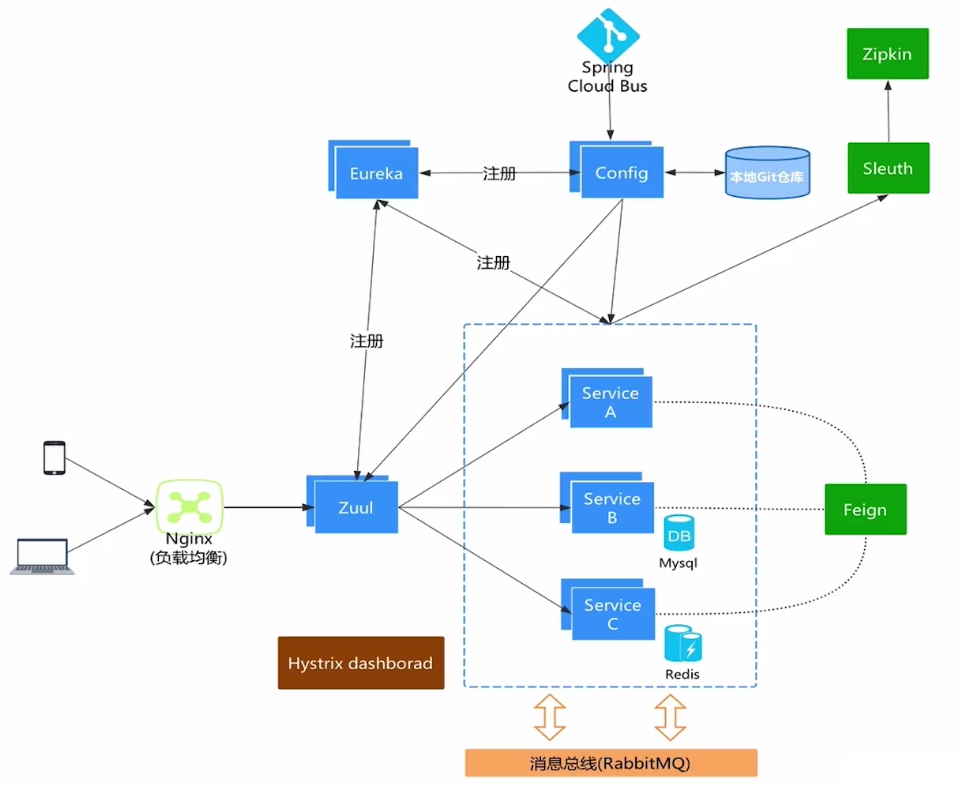
开发人员将配置文件存储至 Git 远程仓库,或后期对 Git 远程仓库的文件进行修改。如果远程仓库发生了版本改变,Config Server 会将 Git 远程仓库中的文件同步至本地仓库中。大家仔细观察 Config Server 的控制台可以看到类似如下信息。
[nio-8888-exec-1] o.s.c.c.s.e.NativeEnvironmentRepository : Adding property source: file:/C:/Users/MRHELL~1/AppData/Local/Temp/config-repo-17506367621853740906/order-service-dev.yml
根据控制台信息打开对应的本地目录,会发现 Git 远程仓库中的文件已同步至本地仓库中。
为什么要这么做呢?因为我们要考虑网络波动的情况下,无法访问远程仓库的问题。
❝
下一篇我们讲解 Config 如何实现配置中心自动刷新,记得关注噢~
❞
本文采用 知识共享「署名-非商业性使用-禁止演绎 4.0 国际」许可协议。
大家可以通过 分类 查看更多关于 Spring Cloud 的文章。
Spring Cloud 系列之 Config 配置中心(一)的更多相关文章
- Spring Cloud 系列之 Config 配置中心(二)
本篇文章为系列文章,未读第一集的同学请猛戳这里:Spring Cloud 系列之 Config 配置中心(一) 本篇文章讲解 Config 如何实现配置中心自动刷新. 配置中心自动刷新 点击链接观看: ...
- Spring Cloud 系列之 Config 配置中心(三)
本篇文章为系列文章,未读前几集的同学请猛戳这里: Spring Cloud 系列之 Config 配置中心(一) Spring Cloud 系列之 Config 配置中心(二) 本篇文章讲解 Conf ...
- Spring Cloud 系列之 Consul 配置中心
前面我们已经学习过 Spring Cloud Config 了: Spring Cloud 系列之 Config 配置中心(一) Spring Cloud 系列之 Config 配置中心(二) Spr ...
- Spring Cloud 系列之 Apollo 配置中心(二)
本篇文章为系列文章,未读第一集的同学请猛戳这里:Spring Cloud 系列之 Apollo 配置中心(一) 本篇文章讲解 Apollo 部门管理.用户管理.配置管理.集群管理. 点击链接观看:Ap ...
- Spring Cloud 系列之 Apollo 配置中心(三)
本篇文章为系列文章,未读前几集的同学请猛戳这里: Spring Cloud 系列之 Apollo 配置中心(一) Spring Cloud 系列之 Apollo 配置中心(二) 本篇文章讲解 Apol ...
- Spring Cloud 系列之 Apollo 配置中心(四)
本篇文章为系列文章,未读前几集的同学请猛戳这里: Spring Cloud 系列之 Apollo 配置中心(一) Spring Cloud 系列之 Apollo 配置中心(二) Spring Clou ...
- Spring Cloud 系列之 Apollo 配置中心(一)
背景 随着程序功能的日益复杂,程序的配置日益增多:各种功能的开关.参数的配置.服务器的地址等等. 对程序配置的期望值也越来越高:配置修改后实时生效,灰度发布,分环境.分集群管理配置,完善的权限.审核机 ...
- Spring Cloud 入门教程 - 搭建配置中心服务
简介 Spring Cloud 提供了一个部署微服务的平台,包括了微服务中常见的组件:配置中心服务, API网关,断路器,服务注册与发现,分布式追溯,OAuth2,消费者驱动合约等.我们不必先知道每个 ...
- Spring Cloud 系列之 Consul 注册中心(二)
本篇文章为系列文章,未读第一集的同学请猛戳这里:Spring Cloud 系列之 Consul 注册中心(一) 本篇文章讲解 Consul 集群环境的搭建. Consul 集群 上图是一个简单的 Co ...
随机推荐
- V - Largest Rectangle in a Histogram HDU - 1506
两种思路: 1 单调栈:维护一个单调非递减栈,当栈为空或者当前元素大于等于栈顶元素时就入栈,当前元素小于栈顶元素时就出栈,出栈的同时计算当前值,当前值所包含的区间范围为从当前栈顶元素到当前元素i的距离 ...
- 嵌入css方式
总体见思维导图 . 嵌入css方式 1 内联式 内联式css样式表就是把css代码直接写在现有的HTML标签中,如下面代码: <p style="color:red"> ...
- 下载mp4文件
实现mp4文件的下载,而不是在线播放 <!DOCTYPE html> <html lang="en"> <head> <meta char ...
- 1. jquery插件手机
1. http://jqtjs.com/preview/demos/main/index.html#home2. jquery weUI ===== 插件:https://blog.csdn.net/ ...
- Centos8安装docker-compose
一.首先检查是否有pip 执行命令:piv -V 二.更新pip 执行命令:pip install --upgrade pip 三.下载 setuptools 执行命令 :pip install - ...
- php算--------法
<?php //冒泡排序:两两交换数值,最小的值在最左边,就如最轻的气泡在最上边.对整列数两两交换一次//最小的数在最左边,每次都能得一个在剩下的数中的最小 的数//“冒”出来的数组成一个有序区 ...
- [Qt] 去掉QMessageBox标题栏上的图标
msgBox.setWindowFlags(Qt::Drawer);
- cocos2dx初体验
我们创建工程后总会自带一个HelloWorld类,短短的几行代码就出来了一个游戏的雏形,请问我们真的理解它了吗?如果我们能早一点弄明白这几行代码,我们或许会比现在走得更远. 理解HelloWorld类 ...
- abp(net core)+easyui+efcore实现仓储管理系统——入库管理之十(四十六)
abp(net core)+easyui+efcore实现仓储管理系统目录 abp(net core)+easyui+efcore实现仓储管理系统——ABP总体介绍(一) abp(net core)+ ...
- C51_PID 水温控制系统
C51_PID 水温控制系统 51CPIDUART水温控制 前言 通过C语言程序写入51单片机实现水的温度的采集,并通过控制器控制加热器给水体加热,对水体的温进行PID控制,保证温度在设定值范围内波动 ...