
springmvc+mybatis 实现登录、注册、邮件激活等功能
原创作品, 转载请注明来源https://www.cnblogs.com/sogeisetsu/p/12933370.html
8 一个真实的开发总结
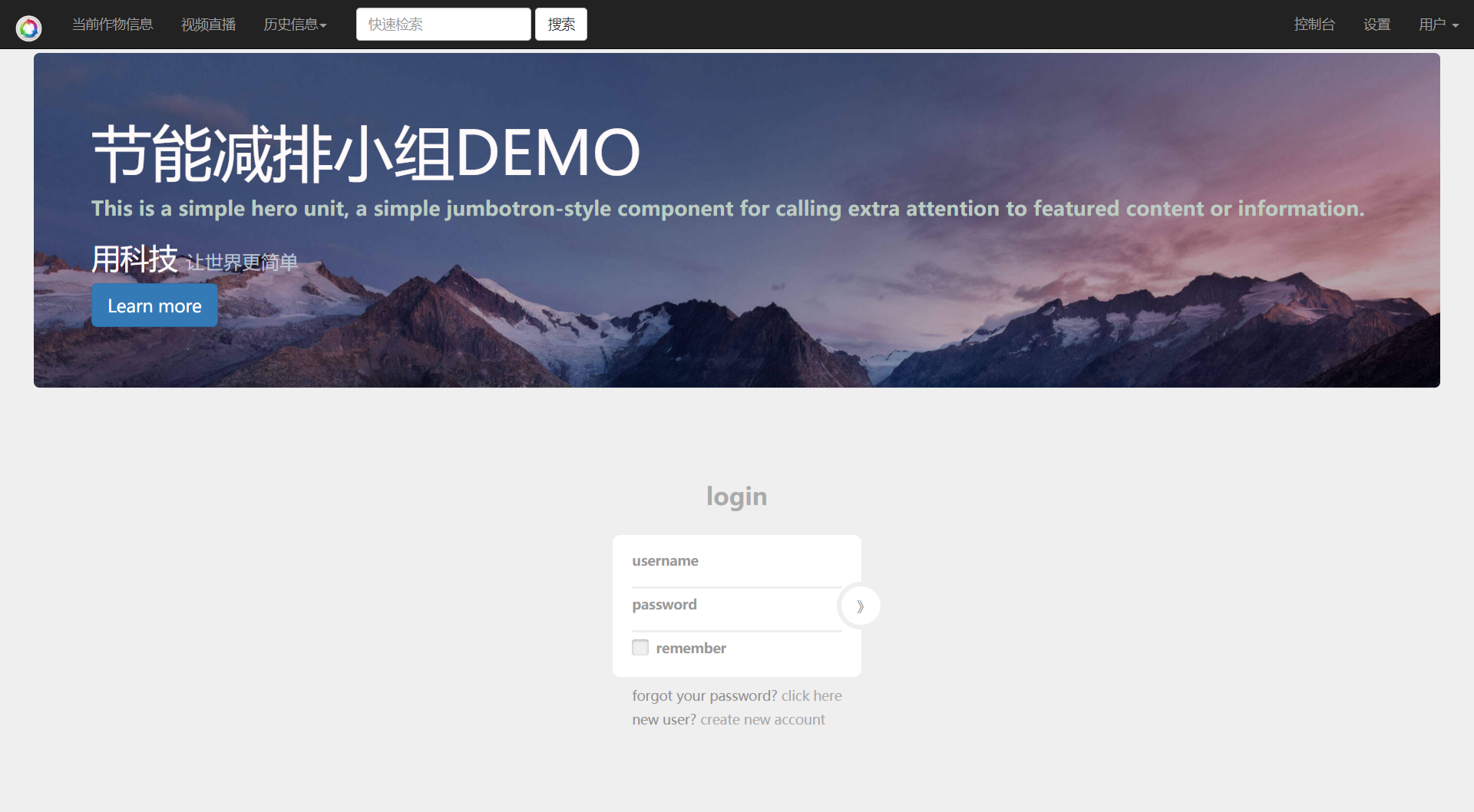
8.1 网站地址
8.2 代码文件
https://github.com/sogeisetsu/springstudyy/tree/master/sptumvc-07
sql建表
show databases ;

create database if not exists springstudy character set utf8;

use springstudy;

create table `User` (

                        `uid` int primary key ,

                        `username` varchar(20) not null ,

                        `password` varchar(20) not null ,

                        `status` char(1),

                        `code` varchar(50),

                        constraint check_status check ( status='Y'or 'N')

);

show tables ;

desc User;

alter table User modify uid int auto_increment;

alter table User modify uid int auto_increment;

alter table User modify username varchar(20) unique not null ;

alter table User add `date` DATETIME;

alter table User add `email` varchar(25);
表格结构
| Field | Type | Null | Key | Default | Extra |
|---|---|---|---|---|---|
| uid | int(11) | NO | PRI | NULL | auto_increment |
| username | varchar(20) | NO | UNI | NULL | |
| password | varchar(20) | NO | NULL | ||
| status | char(1) | YES | NULL | ||
| code | varchar(50) | YES | NULL | ||
| date | datetime | YES | NULL | ||
| varchar(25) | YES | NULL |
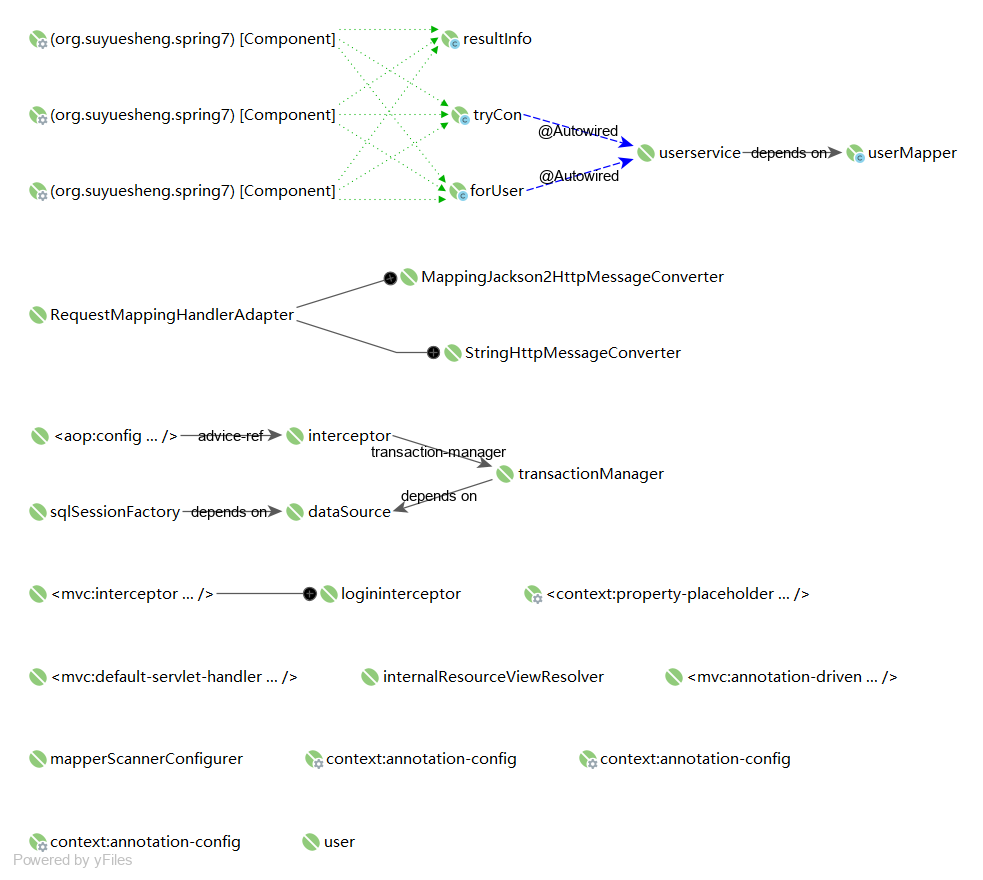
配置文件关系图
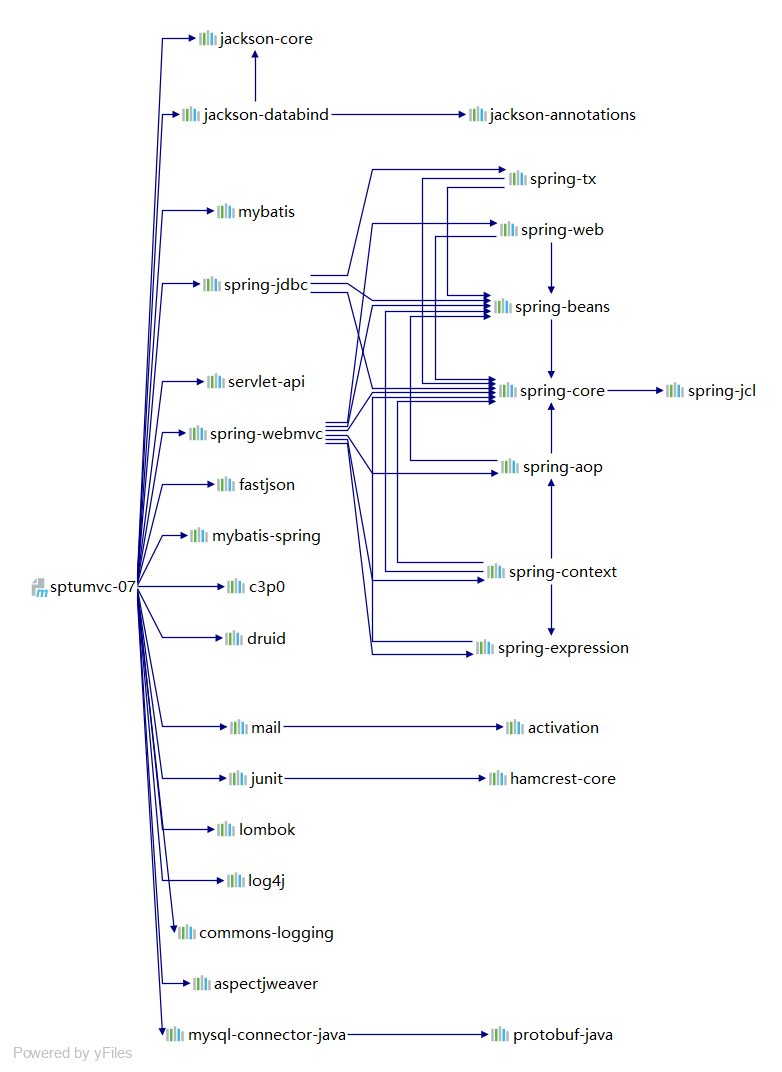
导包
web.xml
<?xml version="1.0" encoding="UTF-8"?>

<web-app xmlns="http://xmlns.jcp.org/xml/ns/javaee"

         xmlns:xsi="http://www.w3.org/2001/XMLSchema-instance"

         xsi:schemaLocation="http://xmlns.jcp.org/xml/ns/javaee http://xmlns.jcp.org/xml/ns/javaee/web-app_4_0.xsd"

         version="4.0">

<!--静态资源的名字和controller的路径名字相同,需要特殊配置让其走tomcat默认的servlet-->

  <servlet-mapping>

    <servlet-name>default</servlet-name>

    <url-pattern>/login.html</url-pattern>

    <url-pattern>/regist.html</url-pattern>

  </servlet-mapping>

<!--  配置spring的DispatcherServlet-->

  <servlet>

    <servlet-name>springmvc06</servlet-name>

    <servlet-class>org.springframework.web.servlet.DispatcherServlet</servlet-class>

    <init-param>

      <param-name>contextConfigLocation</param-name>

      <param-value>classpath:Beans.xml</param-value>

    </init-param>

    <load-on-startup>1</load-on-startup>

  </servlet>

  <servlet-mapping>

    <servlet-name>springmvc06</servlet-name>

    <url-pattern>/</url-pattern>

  </servlet-mapping>

<!--配置字符编码-->

  <filter>

    <filter-name>filterForCharSet</filter-name>

    <filter-class>org.springframework.web.filter.CharacterEncodingFilter</filter-class>

    <init-param>

      <param-name>encoding</param-name>

      <param-value>UTF-8</param-value>

    </init-param>

    <init-param>

      <param-name>forceRequestEncoding</param-name>

      <param-value>true</param-value>

    </init-param>

    <init-param>

      <param-name>forceResponseEncoding</param-name>

      <param-value>true</param-value>

    </init-param>

  </filter>

  <filter-mapping>

    <filter-name>filterForCharSet</filter-name>

    <url-pattern>/*</url-pattern>

  </filter-mapping>

<!--  配置session存活时间-->

  <session-config>

    <session-timeout>40</session-timeout>

  </session-config>

<!--  配置初始页面-->

  <welcome-file-list>

    <welcome-file>login.html</welcome-file>

  </welcome-file-list>

  <error-page>

    <error-code>404</error-code>

    <location>/error/sea-404page.html</location>

  </error-page>

  <error-page>

    <error-code>405</error-code>

    <location>/error/405.html</location>

  </error-page>

  <error-page>

    <error-code>500</error-code>

    <location>/error/500.html</location>

  </error-page>

</web-app>
springmvc 配置(springmvcconfig.xml)
<?xml version="1.0" encoding="UTF-8"?>

<beans xmlns="http://www.springframework.org/schema/beans"

       xmlns:xsi="http://www.w3.org/2001/XMLSchema-instance"

       xmlns:mvc="http://www.springframework.org/schema/mvc"

       xmlns:context="http://www.springframework.org/schema/context"

       xsi:schemaLocation="http://www.springframework.org/schema/beans

       http://www.springframework.org/schema/beans/spring-beans.xsd

       http://www.springframework.org/schema/mvc

       https://www.springframework.org/schema/mvc/spring-mvc.xsd

       http://www.springframework.org/schema/context

       https://www.springframework.org/schema/context/spring-context.xsd">

    <context:annotation-config/>

    <context:component-scan base-package="org.suyuesheng.spring7"/>

    <!--        @Response乱码问题解决-->

    <bean class="org.springframework.web.servlet.mvc.method.annotation.RequestMappingHandlerAdapter" >

        <property name="messageConverters">

            <list>

                <bean class="org.springframework.http.converter.json.MappingJackson2HttpMessageConverter" />

                <bean class="org.springframework.http.converter.StringHttpMessageConverter">

                    <property name="supportedMediaTypes">

                        <list>

                            <value>text/plain;charset=utf-8</value>

                            <value>text/html;charset=UTF-8</value>

                            <value>applicaiton/*;charset=UTF-8</value>

                        </list>

                    </property>

                </bean>

            </list>

        </property>

    </bean>

    <mvc:default-servlet-handler/>

    <mvc:annotation-driven/>

    <bean class="org.springframework.web.servlet.view.InternalResourceViewResolver" id="internalResourceViewResolver">

        <property name="viewClass" value="org.springframework.web.servlet.view.JstlView"></property>

        <property name="prefix" value="/WEB-INF/jsp/"/>

        <property name="suffix" value=".jsp"/>

    </bean>

</beans>
数据库配置(mybatisBean.xml)
<?xml version="1.0" encoding="UTF-8"?>

<beans xmlns="http://www.springframework.org/schema/beans"

       xmlns:xsi="http://www.w3.org/2001/XMLSchema-instance"

       xmlns:context="http://www.springframework.org/schema/context" xmlns:tx="http://www.springframework.org/schema/tx"

       xmlns:aop="http://www.springframework.org/schema/aop"

       xsi:schemaLocation="http://www.springframework.org/schema/beans http://www.springframework.org/schema/beans/spring-beans.xsd http://www.springframework.org/schema/context https://www.springframework.org/schema/context/spring-context.xsd http://www.springframework.org/schema/tx http://www.springframework.org/schema/tx/spring-tx.xsd http://www.springframework.org/schema/aop https://www.springframework.org/schema/aop/spring-aop.xsd">

    <context:component-scan base-package="org.suyuesheng.spring7"/>

    <context:annotation-config/>

    <import resource="springmvcconfig.xml"/>

<!--    引入配置文件-->

    <context:property-placeholder location="classpath:druid.properties"/>

<!--    datasource-->

<!--    连接池 druid-->

    <bean class="com.alibaba.druid.pool.DruidDataSource" id="dataSource">

        <property name="url" value="${jdbc.url}"/>

        <property name="username" value="${jdbc.name}"/>

        <property name="password" value="${jdbc.password}"/>

        <property name="initialSize" value="${jdbc.initialSize}"/>

        <property name="minIdle" value="${jdbc.minIdle}"/>

        <property name="maxActive" value="${jdbc.maxActive}"/>

        <property name="maxWait" value="${jdbc.maxWait}"/>

        <property name="timeBetweenEvictionRunsMillis" value="${jbbc.timeBetweenEvictionRunsMillis}"/>

        <property name="minEvictableIdleTimeMillis" value="${jdbc.minEvictableIdleTimeMillis}"/>

        <property name="validationQuery" value="${jdbc.validationQuery}"/>

        <property name="testWhileIdle" value="true"/>

    </bean>

<!--    sqlsessionFactory-->

    <bean class="org.mybatis.spring.SqlSessionFactoryBean" id="sqlSessionFactory">

        <property name="dataSource" ref="dataSource"/>

        <property name="configLocation" value="classpath:mybatisConfig.xml"/>

        <property name="mapperLocations" value="classpath:org/suyuesheng/spring7/mapper/*.xml"/>

    </bean>

<!--sqlsession-->

<!--    MapperScannerConfigurer会自动代理,其实不用配置-->

<!--    <bean class="org.mybatis.spring.SqlSessionTemplate" id="sqlSessionTemplate" scope="prototype">-->

<!--        <constructor-arg index="0" ref="sqlSessionFactory"/>-->

<!--    </bean>-->

    <!--    自动代理mapper接口-->

    <bean class="org.mybatis.spring.mapper.MapperScannerConfigurer" id="mapperScannerConfigurer">

        <property name="sqlSessionFactoryBeanName" value="sqlSessionFactory"/>

        <property name="basePackage" value="org.suyuesheng.spring7.mapper"/>

    </bean>

    <bean class="org.suyuesheng.spring7.services.UserService" id="userservice">

        <property name="userMapper" ref="userMapper"/>

    </bean>

<!--    配置事务管理器-->

    <bean class="org.springframework.jdbc.datasource.DataSourceTransactionManager" id="transactionManager">

        <property name="dataSource" ref="dataSource"/>

    </bean>

    <tx:advice transaction-manager="transactionManager" id="interceptor">

        <tx:attributes >

            <tx:method name="*" propagation="REQUIRED"/>

        </tx:attributes>

    </tx:advice>

    <aop:config proxy-target-class="true">

        <aop:pointcut id="tx" expression="execution(* org.suyuesheng.spring7.services.*.*(..))"/>

        <aop:advisor advice-ref="interceptor" pointcut-ref="tx"/>

    </aop:config>

</beans>
druid连接池配置 (druid.properties)
jdbc.url=jdbc:mysql://106.14.162.154:3306/springstudy?characterEncoding=utf-8&useUnicode=true

jdbc.name=root

jdbc.password=密码是常规密码

jdbc.initialSize=5

jdbc.minIdle=5

jdbc.maxActive=10

jdbc.maxWait=10000

#配置间隔多久启动一次DestroyThread,对连接池内的连接才进行一次检测,单位是毫秒

#检测时:1.如果连接空闲并且超过minIdle以外的连接,如果空闲时间超过minEvictableIdleTimeMillis设置的值则直接物理关闭。

#     2.在minIdle以内的不处理。

jbbc.timeBetweenEvictionRunsMillis=600000

#配置一个连接在池中最大空闲时间,单位是毫秒

jdbc.minEvictableIdleTimeMillis=300000

#用来检测连接是否有效的sql,要求是一个查询语句,常用select 'x'。如果validationQuery为null,testOnBorrow、testOnReturn、testWhileIdle都不会起作用。

#mysql select 1

#oracle select 1 from dual

jdbc.validationQuery=select 1

#建议配置为true,不影响性能,并且保证安全性。申请连接的时候检测,如果空闲时间大于timeBetweenEvictionRunsMillis,执行validationQuery检测连接是否有效。

jdbc.testWhileIdle=true
数据库配置 (mybatisConfig.xml)
<?xml version="1.0" encoding="UTF-8" ?>

<!DOCTYPE configuration

        PUBLIC "-//mybatis.org//DTD Config 3.0//EN"

        "http://mybatis.org/dtd/mybatis-3-config.dtd">

<configuration>

    <settings>

        <setting name="logImpl" value="LOG4J"/>

        <setting name="mapUnderscoreToCamelCase" value="true"/>

        <setting name="cacheEnabled" value="true"/>

    </settings>

    <typeAliases>

        <package name="org.suyuesheng.spring7.pojo"/>

    </typeAliases>

</configuration>
Beans.xml
<?xml version="1.0" encoding="UTF-8"?>

<beans xmlns="http://www.springframework.org/schema/beans"

       xmlns:xsi="http://www.w3.org/2001/XMLSchema-instance"

       xmlns:mvc="http://www.springframework.org/schema/mvc"

       xmlns:context="http://www.springframework.org/schema/context"

       xsi:schemaLocation="http://www.springframework.org/schema/beans

       http://www.springframework.org/schema/beans/spring-beans.xsd

       http://www.springframework.org/schema/mvc

       https://www.springframework.org/schema/mvc/spring-mvc.xsd

       http://www.springframework.org/schema/context

       https://www.springframework.org/schema/context/spring-context.xsd">

    <context:annotation-config/>

    <context:component-scan base-package="org.suyuesheng.spring7"/>

    <import resource="mybatisBean.xml"/>

    <import resource="springmvcconfig.xml"/>

    <bean class="org.suyuesheng.spring7.pojo.User" id="user"/>

<!--    配置拦截器-->

    <mvc:interceptors>

        <mvc:interceptor>

            <mvc:mapping path="/"/>

            <mvc:mapping path="/**"/>

            <mvc:mapping path="/**/*.html"/>

            <mvc:mapping path="/index.html"/>

            <mvc:exclude-mapping path="/login*"/>

            <mvc:exclude-mapping path="/regist*"/>

            <mvc:exclude-mapping path="/**/*.js"/>

            <mvc:exclude-mapping path="/**/*.css"/>

            <mvc:exclude-mapping path="/bootstrap-3.3.7-dist/**"/>

            <mvc:exclude-mapping path="/img/**"/>

            <mvc:exclude-mapping path="/active"/>

            <bean class="org.suyuesheng.spring7.interceptor.Logininterceptor" id="logininterceptor"/>

        </mvc:interceptor>

    </mvc:interceptors>

</beans>
8.3 开发过程中遇到的问题
druid配置相关资料
https://my.oschina.net/xzfx/blog/478482
https://www.jianshu.com/p/e75d73129f51
https://blog.csdn.net/sjtu_chenchen/article/details/77618967
MapperScannerConfigurer配置
https://www.cnblogs.com/daxin/p/3545040.html
aop中的propagation的7种配置的意思
https://my.oschina.net/wangyongzhi/blog/631200
下面是Spring中Propagation类的事务属性详解:
REQUIRED:支持当前事务,如果当前没有事务,就新建一个事务。这是最常见的选择。
SUPPORTS:支持当前事务,如果当前没有事务,就以非事务方式执行。
MANDATORY:支持当前事务,如果当前没有事务,就抛出异常。
REQUIRES_NEW:新建事务,如果当前存在事务,把当前事务挂起。
NOT_SUPPORTED:以非事务方式执行操作,如果当前存在事务,就把当前事务挂起。
NEVER:以非事务方式执行,如果当前存在事务,则抛出异常。
NESTED:支持当前事务,如果当前事务存在,则执行一个嵌套事务,如果当前没有事务,就新建一个事务。
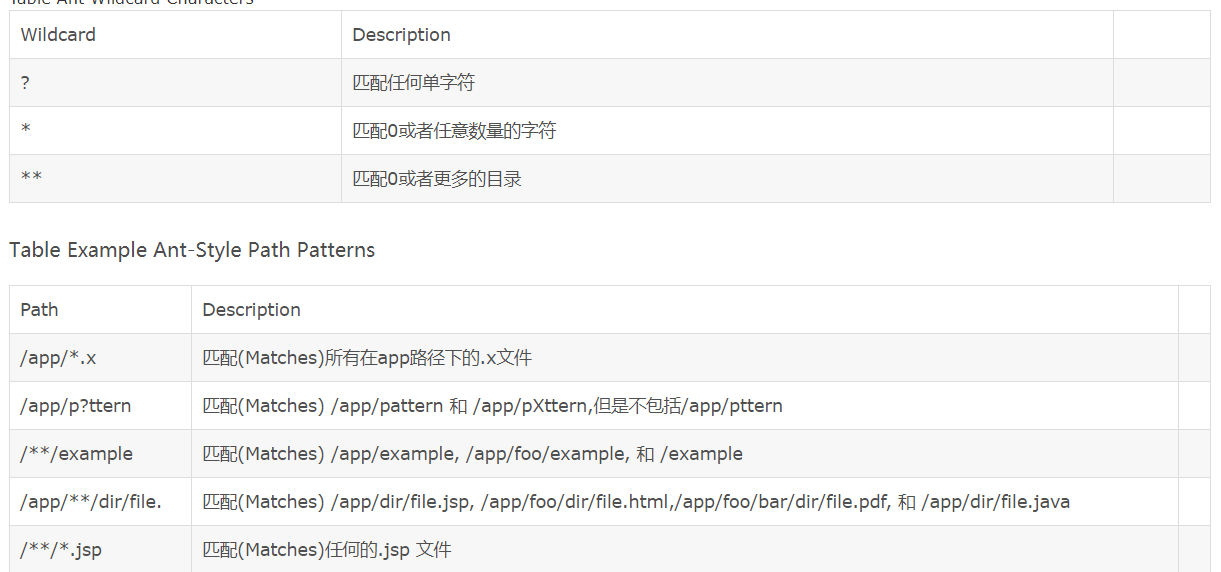
spring mvc路径匹配原则
静态资源和controller重名
静态资源的名字和controller的路径名字相同,需要特殊配置让其走tomcat默认的servlet
比如说有个静态资源叫hello.html 有个controller的路径是/hello。那么访问localhost/hello.html的时候会自动跳转到localhost/hello。为了避免这种现像,需要在web.xml里面定义
<!--静态资源的名字和controller的路径名字相同,需要特殊配置让其走tomcat默认的servlet-->

  <servlet-mapping>

    <servlet-name>default</servlet-name>

    <url-pattern>/login.html</url-pattern>

    <url-pattern>/regist.html</url-pattern>

  </servlet-mapping>
mvc:interceptors拦截器的用法
阿里云服务器25端口的问题
Could not connect to SMTP host: smtp.163.com, port: 25,阿里云服务器封禁了25,解决办法是使用465端口
package org.suyuesheng.spring7.util;

import javax.mail.*;

import javax.mail.internet.InternetAddress;

import javax.mail.internet.MimeMessage;

import java.util.Properties;

/**

 * 发邮件工具类

 */

public final class MailUtils {

    private static final String USER = "sys088519@163.com"; // 发件人称号,同邮箱地址

    private static final String PASSWORD = "授权码"; // 如果是qq邮箱可以使户端授权码,或者登录密码

    /**

     *

     * @param to 收件人邮箱

     * @param text 邮件正文

     * @param title 标题

     */

    /* 发送验证信息的邮件 */

    public static boolean sendMail(String to, String text, String title){

        try {

            final String SSL_FACTORY = "javax.net.ssl.SSLSocketFactory";

            final Properties props = new Properties();

            props.setProperty("mail.smtp.socketFactory.class", SSL_FACTORY);

            props.setProperty("mail.smtp.socketFactory.fallback", "false");

            props.put("mail.smtp.auth", "true");

            props.put("mail.smtp.host", "smtp.163.com");

            props.setProperty("mail.smtp.port", "465");

            props.setProperty("mail.smtp.socketFactory.port", "465");

            // 发件人的账号

            props.put("mail.user", USER);

            //发件人的密码

            props.put("mail.password", PASSWORD);

            // 构建授权信息,用于进行SMTP进行身份验证

            Authenticator authenticator = new Authenticator() {

                @Override

                protected PasswordAuthentication getPasswordAuthentication() {

                    // 用户名、密码

                    String userName = props.getProperty("mail.user");

                    String password = props.getProperty("mail.password");

                    return new PasswordAuthentication(userName, password);

                }

            };

            // 使用环境属性和授权信息,创建邮件会话

            Session mailSession = Session.getInstance(props, authenticator);

            // 创建邮件消息

            MimeMessage message = new MimeMessage(mailSession);

            // 设置发件人

            String username = props.getProperty("mail.user");

            /**

             * 发件人地址:sys088519@163.com

             * 发件人姓名:节能减排小组

             */

            InternetAddress form = new InternetAddress(username, "节能减排小组");

            message.setFrom(form);

            // 设置收件人

            InternetAddress toAddress = new InternetAddress(to);

            message.setRecipient(Message.RecipientType.TO, toAddress);

            // 设置邮件标题

            message.setSubject(title);

            // 设置邮件的内容体

            message.setContent(text, "text/html;charset=UTF-8");

            // 发送邮件

            Transport.send(message);

            return true;

        }catch (Exception e){

            e.printStackTrace();

        }

        return false;

    }

    public static void main(String[] args) throws Exception { // 做测试用

        MailUtils.sendMail("1446942825@qq.com","<h1>测试邮件,无须回复</h1><hr><p>这是一封测试邮件</p>","测试");

        System.out.println("发送成功");

    }

}
使用465端口还有一个证书的问题[javax.net.ssl.SSLException](http://javax.net.ssl.sslexception/): java.lang.RuntimeException: Unexpected error: java.security.InvalidAlgorithmParameterException: the trustAnchors parameter must be non-empty解决办法是https://blog.csdn.net/yu849893679/article/details/86081562
tomcat的项目,不同端口访问的问题
https://blog.csdn.net/gang_strong/article/details/29415301
springmvc+mybatis 实现登录、注册、邮件激活等功能的更多相关文章
- python3 练习题(用函数完成登录注册以及购物车的功能)
''' 用函数完成登录注册以及购物车的功能 作业需求: 1,启动程序,用户可选择四个选项:登录,注册,购物,退出. 2,用户注册,用户名不能重复,注册成功之后,用户名密码记录到文件中. 3,用户登录, ...
- springMVC+mybatis用户登录实例
1.整体结构 2.准备工作 数据库: --Mysql 5.6 创建数据库 wolf 1 CREATE DATABASE wolf; 创建用户表 user 1 2 3 4 5 6 create tabl ...
- SpringMVC+Spring+Mybatis实现登录注册Demo
使用环境:MyEclipse/Eclipse + Tomcat + MySql. 使用技术:SpringMVC + Spring + Mybatis. 实现效果 登录页面: 密码错误提示 登录成功后 ...
- [py][mx]django注册-邮件激活
人生,学习,就是一段旅途, 说是放弃,其实是自信心作祟. 因为不同时间段状态,譬如晚上和早上刚来状态不一样.做相同事情容器失去自信而放弃. 坚持可以打破这个魔咒 还有就是有些问题得分割, 不要让压死牛 ...
- discuz x3.2设置注册邮件激活_企业邮箱发送邮件失败
在discuz x2.5邮箱设置里面已经说了很多关于邮件设置和常见问题的处理办法了,今天这里主要是说明下Discuz! 邮件发送失败排查思路,适用于任何板块的Discuz程序. Discuz! 邮件发 ...
- SpringMVC+MyBatis(最新)
目前主流的Web MVC框架,除了Struts这个主力 外,还有Spring MVC,主要是由于Spring MVC配置比较简单,使用起来也十分明了,非常灵活,与Spring 集成较好,对RESTfu ...
- Django项目登录注册系统
Django项目之个人网站 关注公众号"轻松学编程"了解更多. Github地址:https://github.com/liangdongchang/MyWeb.git 感兴趣的可 ...
- Java实现注册时发送激活邮件+激活
最近从项目分离出来的注册邮箱激活功能,整理一下,方便下次使用 1.RegisterController.java package com.app.web.controller; import java ...
- spring+springMVC 整合 MongoDB 实现注册登录
发现一入手 MongoDB,便无法脱离,简要说一下,MongoDB 是一个介于关系数据库和非关系数据库之间的产品,是非关系数据库当中功能最丰富,最像关系数据库的. 也是在 Nosql 中我最喜欢的一种 ...
随机推荐
- 《Metasploit魔鬼训练营》第一章实践作业
<Metasploit魔鬼训练营>第一章实践作业 1.搜集Samba服务usermap_script安全漏洞的相关信息,画出该安全漏洞的生命周期图,标注各个重要事件点的日期,并提供详细描述 ...
- PL/SQL 九九乘法表
和shell脚本九九乘法表一样,只是语法有少出入 先看看效果图先: 利用for循环: SET SERVEROUTPUT ON DECLARE x INT :=1; y INT :=1; BEGIN F ...
- docker配置dns与容器的访问控制(6)
Docker 没有为每个容器专门定制镜像,那么怎么自定义配置容器的主机名和DNS配置?秘诀就是它利用虚拟文件来挂载到容器的3个相关的配置文件. 进入容器内使用mount命令可以看到挂载信息,这种机制可 ...
- docker 部署FastDFS
教程:https://blog.csdn.net/fangchao2011/article/details/103202591 教程:https://www.jianshu.com/p/3f80cba ...
- MATLAB学习1 之画图函数
ezplot适用条件 "ezplot"命令可以用于显函数.隐函数和参数方程作图. 不同函数的使用格式 显函数y=f(x),ezplot函数的调用格式为ezplot(f, [xmin ...
- javascript中Function、ArrowFunction和GeneratorFunction介绍
ECMAScript规范中对Function的文档描述,我认为是ECMAScript规范中最复杂也是最不好理解的一部分,它涉及到了各方面.光对Function就分了Function Definitio ...
- 使用cpplint检测代码规范
0. cpplint - python脚本, google使用它作为自己的C++代码规范检查工具: 1. 安装 方法一: $sudo apt-get install python-pip $pip i ...
- java基于socket的网络通信,实现一个服务端多个客户端的群聊,传输文件功能,界面使用Swing
最近在复习java的io流及网络编程.但复习写那些样板程序总是乏味的.便准备写个项目来巩固.想来想去还是聊天项目比较好玩.如果日后完成的比较好自己也可以用(哈哈哈).并且自己后面也要继续巩固java多 ...
- Servlet --启动时创建、配置url、ServlectContext、初始化参数、获取资源
servlet的版本的区别 2.5版本, Servlet的配置只支持在xml文件中的配置 3.0版本: Servlet的配置支持在xml文件中的配置, 也可以使用注解的方式, 默认使用注解 让服务器在 ...
- C. Two Arrays(思维DP或组合数学)
\(首先很容易想到一个O(n^4m)的DP\) \(设dp\ [i]\ [j]\ [q]\ 为长度i,a数组以j结尾,b数组以q结尾(q>=j)\) for(int i=1;i<=n;i+ ...