
Netty(二):数据在ChannelPipeline中的流经
本文目的:测试数据在ChannelPipeline中的流经顺序及状态。
先看本文的测试代码:
AdditionalInBoundHandler:入站处理器,不做任何处理,只是在响应读事件时打印用来观察,并继续通过fireChannelRead传递读事件。
public class AdditionalInBoundHandler extends ChannelInboundHandlerAdapter {

    private String name;

    public AdditionalInBoundHandler(String name){

        this.name = name;

    }

    @Override

    public void channelRead(ChannelHandlerContext ctx, Object msg){

        System.out.println("go through additional InBoundHandler[" + name + "]; msg type[" + msg.getClass() + "]");

        ctx.fireChannelRead(msg);

    }

}
BigIntegerDecoder:解码器,用来读取Bytebuf中的字节数据,解码成BigInter对象。
public class BigIntegerDecoder extends ByteToMessageDecoder {

    @Override

    protected void decode(ChannelHandlerContext ctx, ByteBuf in, List<Object> out) {

        System.out.println("BigIntegerDecoder");

        // Wait until the length prefix is available.

        if (in.readableBytes() < 4) {

            return;

        }

        in.markReaderIndex();

        int length = in.readInt();

        if (in.readableBytes() < length){

            in.resetReaderIndex();

            return;

        }

        byte[] data = new byte[length];

        in.readBytes(data);

        out.add(new BigInteger(data));

    }
NettyServerHandler:将读到的BigInteger加1并写出。
public class NettyServerHandler extends SimpleChannelInboundHandler<BigInteger> {

    @Override

    public void channelRead0(ChannelHandlerContext ctx, BigInteger msg) throws Exception {

        System.out.println("NettyServerHandler");

        ctx.writeAndFlush(msg.add(BigInteger.ONE));

    }

    @Override

    public void exceptionCaught(ChannelHandlerContext ctx, Throwable cause) throws Exception {

        cause.printStackTrace();

        ctx.close();

    }

}
NumberEncoder:将BigInteger对象编码成字节数字,由ByteBuf写出。
public class NumberEncoder extends MessageToByteEncoder<Number> {

    @Override

    protected void encode(ChannelHandlerContext ctx, Number msg, ByteBuf out) {

        System.out.println("NumberEncoder");

        // Convert to a BigInteger first for easier implementation.

        BigInteger v;

        if (msg instanceof BigInteger) {

            v = (BigInteger) msg;

        } else {

            v = new BigInteger(String.valueOf(msg));

        }

        // Convert the number into a byte array.

        byte[] data = v.toByteArray();

        int dataLength = data.length;

        // Write a message.

        out.writeInt(dataLength);  // data length

        out.writeBytes(data);      // data

    }

}
AdditionalOutboundHandler:出站处理器,不对数据做任何处理,直接写出,只是简单增加了打印功能,方便测试。
public class AdditionalOutBoundHandler extends ChannelOutboundHandlerAdapter {

    private String name;

    public AdditionalOutBoundHandler(String name) {

        this.name = name;

    }

    @Override

    public void write(ChannelHandlerContext ctx, Object msg, ChannelPromise promise) throws Exception {

        System.out.println("go through additional outbound handler[" + name + "];msg type [" + msg.getClass() + "]");

        ctx.write(msg, promise);

    }

}
测试代码:channelHandlerTest。通过EmbeddedChannel进行测试。
public class ChannelHandlerTest {

    @Test

    public void channelHandlerTest(){

        ByteBuf buf = Unpooled.buffer();

        EmbeddedChannel embeddedChannel = new EmbeddedChannel();

        ChannelPipeline pipeline = embeddedChannel.pipeline();

        pipeline.addLast(new AdditionalInBoundHandler("in handler 1"));

        pipeline.addLast(new AdditionalInBoundHandler("in handler 2"));

        pipeline.addLast(new BigIntegerDecoder());

        pipeline.addLast(new NumberEncoder());

        pipeline.addLast(new AdditionalOutBoundHandler("out handler 1"));

        pipeline.addLast(new AdditionalInBoundHandler("in handler 3"));

        pipeline.addLast(new NettyServerHandler());

        pipeline.addLast(new AdditionalInBoundHandler("in handler 4"));

        pipeline.addLast(new AdditionalOutBoundHandler("out handler 2"));

        byte[] bytes = new byte[]{0x01, 0x02, 0x03, 0x04};

        BigInteger bi = new BigInteger(bytes);

        buf.writeInt(4);

        buf.writeBytes(bytes);

        //因为nettyServerHandler fire了写事件,因此channelpipeline尾部没数据可读

        assertTrue(!embeddedChannel.writeInbound(buf));

        ByteBuf readBuf = embeddedChannel.readOutbound();

        int length = readBuf.readInt();

        bytes = new byte[length];

        readBuf.readBytes(bytes);

        System.out.println(new BigInteger(bytes));

    }

}
我们可以看到ChannelPipeline中的顺序是头到尾:InBound1(入) -> InBound2(入) -> BigIntegerDecoder(入) -> NumberEncoder(出) -> OutBound1(出) -> InBound3(入) -> NettyServerHandler(入) -> InBound4(入) -> OutBound2(出)。
执行测试代码,我们可以看到控制台中的输出是:

我们通过一张流程图片更清晰的看一下整个流经过程以及数据的状态:
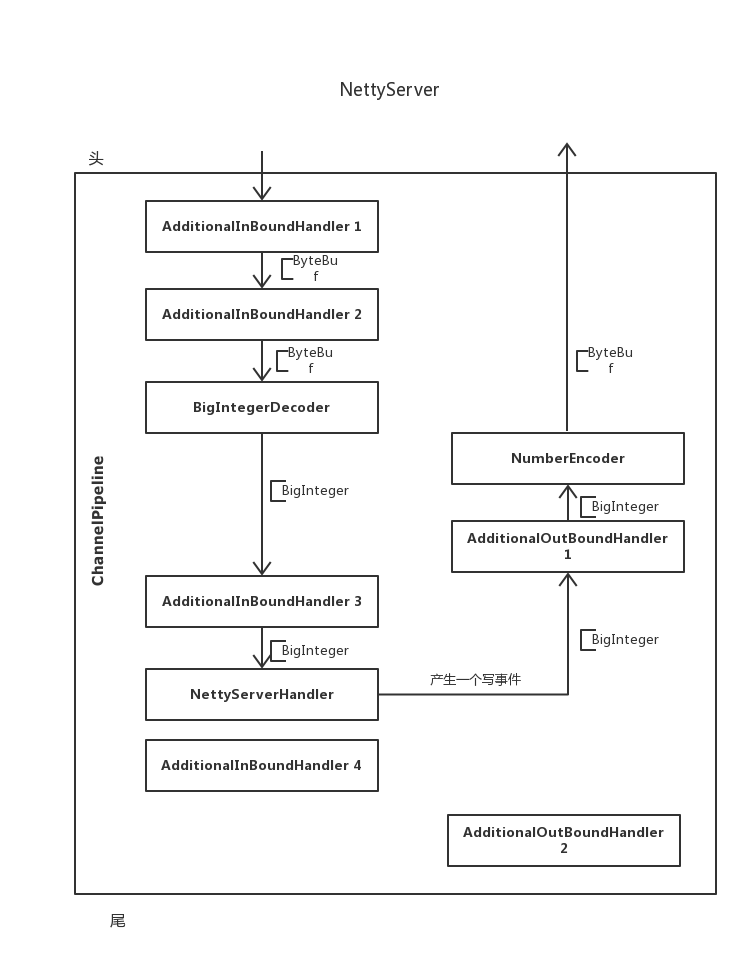
图上的箭头很清楚的表示了数据流经的过程,[XXX则注释出了此时的数据对象。
入站数据沿着ChannelPipeline的头至尾依次寻找下一个可以处理对应消息的处理器。
出战数据则会沿着ChannelPipeline的尾至头依次寻找下一个可以处理对应消息的处理器。
比如为什么数据没有流经InBoundHandler4和OutBoundHandler2?
因为NettyServerHandler发出了一个写事件,因此数据从尾至头的方法找下一个可以处理写消息的处理器,即OutBoundHandler1,在顺延下去。
Netty(二):数据在ChannelPipeline中的流经的更多相关文章
- SpringMVC(二)返回值设置、数据在域中的保存与SpringMVC案例
个人博客网:https://wushaopei.github.io/ (你想要这里多有) 一.返回值的设置 1.返回 String [1]返回 String 默认情况 @RequestMappi ...
- Scrapy基础(十二)————异步导出Item数据到Mysql中
异步导出数据到Mysql中 上次说过从Item中同步写入数据库,因为网络的下载速度和数据库的I/O速度是不一样的所以有可能会发生下载快,但是写入数据库速度慢,造成线程的堵塞:关于堵塞和非堵塞,同步和异 ...
- 【Netty】ChannelHandler和ChannelPipeline
一.前言 前面学习了Netty的ByteBuf,接着学习ChannelHandler和ChannelPipeline. 二.ChannelHandler和ChannelPipeline 2.1 Cha ...
- 一个I/O线程可以并发处理N个客户端连接和读写操作 I/O复用模型 基于Buf操作NIO可以读取任意位置的数据 Channel中读取数据到Buffer中或将数据 Buffer 中写入到 Channel 事件驱动消息通知观察者模式
Tomcat那些事儿 https://mp.weixin.qq.com/s?__biz=MzI3MTEwODc5Ng==&mid=2650860016&idx=2&sn=549 ...
- 在dubbo的一端,看Netty处理数据包,揭网络传输原理
如今,我们想要开发一个网络应用,那是相当地方便.不过就是引入一个框架,然后设置些参数,然后写写业务代码就搞定了. 写业务代码自然很重要,但是你知道: 你的数据是怎么来的吗?通过网络传输过来的呗. 你知 ...
- 自顶向下深入分析Netty(七)--ChannelPipeline和ChannelHandler总述
自顶向下深入分析Netty(七)--ChannelPipeline和ChannelHandler总述 自顶向下深入分析Netty(七)--ChannelPipeline源码实现 自顶向下深入分析Net ...
- Netty(二):如何处理io请求?
文接上一篇.上篇讲到netty暴露一个端口出来,acceptor, handler, pipeline, eventloop 都已准备好.但是并没体现其如何处理接入新的网络请求,今天我们就一起来看看吧 ...
- 一文搞懂 Netty 发送数据全流程 | 你想知道的细节全在这里
欢迎关注公众号:bin的技术小屋,如果大家在看文章的时候发现图片加载不了,可以到公众号查看原文 本系列Netty源码解析文章基于 4.1.56.Final版本 在<Netty如何高效接收网络数据 ...
- (转)原始图像数据和PDF中的图像数据
比较原始图像数据和PDF中的图像数据,结果见表1.1.表1.1中各种“解码器”的解释见本文后续的“PDF支持的图像格式”部分,“PDF中的图像数据”各栏中的数据来自开源的PdfView.如果您有兴趣查 ...
随机推荐
- C9K Stackwise Virtual(一)
一.SV技术基本说明 思科Catalyst9K平台的Stackwise Virtual技术是将两个物理的交换机虚拟成一个逻辑的实体(从网络控制层面和管理的角度来看),这两个交换机合二为一之后,将共享相 ...
- PXE基础装机环境
PXE基础装机环境 案例1:PXE基础装机环境 案例2:配置并验证DHC ...
- Linux基础:Day05
iptables ip 的 tables ip的表格: iptables只是netfilter的前端管理工具:netfilter是linux内核提供的数据流量管理模块: iptables/netfil ...
- 深入理解智能指针之shared_ptr(一)
本文基于C++标准库源码分析shared_ptr,旨在搞清楚shared_ptr是什么,线程安全性等,目标能够安全的使用智能指针. (一)shared_ptr是一个类. 首先可以确定的是shared_ ...
- Python 1基础语法二(标识符、关键字、变量和字符串)
一.标识符 标识符就是程序员自己命名的变量名.名字需要有见名知义的效果,不要随意起名 :比如 a=1 a是个变量,a这个变量名属于标识符 1 company = '小米 2 employeeNum = ...
- matplotlib PyQt5 nivigationBar 中pan和zoom功能的探索
为matplotlib生成的图添加编辑条,我们导入NavigationToolbar2QT from matplotlib.backends.backend_qt5agg import Navigat ...
- editplus 怎么替换为换行
到editplus 的搜索 菜单中,选择替换,记住 这边如果是简单的一些 通用字符 替换可以直接替换,如果是一些特殊的字符 那必须选择 替换框左下中间的 “正则表达式”,即把这个“正则表达式” 前边的 ...
- BAT脚本编写要点_特殊字符
BAT脚本编写要点(1)_特殊字符 分类: 其他 2011-03-20 00:58 5621人阅读 评论(0) 收藏 举报 脚本cdatecmdtreesystem 1. 点 与echo连用,作用是换 ...
- [算法总结]DFS(深度优先搜索)
目录 一.关于DFS 1. 什么是DFS 2. DFS的搜索方式 二.DFS的具体实现 三.剪枝 1. 顺序性剪枝 2. 重复性剪枝 3. 可行性剪枝 4. 最优性剪枝 5. 记忆化剪枝 四.练习 一 ...
- 【图解】你还在为 TCP 重传、滑动窗口、流量控制、拥塞控制发愁吗?看完图解就不愁了
每日一句英语学习,每天进步一点点: 前言 前一篇「硬不硬你说了算!近 40 张图解被问千百遍的 TCP 三次握手和四次挥手面试题」得到了很多读者的认可,在此特别感谢你们的认可,大家都暖暖的. 来了,今 ...