
python 爬虫之 urllib 实践
文章更新于:2020-03-19
注:本文参考官方文档进行 urllib 的讲解。
文章目录
一、urllib 模块介绍
urllib 主要有以下四大模块用于处理URL。
1、urllib.request.py模块
注1:Request Objects有以下属性:full_url、type、host、origin_req_host、selector、data、unverifiable、method
注2:Request Objects有以下方法:·get_method()、add_header(key,val)、add_unredirected_header(key,header)、has_header(header)、remove_header(header)、get_full_url()、set_proxy(host,type)、get_header(header_name,default=None)、header_items()
注3:以上属性或方法,可以在定义一个Request对象后调用。
(1)urlopen函数
urllib.request.urlopen(url, data=None, timeout=socket._GLOBAL_DEFAULT_TIMEOUT,

           		 *, cafile=None, capath=None, cadefault=False, context=None)
注1:用于打开一个url,可以是一个网址字符串,也可以是一个Request对象。
注2:它返回的http.client.HTTPResponse或urllib.response.addinfourl对象具有以下方法:
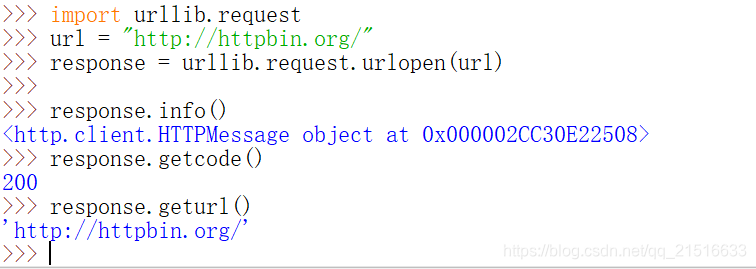
注3:geturl()方法:通常用于查看返回资源的URL,确定是否被重定向。
注4:info()方法:返回页面的元信息,比如headers。
注5:getcode()方法:返回http的响应码。
(2) Request函数
urllib.request.Request(url, data=None, headers={}, origin_req_host=None,

									 unverifiable=False, method=None)
注1:url应该是一个有效的网址字符串。
注2:data是要发送给服务器的数据对象。
注3:如果是post方法,data应该是application/x-www-form-urlencoded格式。
注4:headers应该是一个字典。
(3) ProxyHandler(proxies=None)函数
注1:用于设置代理。
注2:端口号:port可选。
2、urllib.error.py模块
此模块下有URLError、HTTPError和ContentTooShortError(msg,content)。
3、urllib.parse.py模块
这个模块是用来处理URL的,可以分解拼接URL。
通常来说,一个URL可以分为6部分,比如说:scheme://netloc/path;parameters?query#fragment
每部分都是一个字符串,有些可以为空,但这6块都是不可再分的最小单位。
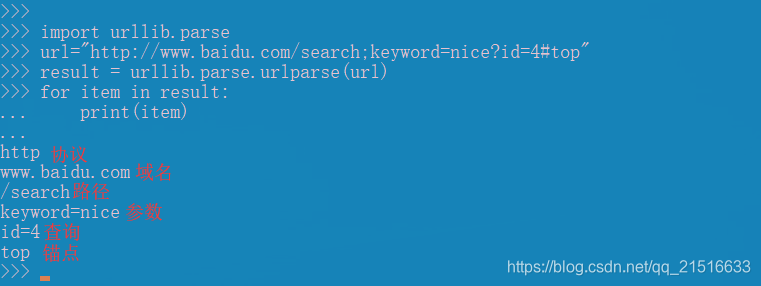
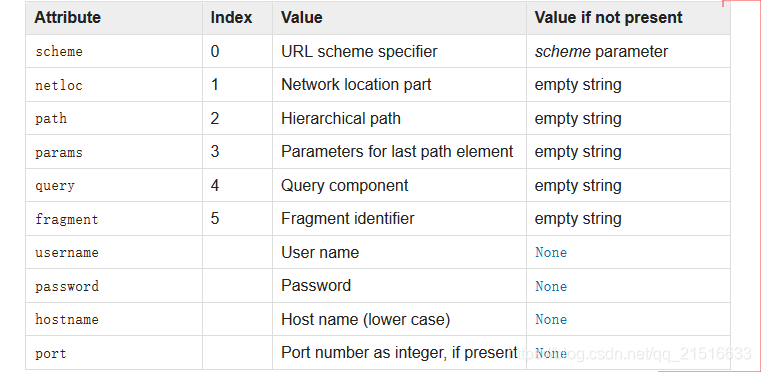
6个参数的解释如下:
4、urllib.robotparser.py模块
二、模块的使用
1、获取网页内容1
>>> import urllib.request

>>> with urllib.request.urlopen('http://www.python.org/') as f:

...     print(f.read(300))

...

b'<!DOCTYPE html PUBLIC "-//W3C//DTD XHTML 1.0 Transitional//EN"

"http://www.w3.org/TR/xhtml1/DTD/xhtml1-transitional.dtd">\n\n\n<html

xmlns="http://www.w3.org/1999/xhtml" xml:lang="en" lang="en">\n\n<head>\n

<meta http-equiv="content-type" content="text/html; charset=utf-8" />\n

<title>Python Programming '
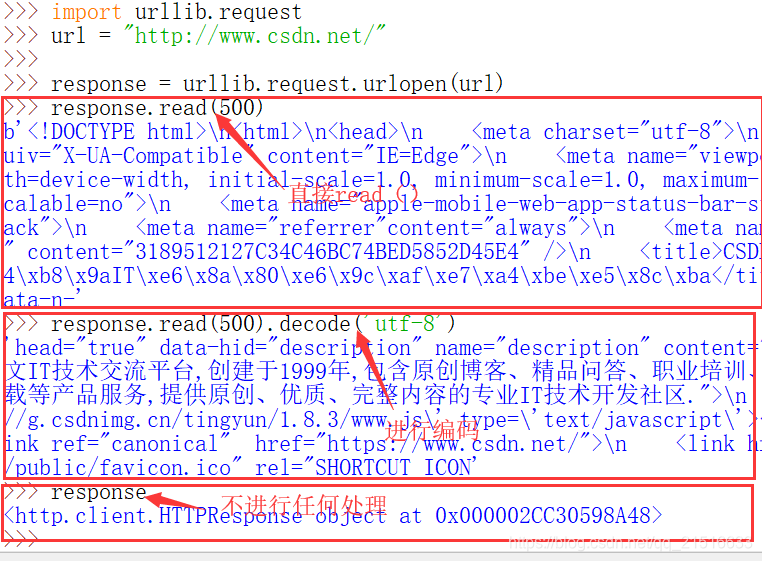
注1:如果是输出中文,这里的f.read(300)要改为f.read(300).decode('utf-8')才可以。
注2:因为urlopen返回的是字节对象,它无法自动转换编码,所以中文的话,手动来一下即可正常显示。
import urllib.request

url = "http://www.baidu.com/"

response = urllib.request.urlopen(url)

print(response.read().decode('utf-8')
注1:response 只能read一次(只print也算),再次read为空。
注2:如果只输出response,而不read(),那么输出的结果是这样的:
2、获取网页内容2
注:当然你还可以使用下面这种方法。
>>> import urllib.request

>>> f = urllib.request.urlopen('http://www.python.org/')

>>> print(f.read(100).decode('utf-8'))

<!DOCTYPE html PUBLIC "-//W3C//DTD XHTML 1.0 Transitional//EN"

"http://www.w3.org/TR/xhtml1/DTD/xhtm
3、使用基本的 HTTP 认证
import urllib.request

# Create an OpenerDirector with support for Basic HTTP Authentication...

auth_handler = urllib.request.HTTPBasicAuthHandler()

auth_handler.add_password(realm='PDQ Application',

                          uri='https://mahler:8092/site-updates.py',

                          user='klem',

                          passwd='kadidd!ehopper')

opener = urllib.request.build_opener(auth_handler)

# ...and install it globally so it can be used with urlopen.

urllib.request.install_opener(opener)

urllib.request.urlopen('http://www.example.com/login.html')
4、添加 headers
import urllib.request

req = urllib.request.Request('http://www.example.com/')

req.add_header('Referer', 'http://www.python.org/')

# Customize the default User-Agent header value:

req.add_header('User-Agent', 'urllib-example/0.1 (Contact: . . .)')

r = urllib.request.urlopen(req)
5、使用参数
>>> import urllib.request

>>> import urllib.parse

>>> data = urllib.parse.urlencode({'spam': 1, 'eggs': 2, 'bacon': 0})

>>> data = data.encode('ascii')

>>> with urllib.request.urlopen("http://requestb.in/xrbl82xr", data) as f:

...     print(f.read().decode('utf-8'))

...
6、使用代理
>>> import urllib.request

>>> proxies = {'http': 'http://proxy.example.com:8080/'}

>>> opener = urllib.request.FancyURLopener(proxies)

>>> with opener.open("http://www.python.org") as f:

...     f.read().decode('utf-8')

...
7、响应码
| 响应码 | 说明 |
|---|---|
| 100 | (‘Continue’, ‘Request received, please continue’) |
| 101 | (‘Switching Protocols’, ‘Switching to new protocol; obey Upgrade header’) |
| 200 | (‘OK’, ‘Request fulfilled, document follows’) |
| 201 | (‘Created’, ‘Document created, URL follows’) |
| 202 | (‘Accepted’, ‘Request accepted, processing continues off-line’) |
| 203 | (‘Non-Authoritative Information’, ‘Request fulfilled from cache’) |
| 204 | (‘No Content’, ‘Request fulfilled, nothing follows’) |
| 205 | (‘Reset Content’, ‘Clear input form for further input.’) |
| 206 | (‘Partial Content’, ‘Partial content follows.’) |
| 300 | (‘Multiple Choices’, ‘Object has several resources – see URI list’) |
| 301 | (‘Moved Permanently’, ‘Object moved permanently – see URI list’) |
| 302 | (‘Found’, ‘Object moved temporarily – see URI list’) |
| 303 | (‘See Other’, ‘Object moved – see Method and URL list’) |
| 304 | (‘Not Modified’, ‘Document has not changed since given time’) |
| 305 | (‘Use Proxy’, ‘You must use proxy specified in Location to access this resource.’) |
| 307 | (‘Temporary Redirect’, ‘Object moved temporarily – see URI list’) |
| 400 | (‘Bad Request’, ‘Bad request syntax or unsupported method’) |
| 401 | (‘Unauthorized’, ‘No permission – see authorization schemes’) |
| 402 | (‘Payment Required’, ‘No payment – see charging schemes’) |
| 403 | (‘Forbidden’, ‘Request forbidden – authorization will not help’) |
| 404 | (‘Not Found’, ‘Nothing matches the given URI’) |
| 405 | (‘Method Not Allowed’, ‘Specified method is invalid for this server.’) |
| 406 | (‘Not Acceptable’, ‘URI not available in preferred format.’) |
| 407 | (‘Proxy Authentication Required’, ‘You must authenticate with this proxy before proceeding.’) |
| 408 | (‘Request Timeout’, ‘Request timed out; try again later.’) |
| 409 | (‘Conflict’, ‘Request conflict.’) |
| 410 | (‘Gone’, ‘URI no longer exists and has been permanently removed.’) |
| 411 | (‘Length Required’, ‘Client must specify Content-Length.’) |
| 412 | (‘Precondition Failed’, ‘Precondition in headers is false.’) |
| 413 | (‘Request Entity Too Large’, ‘Entity is too large.’) |
| 414 | (‘Request-URI Too Long’, ‘URI is too long.’) |
| 415 | (‘Unsupported Media Type’, ‘Entity body in unsupported format.’) |
| 416 | (‘Requested Range Not Satisfiable’, ‘Cannot satisfy request range.’) |
| 417 | (‘Expectation Failed’, ‘Expect condition could not be satisfied.’) |
| 500 | (‘Internal Server Error’, ‘Server got itself in trouble’) |
| 501 | (‘Not Implemented’, ‘Server does not support this operation’) |
| 502 | (‘Bad Gateway’, ‘Invalid responses from another server/proxy.’) |
| 503 | (‘Service Unavailable’, ‘The server cannot process the request due to a high load’) |
| 504 | (‘Gateway Timeout’, ‘The gateway server did not receive a timely response’) |
| 505 | (‘HTTP Version Not Supported’, ‘Cannot fulfill request.’) |
8、处理异常
from urllib.request import Request, urlopen

from urllib.error import URLError, HTTPError

req = Request(someurl)

try:

    response = urlopen(req)

except HTTPError as e:

    print('The server couldn\'t fulfill the request.')

    print('Error code: ', e.code)

except URLError as e:

    print('We failed to reach a server.')

    print('Reason: ', e.reason)

else:

    # everything is fine

    ```

###  9、异常处理2

```python

from urllib.request import Request, urlopen

from urllib.error import URLError

req = Request(someurl)

try:

    response = urlopen(req)

except URLError as e:

    if hasattr(e, 'reason'):

        print('We failed to reach a server.')

        print('Reason: ', e.reason)

    elif hasattr(e, 'code'):

        print('The server couldn\'t fulfill the request.')

        print('Error code: ', e.code)

else:

    # everything is fine
三、总结
1、urllib.request.urlopen()
import urllib.request

url = "http://www.csdn.net/"

req = urllib.request.urlopen(url)

req.add_header('Referer','http://www.csdn.net')

req.add_header('User-Agent','chrome')

response = urllib.request.urlopen(req)

print(response.read(2000).decode('utf-8')
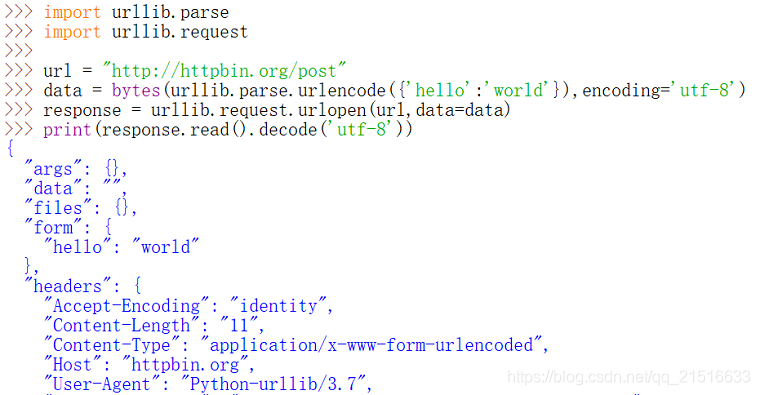
2、添加表单数据
import urllib.parse

import urllib.request

url = "http://httpbin.org/post"

data = bytes(urllib.parse.urlencode({'hello':'world'}),encoding='utf-8')

response = urllib.request.urlopen(url,data=data)

print(response.read().decode('utf-8'))
3、获取响应信息
import urllib.request

url = "http://httpbin.org/"

response = urllib.request.urlopen(url)

response.info()

response.getcode()

response.geturl()
4、保存数据
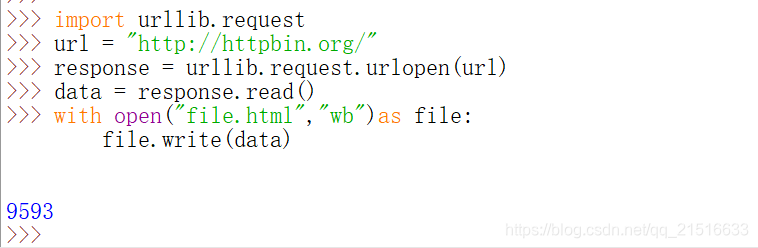
如果是保存 HTML:
import urllib.request

url = "http://httpbin.org/"

response = urllib.request.urlopen(url)

data = response.read()

with open("file.html","wb")as file:

	file.write(data)
·
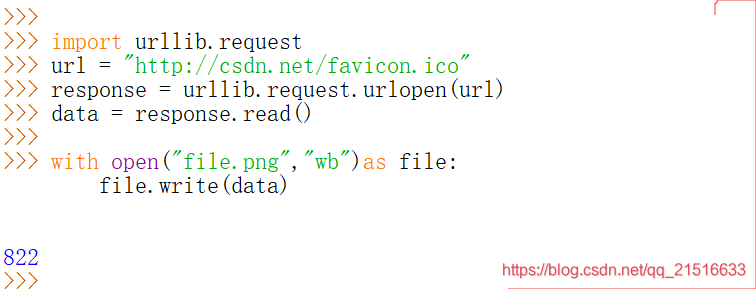
如果是保存图片等数据:
import urllib.request

url = "http://csdn.net/favicon.ico"

response = urllib.request.urlopen(url)

data = response.read()

with open("file.png","wb")as file:

	file.write(data)
另外一种方法,(注意路径要存在):
import urllib.request

url = "http://csdn.net/"

urllib.request.urlretrieve(url,filename=r"d:\test\index.html")
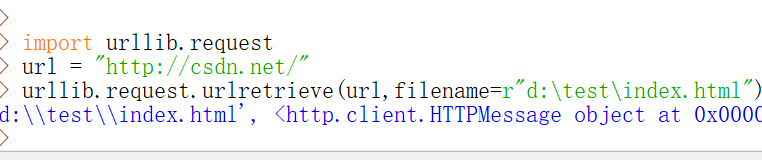
也可以用变量接收这个语句的返回值,类型是数组,可以输出数据。
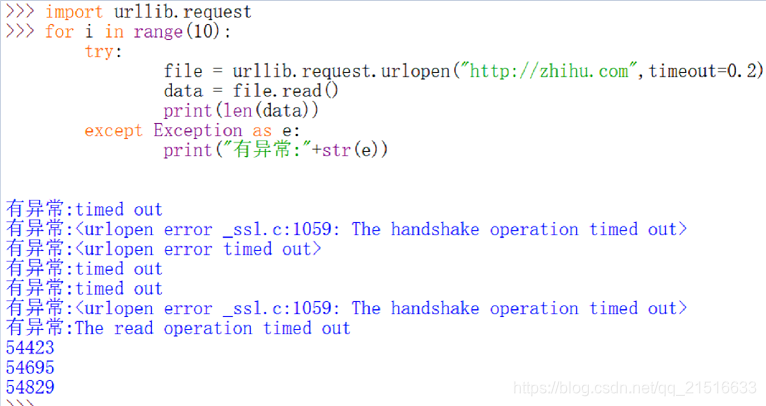
5、处理异常
>>>import urllib.request

>>> for i in range(10):

	try:

		file = urllib.request.urlopen("http://zhihu.com",timeout=0.2)

		data = file.read()

		print(len(data))

	except Exception as e:

		print("有异常:"+str(e))
四、Enjoy!
python 爬虫之 urllib 实践的更多相关文章
- Python爬虫之urllib模块2
Python爬虫之urllib模块2 本文来自网友投稿 作者:PG-55,一个待毕业待就业的二流大学生. 看了一下上一节的反馈,有些同学认为这个没什么意义,也有的同学觉得太简单,关于Beautiful ...
- Python爬虫之urllib模块1
Python爬虫之urllib模块1 本文来自网友投稿.作者PG,一个待毕业待就业二流大学生.玄魂工作室未对该文章内容做任何改变. 因为本人一直对推理悬疑比较感兴趣,所以这次爬取的网站也是平时看一些悬 ...
- python爬虫之urllib库(三)
python爬虫之urllib库(三) urllib库 访问网页都是通过HTTP协议进行的,而HTTP协议是一种无状态的协议,即记不住来者何人.举个栗子,天猫上买东西,需要先登录天猫账号进入主页,再去 ...
- python爬虫之urllib库(二)
python爬虫之urllib库(二) urllib库 超时设置 网页长时间无法响应的,系统会判断网页超时,无法打开网页.对于爬虫而言,我们作为网页的访问者,不能一直等着服务器给我们返回错误信息,耗费 ...
- python爬虫之urllib库(一)
python爬虫之urllib库(一) urllib库 urllib库是python提供的一种用于操作URL的模块,python2中是urllib和urllib2两个库文件,python3中整合在了u ...
- Python爬虫之urllib.parse详解
Python爬虫之urllib.parse 转载地址 Python 中的 urllib.parse 模块提供了很多解析和组建 URL 的函数. 解析url 解析url( urlparse() ) ur ...
- Python爬虫之Urllib库的基本使用
# get请求 import urllib.request response = urllib.request.urlopen("http://www.baidu.com") pr ...
- python爬虫之urllib库
请求库 urllib urllib主要分为几个部分 urllib.request 发送请求urllib.error 处理请求过程中出现的异常urllib.parse 处理urlurllib.robot ...
- Python爬虫系列-Urllib库详解
Urllib库详解 Python内置的Http请求库: * urllib.request 请求模块 * urllib.error 异常处理模块 * urllib.parse url解析模块 * url ...
随机推荐
- drf呼啦圈
呼啦圈 1.1 表结构设计 不会经常变化的值放在内存:choices形式,避免跨表性能低. 分表:如果表中列太多/大量内容可以选择水平分表 表自关联 from django.db import mod ...
- 数据库开发 Oracle与mysql间的批量处理接口 SSIS+存储过程实现
公司目前不同的业务系统用了不同的数据库,涉及到oracle.mysql.sqlserver.而一些核心的业务在mysql中,所以平时经常要把oracle.sqlserver中的数据插入到mysql中. ...
- [BUG]微信小程序ios时间转换
描述 小程序ios new Date('2019-08-14T08:00:00.000+0000') 显示为 <Date: null>. '2019-08-14T08:00:00 ...
- Flutter 使用阿里巴巴icon库
在Flutter默认创建的项目中可以使用系统Material图标,在pubspec.yaml文件中使用图标设置如下: flutter: uses-material-design: true 系统图标如 ...
- python爬取网站页面时,部分标签无指定属性而报错
在写爬取页面a标签下href属性的时候,有这样一个问题,如果a标签下没有href这个属性则会报错,如下: 百度了有师傅用正则匹配的,方法感觉都不怎么好,查了BeautifulSoup的官方文档,发现一 ...
- hdu1908 逆序对
题目链接:https://www.luogu.com.cn/problem/P1908 这个题不要以为拿到手就可以树状数组秒,本题的数据范围是1e9显然简单的树状数组是空间不够的,点个数有5e5,所以 ...
- PU Learning简介:对无标签数据进行半监督分类
当只有几个正样本,你如何分类无标签数据 假设您有一个交易业务数据集.有些交易被标记为欺诈,其余交易被标记为真实交易,因此您需要设计一个模型来区分欺诈交易和真实交易. 假设您有足够的数据和良好的特征,这 ...
- Anaconda常用命令收藏----后期还会更新
一.更换jupyter notobook的打开目录 一般载在安装好Anaconda的时候,打开jupyter指向的目录一般是系统的根目录,如C:\Users\25282,但是这样的话对C盘是个不小的负 ...
- Hive面试准备
Hive与HBase的区别Hive架构原理Hive的数据模型及各模块的应用场景Hive支持的文件格式和压缩格式及各自特点Hive内外表的区分方法及内外部差异Hive视图如何创建.特点及应用场景Hive ...
- GBDT梯度提升树算法及官方案例
梯度提升树是一种决策树的集成算法.它通过反复迭代训练决策树来最小化损失函数.决策树类似,梯度提升树具有可处理类别特征.易扩展到多分类问题.不需特征缩放等性质.Spark.ml通过使用现有decisio ...