
hibernate中简单的增删改查
项目的整体结构如下
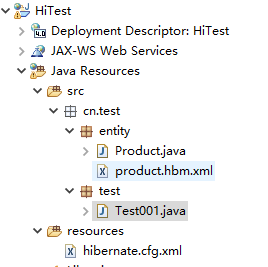
1.配置文件
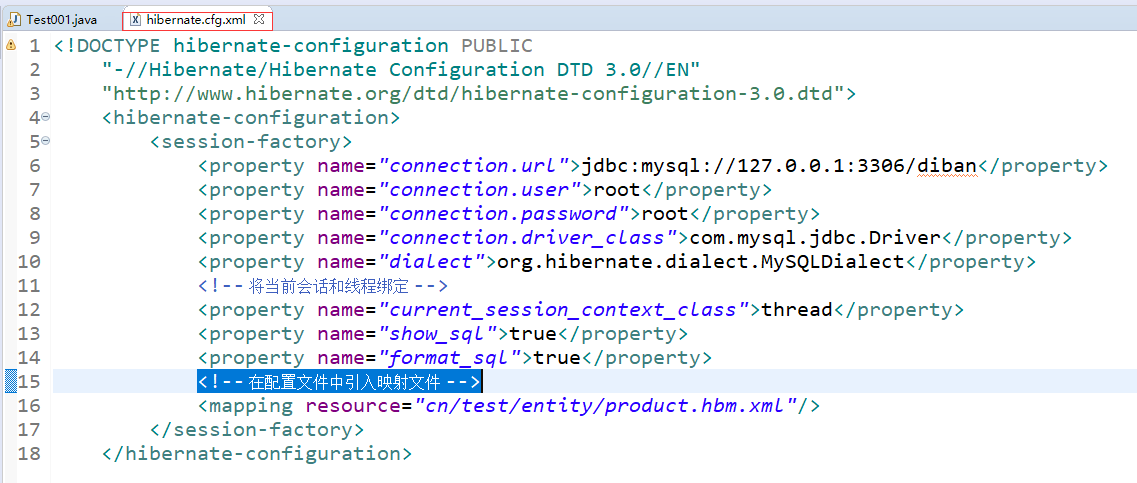
hibernate.cfg.xml
<!DOCTYPE hibernate-configuration PUBLIC
"-//Hibernate/Hibernate Configuration DTD 3.0//EN"
"http://www.hibernate.org/dtd/hibernate-configuration-3.0.dtd">
<hibernate-configuration>
<session-factory>
<property name="connection.url">jdbc:mysql://127.0.0.1:3306/diban</property>
<property name="connection.user">root</property>
<property name="connection.password">root</property>
<property name="connection.driver_class">com.mysql.jdbc.Driver</property>
<property name="dialect">org.hibernate.dialect.MySQLDialect</property>
<!-- 将当前会话和线程绑定 -->
<property name="current_session_context_class">thread</property>
<property name="show_sql">true</property>
<property name="format_sql">true</property>
<!-- 在配置文件中引入映射文件 -->
<mapping resource="cn/test/entity/product.hbm.xml"/>
</session-factory>
</hibernate-configuration>
2.映射文件
<!DOCTYPE hibernate-mapping PUBLIC
"-//Hibernate/Hibernate Mapping DTD 3.0//EN"
"http://www.hibernate.org/dtd/hibernate-mapping-3.0.dtd">
<hibernate-mapping>
<class name="cn.test.entity.Product" table="`product`">
<id name="id" type="java.lang.Integer" column="`id`">
<generator class="assigned"></generator><!-- 由应用程序生成,即自己在程序中书写 -->
</id>
<property name="productName" type="java.lang.String" column="`product_name`"></property>
<property name="productInfo" type="java.lang.String" column="product_info"></property>
<property name="isno" type="java.lang.Integer" column="isno"></property>
<property name="productType" type="java.lang.Integer" column="product_type"></property>
<property name="productYuanjia" type="java.lang.Double" column="product_yuanjia "></property>
<property name="productPrice" type="java.lang.Double" column="product_price"></property>
<property name="productXinghao" type="java.lang.String" column="product_xinghao"></property>
<property name="guige" type="java.lang.String" column="guige"></property>
</class>
</hibernate-mapping>

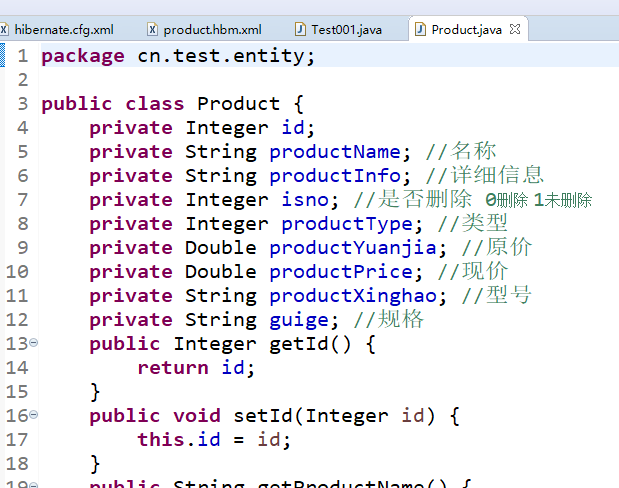
3.实体类
4.例子
package cn.test.test;
import java.util.List;
import org.hibernate.Query;
import org.hibernate.Session;
import org.hibernate.SessionFactory;
import org.hibernate.Transaction;
import org.hibernate.cfg.Configuration;
import org.junit.Test;
import cn.test.entity.Product;
public class Test001 {
/**
* 新增
*/
@Test
public void Test002() {
Transaction tx = null;
try {
//1.读取并解析配置文件和映射文件
Configuration conf = new Configuration().configure();
//2.根据配置文件和映射文件中的信息,创建sessionFactory对象
SessionFactory factory = conf.buildSessionFactory();
//3.创建session对象
Session session = factory.openSession();
//4.开始一个事务(创建一个事物对象)
tx = session.beginTransaction();
//5.创建一个对象并且初始化
Product p = new Product();
p.setId(137);
p.setProductName("137");
//6.数据库操作使用sava方法将数据添加到数据库中
session.save(p);
//7.结束事物
tx.commit();
} catch (Exception e) {
e.printStackTrace();
//7.结束事物
if(tx != null)
tx.rollback();
}
}
/**
* 删除
*/
@Test
public void Test005() {
Transaction tx = null;
try {
Configuration conf = new Configuration().configure();
SessionFactory factory = conf.buildSessionFactory();
Session session = factory.openSession();
tx = session.beginTransaction();
Product p = new Product();
p.setId(138);
session.delete(p);
tx.commit();
} catch (Exception e) {
e.printStackTrace();
if(tx != null)
tx.rollback();
}
}
/**
* updata更新的方法
* saveOrUpdata
* 先根据Id到数据库中判断是否有这条数据
* 如果有那么执行更新的方法
* 如果没有那么执行增加的方法
*/
@Test
public void Test004() {
Transaction tx = null;
try {
Configuration conf = new Configuration().configure();
SessionFactory factory = conf.buildSessionFactory();
Session session = factory.openSession();
tx = session.beginTransaction();
Product p = new Product();
p.setId(138);
p.setProductName("nimei111");
session.saveOrUpdate(p);
tx.commit();
} catch (Exception e) {
e.printStackTrace();
if(tx != null)
tx.rollback();
}
}
/**
* 根据Id查询具体的某一条数据
* load 延迟加载
* 使用load方法时不会直接发动sql语句到数据库中查询具体的数据,而是会先得到一个只有id属性的代理对象,只有当使用到其他属性时才会发送
* sql语句到数据库中查询具体的数据
* get 不延迟加载
*/
@Test
public void Test003() {
Transaction tx = null;
try {
//1.读取并解析配置文件和映射文件
Configuration conf = new Configuration().configure();
//2.根据配置文件和映射文件的信息创建会话工厂
SessionFactory factory = conf.buildSessionFactory();
//3.通过会话工厂打开session对象
Session session = factory.openSession();
//4.通过session对象创建事物对象
tx = session.beginTransaction();
//5.根据对象Id查询指定的单条对象数据
//Product p = (Product) session.load(Product.class, 137);
Product p = (Product)session.get(Product.class, 137);
System.out.println(p.getId());
tx.commit();
} catch (Exception e) {
e.printStackTrace();
if(tx != null)
tx.rollback();
}
}
/**
* ------------hql
*
* 查询语法
* 1.from子句
* from Product #查询所有的Product(查询所有属性)
* 2.select子句
* select Product.id from Product 查询所有Product的id(只查询id)
* 3.where
* from Product where id = 'haha'
* from Product where productName is not null
* 4.使用表达式
* from Product where lower(productName) = 'hhh'
* lower()函数用于把字符串中的每个字母改为小写
* from Product where year(createDate) = 1980
* year()函数用于获取日期字段的年份
*
*
* 如何为sql语句传入参数:
* 1.拼接字符串
* 2.参数绑定
* 1>.按位置绑定参数
* 2>.按名称绑定参数
* 3>.将数据封装到对象中绑定参数
* 如 : from Product where id = :id and productName = :name
* Product p = new Product();
* p.setId(11);
* p.setProductName("hello");
* query.setProperties(p);
*
*/
/**
* 拼接字符串
*/
@Test
public void Test006() {
String id = "id";
String hql = "from Product order by "+id;
Configuration conf = new Configuration().configure();
Session session = conf.buildSessionFactory().openSession();
Transaction tx = session.beginTransaction();
Query query = session.createQuery(hql);
List<Product> proList = query.list();
for (Product product : proList) {
System.out.println(product.getId()+":"+product.getProductName());
}
}
/**
* 按位置绑定参数
*/
@Test
public void Test007() {
String hql = "from Product order by ?";
Configuration conf = new Configuration().configure();
Session session = conf.buildSessionFactory().openSession();
Transaction tx = session.beginTransaction();
Query query = session.createQuery(hql);
query.setString(0, "id");
List<Product> proList = query.list();
for (Product product : proList) {
System.out.println(product.getId()+":"+product.getProductName());
}
}
/**
* 按名称绑定参数
*/
@Test
public void Test008() {
String hql = "from Product order by :id";
Configuration conf = new Configuration().configure();
Session session = conf.buildSessionFactory().openSession();
Transaction tx = session.beginTransaction();
Query query = session.createQuery(hql);
query.setString("id", "id");
List<Product> proList = query.list();
for (Product product : proList) {
System.out.println(product.getId()+":"+product.getProductName());
}
}
/**
* 分页查询
* setFirstResult((当前页-1)*页面容量)
* setmaxResults(页面容量)
*/
@Test
public void Test009() {
String hql = "from Product order by id";
Configuration conf = new Configuration().configure();
Session session = conf.buildSessionFactory().openSession();
Transaction tx = session.beginTransaction();
Query query = session.createQuery(hql);
query.setFirstResult((1-1)*9); //指定从第几条数据开始查询
query.setMaxResults(9); //指定页面容量(也就是每页显示的多少条数据)
List<Product> proList = query.list();
for (Product product : proList) {
System.out.println(product.getId()+":"+product.getProductName());
}
}
}
hibernate中简单的增删改查的更多相关文章
- 数据库中简单的增删改查(CRUD)
一切都是基于数据,而对数据的管理都离不开数据库.最近学到数据库的简单操作,所以写下这篇文章,总结一下学习到的知识.浅陋之处,多多见谅. 补充一下:一直弄不清SQL Server,Mysql ,以及Or ...
- 用CI框架向数据库中实现简单的增删改查
以下代码基于CodeIgniter_2.1.3版 用PHP向数据库中实现简单的增删改查(纯代码)请戳 http://www.cnblogs.com/corvoh/p/4641476.html Code ...
- MyBatis学习--简单的增删改查
jdbc程序 在学习MyBatis的时候先简单了解下JDBC编程的方式,我们以一个简单的查询为例,使用JDBC编程,如下: Public static void main(String[] args) ...
- salesforce 零基础学习(五十一)使用 Salesforce.com SOAP API 实现用户登录以及简单的增删改查(JAVA访问salesforce)
此篇请参看:https://resources.docs.salesforce.com/202/latest/en-us/sfdc/pdf/salesforce_developer_environme ...
- 通过JDBC进行简单的增删改查
通过JDBC进行简单的增删改查(以MySQL为例) 目录 前言:什么是JDBC 一.准备工作(一):MySQL安装配置和基础学习 二.准备工作(二):下载数据库对应的jar包并导入 三.JDBC基本操 ...
- 初试KONCKOUT+WEBAPI简单实现增删改查
初试KONCKOUT+WEBAPI简单实现增删改查 前言 konckout.js本人也是刚刚接触,也是初学,本文的目的是使用ko和asp.net mvc4 webapi来实现一个简单增删改查操作.Kn ...
- MVC3.0+knockout.js+Ajax 实现简单的增删改查
MVC3.0+knockout.js+Ajax 实现简单的增删改查 自从到北京入职以来就再也没有接触MVC,很多都已经淡忘了,最近一直在看knockout.js 和webAPI,本来打算采用MVC+k ...
- SpringMVC之简单的增删改查示例(SSM整合)
本篇文章主要介绍了SpringMVC之简单的增删改查示例(SSM整合),这个例子是基于SpringMVC+Spring+Mybatis实现的.有兴趣的可以了解一下. 虽然已经在做关于SpringMVC ...
- hibernate关联对象的增删改查------查
本篇博客是之前博客hibernate关联对象的增删改查------查 的后继,本篇代码的设定都在前文已经写好,因此读这篇之前,请先移步上一篇博客 //代码片5 SessionFactory sessi ...
随机推荐
- SSH 维持权限(好用)
很多时候我们拿下机器后需要维持权限,在计划任务上加入定时反弹shell这很容易被 运维人员发现,有些场景没必要用到rootkit级别的后门,我们可以尝试使用ssh后门 1.目的 长期维持机器root权 ...
- Cisco TrustSec(理解)
1.Cisco TrustSec的限制当指定了无效的设备ID时,受保护的访问凭据(Protected access credential,PAC)设置将失败并保持挂起状态. 即使在清除PAC并配置正确 ...
- python字典操作方法详解
前言 字典是一种通过名字或者关键字引用的得数据结构,key 类型需要时被哈希,其键可以是数字.字符串.元组,这种结构类型也称之为映射.字典类型是Python中唯一內建的映射类型. 注意,浮点数比较很不 ...
- 「JSOI2015」最大公约数
「JSOI2015」最大公约数 传送门 考虑先枚举区间左端点, 然后我们会发现所有可能的区间虽然有 \(O(n)\) 个,但是本质不同的区间 \(\gcd\) 只有 \(\log n\) 级别,而且是 ...
- ios中为视图添加圆角
1.使用 layer设置指定圆角 或者设定一个或几个圆角 码修 关注 2017.04.20 19:03* 字数 107 阅读 656评论 0喜欢 0 由于项目中需要给按钮左下 和左上加圆角,我司可爱的 ...
- 小程序云开发使用where查询遇到的问题
想用小程序云开发的where查询,结果不论输入什么都是不报错,开始没注意,后来发现输入数据库中有的数据时,给打印出来查询成功,输入数据库中没有的数据时,也会得到一个集合,只不过这个集合的长度为0而已. ...
- .NET精彩博文
vs2019安装和使用教程(详细) 为什么选择.NETCore? C#中Socket的简单使用
- 【转载】Eclipse vs IDEA快捷键对比大全(win系统)
花了几天时间熟悉IDEA的各种操作,将各种快捷键都试了一下,感觉很是不错! 以下为我整理了一下开发过程中经常用的一些Eclipse快捷键与IDEA的对比,方便像我一样使用Eclipse多年但想尝试些改 ...
- Python数据类型-8 集合set
集合set set集合是一个无序不重复元素的集,基本功能包括关系测试和消除重复元素.集合使用大括号({})框定元素,并以逗号进行分隔.但是注意:如果要创建一个空集合,必须用 set() 而不是 {} ...
- LeetCode 445. Add Two Numbers II(链表求和)
题意:两个非空链表求和,这两个链表所表示的数字没有前导零,要求不能修改原链表,如反转链表. 分析:用stack分别存两个链表的数字,然后从低位开始边求和边重新构造链表. Input: (7 -> ...