
【Flutter 1-16】Flutter手把手教程UI布局和Widget——容器控件Container
作者 | 弗拉德
来源 | 弗拉德(公众号:fulade_me)
Container
我们先来看一下Container初始化的参数:
  Container({

    Key key,

    // 位置 居左、居右、居中

    this.alignment,

    // EdgeInsets Container的内边距

    this.padding,

    // 背景颜色

    this.color,

    // 背景装饰器

    this.decoration,

    // 前景装饰器

    this.foregroundDecoration,

    // 宽度

    double width,

    // 告诉

    double height,

    // 约束

    BoxConstraints constraints,

    // EdgeInsets Container的外边距

    this.margin,

    // 旋转

    this.transform,

    // 子控件

    this.child,

    // 裁剪Widget的模式

    this.clipBehavior = Clip.none,

  })
注意:
Container的color属性与属性decoration的color存在冲突,如果两个color都做了设置,默认会以decoration的color为准。- 如果我们没有给
Container设置width和height,Container会跟child的大小一样;假如我们没有设置child的时候,它的尺寸会极大化,尽可能的充满它的父Widget。
1. 最简单的Container
Container(

    child: Text("Fulade"),

    color: Colors.red,

)
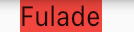
Container接收一个child参数,我们可以传入Text作为child参数,然后传入是一个颜色。
2. Padding
Container(

    child: Text("Pading 10"),

    padding: EdgeInsets.all(10),

    color: Colors.blue,

)
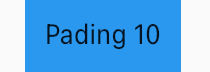
Padding是内边距,我们在这里设置了padding: EdgeInsets.all(10),也就是说Text距离Container的四条边的边距都是10。
3. Margin
Container(

    child: Text("Margin 10"),

    margin: EdgeInsets.all(10),

    color: Colors.green,

)
Margin是外边距,我们在这里设置了margin: EdgeInsets.all(10),Container在原有大小的基础上,又被包围了一层宽度为10的矩形。
需要注意,绿色外围的白色区域也是属于Container的一部分。

4. transform
Container(

    padding: EdgeInsets.symmetric(horizontal: 15),

    margin: EdgeInsets.all(10),

    child: Text("transform"),

    transform: Matrix4.rotationZ(0.1),

    color: Colors.red,

)
transform可以帮助我们做旋转,Matrix4给我们提供了很多的变换样式。

5. decoration
decoration可以帮助我们实现更多的效果。例如形状、圆角、边界、边界颜色等。
Container(

    child: Text("Decoration"),

    padding: EdgeInsets.symmetric(horizontal: 15),

    margin: EdgeInsets.all(10),

    decoration: BoxDecoration(

        color: Colors.red,

        shape: BoxShape.rectangle,

        borderRadius: BorderRadius.all(Radius.circular(5)),

    ),

)
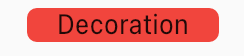
这里就是设置了一个圆角的示例,同样我们对BoxDecoration的color属性设置颜色,对整个Container的也是有效的。
6. 显示 Image
Container(

    height: 40,

    width: 100,

    margin: EdgeInsets.all(10),

    decoration: BoxDecoration(

        image: DecorationImage(

                image: AssetImage("images/flutter_icon_100.png"),

                fit: BoxFit.contain,

            ),

    ),

)
BoxDecoration可以传入一个Image对象,这样就灵活了很多,Image可以来自本地也可以来自网络。
7. Border
Container(

    child: Text('BoxDecoration with border'),

    padding: EdgeInsets.symmetric(horizontal: 15),

    margin: EdgeInsets.all(5),

    decoration: BoxDecoration(

        borderRadius: BorderRadius.circula(12),

        border: Border.all(

            color: Colors.red,

            width: 3,

        ),

    ),

)
使用border可以帮助我们做边界效果,还可以设置圆角borderRadius,也可以设置border的宽度,颜色等。

8. 渐变色
Container(

    padding: EdgeInsets.symmetric(horizontal: 20),

    margin: EdgeInsets.all(20), //容器外填充

    decoration: BoxDecoration(

        gradient: RadialGradient(

            colors: [Colors.blue, Colors.black, Colors.red],

            center: Alignment.center,

            radius: 5

        ),

    ),

    child: Text(

        //卡片文字

        "RadialGradient",

        style: TextStyle(color: Colors.white),

    ),

)
BoxDecoration的属性gradient可以接收一个颜色的数组,Alignment.center是渐变色开始的位置,可以从左上角、右上角、中间等位置开始颜色变化。
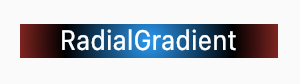
想体验以上的Container的示例的运行效果,可以到我的Github仓库项目flutter_app->lib->routes->container_page.dart查看,并且可以下载下来运行并体验。

【Flutter 1-16】Flutter手把手教程UI布局和Widget——容器控件Container的更多相关文章
- Flutter学习指南:UI布局和控件
Flutter学习指南:UI布局和控件 - IT程序猿 https://www.itcodemonkey.com/article/11041.html
- 聊聊flutter的UI布局
UI布局多半是套路,熟悉套路的规则. Flutter的UI布局也有一套规则 center center可以让任何元素在屏幕中居中,既是水平居中又是垂直居中,如果想让元素从上而下排列要怎么办呢?那就得使 ...
- Flutter实战视频-移动电商-64.会员中心_顶部头像UI布局
64.会员中心_顶部头像UI布局 会员中心的样式 member.dart 清除原来的代码生成一个基本的结构 默认返回一个scaffold脚手架工具,body里面布局使用ListView,这样不会出现纵 ...
- Flutter实战视频-移动电商-65.会员中心_订单区域UI布局
65.会员中心_订单区域UI布局 我的订单区域 member.dart写我的标题的方法 布局使用瓦片布局 先做修饰,decoration颜色的背景,下边线的样式 //我的订单标题 Widget _or ...
- Flutter免费(视频)教程汇总
Flutter学习导航 Flutter简介: Flutter可以轻松快速地构建漂亮的移动应用程序. Flutter是谷歌的移动应用SDK,用于短时间内在iOS和Android上制作高质量的原生界面应用 ...
- Flutter 布局(一)- Container详解
本文主要介绍Flutter中非常常见的Container,列举了一些实际例子介绍如何使用. 1. 简介 A convenience widget that combines common painti ...
- Flutter学习笔记(22)--单个子元素的布局Widget(Container、Padding、Center、Align、FittedBox、Offstage、LimitedBox、OverflowBox、SizedBox)
如需转载,请注明出处:Flutter学习笔记(22)--单个子元素的布局Widget(Container.Padding.Center.Align.FittedBox.Offstage.Limited ...
- [Flutter] Windows平台Flutter开发环境搭建(Andorid Studio)
前两天网友在群里说起了Flutter,就了解了一下,在手机上跑了它的demo,直接就被打动了. 虽然网上有很多教程,但真正开始的时候,还是会碰到很多坑.下面详细的讲解Flutter + Android ...
- flutter系列之:flutter中常用的container layout详解
目录 简介 Container的使用 旋转Container Container中的BoxConstraints 总结 简介 在上一篇文章中,我们列举了flutter中的所有layout类,并且详细介 ...
随机推荐
- Mybatis入门及第一个Mybatis程序
Mybatis笔记整理 所需要的基础知识 JDBC Mysql Java基础 Maven Junit 框架:是有配置文件的.最好的方式:看官网文档 1.简介 1.1.什么是MyBatis 简介 什么是 ...
- leetcode_3FizzBuzz的一些思考
题目很简单,给定一个正整数n,如果n能整除3的话往list里加入Fizz,如果n能整除5的话往list里面加入Buzz,如果即能整除3又能整除5的话,加入FizzBuzz,代码也很简单 public ...
- rest-framework 解析器
一 解析器的作用: 根据请求头 content-type 选择对应的解析器对请求体内容进行处理. 有application/json,x-www-form-urlencoded,form-data等格 ...
- Spring Cloud 学习 (九) Spring Security, OAuth2
Spring Security Spring Security 是 Spring Resource 社区的一个安全组件.在安全方面,有两个主要的领域,一是"认证",即你是谁:二是& ...
- 20190620_二次开发BarTender打印机时,未能解析主引用“Seagull.BarTender.Print, Version=1.0.0.0, Culture=neutral, processorArchitecture=x86”
错误提示: 严重性 代码 说明 项目 文件 行 禁止显示状态警告 未能解析主引用"Seagull.BarTender.Print, Version=1.0.0.0, Culture=neut ...
- moviepy音视频剪辑VideoClip类set_position方法pos参数的使用方法及作用
☞ ░ 前往老猿Python博文目录 ░ moviepy音视频剪辑VideoClip类set_position方法用于多个剪辑合成一个剪辑时设置调用剪辑实例的拷贝在合成剪辑的位置. 调用语法: set ...
- 使用pip安装的Python扩展模块是从哪里下载的?
对于初学者才开始使用Python安装扩展模块时,发现只要输入扩展模块名就可以安装,无需先下载再安装,不免疑惑那些要安装的软件是在哪里下载的?是否可以从别的地方下载? 这个问题答案如下: pip安装第三 ...
- 【题解】Casting Spells(UVA1470)
虽然训练指南上没有讲 Manacher--但是这题几乎就是一个裸的 Manacher啊-- 然而书上的标签是:有难度,配合数据结构 Manacher详解 题意 问给定字符串中最大的W串的长度.其中W串 ...
- CF850F Rainbow Balls 题解
考虑最后变成哪一种颜色. 设 \(s = \sum\limits_{i=1}^n a_i\) 设现在有 \(k\) 种当前颜色, 需要全部变成该种颜色, 期望步数为 \(f_k\). 考虑状态转移.设 ...
- 落谷 P1410 子序列
题目链接. Discription 给定长度为 \(n\) 的序列 \(A\)(\(n\) 为偶数),判断是否能将其划分为两个长度为 \(\dfrac{N}{2}\) 的严格递增子序列. Soluti ...