
Spring Cloud Admin健康检查 邮件、钉钉群通知
源码地址:https://github.com/muxiaonong/Spring-Cloud/tree/master/cloudadmin
Admin 简介
官方文档:What is Spring Boot Admin?
SpringBootAdmin是一个用于管理和监控SpringBoot微服务的社区项目,可以使用客户端注册或者Eureka服务发现向服务端提供监控信息。
注意,服务端相当于提供UI界面,实际的监控信息由客户端Actuator提供
通过SpringBootAdmin,你可以通过华丽大气的界面访问到整个微服务需要的监控信息,例如服务健康检查信息、CPU、内存、操作系统信息等等
本篇文章使用SpringBoot 2.3.3.RELEASE、SpringCloud Hoxton.SR6、SpringBoot Admin 2.2.3版本,此外,服务注册中心采用eureka
一、SpringCloud使用SpringBoot Admin
1.1 创建一个SpringBoot项目,命名为admin-test,引入如下依赖
 <!-- Admin 服务 -->

  <dependency>

      <groupId>de.codecentric</groupId>

      <artifactId>spring-boot-admin-starter-server</artifactId>

      <version>2.2.1</version>

  </dependency>

  <!-- Admin 界面 -->

  <dependency>

      <groupId>de.codecentric</groupId>

      <artifactId>spring-boot-admin-server-ui</artifactId>

      <version>2.2.1</version>

  </dependency>
1.2 启动类
@SpringBootApplication

@EnableAdminServer

public class AdminTestApplication {

    public static void main(String[] args) {

        SpringApplication.run(AdminTestApplication.class, args);

    }

  }
1.3 配置文件
spring.application.name=admin-test

management.endpoints.jmx.exposure.include=*

management.endpoints.web.exposure.include=*

management.endpoint.health.show-details=always

# spring cloud access&secret config

alibaba.cloud.access-key=****

alibaba.cloud.secret-key=****
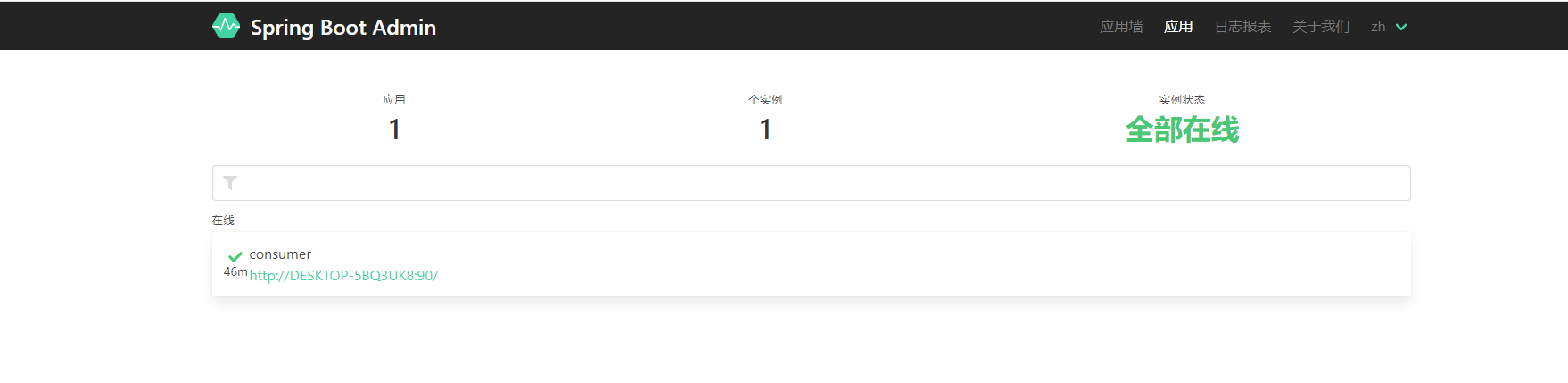
1.4 启动项目
输入项目地址:http://localhost:8080/applications
二、配置邮件通知
2.1 pom
<dependency>

	<groupId>org.springframework.boot</groupId>

	<artifactId>spring-boot-starter-mail</artifactId>

</dependency>
2.2 邮件配置
spring.mail.host=smtp.qq.com

spring.mail.username=单纯QQ号

spring.mail.password=授权码

spring.mail.properties.mail.smpt.auth=true

spring.mail.properties.mail.smpt.starttls.enable=true

spring.mail.properties.mail.smpt.starttls.required=true

#收件邮箱

spring.boot.admin.notify.mail.to=xxxx@qq.com

# 发件邮箱

spring.boot.admin.notify.mail.from= xxxx@qq.com
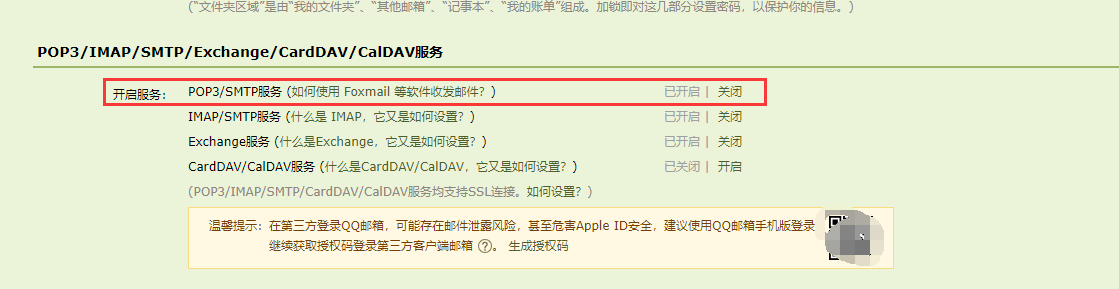
2.3 QQ邮箱设置
找到自己的QQ邮箱
QQ邮箱 》 设置 》 账户 》红框处获取 授权码
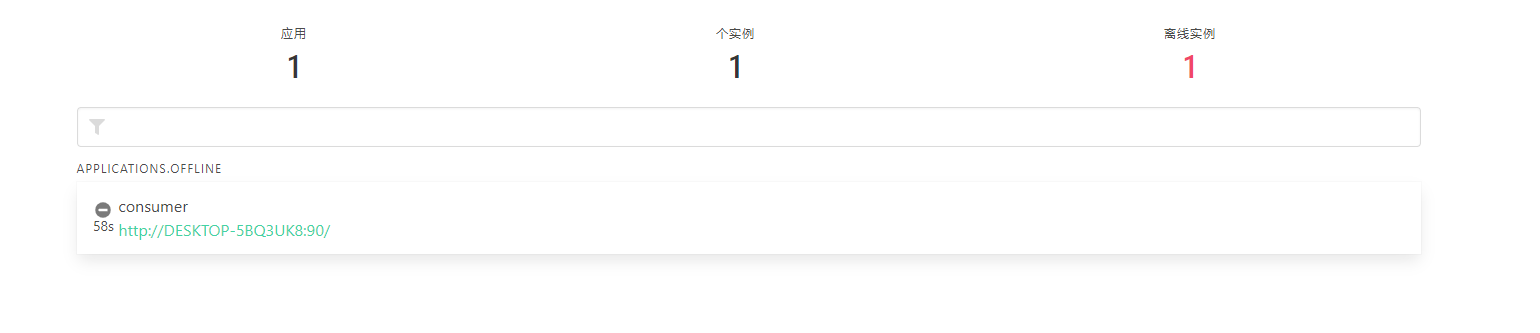
我们将 consumer 服务下线后,
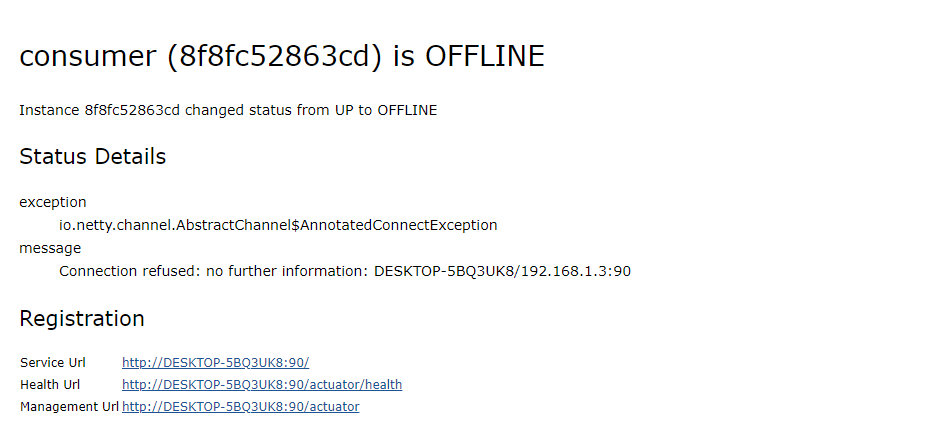
接着我们就收到了邮件通知,告诉我们服务关闭了
三、发送钉钉群通知
找到群里面的 群设置 》 智能群助手 》 添加机器人
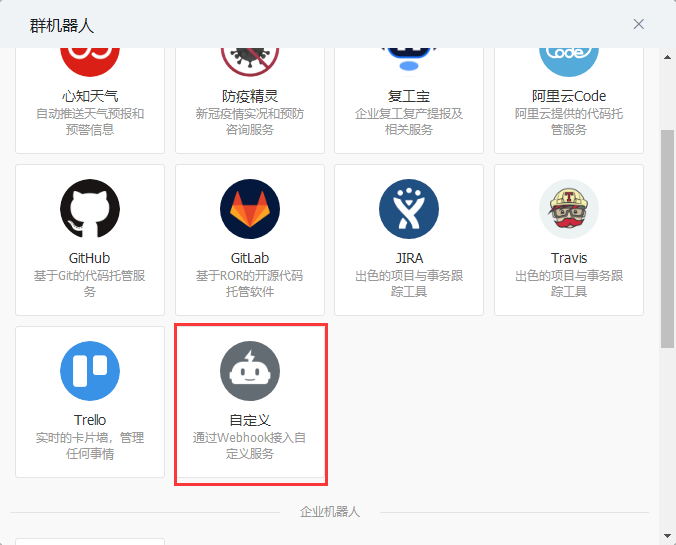
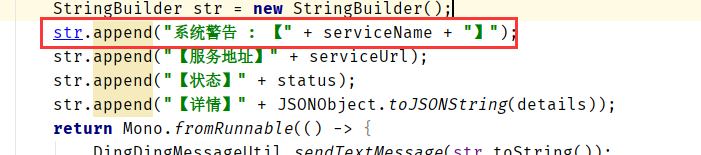
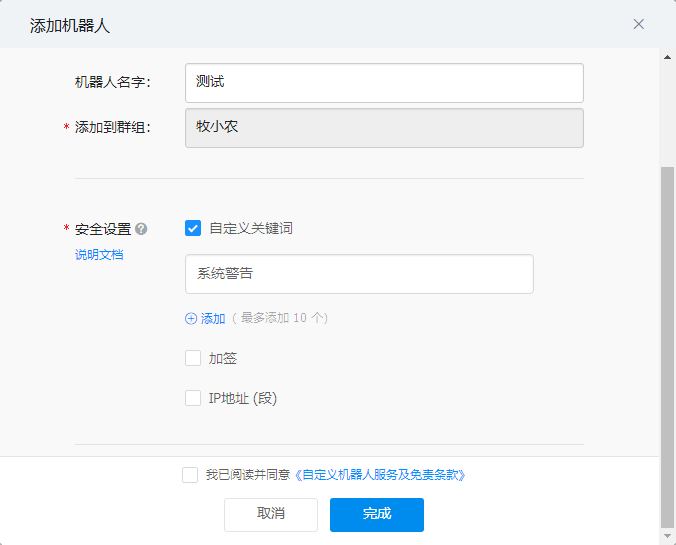
注意:这里的自定义关键词一定要和项目的关键字匹配
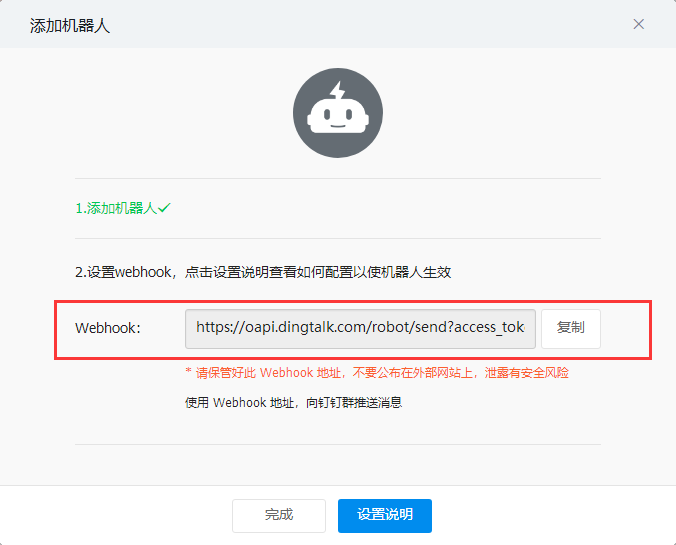
获取 Webhook 到项目中,这个是后面要使用到的
启动类:
import org.springframework.boot.SpringApplication;

import org.springframework.boot.autoconfigure.SpringBootApplication;

import org.springframework.context.annotation.Bean;

import de.codecentric.boot.admin.server.config.EnableAdminServer;

import de.codecentric.boot.admin.server.domain.entities.InstanceRepository;

@SpringBootApplication

@EnableAdminServer

public class AdminApplication {

	public static void main(String[] args) {

		SpringApplication.run(AdminApplication.class, args);

	}

	   @Bean

	    public DingDingNotifier dingDingNotifier(InstanceRepository repository) {

	        return new DingDingNotifier(repository);

	    }

}
通知类:
import java.util.Map;

import com.alibaba.fastjson.JSONObject;

import de.codecentric.boot.admin.server.domain.entities.Instance;

import de.codecentric.boot.admin.server.domain.entities.InstanceRepository;

import de.codecentric.boot.admin.server.domain.events.InstanceEvent;

import de.codecentric.boot.admin.server.notify.AbstractStatusChangeNotifier;

import reactor.core.publisher.Mono;

public class DingDingNotifier extends AbstractStatusChangeNotifier  {

	public DingDingNotifier(InstanceRepository repository) {

        super(repository);

    }

    @Override

    protected Mono<Void> doNotify(InstanceEvent event, Instance instance) {

        String serviceName = instance.getRegistration().getName();

        String serviceUrl = instance.getRegistration().getServiceUrl();

        String status = instance.getStatusInfo().getStatus();

        Map<String, Object> details = instance.getStatusInfo().getDetails();

        StringBuilder str = new StringBuilder();

        str.append("服务预警 : 【" + serviceName + "】");

        str.append("【服务地址】" + serviceUrl);

        str.append("【状态】" + status);

        str.append("【详情】" + JSONObject.toJSONString(details));

        return Mono.fromRunnable(() -> {

            DingDingMessageUtil.sendTextMessage(str.toString());

        });

    }

}
发送工具类
import java.io.InputStream;

import java.io.OutputStream;

import java.net.HttpURLConnection;

import java.net.URL;

import com.alibaba.fastjson.JSONObject;

public class DingDingMessageUtil {

	public static String access_token = "Token";

    public static void sendTextMessage(String msg) {

        try {

            Message message = new Message();

            message.setMsgtype("text");

            message.setText(new MessageInfo(msg));

            URL url = new URL("https://oapi.dingtalk.com/robot/send?access_token=" + access_token);

            // 建立 http 连接

            HttpURLConnection conn = (HttpURLConnection) url.openConnection();

            conn.setDoOutput(true);

            conn.setDoInput(true);

            conn.setUseCaches(false);

            conn.setRequestMethod("POST");

            conn.setRequestProperty("Charset", "UTF-8");

            conn.setRequestProperty("Content-Type", "application/Json; charset=UTF-8");

            conn.connect();

            OutputStream out = conn.getOutputStream();

            String textMessage = JSONObject.toJSONString(message);

            byte[] data = textMessage.getBytes();

            out.write(data);

            out.flush();

            out.close();

            InputStream in = conn.getInputStream();

            byte[] data1 = new byte[in.available()];

            in.read(data1);

            System.out.println(new String(data1));

        } catch (Exception e) {

            e.printStackTrace();

        }

    }

}
消息类:
public class Message {

	private String msgtype;

    private MessageInfo text;

    public String getMsgtype() {

        return msgtype;

    }

    public void setMsgtype(String msgtype) {

        this.msgtype = msgtype;

    }

    public MessageInfo getText() {

        return text;

    }

    public void setText(MessageInfo text) {

        this.text = text;

    }

}
public class MessageInfo {

    private String content;

    public MessageInfo(String content) {

        this.content = content;

    }

    public String getContent() {

        return content;

    }

    public void setContent(String content) {

        this.content = content;

    }

}
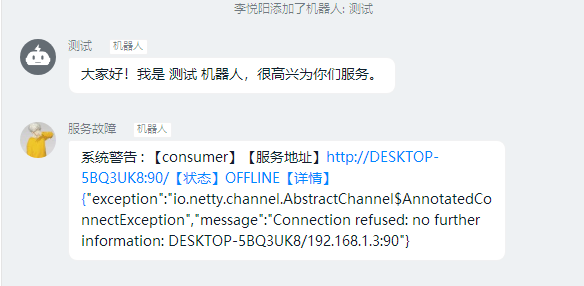
我们下线一个服务后,就可以看到钉钉群就发了消息的通知
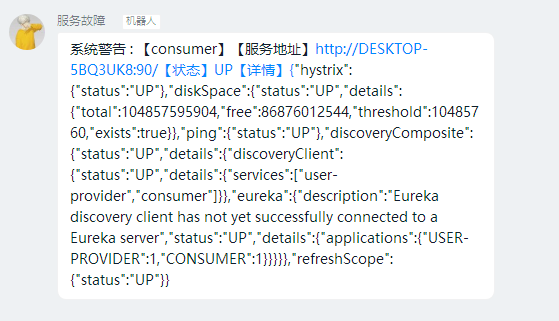
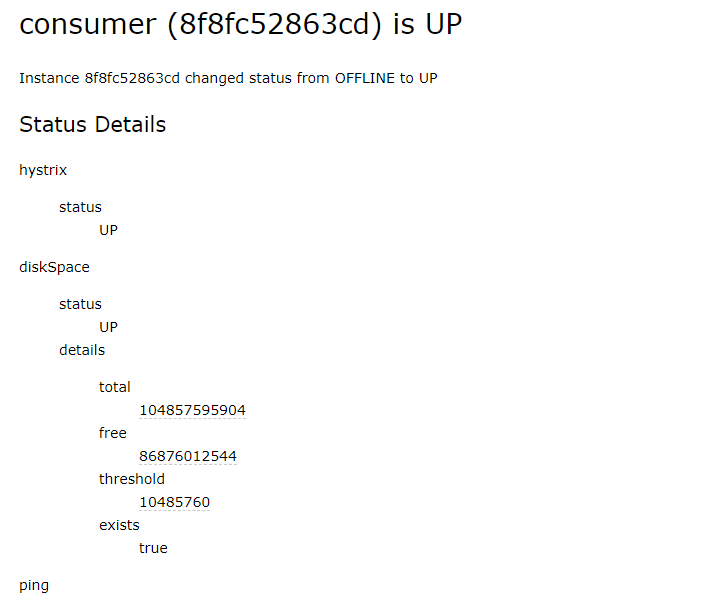
同时,当我们启动服务的时候,也会有消息通知我们服务启动了
四 总结
上面就是我们对admin 健康检查的实际应用,在企业中一般会有短信通知+钉钉群通知和邮件,感兴趣的小伙伴可以去试试看,还是挺好玩的,还有一个就是微信通知,在服务号 模板消息感兴趣的小伙伴可以自行去研究看看,大家加油~
Spring Cloud Admin健康检查 邮件、钉钉群通知的更多相关文章
- Spring Boot Actuator:健康检查、审计、统计和监控(转)
Spring Boot Actuator可以帮助你监控和管理Spring Boot应用,比如健康检查.审计.统计和HTTP追踪等.所有的这些特性可以通过JMX或者HTTP endpoints来获得. ...
- Spring Boot Actuator:健康检查、审计、统计和监控
Spring Boot Actuator可以帮助你监控和管理Spring Boot应用,比如健康检查.审计.统计和HTTP追踪等.所有的这些特性可以通过JMX或者HTTP endpoints来获得. ...
- spring cloud:搭建基于consul的服务提供者集群(spring cloud hoxton sr8 / spring boot 2.3.4)
一,搭建基于consul的服务提供者集群 1,consul集群,共3个实例: 2, 服务提供者集群:共2个实例: 3,服务消费者:一个实例即可 4,consul集群的搭建,请参考: https://w ...
- SpringCloud学习笔记(16)----Spring Cloud Netflix之Hystrix Dashboard+Turbine集群监控
前言: 上一节中,我们使用Hystrix Dashboard,只能看到单个应用内的服务信息.在生产环境中,我们经常是集群状态,所以我们需要用到Turbine这一应用. 作用:汇总系统内的多个服务的数据 ...
- Spring Cloud Config 配置中心实践过程中,你需要了解这些细节!
本文导读: Spring Cloud Config 基本概念 Spring Cloud Config 客户端加载流程 Spring Cloud Config 基于消息总线配置 Spring Cloud ...
- Spring Boot Admin实现服务健康预警
Over View 上一篇文章主要介绍了Spring Boot Admin的概况以及我们如何在系统中引入和使用Spring Boot Admin,以此来帮助我们更加了解自己的系统,做到能快速发现.排查 ...
- Springboot 系列(十七)迅速使用 Spring Boot Admin 监控你的 Spring Boot 程序,支持异常邮件通知
1. Spring Boot Admin 是什么 Spring Boot Admin 是由 codecentric 组织开发的开源项目,使用 Spring Boot Admin 可以管理和监控你的 S ...
- Spring Boot Admin 监控中心
Spring Boot Admin 监控中心 Spring Boot Admin用来收集微服务系统的健康状态.会话数量.并发数.服务资源.延迟等度量信息 服务端 建立spring-cloud-admi ...
- Spring Cloud Alibaba基础教程-Nacos(三)
在Spring Cloud Alibaba基础教程-Nacos(二)当中学习了,如何使用 nacos图形化界面操作 ,使用Nacos部署集群,下面我们开始Nacos最后一篇的学习 ,如果对你有帮助,记 ...
随机推荐
- reverse 字符串翻转
头文件 algorithm string s="hello"; reverse(s.begin(),s.end()); char c[]="hello"; re ...
- Spring学习之Spring与Mybatis的两种整合方式
本机使用IDEA 2020.1.MySql 8.0.19,通过Maven进行构建 环境准备 导入maven依赖包 <dependencies> <dependency> < ...
- arcgis for js 如何用contains过滤数据
添加全部数据 // 构建map容器 var view = new MapView({ container: 'mapId', map: map }); /******************** * ...
- 8-Pandas之如何查找存在缺失值的行(any与all详解)
若有一份数据,简略如下: 国家 啤酒消耗量 烈酒消耗量 红酒消耗量 总酒精消耗量 所在大洲 0 Afghanistan 0.0 0.0 0.0 0.0 AS 1 Albania 89.0 132. ...
- PHP date_sunrise() 函数
------------恢复内容开始------------ 实例 返回葡萄牙里斯本今天的日出时间: <?php// Lisbon, Portugal:// Latitude: 38.4 Nor ...
- PHP stripos() 函数
实例 查找 "php" 在字符串中第一次出现的位置: <?php高佣联盟 www.cgewang.comecho stripos("I love php, I lo ...
- Chrome IDM下载插件安装使用方法
一. 下载IDM (1)官方网站: http://www.internetdownloadmanager.com/download.html 二.安装IDM IDM安装 (1)运行安装程序 前进 ...
- react-ts模板/脚手架
react-ts-template 脚手架 使用 npm i -g maple-react-cli maple-react-cli init 选择模板 'react-ts-template' 输入自定 ...
- 浅析BST二叉搜索树
2020-3-25 update: 原洛谷日报#2中代码部分出现一些问题,详情见此帖.并略微修改本文一些描述,使得语言更加自然. 2020-4-9 update:修了一些代码的锅,并且将文章同步发表于 ...
- 埋在MySQL数据库应用中的17个关键问题!
作者:扎瓦陈序元 来源:https://blog.csdn.net/weixin_42882439 MySQL的使用非常普遍,跟MySQL有关的话题也非常多,如性能优化.高可用性.强一致性.安全.备份 ...