
Spring Cloud Config 配置中心实践过程中,你需要了解这些细节!
本文导读:
- Spring Cloud Config 基本概念
- Spring Cloud Config 客户端加载流程
- Spring Cloud Config 基于消息总线配置
- Spring Cloud Config 中的占位符
- Spring Cloud Config 仓库最佳实践
- Spring Cloud Config 健康检查问题剖析
本文主要介绍 Spring Cloud Config 基本概念、实践过的配置及遇到的问题进行剖析。关于如何启动运行配置中心可以参考官方 Demo。
本文使用的Spring Cloud 版本:Edgware.SR3
Spring Cloud Config 基本概念
Spring Cloud Config 用来为分布式系统中的基础设施和微服务应用提供集中化的外部配置支持。
- 服务端:分布式配置中心,独立的微服务应用,用来连接配置仓库(GIT)并为客户端提供获取配置信息、加密/解密等访问接口。、
- 客户端:微服务架构中各个微服务应用和基础设施,通过指定配置中心管理应用资源与业务相关的配置内容,启动时从配置中心获取和加载配置信息
SCC作用:
实现了对服务端和客户端中环境变量和属性配置的抽象映射。
SCC优势:
默认采用 GIT 存储配置信息,天然支持对配置信息的版本管理。
Spring Cloud Config架构图:
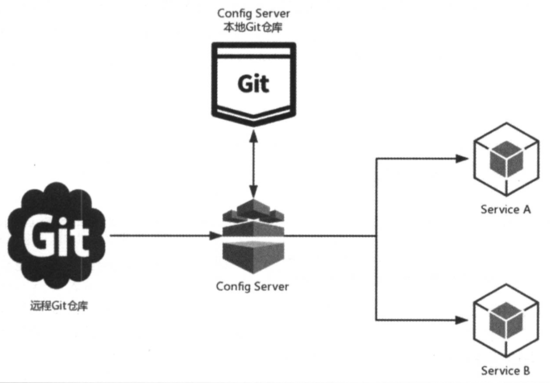
基于消息总线的架构图:
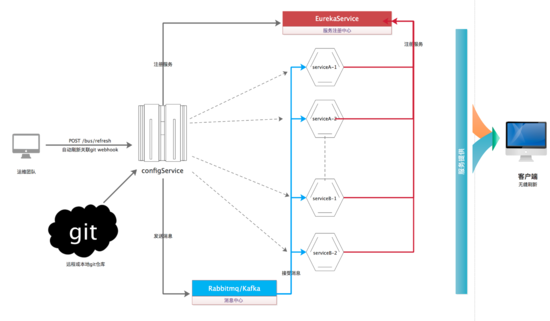
如上图所示,架构图中的几个主要元素作用:
远程 GIT 仓库:
用来存储配置文件的地方。
Config Server:
分布式配置中心,微服务中指定了连接仓库的位置以及账号密码等信息。
本地 GIT 仓库:
在 Config Server 文件系统中,客户单每次请求获取配置信息时,Config Server 从 GIT 仓库获取最新配置到本地,然后在本地 GIT 仓库读取并返回。当远程仓库无法获取时,直接将本地仓库内容返回。
ServerA/B:
具体的微服务应用,他们指定了 Config Server 地址,从而实现外部化获取应用自己想要的配置信息。应用启动时会向 Config Server 发起请求获取配置信息进行加载。
消息中心:
上述第二个架构图是基于消息总线的方式,依赖的外部的 MQ 组件,目前支持 Kafka、Rabbitmq。通过 Config Server 配置中心提供的 /bus/refresh endpoint 作为生产者发送消息,客户端接受到消息通过http接口形式从 Config Server 拉取配置。
服务注册中心:
可以将 Config Server 注册到服务注册中心上比如 Eureka,然后客户端通过服务注册中心发现Config Server 服务列表,选择其中一台 Config Server 来完成健康检查以及获取远端配置信息。
Spring Cloud Config 客户端加载流程
客户端应用从配置管理中获取配置执行流程:
1)应用启动时,根据 bootstrap.yml 中配置的应用名 {application}、环境名 {profile}、分支名 {label},向 Config Server 请求获取配置信息。
2)Config Server 根据自己维护的 GIT 仓库信息与客户端传过来的配置定位去查找配置信息。
3)通过 git clone 命令将找到的配置下载到 Config Server 的文件系统(本地GIT仓库)
4)Config Server 创建 Spring 的 ApplicationContext 实例,并从 GIT 本地仓库中加载配置文件,最后读取这些配置内容返回给客户端应用。
5)客户端应用在获取外部配置内容后加载到客户端的 ApplicationContext 实例,该配置内容优先级高于客户端 Jar 包内部的配置内容,所以在 Jar 包中重复的内容将不再被加载。
Spring Cloud Config 基于消息总线配置
Config Server 作为配置中心 pom.xml 引入:
<dependency>

    <groupId>org.springframework.cloud</groupId>

   <artifactId>spring-cloud-config-server</artifactId>

</dependency>

<dependency>

       <groupId>org.springframework.cloud</groupId>

        <artifactId>spring-cloud-starter-bus-kafka</artifactId>

</dependency>

<dependency>

        <groupId>org.springframework.boot</groupId>

       <artifactId>spring-boot-starter-security</artifactId>

</dependency>

<dependency>

      <groupId>org.springframework.boot</groupId>

      <artifactId>spring-boot-starter-actuator</artifactId>

</dependency>
Config Server 配置文件(yml格式):
server:

  port: ${CONFIG_SERVER_PORT:8021}

spring:

  application:

    name: letv-mas-config

    # 配置了该项,访问/bus/refresh?destination=应用名:spring.application.index,如果未指定spring.application.index默认使用「应用名:server.port」

    index: ${CONFIG_SERVER_IP:127.0.0.1}

  cloud:

    config:

      server:

        git:

          # 基于 http 协议的单仓库,每一个应用创建一个目录,每个目录下创建配置文件

          uri: ${GIT_URI:http://xxxx/config.git}

          search-paths: '{application}'

          # 配置的 Git 仓库基于 http 协议的,必须配置用户名和密码

          username: ${GIT_USERNAME:config_server}

          password: ${GIT_PASSWORD:config@123}

          # 本地仓库目录设定

          basedir: /letv/app/mas/config/repos

          # 本地仓库如果有脏数据,则会强制拉取(默认是false)

          force-pull: true

          # 配置中心启动后从 GIT 仓库下载,如果uri配置中使用了 {application} 作为仓库名,这里要使用默认值false,否则启动报错.

          clone-on-start: false

management:

  security:

    enabled: false

# 用户认证,客户端应用接入时加入安全认证配置

security:

  user:

    name: config

    password: config2018

  basic:

    enabled: true

# 基于消息总线的 MQ 配置

spring:

  cloud:

    stream:

      kafka:

        binder:

          zk-nodes: ${ZK_NODES:localhost:2181}

          brokers: ${KAFKA_BROKERS:localhost:9092}

          requiredAcks: -1

          configuration:

            security:

              protocol: SASL_PLAINTEXT

            sasl:

              mechanism: PLAIN

          jaas:

            loginModule: org.apache.kafka.common.security.plain.PlainLoginModule

            options:

              username: test

              password: test-secret

    # 开启跟踪事件消息(默认是false)

    bus:

      trace:

        enabled: true

      # 自定义 topic 主题

      destination: test.springcloud.config
Config Client 作为客户端 pom.xml 引入:
<dependency>

    <groupId>org.springframework.cloud</groupId>

    <artifactId>spring-cloud-starter-config</artifactId>

</dependency>

<dependency>

       <groupId>org.springframework.cloud</groupId>

        <artifactId>spring-cloud-starter-bus-kafka</artifactId>

</dependency>

<dependency>

        <groupId>org.springframework.boot</groupId>

       <artifactId>spring-boot-starter-security</artifactId>

</dependency>

<dependency>

      <groupId>org.springframework.boot</groupId>

      <artifactId>spring-boot-starter-actuator</artifactId>

</dependency>
Config Client 配置文件(yml格式):
spring:

  application:

    name: letv-mas-client

    index: ${CLIENT_SERVER_IP:127.0.0.1}:${server.port}

  profiles:

    active: ${CLIENT_PROFILE:default}

    #include: busdev,streamdev

  cloud:

    config:

      uri: ${CONFIG_SERVER_DOMAIN:http://config.xxx.cn/}

      failFast: true #the client will halt with an Exception

      enabled: true

      # boostrap.yml 配置优先于启动参数变量 spring.profiles.active

      profile: ${spring.profiles.active:${CLIENT_PROFILE:default}}

      label: master

      # 访问配置中心,用户安全认证

      username: config

      password: config2018

      # 激活定时任务,当 GIT 版本发生变更后加载最新配置上下文

      watcher:

        enabled: true

security:

  user:

    name: config

    password: config2018

# 基于消息总线的 MQ 配置( Kakfa 队列),如果zipkin中也使用 Kafka 队列,那么需要通过binder 形式配置做隔离,否则会互相影响,无法下发配置消息。

spring:

  cloud:

    stream:

      # 自定义开关

      enabled: true

      # 指定中间件

      default-binder: config-kafka

      binders:

        config-kafka:

          type: kafka

          environment:

            spring:

              cloud:

                stream:

                  kafka:

                    binder:

                      zkNodes: ${ZK_NODES:localhost:2181}

                      brokers: ${KAFKA_BROKERS:localhost:9092}

                      # 生产者确认,0、1、-1,默认为1。0为不确认,1为leader单确认,-1为同步副本确认。-1的情况下消息可靠性更高。

                      required-acks: -1

                      # 是否自动创建topic,默认为true。设为false的情况下,依赖手动配置broker相关topic>配置,如果topic不存在binder则无法启动。

                      auto-create-topics: true

                      configuration:

                        security:

                          protocol: SASL_PLAINTEXT

                        sasl:

                          mechanism: PLAIN

                      jaas:

                        loginModule: org.apache.kafka.common.security.plain.PlainLoginModule

                        options:

                          username: test

                          password: test-secret

    bus:

      # 是否启用bus

      enabled: true

      # Bus 使用的队列或 Topic,Kafka 中的 topic,Rabbitmq 中的 queue

      destination: test.springcloud.config

      trace:

        # 是否启用 Bus 事件跟踪,可以通过 /trace 页面查看

        enabled: true

      refresh:

        # 是否发送 refresh 事件,开启时支持基于 config 文件变更的动态配置

        enabled: true

      env:

        # 是否开启 env 事件,开启时支持直接动态配置相应环境变量,如 /bus/env?arg1=value1&arg2=value2

        enabled: true
Spring Cloud Config 中的占位符
占位符的使用:
这里的 {application} 代表了应用名,当客户端向 Config Server 发起获取配置请求时,Config Server 会根据客户端的 spring.application.name 信息来填充 {application} 占位符以定位配置资源的存储位置。
注意:{label} 参数很特别,如果 GIT 分支和标签包含 “/”,那么 {label} 参数在 HTTP 的 URL 中应用使用 “(_)” 替代,以避免改变了 URI 含义,指向到其他 URI 资源。
为什么要有占位符?
当使用 GIT 作为配置中心来存储各个微服务应用的配置文件时,URI 中的占位符的使用可以帮助我们规划和实现通用的仓库配置。
Spring Cloud Config 仓库最佳实践
本地仓库:
Spring Cloud 的 D、E 版本中默认存储到 /var/folders/ml/9rww8x69519fwqlwlt5jrx700000gq/T/config-repo-2486127823875015066目录下。
在 B 版本中,未实际测试过,存储到临时目录 /tmp/config-repo-随机数目录下。
为了避免一些不可预知的问题,我们设置一个固定的本地GIT仓库目录。
通过 spring.cloud.config.server.git.basedir=${user.home}/local-config-repo 如果${user.home}目录下发现local-config-repo不存在,在Config Server启动后会自动创建,并从GIT远程仓库下载配置存储到这个位置。
远程仓库实践:
单仓库目录:
每一个项目对应一个仓库
spring.cloud.config.server.git.uri=https://gitee.com/ldwds/{application}
多仓库目录:
同一个仓库下,每个项目一个目录
spring.cloud.config.server.git.uri=https://gitee.com/ldwds/config-repo-demo.git
spring.cloud.config.server.git.search-paths='{application}'
1)单仓库目录注意事项:
spring.cloud.config.server.git.uri=[https://gitee.com/ldwds/config-repo-demo/](https://gitee.com/ldwds/config-repo-demo/)

spring.cloud.config.serversearch-paths:’{application}'
客户端应用启动前,在 config-repo-demo 仓库下创建子目录,子目录名称就是配置中指定的spring.application.name 应用名。
否则,工程中引用的属性找不到,会报如下错误:
Caused by: java.lang.IllegalArgumentException: Could not resolve placeholder 'from' in value "${from}"
2)多仓库目录注意事项:
这种方式不能设置参数
spring.cloud.config.server.git.force-pull=true 和 spring.cloud.config.server.git.clone-on-start=true
否则启动会报错,也很好理解因为使用了 {applicatoin} 作为占位符,没有指明具体的仓库名,所以无法强制拉取远程仓库配置。
如果你设置了本地仓库目录比如 spring.cloud.config.server.git.basedir=/data/config-repos/local-config-repo Config Server 启动后会自动创建 /data/config-repos 目录,并创建 config-repo-随机数命名的仓库名录,这个仓库下的内容来自于健康检查的默认仓库app。
客户端应用启动后,会根据 {application} 应用名去查找该仓库,Config Server 从匹配 Git 仓库并 clone 到 config-repo-随机数的目录下。
如果 Config Server 重启了,客户端应用通过 /bus/refresh 刷新配置,因为并没有缓存之前的仓库名,所以会自动创建一个 config-repo-随机数 的仓库目录并从 Git clone 数据。
如果 Config Server 已有本地仓库,客户端重启或 /bus/refresh 刷新配置则 Config Server 不会重建新的仓库。
配置中心本地仓库执行原理:
本地仓库是否存在根据 basedir 目录下是否包含.git 隐藏文件。如果本地仓库不存在,则从远端仓库 clone 数据到本地;如果本地仓库存在,则从远程仓库 fetch 最新数据到本地;然后 checkout 到指定 label,从远端仓库 merge 数据,并获取当前 label 分支最新的HEAD 版本,以及默认的应用名 app 作为环境信息返回。
Spring Cloud Config健康检查问题剖析
健康检查 pom.xml 中引入:
<dependency>

    <groupId>org.springframework.boot</groupId>

    <artifactId>spring-boot-actuator</artifactId>

</dependency>
添加上述依赖后,默认开启健康检查。如果不需要健康检查,可以通过 spring.cloud.config.server.health.enabled=false 参数设定关闭。
如果配置为: spring.cloud.config.server.git.uri=[https://gitee.com/ldwds/config-repo-demo.git](https://gitee.com/ldwds/config-repo-demo.git)
默认开启了健康检查,我开始认为默认检查应用名称为 app,profiles 为 default,label 为 null进行监控(源码中看到的)。
但是 GIT 配置仓库下并没有 app 应用,此时访问 /health,监控状态仍然是 UP?
{

    "status": "UP"

}
上述理解是错误的,原因分析如下:
这个主要跟配置中心指定的 GIT 仓库地址有关系,如果仓库地址指定的是 https://gitee.com/ldwds/{application} ,检查监视器会将 {application} 替换为默认应用名 app 作为仓库地址,此时会在 {user.home} 目录下创建 config-repo-随机数作为 {application} 应用的本地仓库(如:/Users/liudewei1228/config-repo-7949870192520306956)。
即使设置了
spring.config.server.git.basedir=${user.home}/local-config-repo/也不会被使用到。
为什么?因为 {application} 作为仓库,是个动态的,可能会有多个 {application} 项目仓库,所以不会使用 basedir 特定目录作为本地仓库。
如下参数设置健康检查的配置:
spring.cloud.config.server.health.repositories.config-repo-demo.name=应用名

spring.cloud.config.server.health.repositories.config-repo-demo.label=分支

spring.cloud.config.server.health.repositories.config-repo-demo.profiles=环境变量
找到环境信息即显示状态 UP,此过程出现任何异常(如找不到仓库 NoSuchRespositoryException)就会显示 DOWN 状态。
在uri中包含 {application} 作为仓库情况下,客户端应用在启用前需提前创建好spring.application.name=config-client应用名作为仓库,否则会导致无法启用。(因为 {application} 被认为是一个项目仓库,并不是一个目录)。
源码详见:ConfigServerHealthIndicator.java 的 doHealthCheck 方法。
配置正确仓库的 name、label、profiles,访问 /health 接口显示 sources,这个 sources 中的地址无法访问的,实际只是一个标识的作用。
访问/health结果:
{

        "status": "UP",

        "repositories": [

                {

                        "sources": [

                                "https://gitee.com/ldwds/config-repo-demo/config-client/config-client.properties";

            ],

                        "name": "config-client",

                        "profiles": [

                                "default"

            ],

                        "label": "master"

        }

    ]

}
否则,找不到指定仓库的信息,只会显示如下信息:
{

        "status": "UP",

        "repositories": [

                {

                        "name": "config-client",

                        "profiles": [

                                "default"

            ],

                        "label": "master"

        }

    ]

}
最新 Spring Cloud Config 改进了很多问题,大家可以结合官网进一步学习了解。
本文对 Spring Cloud Config (Spring Cloud E 版本)的基本概念、基于消息总线的配置使用、仓库目录实践、健康检查的实践以及实践中遇到的问题进行了剖析,希望有使用到这个配置中心的朋友们有所帮助。
目前微服务架构中选型时,推荐使用国内开源的配置中心:Apollo配置中心(携程开源)、Nacos注册&配置中心(阿里巴巴开源)。
欢迎关注我的公众号,扫码关注,解锁更多精彩文章,与你一同成长~

Spring Cloud Config 配置中心实践过程中,你需要了解这些细节!的更多相关文章
- 跟我学SpringCloud | 第七篇:Spring Cloud Config 配置中心高可用和refresh
SpringCloud系列教程 | 第七篇:Spring Cloud Config 配置中心高可用和refresh Springboot: 2.1.6.RELEASE SpringCloud: Gre ...
- 微服务SpringCloud之Spring Cloud Config配置中心Git
微服务以单个接口为颗粒度,一个接口可能就是一个项目,如果每个项目都包含一个配置文件,一个系统可能有几十或上百个小项目组成,那配置文件也会有好多,对后续修改维护也是比较麻烦,就和前面的服务注册一样,服务 ...
- 微服务SpringCloud之Spring Cloud Config配置中心服务化
在前面两篇Spring Cloud Config配置中心的博客中都是需要指定配置服务的地址url:spring.cloud.config.uri,客户端都是直接调用配置中心的server端来获取配置文 ...
- spring cloud --- config 配置中心 [本地、git获取配置文件]
spring boot 1.5.9.RELEASE spring cloud Dalston.SR1 1.前言 spring cloud config 配置中心是什么? 为了统一管理配 ...
- SpringCloud学习笔记(7):使用Spring Cloud Config配置中心
简介 Spring Cloud Config为分布式系统中的外部化配置提供了服务器端和客户端支持,服务器端统一管理所有配置文件,客户端在启动时从服务端获取配置信息.服务器端有多种配置方式,如将配置文件 ...
- Spring Cloud Config 配置中心
请将远程配置文件的格式写对: 比如使用 *.yml 或者 *.properties yml: testconfig: testvalue properties: testconfig=testvalu ...
- 微服务SpringCloud之Spring Cloud Config配置中心SVN
在回来的路上看到一个个的都抱着花,吃了一路的狗粮,原本想着去旁边的工业园里跑跑步呢,想想还是算了,人家过七夕,俺们过巴西.上一博客学习了Spring Cloud Config使用git作为配置中心,本 ...
- Spring Cloud Config 配置中心高可用
详细参见 <Spring Cloud 与 Docker微服务架构实战> p163-9.10 Spring Cloud Config 与 Eureka 配合使用 p163-9.12 Conf ...
- Spring Cloud Config 配置中心 自动加解密功能 jasypt方式
使用此种方式会存在一种问题:如果我配置了自动配置刷新,则刷新过后,加密过后的密文无法被解密.具体原因分析,看 SpringCloud 详解配置刷新的原理 使用 jasypt-spring-boot- ...
随机推荐
- HDU 6299
题意略. 思路: 我们先把所有字符串处理成 ")))((((" 这样的形式.然后我们把这些字符串排个序,按照min(l,r)来排,小的在前,在我的代码中,l为 ( 的个数,r 为 ...
- webrtc笔记(1): 基于coturn项目的stun/turn服务器搭建
webrtc是google推出的基于浏览器的实时语音-视频通讯架构.其典型的应用场景为:浏览器之间端到端(p2p)实时视频对话,但由于网络环境的复杂性(比如:路由器/交换机/防火墙等),浏览器与浏览器 ...
- Django之使用中间件解决前后端同源策略问题
问题描述 前端时间在公司的时候,要使用angular开发一个网站,因为angular很适合前后端分离,所以就做了一个简单的图书管理系统来模拟前后端分离. 但是在开发过程中遇见了同源策略的跨域问题,页面 ...
- sql建表经验总结——主要是建表现象
在建表方面你都有哪些感悟? 见过的建表的一些现象: 1,一对多业务,有时候在主表见一个字段xxIds,然后存多表的id,多个英文逗号隔开,不知道这样好不好? 2,大部分字段建成varchar(50), ...
- JVM参数配置&&命令工具
JVM参数配置 大致方向:JVM调优的目的是保证在一定吞吐量的情况下尽可能的减少GC次数,从而减少系统停顿时间,提高服务质量和效率. 其中减少GC次数的原则: 将新生代转换成老年代的数量降至最少(及时 ...
- 给手机端页面留一个调试后门吧(vue)
当我们在浏览器开发vue页面时,由于浏览器对于调试有天然的支持,我们开发起来很方便.但是现在已经进入了移动端时代,移动端页面的需求越来越大. 在开发移动端页面的时候我们通常是在浏览器完成开发完成,之后 ...
- px和dp(内含大量的像素单位详解)
1.前言: 读完本文你会学到什么: dp(device pixels) px(css pixels) pt(point) ppi(pixels per inch) dpi(dots per inch) ...
- 浅谈contentType = false
转自https://segmentfault.com/a/1190000007207128 在刚接触 JQuery 中的 ajax 时,对其 contentType 并没有很在意,只是知晓它是代表发送 ...
- 【Offer】[50-2] 【字符流中第一个只出现一次的字符】
题目描述 思路分析 测试用例 Java代码 代码链接 题目描述 请实现一个函数用来找出字符流中第一个只出现一次的字符.例如,当从字符流中只读出前两个字符"go"时,第一个只出现一次 ...
- Docker版本与centos和ubuntu环境下docker安装介绍
# Docker版本与安装介绍 * Docker-CE 和 Docker-EE * Centos 上安装 Docker-CE * Ubuntu 上安装 Docker-CE ## Docker-CE和D ...