
How to Convert and Import VHD to VMDK (VMWare)
VHD or Virtual Hard Disk is the disk image format used by Microsoft virtualization software such as Microsoft Virtual PC, Windows Virtual PC, Microsoft Virtual Server and Microsoft Hyper-V. VHD file format is not compatible with VMDK or Virtual Machine Disk file format used by VMWare virtual appliance products such as VMware Workstation, VMware Player, VMware Server, VMware Fusion or VMware ESX.
Both VHD and VMDK contains hard disk image which used by virtual machines. Theoretically a VHD can be converted to VMDK format and used as the hard disk image for VMWare virtual machine. In fact, the virtual machines created in Microsoft virtualization products can be easily converted VMWare virtual machines with VMware vCenter Converter.
VMware vCenter Converter is provided as free download by VMWare to facilitate, automate and simply conversions from physical machine to virtual machine as well as conversions between third-party and VMWare virtual machine image formats. The converter converts and imports supported third-party virtual machine for use on a VMWare product complete with converted .VMX and .VMDK from .VMC and .VHD without further customization. However, VMWare vCenter Converter only does conversion from a virtualization server is installed. Users can’t manually select a VHD file for conversion.
If you only have a VHD file, and want to convert it to VMDK format, WinImage can come to rescue. WinImage is a shareware but available for free evaluation use for up to 30 days. WinImage, which available in both 32-bit (x86) and 64-bit (x64) versions, is available for download from http://www.winimage.com/download.htm.
Here’s how to use WinImage to convert a VHD to VMDK disk image:
- Install and run WinImage.
- Go to Disk in the menu bar and select Convert Virtual Hard Disk Image.
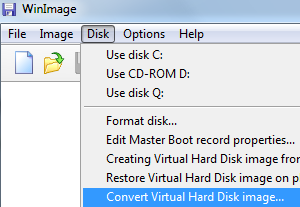
- An “Open” dialog box will show up. Make sure that the file type selected is Virtual Hard Disk (*.vhd) which should be default selection. Browse to the folder location for the VHD file, select to highlight the VHD, and then click Open.

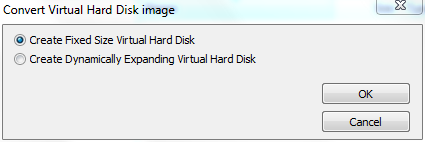
- Select either Create Fixed Size Virtual Hard Disk or Create Dynamically Expanding Virtual Hard Disk. You should choose the later for more flexibility if you foresee there will extensive usage on the disk image.
- On the “Save As” dialog box, change the output format under the Save as Type to VMWare VMDK (*.vmdk). Browse to the folder location which the output disk image to be saved and enter a file name (no extension required).

When done, click on Save button.
- WinImage will start the virtual hard disk image conversion process, which may take a while to complete, depending on the size of the virtual hard disk.
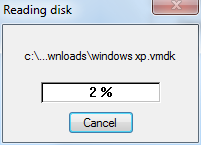
- Once the coversion is done, the VMDK vritual disk is ready for use. WinImage will try to mount the converted virtual disk image in the program after the conversion, where it asks user to select the partition to connect to.
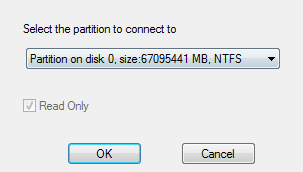
Click OK if you want to open the virtual disk in WinImage, or Cancel to return to main program.
Once the VMDK virtual disk image is created, the VMDK can be added to existing virtual machine as additional hard disk drive to access its content, or used as existing virtual disk when creating new virtual machine.
From: http://www.mydigitallife.info/how-to-convert-and-import-vhd-to-vmdk-vmware/
How to Convert and Import VHD to VMDK (VMWare)的更多相关文章
- Convert a VMDK (VMWare) file to VHDX (Hyper-V)
https://www.meziantou.net/2016/09/09/convert-a-vmdk-vmware-file-to-vhdx-hyper-v Microsoft provides a ...
- vdi、vhd、vmdk虚拟格式转换
VirtualBox带来VBoxManager.exe,可以来转换格式. 命令如下(Windows环境,Linux版的应该也有VBoxManager这个二进制文件): VBoxManager存在于Vi ...
- 虚拟硬盘格式vdi、vhd、vmdk相互转换
Windows7的引导程序能够引导vhd格式的虚拟硬盘,而VirtualBox创建的虚拟硬盘文件是vdi格式的,怎么办呢? 以前要借助其他软件才能实现,但是VirtualBox早就悄悄为我们带来了一个 ...
- VMWare File Format Learning && Use VHD File To Boot VMWare && CoreOS Docker Configuration And Running
目录 . Virtual Machine Introduce . Vmware Image File Format . VHD File Format . Convert VHD File Into ...
- 关于将Azure云上磁盘导出-使用VirtualBox转换成vmdk格式的方法记录
在工作中,经常会遇到虚拟磁盘文件格式的转换需求,尤其是在虚拟化迁移及云环境迁移到DC的虚拟化环境中 或者中转处理,如最近笔者遇到一个需要将Azure Cloud上的磁盘导出到VMware中,但Azur ...
- qcow2、raw、vmdk等镜像格式
转自 http://www.prajnagarden.com/?p=248 http://blog.csdn.net/starshine/article/details/8179483 转者言:对pr ...
- KVM磁盘镜像qcow2、raw、vmdk等格式区别(转)
raw(default) the raw format is a plain binary image of the disc image, and is very portable. On file ...
- qcow2、raw、vmdk等镜像格式的比较和基本转换
注:本文转自http://www.cnblogs.com/feisky/archive/2012/07/03/2575167.html 云计算用一个朋友的话来说:”做云计算最苦逼的就是得时时刻刻为 ...
- [React Native] Reduce Long Import Statements in React Native with Absolute Imports
In large React Native projects, it’s common to have long relative import paths like: import MyCompon ...
随机推荐
- jwtUtils顾名思意
1 package com.pipihao.blog.util; 2 import java.util.Date; 3 4 import javax.crypto.SecretKey; 5 impor ...
- I2C总线的Arduino库函数
I2C总线的Arduino库函数 I2C即Inter-Integrated Circuit串行总线的缩写,是PHILIPS公司推出的芯片间串行传输总线.它以1根串行数据线(SDA)和1根串行时钟线(S ...
- 更简易的机器学习-pycaret的安装和环境初始化
1.安装 pip install pycaret 在谷歌colab中还要运行: from pycaret.utils import enable_colab enable_colab() 2.获取数据 ...
- JVM系列【5】JVM常用指令
JVM系列笔记目录 虚拟机的基础概念 class文件结构 class文件加载过程 jvm内存模型 JVM常用指令 GC与调优 指令集分类 基于寄存器的指令集 基于栈的指令集 Hotspot中的Loca ...
- ansible-playbook-roles基本使用
1. ansible-角色-roles基本使用 1.1) 创建roles目录结构 1 [root@test-1 ansible]# mkdir -p /ansible/roles/{common,n ...
- 收到DE2+LCM+ D5M套件,拾回DE2,努力,奋进!
今天收到磐转寄的查无此人的DE2二手开发套件,准备用它来做科研验证!今天天是快学的第一天,参加电子设计竞赛会议.开集体会!
- DM9000时序设置
想了解一下DM9000的移植修改原理,所以分析了一下时序图和引脚连接 首先看一下DM9000的引脚和MINI2440的引脚连接 DM9000 MINI2440 功能描述 SD0 DA ...
- mapbox处理中文标注不能换行问题
mapbox的换行侧率是根据空格进行的,因为中文中没有设置空格,因此换行不起作用. 解决方法:在node_modules\ol-mapbox-style\util.js 60行添加下列代码: let ...
- 多测师讲解接口测试 _fiddler无法打开浏览器_高级讲师肖sir
错误现象: 打开fi'd'dler以后浏览器无法打开,关闭fiddler之后可以打开浏览器 解决方案: 1. 2. 在点击确定
- 如何使用 Gin 和 Gorm 搭建一个简单的 API 服务 (三)
修改数据结构 基本的 API 已经定义好了,现在是个修改 Person 对象结构的好时机.只要修改 Person 结构体,数据库和 API 都会自动做出相应的修改. 我要做的是在 Person ...