
office加载项部署清单签名的证书或其位置不受信任
异常信息:
System.Security.SecurityException: 此应用程序中的自定义功能将不起作用,原因是用于为 BIMT写作指导 的部署清单签名的证书或其位置不受信任。请向管理员寻求进一步帮助。
在 Microsoft.VisualStudio.Tools.Applications.Deployment.ClickOnceAddInTrustEvaluator.VerifyTrustPromptKeyInternal(ClickOnceTrustPromptKeyValue promptKeyValue, DeploymentSignatureInformation signatureInformation, String productName, TrustStatus status)
在 Microsoft.VisualStudio.Tools.Applications.Deployment.ClickOnceAddInTrustEvaluator.VerifyTrustUsingPromptKey(Uri manifest, DeploymentSignatureInformation signatureInformation, String productName, TrustStatus status)
在 Microsoft.VisualStudio.Tools.Applications.Deployment.ClickOnceAddInTrustEvaluator.VerifyTrustUsingPromptKey(Uri manifest, DeploymentSignatureInformation signatureInformation, String productName)
在 Microsoft.VisualStudio.Tools.Applications.Deployment.ClickOnceAddInDeploymentManager.ProcessSHA1Manifest(ActivationContext context, DeploymentSignatureInformation signatureInformation, PermissionSet permissionsRequested, Uri manifest, ManifestSignatureInformationCollection signatures, AddInInstallationStatus installState)
在 Microsoft.VisualStudio.Tools.Applications.Deployment.ClickOnceAddInDeploymentManager.VerifySecurity(ActivationContext context, Uri manifest, AddInInstallationStatus installState)
在 Microsoft.VisualStudio.Tools.Applications.Deployment.ClickOnceAddInDeploymentManager.InstallAddIn()
失败的程序集的区域是:
MyComputer
异常截图:
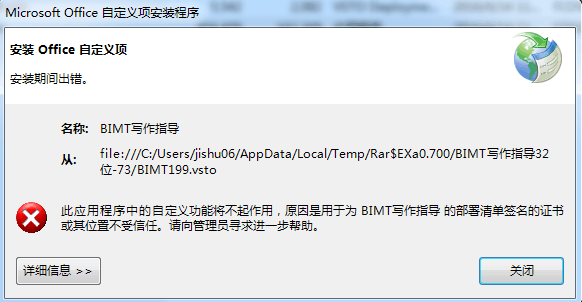
结觉方案:
  private void button1_Click(object sender, EventArgs e)

         {

             try//32位

             {

                 Microsoft.Win32.RegistryKey key;

                 key = Microsoft.Win32.Registry.LocalMachine.CreateSubKey(@"SOFTWARE\MICROSOFT\.NETFramework\Security\TrustManager\PromptingLevel");

                 key.SetValue("MyComputer", "Enabled");

                 key.SetValue("LocalIntranet", "Enabled");

                 key.SetValue("Internet", "Enabled");

                 key.SetValue("TrustedSites", "Enabled");

                 key.SetValue("UntrustedSites", "Enabled");

                 key.Close();

                 MessageBox.Show("Security Reg Done!");

             }

             catch (Exception ex)

             {

                 MessageBox.Show(ex.Message);

             }

         }

         private void button2_Click(object sender, EventArgs e)

         {

             try//64位

             {

                 Microsoft.Win32.RegistryKey key;

                 key = Microsoft.Win32.Registry.LocalMachine.CreateSubKey(@"SOFTWARE\Wow6432Node\MICROSOFT\.NETFramework\Security\TrustManager\PromptingLevel");

                 key.SetValue("MyComputer", "Enabled");

                 key.SetValue("LocalIntranet", "Enabled");

                 key.SetValue("Internet", "Enabled");

                 key.SetValue("TrustedSites", "Enabled");

                 key.SetValue("UntrustedSites", "Enabled");

                 key.Close();

                 MessageBox.Show("Security Reg Done!");

             }

             catch (Exception ex)

             {

                 MessageBox.Show(ex.Message);

             }

         }

软件下载地址:http://pan.baidu.com/s/1jH3Rc1o
msdn说明:https://msdn.microsoft.com/zh-cn/library/ms996418.aspx
office加载项部署清单签名的证书或其位置不受信任的更多相关文章
- Office加载项
出自我的个人主页 Alvin Blog 前言 前一段时间公司做了有关Excel 加载项的开发,也遇到了很多坑,所以在此记录一下,有两个原因,1.留给以后在用到加载项的时候,复习所用,避免 跳进同一个坑 ...
- Office加载项安装
出自我的个人主页 Alvin Blog 前言 Excel加载项离不开安装,Excel加载项本身安装及其简单,但这是在申请下来Office开发者账户之后,再次之前都得自行安装 线上安装 微软申请开发者账 ...
- Office加载项对Excel进行读写操作
转载自我的个人主页 前言 在开发ExcelWeb插件的时候,一大亮点就是可以在web项目中操作Excel,读取Excel的内容,也可以将服务端的数据写入的 Excel中,大大方便的用户使用Excel, ...
- VSTO学习笔记(三) 开发Office 2010 64位COM加载项
原文:VSTO学习笔记(三) 开发Office 2010 64位COM加载项 一.加载项简介 Office提供了多种用于扩展Office应用程序功能的模式,常见的有: 1.Office 自动化程序(A ...
- word加载项打包发布注意事项总结
最近在做一个word加载项,发布的时候还是有很多坑的现在总结一下:发布工具为Advanced Installer 11.0 网盘地址:http://pan.baidu.com/s/1i4GK3g5 1 ...
- VSTO - 使用Excel加载项生成表和图表
此示例显示如何创建Excel的加载项,使用户可以在其工作表中选择库存符号,然后生成一个新工作表,显示库存的历史性能. 工作表包含数据表和图表. 介绍Excel加载项通常不知道工作表包含什么.典型的加载 ...
- IE加载项
加载项 加载项也称为ActiveX控件.浏览器扩展.浏览器帮助应用程序对象或工具栏,可以通过提供多媒体或交互式内容(如动画)来增强对网站的体验. 但是,某些加载项可导致计算机停止响应或显示不需要的 ...
- 教您如何在Word的mathtype加载项中修改章节号
在MathType数学公式编辑器中,公式编号共有五部分内容:分别是章编号(Chapter Number).节编号(Section Number).公式编号(Equation Number).括号(En ...
- 如何在word文档中添加mathtype加载项
MathType是强大的数学公式编辑器,通常与office一起使用,mathtype安装完成后,正常情况下会在word文档中的菜单中自动添加mathtype加载项,但有时也会出现小意外,mathtyp ...
随机推荐
- centos中jdk配置
为了搭建jenkins环境,我这里必须先要配置jdk,我的系统环境时centos6.5,首先申明的是我系统是新系统,没有安装过jdk 我这里准备的安装包是jdk-7u80-linux-x64.gz. ...
- 关于Select * 与Select 字段名 的问题!
[转]http://blog.csdn.net/tongyu2009/article/details/8252418 1.SELECT * 语句取出表中的所有字段,不论该字段的数据对调用的应用程序是否 ...
- subversion-fundamental concepts
1.在使用svn 的时候,版本号version的问题一直困恼. 如在目录/app/controller上面右键选择查看该目录的 show log ,弹出的窗口显示的Revision log.单击每一条 ...
- 自定义switch开关
自定义一个switch开关 <!DOCTYPE html> <html> <head> <meta charset="utf-8"> ...
- Hibernate 系列教程1-枚举单例类
你还在为不知道怎样正确使用Hibernate而纠结吗 你还在为不知道怎样配置映射文件而郁闷吗 枚举单例(Enum Singleton) 是实现单例模式的一种方式而已,不过写法简单,创建枚举默认也是线程 ...
- Moya 浅析
Moya是一个高度抽象的网络库,他的理念是让你不用关心网络请求的底层的实现细节,只用定义你关心的业务.且Moya采用桥接和组合来进行封装(默认桥接了Alamofire),使得Moya非常好扩展,让你不 ...
- 源代码管理工具-GIT
源代码管理工具-GIT ---- 一. 掌握 - git 概述 1. git 简介? 什么是git? git是一款开源的分布式版本控制工具在世界上所有的分布式版本控制工具中,git是最快.最简单.最流 ...
- js管理内存
数据不再有用时,最好通过将其值置NULL来释放其引用-这个做法叫做解除引用(dereference).这个做法适用于全局变法和全局对象的属性. function createPerson(name){ ...
- tiny210移植linux内核(3.0.8)杂项
关于三星芯片nand内存分区文件: linux-3.0.8/drivers/mtd/nand/s3c_nand.c struct mtd_partition s3c_partition_info[] ...
- LightOJ 1370 Bi-shoe and Phi-shoe(欧拉函数)
题意:题目给出一个欧拉函数值F(X),让我们求>=这个函数值的最小数N,使得F(N) >= F(X); 分析:这个题目有两种做法.第一种,暴力打出欧拉函数表,然后将它调整成有序的,再建立一 ...