
Dev之ChartControl控件(二)— 绘制多重坐标图形
有时针对一个ChartControl控件可能要设置多个Y轴,进行显示:
以下举个例子:如在一个Chart中显示多个指标项如图:
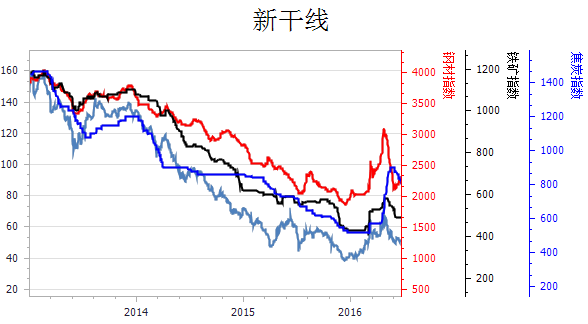
首先,读取数据,并对左边的Y轴最大和最小值进行设定
IndexSeriesControler indexControl = new IndexSeriesControler();

            IEnumerable<IndexModel> ieModel= indexControl.GetDate(dateB,dateE,indexName);//读取的数据集

            decimal max=  ieModel.Max(x => x.IndexValue);

            decimal min = ieModel.Min(x => x.IndexValue);
其次,生成Series,并添加到charControl控件;
 Series series = new Series(indexName, ViewType.Spline);

            if (num != )

            {

                lstSeries.Add(series);

            }

             foreach (IndexModel model in ieModel)

             {

                 series.Points.Add(new SeriesPoint(model.PublishDate, new double[] { (double)model.IndexValue }));

             }

             series.View = splineSeriesView1;

            this.chartControl.Series.Add(series);

            this.chartControl.Legend.Visible = false;
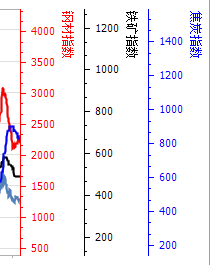
再次,创建图标的第二坐标;
效果如图:
 public void GetAxisY()

        {

            for (int i = ; i < lstSeries.Count; i++)

            {

                lstSeries[i].View.Color = lstColor[i];

                CreateAxisY(lstSeries[i]);

            }

        }

        /// <summary>

        /// 创建图表的第二坐标系

        /// </summary>

        /// <param name="series">Series对象</param>

        /// <returns></returns>

        private SecondaryAxisY CreateAxisY(Series series)

        {

            SecondaryAxisY myAxis = new SecondaryAxisY(series.Name);

            ((XYDiagram)chartControl.Diagram).SecondaryAxesY.Add(myAxis);

            ((LineSeriesView)series.View).AxisY = myAxis;

            myAxis.Title.Text = series.Name;

            myAxis.Title.Alignment = StringAlignment.Far; //顶部对齐

            myAxis.Title.Visible = true; //显示标题

            myAxis.Title.Font = new Font("宋体", 9.0f);

            Color color = series.View.Color;//设置坐标的颜色和图表线条颜色一致

            myAxis.Title.TextColor = color;

            myAxis.Label.TextColor = color;

            myAxis.Color = color;

            return myAxis;

        }
完整代码如下:
 public partial class ChartControlExtension : UserControl

    {

        public ChartControlExtension()

        {

            InitializeComponent();

            ChartTitle chartTitle=new ChartTitle();

            chartTitle.Text="新干线";

            chartTitle.TextColor=System.Drawing.Color.Black;

            this.chartControl.Titles.Add(chartTitle);

            lstColor.Add(Color.Red);

            lstColor.Add(Color.Black);

            lstColor.Add(Color.Blue);

            lstColor.Add(Color.Brown);

        }

        public bool IsRange { set; get; }

        public List<Series> lstSeries = new List<Series>();

        public List<Color> lstColor = new List<Color>();

        int num = ;

        public void GetDate(DateTime dateB, DateTime dateE, string indexName)

        {

            IndexSeriesControler indexControl = new IndexSeriesControler();

            IEnumerable<IndexModel> ieModel= indexControl.GetDate(dateB,dateE,indexName);

            decimal max=  ieModel.Max(x => x.IndexValue);

            decimal min = ieModel.Min(x => x.IndexValue);

           // this.chartControl.Series.Clear();

            Series series = new Series(indexName, ViewType.Spline);

            if (num != )

            {

                lstSeries.Add(series);

            }

             foreach (IndexModel model in ieModel)

             {

                 series.Points.Add(new SeriesPoint(model.PublishDate, new double[] { (double)model.IndexValue }));

             }           this.chartControl.Series.Add(series);

            this.chartControl.Legend.Visible = false;

            //this.chartControl.cut

            if (num == )

            {

                XYDiagram diag = (XYDiagram)this.chartControl.Diagram;

                diag.AxisY.VisualRange.MaxValue = max;

                diag.AxisY.VisualRange.MinValue = min-;

            }

            //this.IsRange = true;

            num++;

        }

        public void GetAxisY()

        {

            for (int i = ; i < lstSeries.Count; i++)

            {

                lstSeries[i].View.Color = lstColor[i];

                CreateAxisY(lstSeries[i]);

            }

        }

        /// <summary>

        /// 创建图表的第二坐标系

        /// </summary>

        /// <param name="series">Series对象</param>

        /// <returns></returns>

        private SecondaryAxisY CreateAxisY(Series series)

        {

            SecondaryAxisY myAxis = new SecondaryAxisY(series.Name);

            ((XYDiagram)chartControl.Diagram).SecondaryAxesY.Add(myAxis);

            ((LineSeriesView)series.View).AxisY = myAxis;

            myAxis.Title.Text = series.Name;

            myAxis.Title.Alignment = StringAlignment.Far; //顶部对齐

            myAxis.Title.Visible = true; //显示标题

            myAxis.Title.Font = new Font("宋体", 9.0f);

            Color color = series.View.Color;//设置坐标的颜色和图表线条颜色一致

            myAxis.Title.TextColor = color;

            myAxis.Label.TextColor = color;

            myAxis.Color = color;

            return myAxis;

        }

}
调用方法:
 private void tolBtnSearch_Click(object sender, EventArgs e)

        {

            chartControlExtension1.GetDate(datPBegin.Value,datPEnd.Value,"铁矿石指数");

            chartControlExtension1.GetDate(datPBegin.Value, datPEnd.Value, "钢材指数");

            chartControlExtension1.GetDate(datPBegin.Value, datPEnd.Value, "铁矿指数");

            chartControlExtension1.GetDate(datPBegin.Value, datPEnd.Value, "焦炭指数");

            chartControlExtension1.GetAxisY();

        }
其打印方法可用:
this.chartControl.ShowPrintPreview(DevExpress.XtraCharts.Printing.PrintSizeMode.Zoom);
Dev之ChartControl控件(二)— 绘制多重坐标图形的更多相关文章
- DevExpress控件使用之多重坐标图形的绘制 z
有时候,基于对一些年份.月份的统计,需要集成多个数值指标进行分析,因此就需要把多种数据放到一个图形里面展现,也成为多重坐标轴,多重坐标轴可以是多个X轴,也可以是Y轴,它们的处理方式类似.本文通过一个例 ...
- Dev之ChartControl控件(一)
ChartControl控件主要包括Chart Title,Legend,Annotations,Diagram,Series五部分:如图: 1. 用RangeControl控件控制ChartCon ...
- DevExpress使用之ChartControl控件绘制图表(多坐标折线图、柱状图、饼状图)
最近因为公司项目需要用到WinForm的DecExpress控件,在这里把一些使用方法总结一下. DevExpress中有一个专门用来绘制图表的插件ChartControl,可以绘制折线图.饼状图.柱 ...
- WinForm DevExpress使用之ChartControl控件绘制图表一——基础
最近因为公司项目需要用到WinForm的DecExpress控件,在这里把一些使用方法总结一下. DevExpress中有一个专门用来绘制图表的插件ChartControl,可以绘制折线图.饼状图.柱 ...
- QRowTable表格控件(二)-红涨绿跌
目录 一.开心一刻 二.概述 三.效果展示 四.任务需求 五.指定列排序 六.排序 七.列对其方式 八.相关文章 原文链接:QRowTable表格控件(二)-红涨绿跌 一.开心一刻 一天,五娃和六娃去 ...
- 玩转控件:对Dev中GridControl控件的封装和扩展
又是一年清明节至,细雨绵绵犹如泪光,树叶随风摆动.... 转眼间,一年又过去了三分之一,疫情的严峻让不少企业就跟清明时节的树叶一样,摇摇欲坠.裁员的裁员,降薪的降薪,996的996~~说起来都是泪,以 ...
- Windows高DPI系列控件(二) - 柱状图
目录 一.QCP 二.效果展示 三.高DPI适配 1.自定义柱状图 2.新的柱状图 3.测试代码 四.相关文章 原文链接:Windows高DPI系列控件(二) - 柱状图 一.QCP QCP全称QCu ...
- WPF 截图控件之绘制箭头(五)「仿微信」
前言 接着上周写的截图控件继续更新 绘制箭头. 1.WPF实现截屏「仿微信」 2.WPF 实现截屏控件之移动(二)「仿微信」 3.WPF 截图控件之伸缩(三) 「仿微信」 4.WPF 截图控件之绘制方 ...
- 在Image控件中绘制文字
//Canvas 在Image控件中绘制文字 procedure TForm1.Button1Click(Sender: TObject);begin image1.Canvas.Font.Size ...
随机推荐
- Channel Allocation(DFS)
Channel Allocation Time Limit : 2000/1000ms (Java/Other) Memory Limit : 20000/10000K (Java/Other) ...
- Android自动测试之Monkey工具
Monkey工具 前言: 最 近开始研究Android自动化测试方法,对其中的一些工具.方法和框架做了一些简单的整理,其中包括android测试框架.CTS.Monkey. Monkeyrunner. ...
- 《Windows驱动开发技术详解》之编程加载NT式驱动
之前我们加载驱动都是利用INSTDRV这个应用,其原理是在注册表中写入相应的字段,这一节我们手动编写代码去加载驱动,其原理类似:
- 推荐两个界面原型设计工具--GUIDesignStudio 和 Mockups For Desktop
前段时间,有幸参加一次高级软件架构师的培训,授课老师介绍了两个很好玩的界面原型设计工具:GUIDesignStudio 和 Mockups For Desktop,现分享一下,截图说明,洗洗眼球,权当 ...
- hdu_5752_Sqrt Bo(xjb搞)
题目链接:hdu_5752_Sqrt Bo 题意: 给你一个数,问你最少要开多少次方才能为1 题解: 我们发现如果给的数大于232 那么肯定在5次以内是开不出来的,所以直接输出TAT,然后小于的就模拟 ...
- c语言编译命令
第14章 预处理及用户配置文件 • 预处理命令通常在程序编译时进行一些符号处 理,其并不执行具体的硬件操作.C51语言中的预 处理命令主要有宏定义指令.文件包指令和条 件编译指令,还有其他一些调试时使 ...
- hostent h_addr_list
struct hostent { char FAR * h_name; /* official name of host */ char FAR * FAR * h_aliases; /* alias ...
- PCI源码学习笔记
这个是PCI的关键结构体. static const struct file_operations proc_bus_pci_operations = { .owner = THIS_MODULE, ...
- Android BuildConfig.DEBUG的妙用
在Android开发中,我们使用android.util.Log来打印日志,方便我们的开发调试.但是这些代码不想在发布后执行,我们并不想在软件发布后调试日志被其他开发者看到,现在我的方法是设置一个全局 ...
- 笨方法学python--打印
1 print 语句 尾端的逗号 end1 = "C" end2 = "h" end3 = "e" end4 = "e" ...