
JNDI-j2ee
| Database Connection Pool (DBCP) Configurations | |||||||||||||||||||||||||||||||||||||||||||||||||||
|
META-INF/context.xml:
<?xml version="1.0" encoding="UTF-8"?>

<Context reloadable="true">

    <!-- maxActive: Maximum number of database connections in pool. Make sure

        you configure your mysqld max_connections large enough to handle all of your

        db connections. Set to -1 for no limit. -->

    <!-- maxIdle: Maximum number of idle database connections to retain in pool.

        Set to -1 for no limit. See also the DBCP documentation on this and the minEvictableIdleTimeMillis

        configuration parameter. -->

    <!-- maxWait: Maximum time to wait for a database connection to become available

        in ms, in this example 10 seconds. An Exception is thrown if this timeout

        is exceeded. Set to -1 to wait indefinitely. -->

    <!-- username and password: MySQL username and password for database connections -->

    <!-- driverClassName: Class name for the old mm.mysql JDBC driver is org.gjt.mm.mysql.Driver

        - we recommend using Connector/J though. Class name for the official MySQL

        Connector/J driver is com.mysql.jdbc.Driver. -->

    <!-- url: The JDBC connection url for connecting to your MySQL database. -->

    <Resource name="jdbc/TestDB" auth="Container" type="javax.sql.DataSource"

        maxActive="100" maxIdle="30" maxWait="10000"

        username="javauser"

        password="javadude"

        driverClassName="com.mysql.jdbc.Driver"

        url="jdbc:mysql://localhost:3306/javatest" />

</Context>
3. web.xml configuration
Now create a WEB-INF/web.xml for this test application.
 |
|
|
|
<web-app xmlns="http://java.sun.com/xml/ns/j2ee" |
|
|
|
|
4. Test code
Now create a simple test.jsp page for use later.
<%@ taglib uri="http://java.sun.com/jsp/jstl/sql" prefix="sql" %>

<%@ taglib uri="http://java.sun.com/jsp/jstl/core" prefix="c" %>

<sql:query var="rs" dataSource="jdbc/TestDB">

select id, foo, bar from testdata

</sql:query>

<html>

  <head>

    <title>DB(JNDI) Test</title>

  </head>

  <body>

  <h2>Results</h2>

<c:forEach var="row" items="${rs.rows}">

    Foo: ${row.foo}<br/>

    Bar: ${row.bar}<br/>

</c:forEach>

  </body>

</html>
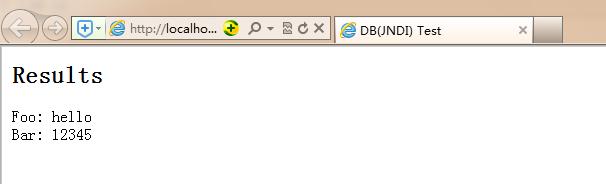
That JSP page makes use of JSTL's SQL and Core taglibs. You can get it from Apache Tomcat Taglibs - Standard Tag Library project — just make sure you get a 1.1.x release. Once you have JSTL, copyjstl.jar and standard.jar t(
| Standard 1.1 | JSTL 1.1 | Servlet 2.4, JavaServer Pages 2.0 | download |
)o your web app's WEB-INF/lib directory.
Finally deploy your web app into $CATALINA_BASE/webapps either as a warfile called DBTest.war or into a sub-directory called DBTest
Once deployed, point a browser at http://localhost:8080/DBTest/test.jsp to view the fruits of your hard work.
JNDI-j2ee的更多相关文章
- J2EE学习记录,EJB,JNDI,RMI
Java EE 是java平台企业版(Java Platform Enterprise Edition)缩写,是Sum公司为企业级应用推出的标准平台. 随着Java技术的发展,J2EE平台得到了迅速的 ...
- J2EE学习从菜鸟变大鸟之四 JNDI(Java Naming and Directory Interface)
掌握 J2EE 是件不是很轻松的事哈,但是很有意思,抽象抽象哈哈,因为它包含的技术和缩略语在不断地增长.Java 命名和目录接口(Java Naming and Directory Interface ...
- J2EE相关概念,EJB/JNDI/JMS/RMI等
J2EE 四层模型 J2EE的核心API.组件.相关概念 JDBC(Java Database Connectivity) JNDI(Java Name and Directory Interface ...
- JNDI 在 J2EE 中的角色
JNDI 在 J2EE 中的角色 Spring整合HIbernate时,三种数据库连接池的配置和比较 Tomcat 6 JNDI数据源详解 Tomcat 6 --- JNDI详解 Spring整合HI ...
- J2EE的十三种技术——JNDI
背景: 上一篇博客中介绍了J2EE的十三种技术之一--JDBC,主要用于提供了统一访问多种数据库的方式.这篇文章我们继续介绍J2EE的技术--JNDI. JNDI: Java Naming and D ...
- Java学习笔记之JNDI(六)
JNDI 是什么 JNDI是 Java 命名与目录接口(Java Naming and Directory Interface),在J2EE规范中是重要的规范之一,不少专家认为,没有透彻理解JNDI的 ...
- JNDI
这两天研究了一下 context.lookup("java:comp/env/XXX")和直接context.lookup("XXX")的区别 网上关于这两个的 ...
- (转)J2EE的13种核心技术
一.JDBC(Java Database Connectivity) JDBC API为访问不同的数据库提供了一种统一的途径,象ODBC一样,JDBC对开发者屏蔽了一些细节问题,另外,JDBC对数据 ...
- J2EE的13种核心技术
一.JDBC(Java Database Connectivity) JDBC API为访问不同的数据库提供了一种统一的途径,象ODBC一样,JDBC对开发者屏蔽了一些细节问题,另外,JDBC对数据库 ...
- 帆软报表FineReport中数据连接之Jboss配置JNDI连接
使用sqlsever 2000数据库数据源来做实例讲解,帆软报表FineReport数据连接中Jboss配置JNDI大概的过程和WEBSPHERE以及WEBLOGIC基本相同,用JDBC连接数据库制作 ...
随机推荐
- CSS3 3D旋转动画代码实例
<!DOCTYPE html PUBLIC "-//W3C//DTD XHTML 1.0 Transitional//EN" "http://www.w3.org/ ...
- Nagios经check_http监视web申请书server多个tomcat维修
怎么样nagios显示器tomcat,它是一个相对简单的和复杂的事情.简单是因为,只有监控的假设web应用服务器tomcat无论是服务正常进行,很简单.假设你要监视tomcat其他例子,例如连接数jv ...
- zoj3822 期望dp
每天在一个n*m的棋盘上放棋子,问使得每一行,每一列都有棋子的期望天数 dp[n][m][k] 表示用k个棋子占据了n行,m列,距离目标状态还需要的期望天数 那么dp[n][m][k] = p1 * ...
- bnu1066
hnu1066 给我们一张图,问我们摧毁边使得s和t不连通有多少种方案, 方案与方案之间不能存在相同的摧毁目标. 这是一个神奇的题目. 这题可以转为求s与t的最短路,为什么呢? 因为方案与方案之间不能 ...
- 对于Hadoop的MapReduce编程makefile
根据近期需要hadoop的MapReduce程序集成到一个大的应用C/C++书面框架.在需求make当自己主动MapReduce编译和打包的应用. 在这里,一个简单的WordCount1一个例子详细的 ...
- 最简单的历史Hibernate获得短暂的
其实Hibernate本身就是一个单独的帧,不管它不需要web server或application server支持. 然而,最Hibernate简介已经加入了非常多的非Hibernate事,例: ...
- paip.关于动画效果的原则 html js 框架总结
paip.关于动画效果的原则 html js 框架总结 1. 动画框架的来源:flex,jqueryui 3 2. 特效的分类 3 2.1. Property effects 动态改变一个或多个目标对 ...
- Android 反编译(一,apktool+smail2java)
一:解压缩(获取图片等资源) 对于apk中丰富的资源,假设我们在练习的时候须要引用某些apk中的资源文件时,最简单的办法使用解压缩工具对apk进行解压缩,然后在对应的文件夹下查找须要的资源文件. 二: ...
- 如何利用多核CPU来加速你的Linux命令 — awk, sed, bzip2, grep, wc等(转)
你是否曾经有过要计算一个非常大的数据(几百GB)的需求?或在里面搜索,或其它操作——一些无法并行的操作.数据专家们,我是在对你们说.你可能有一个4核或更多核的CPU,但我们合适的工具,例如 grep, ...
- Eclipse+Maven创建webapp项目<二> (转)
Eclipse+Maven创建webapp项目<二> 1.开启eclipse,右键new——>other,如下图找到maven project 2.选择maven project,显 ...