
ElasticSearch-5.0安装head插件
环境
- Windows10企业版X64
- JDK-1.8
- ElasticSearch-5.0.0
- node-v4.5.0-x64.msi
- git客户端
步骤
安装node到D盘。如D:\nodejs。
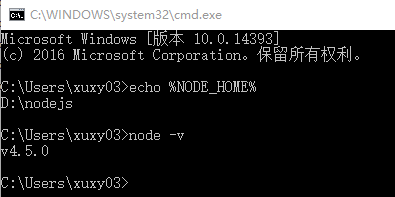
把NODE_HOME设置到环境变量里(安装包也可以自动加入PATH环境变量)。测试一下node是否生效:
安装grunt
grunt是一个很方便的构建工具,可以进行打包压缩、测试、执行等等的工作,5.0里的head插件就是通过grunt启动的。因此需要安装grunt:
注意:路径切到D:\nodejs下。
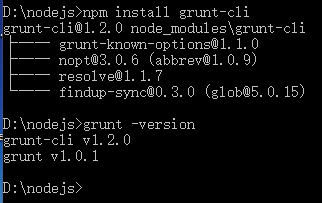
npm install -g grunt-cli
-g代表全局安装。安装路径为C:\Users\yourname\AppData\Roaming\npm,并且自动加入PATH变量。安装完成后检查一下:
把head插件的源码git clone下来:
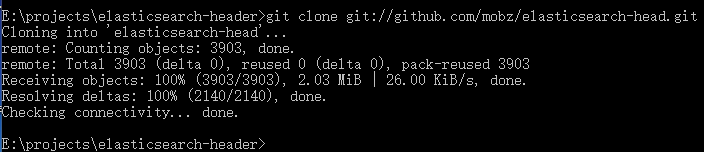
git clone git://github.com/mobz/elasticsearch-head.git
效果如图:
修改head源码
由于head的代码还是2.6版本的,直接执行有很多限制,比如无法跨机器访问。因此需要用户修改两个地方:
目录:head/Gruntfile.js:
connect: {

    server: {

        options: {

            port: 9100,

            hostname: '*',

            base: '.',

            keepalive: true

        }

    }

}
增加hostname属性,设置为*
修改连接地址:
目录:head/_site/app.js
修改head的连接地址:
this.base_uri = this.config.base_uri || this.prefs.get("app-base_uri") || "http://localhost:9200";
把localhost修改成你es的服务器地址,如:
this.base_uri = this.config.base_uri || this.prefs.get("app-base_uri") || "http://10.10.10.10:9200";
运行head
修改elasticsearch的参数
修改一下es使用的参数。编辑config/elasticsearch.yml:
# 换个集群的名字,免得跟别人的集群混在一起

cluster.name: es-5.0-test

# 换个节点名字

node.name: node-

# 修改一下ES的监听地址,这样别的机器也可以访问

network.host: 0.0.0.0

# 默认的就好

http.port:

# 增加新的参数,这样head插件可以访问es

http.cors.enabled: true

http.cors.allow-origin: "*"
注意,设置参数的时候:后面要有空格!
开启ES-5.0.0:
D:\ElasticSearch-5.0.\bin\elasticsearch.bat
启动效果:

然后在head源码目录中,执行npm install 下载的包:
npm install
效果如图:

初次运行安装可能会报警告或错误。可以重新运行一次npm install。
最后,在head源代码目录下启动nodejs:
grunt server
效果如图:

访问:target:9100
这个时候,访问http://localhost:9100就可以访问head插件了:
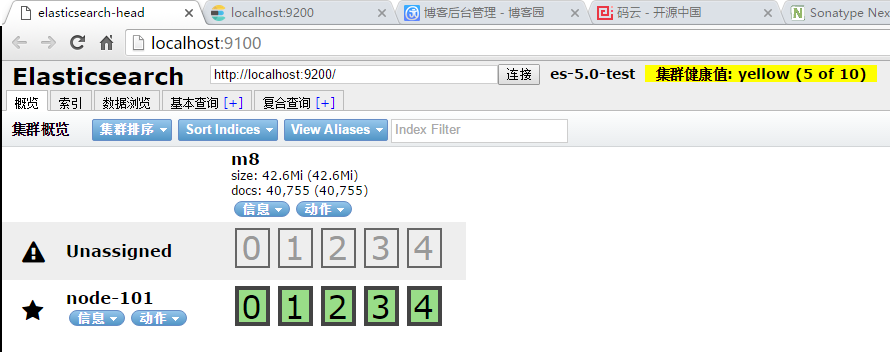
因为之前已在ES中建立了一个索引m8,因此可以看到数据:

参考文章:http://blog.csdn.net/laoyang360/article/details/51472821
ElasticSearch-5.0安装head插件的更多相关文章
- windows 7 下elasticsearch5.0 安装head 插件
windows 7 下elasticsearch5.0 安装head 插件 elasticsearch5.0 和2有了很大的变化,以前的很多插件都有了变化比如 bigdesk head,以下是安装he ...
- myeclipse6.0安装svn插件
myeclipse6.0安装svn插件 转载地址:http://www.cnblogs.com/danica/archive/2011/07/12/2104323.html myeclipse6.0安 ...
- Elasticsearch 5.0 安装 Search Guard 5 插件 (五)
一.Search Guard 简介 Search Guard 是 Elasticsearch 的安全插件.它为后端系统(如LDAP或Kerberos)提供身份验证和授权,并向Elasticsearc ...
- ElasticSearch 5.0及head插件安装
一.elasticsearch安装配置 1.官网下载源码包 https://artifacts.elastic.co/downloads/elasticsearch/elasticsearch-5.0 ...
- Elasticsearch 5.0 安装 Search Guard 5 插件
一.Search Guard 简介 Search Guard 是 Elasticsearch 的安全插件.它为后端系统(如LDAP或Kerberos)提供身份验证和授权,并向Elasticsearc ...
- (转) Elasticsearch 5.0 安装 Search Guard 5 插件
一.Search Guard 简介 Search Guard 是 Elasticsearch 的安全插件.它为后端系统(如LDAP或Kerberos)提供身份验证和授权,并向Elasticsearc ...
- Eclipse Indigo 3.7.0 安装GIT插件提示 requires 'bundle org.eclipse.team.core(转)
文章参考来源:http://showlike.iteye.com/blog/1958538 错误提示: Cannot complete the install because one or more ...
- Eclipse Indigo 3.7.0 安装GIT插件提示 requires 'bundle org.eclipse.team.core(转)
错误提示: Cannot complete the install because one or more required items could not be found.Software bei ...
- myeclipse9.0安装svn插件
先得保证myeclipse9.0是可以正常使用的吧. 第一步当然是从网上下载SVN插件啦.myeclipse9.0集成的eclipse版本是属于3.x,所以下载eclipse3.x系列的SVN插件. ...
- Eclipse Indigo 3.7.0 安装GIT插件
Eclipse上安装GIT插件EGit 首先打开Eclipse,然后点击Help>Install New Software>Add. Name:EGit Location: http:// ...
随机推荐
- SQL Server 2008 R2 Service Pack 3 已经发布
微软SQL Server Product Team在9月26号官方博客宣布,Microsoft SQL Server 2008 R2 Service Pack 3 (SP3)正式发布了 .具体信息可以 ...
- Windows驱动——虚拟机 虚拟串口 双机调试
=================================版权声明================================= 版权声明:原创文章 谢绝转载 请通过右侧公告中的“联系邮 ...
- C# DESC加密
DESC加密方法 直接上代码: 1.加密 /// <summary> /// 加密 /// </summary> /// <param name="obj&qu ...
- JQuery判断元素是否存在
JQuery判断元素是否存在的原理与javascript略有不同,因为$选择器选择的元素无论是否存在都不会返回null或undefined,要使用JQuery判断元素是否存在,只能使用length属性 ...
- [WPF系列]基础Combox
示例 参考 WPF combobox SelectedValue binding to string Confused with wpf ComboBox DisplayMemberPath, ...
- 洛谷P1280 尼克的任务[DP]
题目描述 尼克每天上班之前都连接上英特网,接收他的上司发来的邮件,这些邮件包含了尼克主管的部门当天要完成的全部任务,每个任务由一个开始时刻与一个持续时间构成. 尼克的一个工作日为N分钟,从第一分钟开始 ...
- Python版本共存之道:virtualenv和virtualenvwrapper
以前觉得根本用不着这个,但是写不同项目的时候就遇到了问题,不可能把之前的全部删掉从新安装,于是就想到了这个,终于还是要学它, 现在做一个命令的总结,方便自己和大家查询 #以下以对 test 为名的虚拟 ...
- [bzoj1597][usaco2008 mar]土地购买 (动态规划+斜率优化)
Description 农夫John准备扩大他的农场,他正在考虑N (1 <= N <= 50,000) 块长方形的土地. 每块土地的长宽满足(1 <= 宽 <= 1,000, ...
- IIS部署站点相关经验总结
IIS部署站点相关经验总结 1.IIS和.net4.0安装是有先后顺序的,应该先安装.net framework 4.0,再安装IIS.如果按相反顺序安装的话,IIS中看不到4.0相关的东西,那么只能 ...
- 通过xshell远程连接ubuntu
ubuntu开启sshd服务SSH分客户端openssh-client和openssh-server如果你只是想登陆别的机器的SSH只需要安装openssh-client(ubuntu有默认安装,如果 ...