
电商、商城类APP常用标签"hot"--第三方开源--LabelView
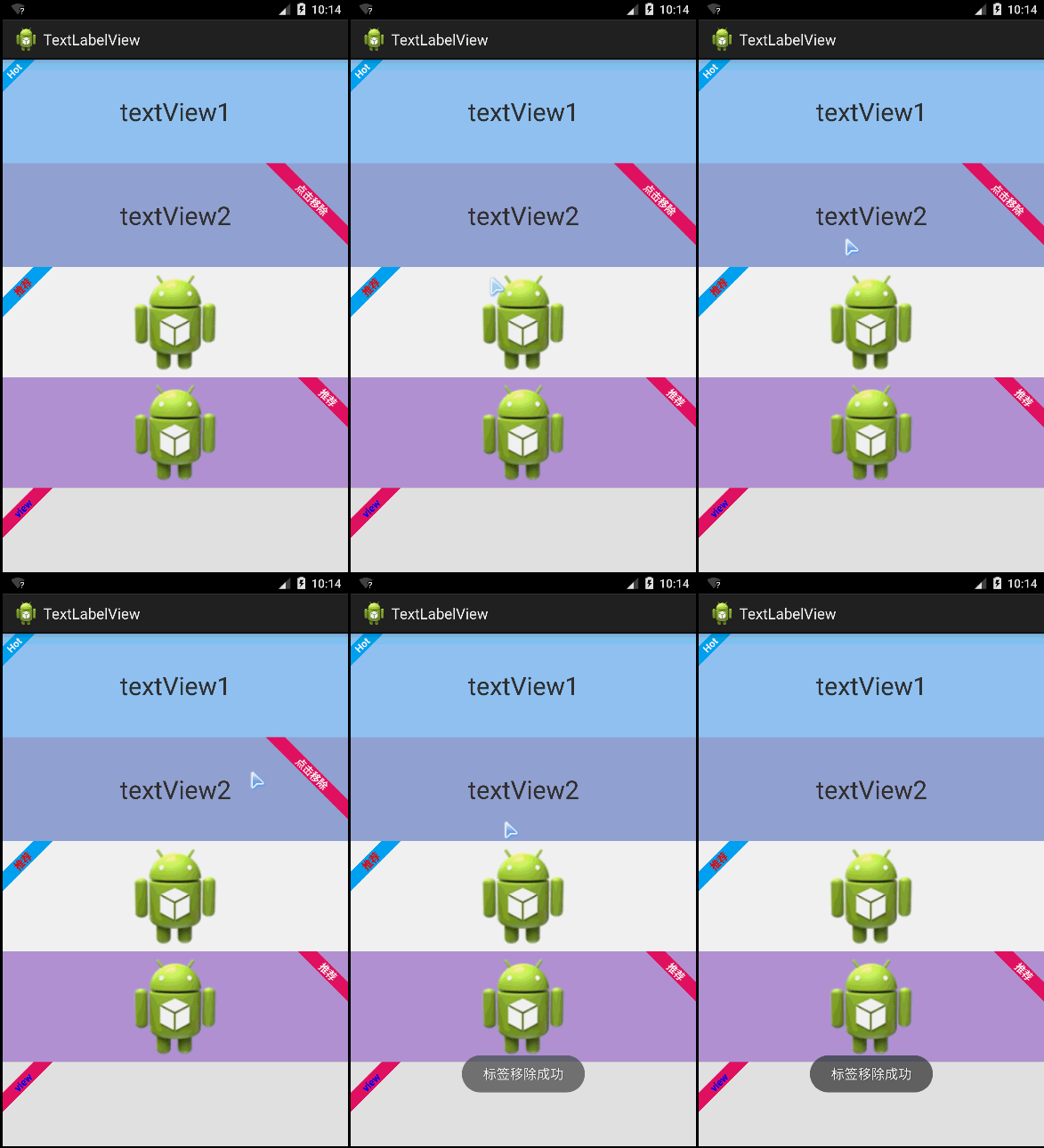
LabelView是在github上一个开源的标签库。其项目主页是:https://github.com/linger1216//labelview
LabelView为一个TextView,ImageView或者为ListView中适配器getView返回的View,增加一个左上角或者右上角的标签
这种需求设计在商城类APP、电商类APP中比较常用,这些APP展示的商品,通常会增加一些促销或者该类商品的特征。
LabelView集成自Android TextView,可以像使用Android TextView一样使用LabelView,LabelView使用简单,如代码所示:
布局代码:
 <LinearLayout xmlns:android="http://schemas.android.com/apk/res/android"

     xmlns:tools="http://schemas.android.com/tools"

     android:layout_width="match_parent"

     android:layout_height="match_parent"

     android:orientation="vertical"

     tools:context="com.zzw.textlabelview.MainActivity" >

     <TextView

         android:id="@+id/textView1"

         android:layout_width="match_parent"

         android:layout_height="wrap_content"

         android:layout_weight="1"

         android:background="#90CAF9"

         android:gravity="center"

         android:text="textView1"

         android:textSize="30sp" />

     <TextView

         android:id="@+id/textView2"

         android:layout_width="match_parent"

         android:layout_height="wrap_content"

         android:layout_weight="1"

         android:background="#9FA8DA"

         android:gravity="center"

         android:text="textView2"

         android:textSize="30sp" />

     <ImageView

         android:id="@+id/imageView1"

         android:layout_width="match_parent"

         android:layout_height="wrap_content"

         android:layout_weight="1"

         android:src="@drawable/ic_launcher" />

     <ImageView

         android:id="@+id/imageView2"

         android:layout_width="match_parent"

         android:layout_height="wrap_content"

         android:layout_weight="1"

         android:background="#B39DDB"

         android:src="@drawable/ic_launcher" />

   <View

         android:id="@+id/view"

         android:layout_width="match_parent"

         android:layout_height="100dip"

         android:background="#e0e0e0" >

     </View>

 </LinearLayout>
JAVA代码:
 package com.zzw.textlabelview;

 import com.lid.lib.LabelView;

 import com.lid.lib.LabelView.Gravity;

 import android.app.Activity;

 import android.graphics.Color;

 import android.os.Bundle;

 import android.view.View;

 import android.view.View.OnClickListener;

 import android.widget.Toast;

 public class MainActivity extends Activity {

     @Override

     protected void onCreate(Bundle savedInstanceState) {

         super.onCreate(savedInstanceState);

         setContentView(R.layout.activity_main);

         //为TextView1左上角添加一个标签

         LabelView label1 = new LabelView(this);

         label1.setText("Hot");

         label1.setBackgroundColor(0xff03a9f4);

         label1.setTargetView(findViewById(R.id.textView1), 4, Gravity.LEFT_TOP);

         //为TextView2右上角添加一个标签,点击标签移除

         final LabelView label2 = new LabelView(this);

         label2.setText("点击移除");

         label2.setBackgroundColor(0xffE91E63);

         label2.setTargetView(findViewById(R.id.textView2), 20,

                 Gravity.RIGHT_TOP);

         findViewById(R.id.textView2).setOnClickListener(new OnClickListener() {

             @Override

             public void onClick(View v) {

                 label2.remove();

                 Toast.makeText(getApplicationContext(), "标签移除成功", 0).show();

             }

         });

         //为ImageView1添加一个左上角标签,并且自定义标签字颜色

         LabelView label3 = new LabelView(this);

         label3.setText("推荐");

         label3.setTextColor(Color.RED);

         label3.setBackgroundColor(0xff03a9f4);

         label3.setTargetView(findViewById(R.id.imageView1), 10,

                 Gravity.LEFT_TOP);

         //为IamgeView2添加一个右上角标签

         LabelView label4 = new LabelView(this);

         label4.setText("推荐");

         label4.setBackgroundColor(0xffE91E63);

         label4.setTargetView(findViewById(R.id.imageView2), 10,

                 Gravity.RIGHT_TOP);

         //为一个View添加一个左上角标签(ListView用)

         LabelView label5 = new LabelView(this);

         label5.setText("view");

         label5.setTextColor(Color.BLUE);

         label5.setBackgroundColor(0xffE91E63);

         label5.setTargetView(findViewById(R.id.view), 10, Gravity.LEFT_TOP);

     }

 }
电商、商城类APP常用标签"hot"--第三方开源--LabelView的更多相关文章
- nopcommerce 电商商城 ASP.NET 开源系统
nopcommerce 电商商城 ASP.NET 开源系统
- Android音乐、视频类APP常用控件:DraggablePanel(2)
Android音乐.视频类APP常用控件:DraggablePanel(2) 附录文章1主要演示了如何使用DraggablePanel 的DraggableView.DraggablePanel ...
- Android音乐、视频类APP常用控件:DraggablePanel(1)
Android音乐.视频类APP常用控件:DraggablePanel(1) Android的音乐视频类APP开发中,常涉及到用户拖曳视频.音乐播放器产生一定交互响应的设计需求,最典型的以You ...
- iOS开发之资讯类App常用分类控件的封装与实现(CollectionView+Swift3.0+)
今天博客中,我们就来实现一下一些常用资讯类App中常用的分类选择的控件的封装.本篇博客中没有使用到什么新的技术点,如果非得说用到了什么新的技术点的话,那么勉强的说,用到了一些iOS9以后UIColle ...
- 项目内部IT/电商/信息化类简报,分享电子版
除了一些国内不准发的内容,还有公司内部项目相关的.其他的大多数资料会在微信公众号推送,分享一下吧,希望大家也能推荐一些好文章. 微信公众号:WallinWind,原创IT类文章在CSDN博客也会同步更 ...
- 开发者如何快速搭建自己的电商App?
面向电商购物场景,HMS Core提供了创新的电商解决方案,帮助应用快速获客.提升转化率,实现业务增长.为了帮助开发者了解如何在电商购物类应用中集成HMS Core的各项能力,HMS Core开发了电 ...
- iOS开发之常用资讯类App的分类展示与编辑的完整案例实现(Swift版)
上篇博客我们聊了<资讯类App常用分类控件的封装与实现(CollectionView+Swift3.0)>,今天的这篇博客就在上篇博客的基础上做些东西.做一个完整的资讯类App中的分类展示 ...
- 第四章 电商云化,4.2 集团AliDocker化双11总结(作者: 林轩、白慕、潇谦)
4.2 集团AliDocker化双11总结 前言 在基础设施方面,今年双11最大的变化是支撑双11的所有交易核心应用都跑在了Docker容器中.几十万Docker容器撑起了双11交易17.5万笔每秒的 ...
- 电商H5制作常使用的排版方式
在很多电商网站或者APP中,经常会出现一些精美夺目的活动宣传海报,吸引着用户点击.购买.如今,电商们可以把海报搬到微信中,做出面向用户群大.传播快的H5制作.那么,制作电商H5制作时可以使用哪三种排版 ...
随机推荐
- [HDU 1011] Starship Troopers (树形dp)
题目链接:http://acm.hdu.edu.cn/showproblem.php?pid=1011 dp[u][i]为以u为根节点的,花了不超过i元钱能够得到的最大价值 因为题目里说要访问子节点必 ...
- SparkSQL External Datasource简易使用之AVRO
下载源码&编译: git clone https://github.com/databricks/spark-avro.git sbt/sbt package Maven GAV: group ...
- 未完全关闭数据库导致ORA-01012: not logged的解决
首先使用SHUTDOWN 没加任何参数方式关闭数据库,在数据库未关闭时CTRL+Z停止执行,退出用SQLPLUS重登陆,出现报错:ORA-01012: not logged on SQL> st ...
- Java基本概念(未完)
仅简单总结~辅助快速回忆~ 一.JVM 1,Java类加载机制 Java程序由多个类文件组成,按需加载. Java的动态扩展是由运行期动态加载和动态链接实现的.——动态绑定,多态. 加载步骤: 1)装 ...
- django-ajax之post方式
post方式不同于get方式可以被django直接得到,因为django为post加入了csrf保护, 详细的文档地址https://docs.djangoproject.com/en/dev/re ...
- phonegap ios默认启动页
phonegap创建的项目默认的启动界面是phonegap的图标,想去掉这个图标,有两个方法,第一就是将resourece下面的splash文件下面的图片改成自己想要的启动页面,名字要相同,替换掉它默 ...
- php 单例设计模式 example
<?php class User { //静态变量保存全局变量 private static $_instance=null; //私有化构造函数,防止外界实例化对象 private funct ...
- CentOS6.5配置vim使支持Python
CentOS6.5下开启vim对python的支持,配置方法如下: 1.检查系统已经安装了RPM包vim-enhanced; 2.复制默认的.vimrc初始化文件: # cp /usr/share/v ...
- mysql数据库去重语句和不同表之间列的复制语句
1.去重语句:DELETE FROM `v_klg_item` WHERE id NOT IN (SELECT * FROM (SELECT MAX(id) FROM `v_klg_item` GRO ...
- 个人博客实现Archives查询小记
这两天正在做博客,刚刚遇到一个问题,就是需要在主页实现文档分类功能,即通过日期将文章进行按日期进行分类. 比如这样的: 我个人的想法是,查询所有文章的日期,然后将日期进行格式化,只留下年份和月份,然后 ...