
电商、商城类APP常用标签"hot"--第三方开源--LabelView
LabelView是在github上一个开源的标签库。其项目主页是:https://github.com/linger1216//labelview
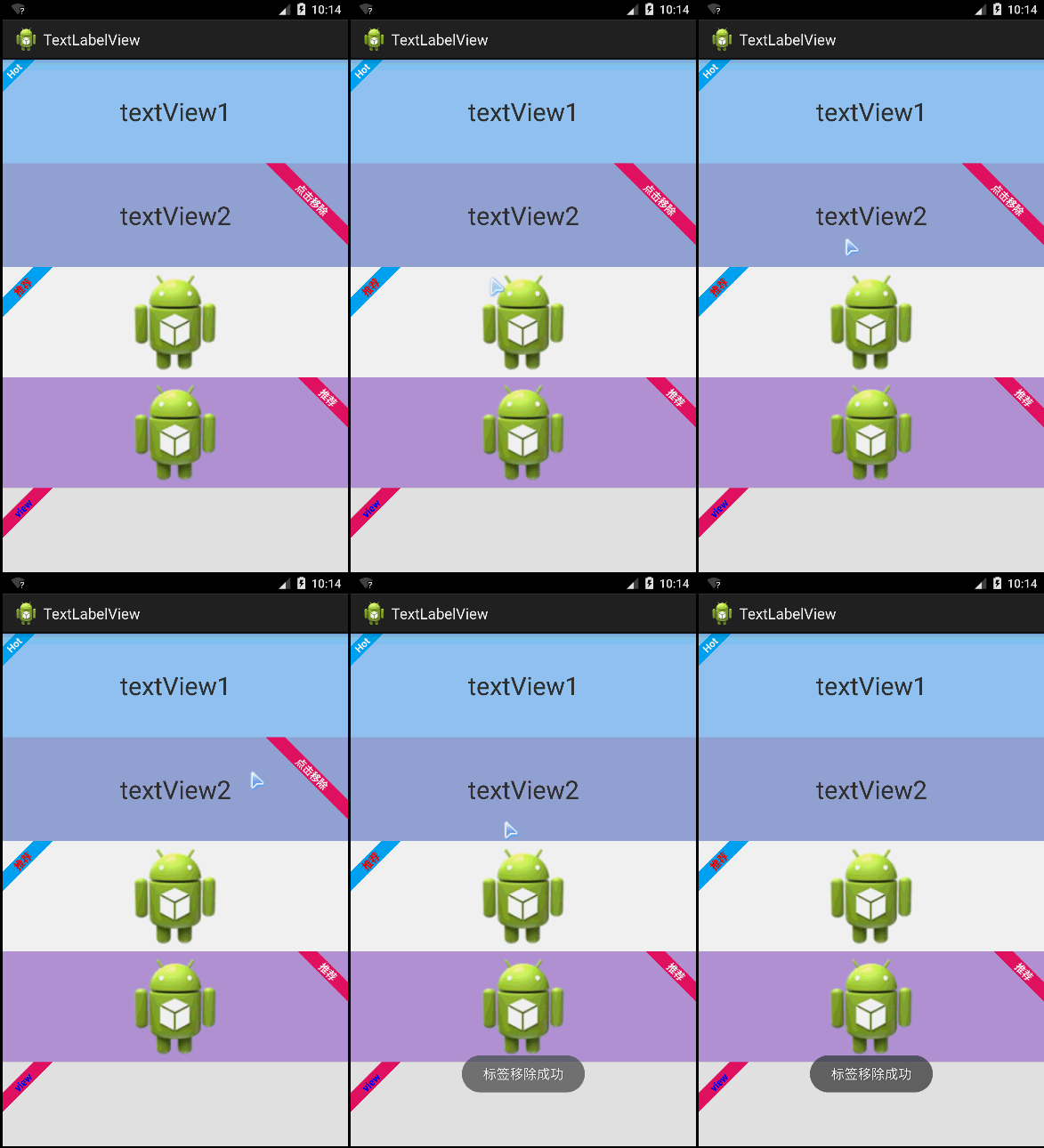
LabelView为一个TextView,ImageView或者为ListView中适配器getView返回的View,增加一个左上角或者右上角的标签
这种需求设计在商城类APP、电商类APP中比较常用,这些APP展示的商品,通常会增加一些促销或者该类商品的特征。
LabelView集成自Android TextView,可以像使用Android TextView一样使用LabelView,LabelView使用简单,如代码所示:
布局代码:
 <LinearLayout xmlns:android="http://schemas.android.com/apk/res/android"

     xmlns:tools="http://schemas.android.com/tools"

     android:layout_width="match_parent"

     android:layout_height="match_parent"

     android:orientation="vertical"

     tools:context="com.zzw.textlabelview.MainActivity" >

     <TextView

         android:id="@+id/textView1"

         android:layout_width="match_parent"

         android:layout_height="wrap_content"

         android:layout_weight="1"

         android:background="#90CAF9"

         android:gravity="center"

         android:text="textView1"

         android:textSize="30sp" />

     <TextView

         android:id="@+id/textView2"

         android:layout_width="match_parent"

         android:layout_height="wrap_content"

         android:layout_weight="1"

         android:background="#9FA8DA"

         android:gravity="center"

         android:text="textView2"

         android:textSize="30sp" />

     <ImageView

         android:id="@+id/imageView1"

         android:layout_width="match_parent"

         android:layout_height="wrap_content"

         android:layout_weight="1"

         android:src="@drawable/ic_launcher" />

     <ImageView

         android:id="@+id/imageView2"

         android:layout_width="match_parent"

         android:layout_height="wrap_content"

         android:layout_weight="1"

         android:background="#B39DDB"

         android:src="@drawable/ic_launcher" />

   <View

         android:id="@+id/view"

         android:layout_width="match_parent"

         android:layout_height="100dip"

         android:background="#e0e0e0" >

     </View>

 </LinearLayout>
JAVA代码:
 package com.zzw.textlabelview;

 import com.lid.lib.LabelView;

 import com.lid.lib.LabelView.Gravity;

 import android.app.Activity;

 import android.graphics.Color;

 import android.os.Bundle;

 import android.view.View;

 import android.view.View.OnClickListener;

 import android.widget.Toast;

 public class MainActivity extends Activity {

     @Override

     protected void onCreate(Bundle savedInstanceState) {

         super.onCreate(savedInstanceState);

         setContentView(R.layout.activity_main);

         //为TextView1左上角添加一个标签

         LabelView label1 = new LabelView(this);

         label1.setText("Hot");

         label1.setBackgroundColor(0xff03a9f4);

         label1.setTargetView(findViewById(R.id.textView1), 4, Gravity.LEFT_TOP);

         //为TextView2右上角添加一个标签,点击标签移除

         final LabelView label2 = new LabelView(this);

         label2.setText("点击移除");

         label2.setBackgroundColor(0xffE91E63);

         label2.setTargetView(findViewById(R.id.textView2), 20,

                 Gravity.RIGHT_TOP);

         findViewById(R.id.textView2).setOnClickListener(new OnClickListener() {

             @Override

             public void onClick(View v) {

                 label2.remove();

                 Toast.makeText(getApplicationContext(), "标签移除成功", 0).show();

             }

         });

         //为ImageView1添加一个左上角标签,并且自定义标签字颜色

         LabelView label3 = new LabelView(this);

         label3.setText("推荐");

         label3.setTextColor(Color.RED);

         label3.setBackgroundColor(0xff03a9f4);

         label3.setTargetView(findViewById(R.id.imageView1), 10,

                 Gravity.LEFT_TOP);

         //为IamgeView2添加一个右上角标签

         LabelView label4 = new LabelView(this);

         label4.setText("推荐");

         label4.setBackgroundColor(0xffE91E63);

         label4.setTargetView(findViewById(R.id.imageView2), 10,

                 Gravity.RIGHT_TOP);

         //为一个View添加一个左上角标签(ListView用)

         LabelView label5 = new LabelView(this);

         label5.setText("view");

         label5.setTextColor(Color.BLUE);

         label5.setBackgroundColor(0xffE91E63);

         label5.setTargetView(findViewById(R.id.view), 10, Gravity.LEFT_TOP);

     }

 }
电商、商城类APP常用标签"hot"--第三方开源--LabelView的更多相关文章
- nopcommerce 电商商城 ASP.NET 开源系统
nopcommerce 电商商城 ASP.NET 开源系统
- Android音乐、视频类APP常用控件:DraggablePanel(2)
Android音乐.视频类APP常用控件:DraggablePanel(2) 附录文章1主要演示了如何使用DraggablePanel 的DraggableView.DraggablePanel ...
- Android音乐、视频类APP常用控件:DraggablePanel(1)
Android音乐.视频类APP常用控件:DraggablePanel(1) Android的音乐视频类APP开发中,常涉及到用户拖曳视频.音乐播放器产生一定交互响应的设计需求,最典型的以You ...
- iOS开发之资讯类App常用分类控件的封装与实现(CollectionView+Swift3.0+)
今天博客中,我们就来实现一下一些常用资讯类App中常用的分类选择的控件的封装.本篇博客中没有使用到什么新的技术点,如果非得说用到了什么新的技术点的话,那么勉强的说,用到了一些iOS9以后UIColle ...
- 项目内部IT/电商/信息化类简报,分享电子版
除了一些国内不准发的内容,还有公司内部项目相关的.其他的大多数资料会在微信公众号推送,分享一下吧,希望大家也能推荐一些好文章. 微信公众号:WallinWind,原创IT类文章在CSDN博客也会同步更 ...
- 开发者如何快速搭建自己的电商App?
面向电商购物场景,HMS Core提供了创新的电商解决方案,帮助应用快速获客.提升转化率,实现业务增长.为了帮助开发者了解如何在电商购物类应用中集成HMS Core的各项能力,HMS Core开发了电 ...
- iOS开发之常用资讯类App的分类展示与编辑的完整案例实现(Swift版)
上篇博客我们聊了<资讯类App常用分类控件的封装与实现(CollectionView+Swift3.0)>,今天的这篇博客就在上篇博客的基础上做些东西.做一个完整的资讯类App中的分类展示 ...
- 第四章 电商云化,4.2 集团AliDocker化双11总结(作者: 林轩、白慕、潇谦)
4.2 集团AliDocker化双11总结 前言 在基础设施方面,今年双11最大的变化是支撑双11的所有交易核心应用都跑在了Docker容器中.几十万Docker容器撑起了双11交易17.5万笔每秒的 ...
- 电商H5制作常使用的排版方式
在很多电商网站或者APP中,经常会出现一些精美夺目的活动宣传海报,吸引着用户点击.购买.如今,电商们可以把海报搬到微信中,做出面向用户群大.传播快的H5制作.那么,制作电商H5制作时可以使用哪三种排版 ...
随机推荐
- Xpath定位大全
selenium使用Xpath定位之完整篇 其中有一片文章提到了xpath元素定位,但是该文章中有些并不能适应一些特殊与个性化的场景.在文本中提供xpath元素的定位终极篇,你一定能在这里找到你需 ...
- OLAP如何实现数据的聚合计算-分析过程
- Temporary Segments: What Happens When a Sort Occurs (文档 ID 102339.1)
APPLIES TO: Oracle Database - Enterprise Edition - Version 8.1.7.4 to 11.2.0.1 [Release 8.1.7 to 11. ...
- 利用Scanner键盘输入
Scanner不在java.lang.*包中,故必须import包java.util.Scanner.输入流(InputStream)为System.in 方法如下:Scanner s= new Sc ...
- C# Windows Forms 事件处理顺序
事件引发的顺序对某些Windows 窗体应用来说十分重要.当某些事件需要特别处理时(如重绘窗体的某些部分),必须知道事件在运行时的确切引发顺序.下面就应用程序和控件的生命周期中的几个重要阶段的事件顺序 ...
- 刻意练习,逃离舒适区——怎么样成为一个高手[罗辑思维]No.183_知识笔记
2016/10/30 14:31:32 一.对事物的见解分为两类: 1.评论性的见解 说的内容都是对的,符合常理的,但是却是不解决问题的. ...
- c# 读取XML数据
1.首先调用接口,要有一个post数据到指定url并返回数据的函数: protected string PostXmlToUrl(string url, string postData) { stri ...
- 第4章 sed命令
1 sed命令基本用法 sed(stream editor)是流编辑器,可对文本文件和标准输入进行编辑: sed只是对缓冲区中原始文件的副本进行编辑,并不编辑原始的文件,如果需要保存改动内容,可以选择 ...
- SQL 实现,如果存在就更新,如果不存在就添加
alter proc proc_DataSummary as begin begin try begin tran --PV --统计的信息存入临时表 ), CreateDate, ) ), Crea ...
- Activity的四种launchMode 详细分析
launchMode在多个Activity跳转的过程中扮演着重要的角色,它可以决定是否生成新的Activity实例,是否重用已存在的 Activity实例,是否和其他Activity实例公用一个tas ...